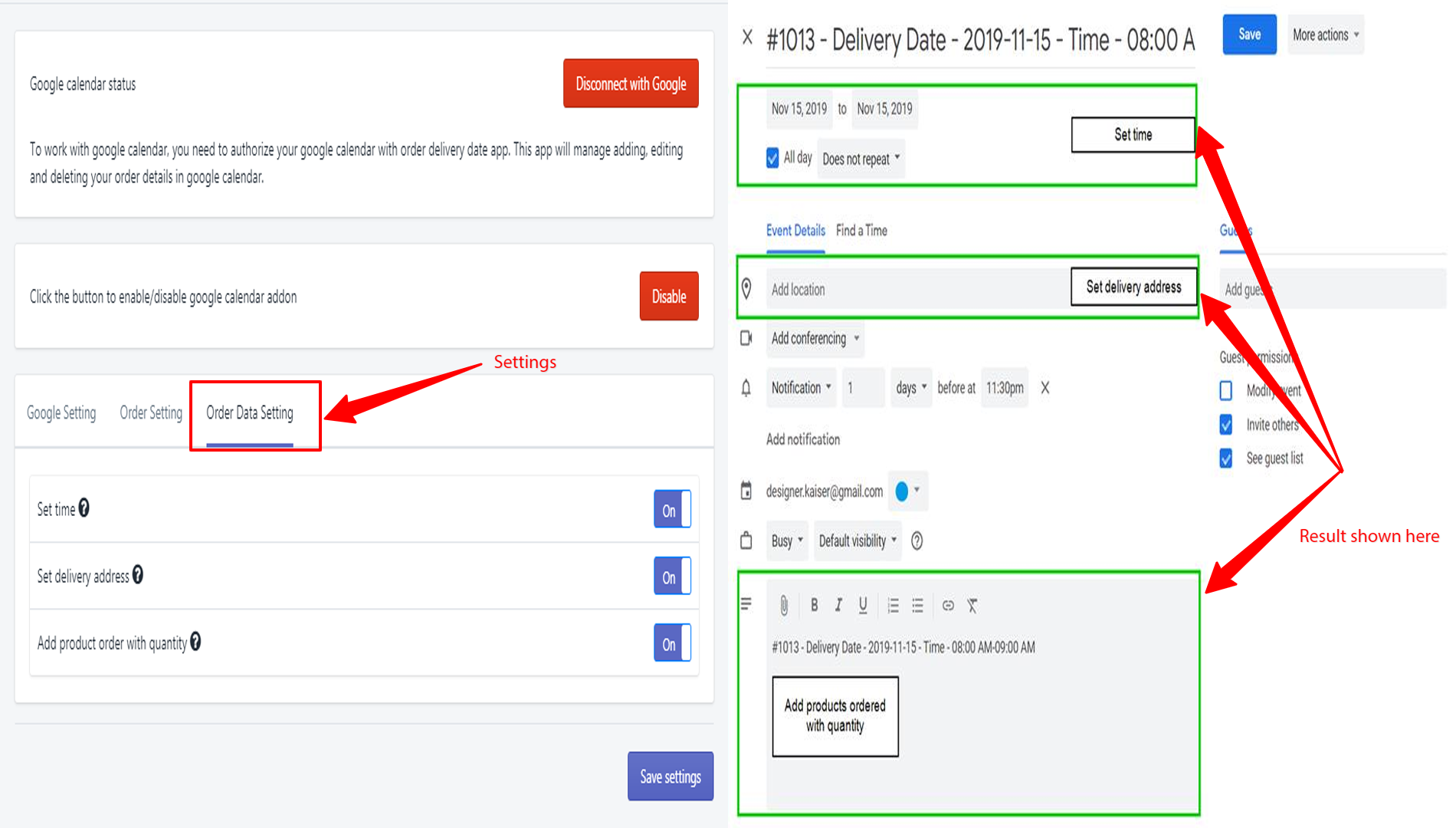
This feature allows you to automatically send order delivery date information to Google Calendar events, including delivery time, address, and products ordered with their quantities. By enabling this option, you can streamline your order management and keep track of deliveries more efficiently. To activate this feature, open the Google Calendar settings and navigate to the Order Data Settings tab.
Here, you can enable or disable the option and choose from three settings: Set Time, Set Delivery Address, and Add Products Ordered with Quantity. Make sure to configure these options according to your needs to ensure accurate event details in your calendar.
→ This feature will allow sending order delivery date data to google calendar events.
→ Once the option is enabled, delivery time, address, and products ordered with quantity data will be included in Google Calendar’s event automatically.
- Open the Google Calendar settings tab.
- Navigate to the Order Data Settings tab to enable/disable the option
- There are 3 options available: (1) Set Time, (2) Set Delivery Address, and (3) Add products ordered with quantity.
→ Take a look at the following image for the option