

Table manipulation involves modifying and managing data within a table, allowing you to edit, add, hide, duplicate, or insert rows and columns as needed. You can also enhance your tables by adding images and links, and use the advanced editor to customize font styles, colors, sizes, and text formatting. The Table Options feature in the iTable app lets you adjust the appearance and functionality of tables in your store, including enabling header and footer rows, alternating row colors, and hover highlighting.
You can further customize your tables through various settings that adjust styling elements like borders, sizes, and background colors, as well as text configuration for headers and cell content. For more detailed guidance, refer to the table custom options and DataTables JavaScript library resources to explore additional features that can enhance your table presentations.
Table manipulation
Table manipulation refers to the process of modifying, organizing, and managing data within a table
You can edit the table as needed. Clicking the “Edit Table” button will open the Table page, allowing you to add data, as well as add, hide, duplicate, or insert rows and columns. You can also add images and links. The advanced editor lets you customize the font style, color, size, add links, and format text (e.g., bold, italic) and alignment.
Edit Table
This option allows you to modify the table’s name and description. You will also see the last modified date.
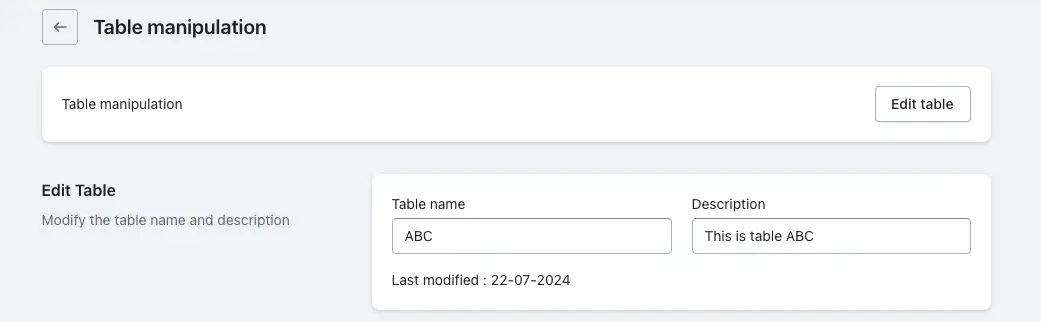
Table Options
The Table Options feature in the iTable app allows users to customize the behavior, appearance, and functionality of tables embedded in their Shopify store.
Configure the table’s styling and text using the following features:
1. Table Head Row: When enabled, the first row of the table will be used as the header.
2. Table Foot Row: When enabled, the last row of the table will be used as the footer.
3. Alternating Row Colors: This option alternates the background color of consecutive rows.
4. Row Hover Highlighting: When you hover your cursor over a row, its background color will change.
5. Show Table Title: When enabled, the table name will be displayed. You can choose to place the table name above or below the table.
6. Show Table Description: When enabled, the table description will be displayed. You can choose to place the description above or below the table.
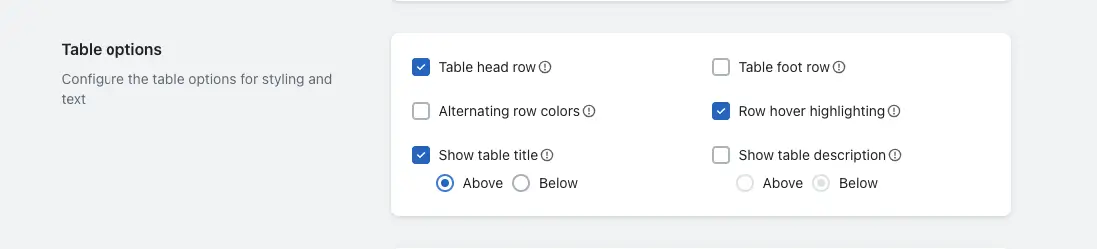
Table custom options
Table custom options refers to the settings that allow users to customize the appearance and content of tables displayed in an application. This includes configuring styling elements such as borders, row and column sizes, background colors, font styles and sizes, and spacing within cells. Additionally, it encompasses text configuration, allowing for customization of header text, cell content, and text alignment.
If you want more detailed information, please check this table custom options guide.
Features of the data table JavaScript library
The DataTables JavaScript library, used in the iTable Shopify app, offers a range of features that enhance the functionality and presentation of tables on a website. Use the DataTables JavaScript library features for various actions.
If you want more detailed information, please check this “Features of Data Table Javascript Library” guide.