

The App Proxy URL in Shopify is a secure link that enables apps to display dynamic content on your store pages while ensuring a smooth customer experience. This URL connects your store with the app, allowing it to manage specific data requests and offer customized features, such as custom pricing or wholesale options. For those using the Wholesale Hero & B2B Pricing app, copying the App Proxy URL is vital for proper integration.
To copy the App Proxy URL, log into your Shopify account, navigate to Settings, then Apps and Sales Channels, and find the Wholesale Hero & B2B Pricing App. Scroll down to the App Proxy URL section and copy the URL. This URL is essential for the app's functionality, so if you face any issues, don't hesitate to contact support for help.
The App Proxy URL in Shopify is a secure link that allows apps to display dynamic content on Shopify store pages while maintaining a seamless customer experience. This URL acts as a bridge between your Shopify store and the app, enabling the app to handle specific data requests and provide tailored functionality, such as custom pricing or wholesale features. If you’re using the Wholesale Hero & B2B Pricing app, copying the App Proxy URL is essential for integrating the app effectively with your store.
Steps to Copy the App Proxy URL
1. Login to Your Shopify Account
2. Open Shopify Settings
3. Visit Apps and Sales Channels
4. Locate the Wholesale Hero & B2B Pricing App and open it
5. scroll down to the App Proxy URL section and Copy the App Proxy URL
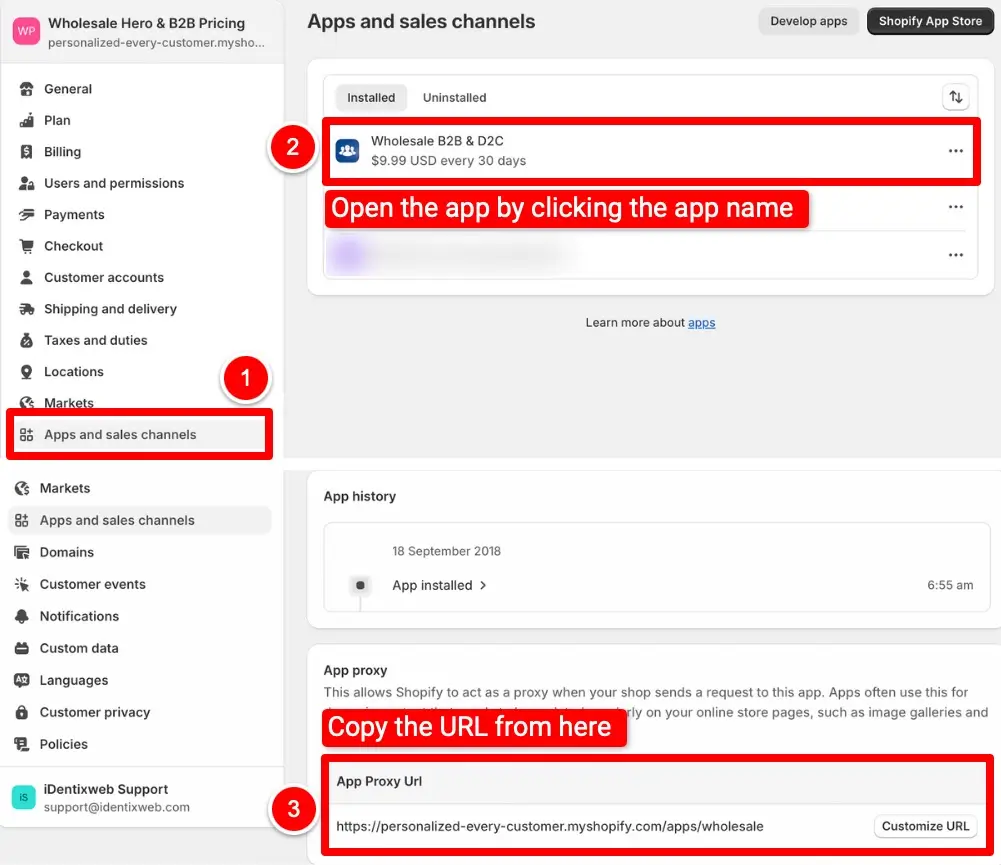
By following these steps, you can easily locate and copy the App Proxy URL for the Wholesale Hero & B2B Pricing app. This URL plays a crucial role in ensuring the app works seamlessly with your Shopify store. If you encounter any issues or have questions, feel free to reach out to our support team for assistance.