





Running a Shopify store is one thing. Managing it well every single day is another.
Shopify store management is the daily, weekly, and monthly discipline that separates stores that grow from stores that stagnate.
This guide walks you through every layer of it, from handling orders to managing your accounting to scaling across multiple stores. This is my store management guide from years of experience in the Shopify ecosystem.
What is Shopify store management?
Shopify store management is the ongoing work of keeping your store operational, profitable, and customer-ready. Here’s what I always cover when managing Shopify stores.
- Product updates
- Order processing
- Inventory tracking
- Customer support
- Marketing follow-ups
- Financial oversight
When Shopify store management is tight, customers get their orders on time, stock never runs out unexpectedly, and your finances stay clean. When it is loose, small problems pile into big ones fast.
Shopify store daily management tasks you should not skip
Order review
Check for new orders, flag any payment issues, and confirm that fulfilment has been triggered.
If you use third-party fulfilment or dropshipping, verify dispatch confirmations. A solid Shopify order management system centralizes all of this, so you are not hunting across tabs.
Inventory spot check
Scan your low-stock alerts. If a best-seller is close to zero, raise a purchase order immediately rather than waiting until it is out. Stockouts cost you sales and hurt your search rankings.
Customer support queue
Respond to open tickets, refund requests, and delivery queries. Customers who wait more than 24 hours for a reply rarely come back.
If you are handling volume alone, set up canned replies in Shopify Inbox for the most common questions.
Abandoned cart check
Review your abandoned checkout list in Shopify admin (Orders > Abandoned checkouts). If you do not have an automated recovery flow running, you are leaving money on the table every single day.
Don’t Wait to Recover Carts. Improve Them First.
With iCart, you can add cart page upsells, progress bars, product recommendations, and offers that encourage shoppers to complete their order instead of leaving midway.
App and theme check
Look at your storefront from a mobile device. Look for any layout breaks, slow loading, or app conflicts. These happen more often than you would expect after updates.
Accounting is the area most Shopify owners either avoid or handle too late. Let’s dig into this.
How to manage your accounting for your Shopify store?
Why are Shopify's built-In reports not enough?
Shopify gives you a solid sales overview: Gross sales, refunds, net sales, taxes, and shipping. But it does not handle profit margins, expense tracking, VAT returns, or bank reconciliation.
For that, you need a proper accounting integration.
The best options for Shopify accounting:
- QuickBooks Online: Most widely used. Syncs Shopify orders, payouts, refunds, and fees directly. Strong for US-based stores managing sales tax across states.
- Xero: Popular in the UK, Australia, and India. Clean interface, solid Shopify integration, and excellent bank reconciliation.
- Wave: Free option for very small stores. Limited automation, but functional for basic bookkeeping.
- A2X: Not an accounting tool itself, but a reconciliation layer between Shopify payouts and QuickBooks or Xero. It maps every payout to the correct revenue, fee, and refund line, which is something most stores get wrong manually.
What to track every month?
Once your accounting is connected, review these figures monthly:
- Net revenue (after refunds and discounts)
- Cost of goods sold (COGS)
- Gross margin per product category
- Shopify fees and app subscriptions
- Advertising spend vs revenue attributed
- Outstanding refunds or chargebacks
Keeping this clean monthly means tax time is a review, not a panic.
Shopify store management guide: weekly and monthly Priorities
Weekly tasks I do for store management
Performance review: Check your conversion rate, AOV, and top traffic sources. Shopify's analytics dashboard gives you enough for a weekly pulse check. If you have Google Analytics 4 connected, layer that on top for session-level data.
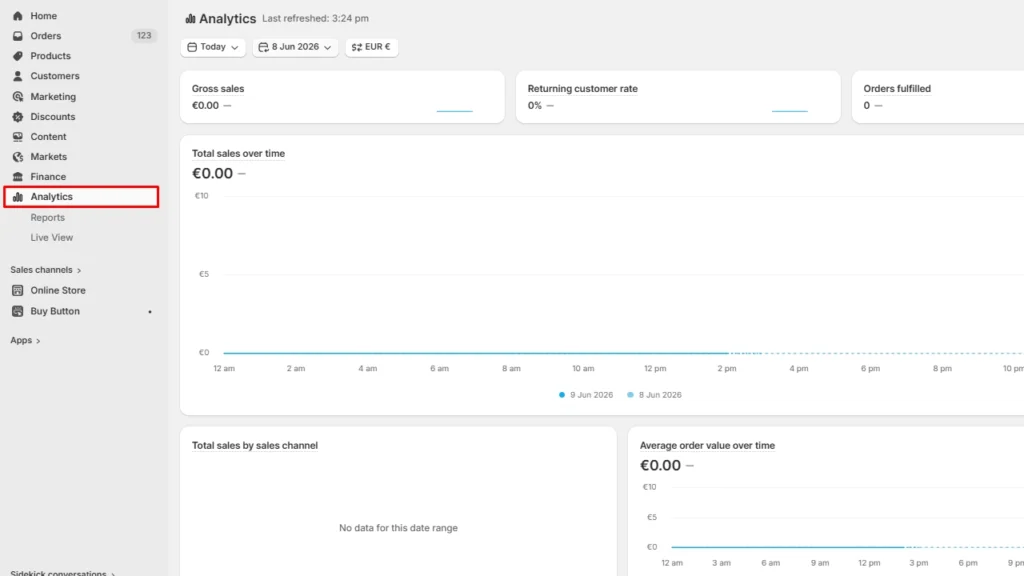
The Analytics can be seen on the left side of the admin panel, as shown in the above image.
Email and SMS marketing: Review open rates and click rates from the past week's campaigns. If you are not running automated flows (welcome, post-purchase, win-back), set them up before sending more broadcast campaigns.
Product page updates: Check that your top-selling products have current images, accurate descriptions, and active reviews. A stale product page quietly kills conversions.
Returns processing: Process all pending returns and make sure refund communications have gone out. Delayed refunds generate chargebacks.
Monthly tasks I do for store management
- SEO and content audit: Check your store's organic positions for your primary keywords. Update blog posts and collection pages with fresh data. Search engines reward recency.
- App audit: Remove any unused apps. Every active app adds to your page load time and your monthly bill.
- Goal tracking: Compare actual revenue, orders, and margin against your targets. Adjust your marketing budget accordingly.
Once your first store is running smoothly, the question of a second store usually comes up. Here’s how I manage this.
Managing multiple Shopify stores: What you need to know
One account, up to 10 stores
Shopify allows up to 10 stores under one email account. You can switch between them from the top-left of the admin. Each store is billed separately, runs independently, and has its own products, orders, and theme.
The real challenges of multi-store management
- Inventory sync: Without a third-party app, inventory does not sync between stores. Selling the same SKU across two stores manually is a reliable path to overselling.
- Order routing: Customers do not know your store structure. If someone orders from the wrong store, your fulfilment team has to handle it manually.
- Customer data: Each store has a separate customer database. Unified loyalty programmes and email lists require middleware.
- Operational overhead: Two stores mean double the customer support, double the reporting, and double the app subscriptions.
Tools for managing multiple Shopify stores
- Matrixify (Bulk Import/Export): Useful for syncing product data across stores via CSV or scheduled exports.
- Syncio multi-store sync: Syncs products and inventory in near real-time between Shopify stores. Strong for merchants running separate regional stores with shared inventory.
- Multi‑store sync power: Similar sync capability with better support for store-specific pricing.
When does managing multiple stores make sense?
Multi-store is worth the complexity when you are serving distinct markets with different currencies, languages, or product ranges.
A UK store and a US store with different catalogues, pricing, and VAT rules benefit from separation. Two stores selling identical products in the same region rarely do.
If you are managing enterprise stores, you need to know the Plus features for the same.
Shopify Plus multi-store management features include:
- Up to 9 expansion stores included at no extra per-store cost (10 total)
- Shopify organization admin: A single dashboard to oversee all stores, users, and settings from one place. This is the feature that standard Shopify completely lacks.
- Shared user permissions: Add staff with role-based access across your entire store portfolio without logging into each one separately.
- Shopify Flow: Advanced automation across stores. Trigger actions like tagging customers, moving inventory, or sending alerts based on custom conditions.
- Launchpad: Schedule flash sales, product drops, and theme changes across stores in advance.
- Custom checkout: Modify checkout logic, fields, and scripts in ways standard merchants cannot.
Automating your Shopify store management in 2026
Here are the highest-impact automation areas I use every day for stores.
Email and SMS flows
Set up welcome, abandoned cart, post-purchase, and win-back automations. Tools like Klaviyo and Omnisend make this straightforward. Once live, these flows run without your involvement and recover revenue you would otherwise lose.
Inventory alerts
Configure low-stock notifications inside Shopify or through apps like Assisty. Automated purchase order triggers take this further.
Order tagging and routing
Use Shopify Flow to automatically tag orders by product type, value, or shipping destination. This speeds up fulfilment decisions without manual review.
Review requests
Trigger review request emails 7 days after delivery. Judge.me and Loox both handle this automatically.
Accounting sync
Set your accounting integration to auto-sync daily. Manual export and upload are a time drain and introduce errors.
Customer service as a core management function
Here is how to run customer service as a system to manage your store.
- Set response time targets: Aim for under 4 hours on weekdays for email and chat. Communicate this SLA in your confirmation emails so customers know when to expect a reply.
- Use Shopify Inbox: Free, native, and integrates with your order data. Agents can see what a customer ordered without switching tabs.
- Document your policies clearly: Refund, return, exchange, and shipping policies should be easy to find. Half of all support queries are policy questions that a visible FAQ would answer.
- Tag and track support topics: Whether you use Gorgias, Reamaze, or native Inbox, tag every ticket by category. Monthly, review the top five categories. They tell you exactly where your product or process has friction.
The hidden layer of store management that you miss
- Conversion rate monitoring: Your conversion rate is the single most important signal in your admin. A 0.5% drop is not good. It usually means a page broke, a price changed, or a competitor undercut you. Check it weekly without fail.
- Page speed and core web vitals: Slow stores lose customers silently. A store that loaded in 2.1 seconds six months ago might load in 3.8 seconds today after a dozen app installs. Run a speed audit quarterly and remove unused scripts aggressively.
- SEO health: Check for broken links, missing meta titles, and duplicate content at least monthly. Your organic channel is your lowest-cost traffic source, so keep an eye on it regularly.
Build a store management routine that sticks
Here is a simple structure that worked for me for 10 years.
| Frequency | Focus Areas |
| Daily | Orders, support queue, low-stock alerts, abandoned carts |
| Weekly | Analytics review, email performance, returns, product page spot-check |
| Monthly | P&L review, app audit, SEO check, supplier review |
| Quarterly | Speed audit, pricing review, strategy reset |
Document your routine. Share it with your team. Review it whenever something breaks or slips through. Over time, this becomes the operating standard your store runs on.
FAQs
1. What does Shopify store management actually include?
Shopify store management covers all ongoing operations after launch: inventory tracking, order processing, customer support, marketing follow-ups, financial reporting, and store performance monitoring.
2. How can I manage my accounting for my Shopify store?
Connect a dedicated accounting tool to Shopify. QuickBooks Online, Xero, or Wave are the most common. For accurate payout reconciliation, use A2X as a bridge layer. Track net revenue, COGS, gross margin, and Shopify fees monthly, so your books are always current.
3. What are the most important Shopify store daily management tasks?
The non-negotiables are: reviewing new orders, checking low-stock alerts, responding to customer support tickets, reviewing abandoned carts, and doing a quick storefront check on mobile.
4. What is the difference between managing one Shopify store and managing multiple Shopify stores?
One store is primarily an operational challenge. Multiple stores add a coordination layer: you need inventory sync tools, separate accounting per store, unified customer data solutions, and significantly more support capacity.
5. What Shopify Plus multi-store management features are worth the upgrade?
The Organization Admin is the standout feature. It gives you a single dashboard across all stores with shared user roles and centralized reporting. Shopify Flow for automation, Launchpad for scheduled campaigns, and custom checkout logic are also strong reasons to upgrade.
6. Do I need a team to manage a Shopify store?
You can run a lean store solo with the right automations in place, like email flows, inventory alerts, accounting sync, and review requests. Once you pass roughly 50 orders per day, customer support alone typically requires at least one dedicated person.
7. How often should I audit my Shopify store's performance?
Run a full audit quarterly. Check conversion rate trends, page speed, organic rankings, and top apps for ROI. Do lighter weekly reviews on analytics and email performance. Quarterly audits catch problems that weekly checks miss.




About the author
Vineet Nair
Vineet is an experienced content strategist with expertise in the ecommerce domain and a keen interest in Shopify. He aims to help Shopify merchants thrive in this competitive environment with technical solutions and thoughtfully structured content.