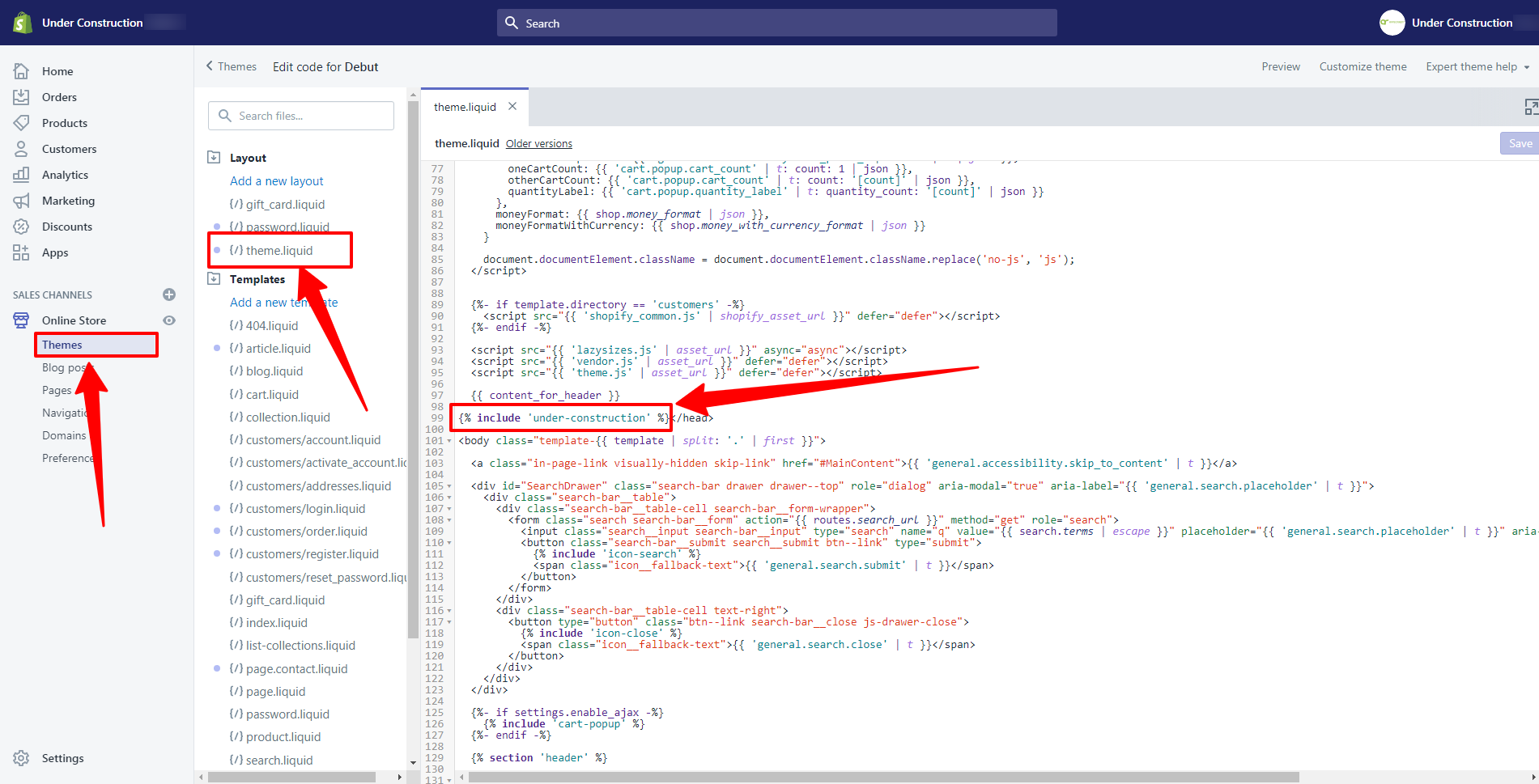
If you see a 404 – Page Not Found error after uninstalling the app, it’s likely due to leftover code in your theme. This is a common issue, but you can resolve it by editing your theme's code in Shopify. To fix the error, go to Online Store > Themes in your Shopify admin, click on “Edit code” for your active theme, and locate the line {% include 'under-construction' %} in the theme.
liquid file. Remove this line and save your changes to eliminate the coming soon page and the 404 error. Make sure to check for this specific code to ensure a successful fix.
If you’ve uninstalled the app but the page still exists or shows a 404 error, here’s how to fix it:
Don’t panic—this is a common issue caused by leftover code in your theme.
Steps to Fix:
1. Go to Online Store > Themes in your Shopify admin.
2. Click on “Edit code” for your active theme.
3. In the theme.liquid file, look for the following line of code (usually placed before the closing tag): {% include 'under-construction' %}
4. Remove this line of code.
5. Save the changes.
Once this code is removed, the coming soon page and the 404 error should no longer appear.
For a quick visual reference, check the image below.