





Are you worried about how upselling could work for your business? Upselling is a powerful way to grow sales and give customers extra value. But it can be tricky to know what works and why.
This post will explore upselling examples to show how top brands use these techniques to increase revenue and delight customers.
By the end, you will have fresh ideas for improving your sales through examples of upselling and strategies.
Sound good? Let's get started!
What is upselling?
Upselling is a way to encourage customers to choose a more expensive or upgraded version of a product they are interested in.
This might include suggesting a better model, offering extra features, or showing items that complement their purchase.
Why upselling matters: 5 benefits backed by data
Upselling is one of the highest-ROI activities in ecommerce. Here's what the data says.
1. Upselling drives 10–30% of total ecommerce revenue
According to Forrester research, properly executed upsells and cross-sells account for 10–30% of all ecommerce revenue. For most Shopify stores, this is more profitable than acquiring new customers through paid ads.
2. Existing customers convert 5–7× more often than new ones
The probability of selling to an existing customer is 60–70%, vs just 5–20% for a new prospect (Marketing Metrics). Every upsell to a checkout-stage customer is essentially selling to an existing customer in the moment.
3. A 1% upsell take rate improvement = ~7% AOV lift
For a store with $50 average orders, a small upsell take rate of 5% adds $3.50 to AOV, that's $35,000 extra revenue per 10,000 orders, with zero ad spend.
4. Post-purchase upsells convert 3–4× higher than in-cart upsells
Post-purchase offers (thank-you page, order status page) see take rates of 8–15%, vs 2–5% for in-cart upsells.
5. Cart drawer upsells reduce abandonment by ~30%
Stores using sticky cart drawers with built-in upsells see ~30% lower cart abandonment than stores using a standard cart page. Aggregate data from 2,300+ Shopify merchants using iCart Cart Drawer Cart Upsell.
Put These Upselling Examples to Work
Learning from upselling examples is one thing. Applying them at the right moment is where the real impact starts.
With iCart Cart Drawer Cart Upsell, Shopify merchants can show relevant upsells, cross-sells, product bundles, progress bars, and free shipping offers inside the cart drawer, cart popup, or cart page.
This helps customers discover useful add-ons before checkout without breaking their shopping flow. From “complete the look” offers to free gift thresholds, iCart gives you a simple way to turn your cart into a conversion-focused space.
10 Best Upselling Examples to Grow Businesses
There are countless approaches to upselling, but not every upselling example delivers results. That's why we have considered 10 of the most effective, easy-to-implement Shopify upselling examples to help you drive more sales without overcomplicating things.
One-Click Upselling
One-click upselling is an advanced upselling strategy that lets customers instantly add an upsell item to their order, increasing order value without interrupting their shopping flow.
Unlike traditional methods with multiple steps, one-click upsells use personalized recommendations based on browsing or purchase history.
By showing these offers on the cart, checkout, or confirmation page, customers can easily add complementary products or premium upgrades with minimal effort.
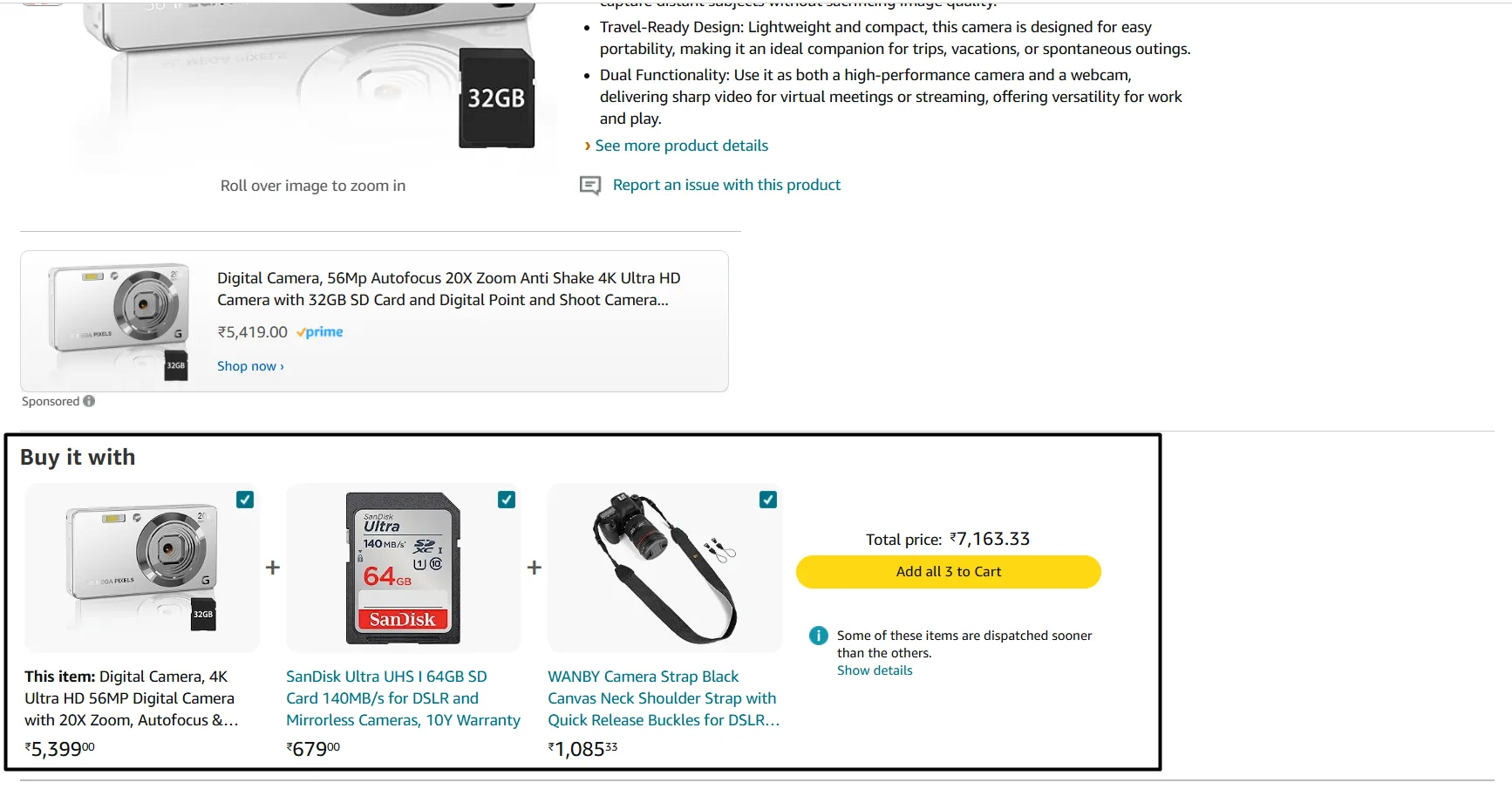
Source: Amazon
For example, Amazon’s “Add-On” feature is a well-known implementation of one-click upselling. When a customer adds an item to their cart, Amazon’s algorithm identifies relevant products based on the selected item.
For upselling examples, if a customer adds a DSLR camera to their cart, Amazon might display an "Add-On" recommendation for accessories like memory cards, lens filters, or camera bags. Customers can add these items with one click without leaving the checkout page or interrupting their purchase process.
Real Example: Manscaped
Manscaped is another great example. Their product detail page shows the main grooming product alongside a single-toggle accessory bundle, "Add the deodorant for 30% off" visible right next to the Add to Cart button.
The accessory image, original price, and discounted price are all displayed in-line. Customers check one box, and both products land in the cart together.What you can copy: Add a single complementary accessory toggle to your PDP, positioned near "Add to Cart." Show the discount visibly. Don't force a separate decision later by clicking. The toggle should be enough.
Checkout Upselling
This technique strategically places additional product recommendations or upgrades on the checkout page.
This is often the last opportunity to capture customers' attention and encourage them to consider additional items, upgrades, or extended services related to the product they’re already committed to buying.
The success of checkout upselling depends on relevancy and timing. Ideally, the recommended products are highly complementary, such as warranties, accessories, or premium upgrades, which add value to the main purchase.
E-commerce platforms like Shopify have several apps designed for checkout upselling. One popular choice is SellMore. With SellMore, merchants can configure specific upsell and cross-sell offers to appear on the checkout page based on the customer’s cart contents.
Real Example: Warby Parker
Warby Parker is a great example here. It presents lens upgrade options as a mandatory checkout step: standard, anti-glare (+$50), or light-responsive Transitions (+$150). Each tier has a 2-line explanation of who it's right for ("recommended for daily computer use," etc.). The decision is built INTO the checkout flow rather than offered as an optional add-on.
Why it works: Where possible, build configuration choices that include premium tiers. Don't position them as add-ons. Position them as legitimate product variants. Explain who each tier is for.
Thank You Page Upselling
This is one of the most popular post-purchase upselling examples.
It is a strategy that targets customers immediately after they complete a purchase. At this point, they are in a positive mindset and more likely to consider related products or add-ons. Instead of a static confirmation page, customers see dynamic upsell offers that complement their purchases.
For example, imagine a customer just bought a moisturizer from a skincare store. On the thank-you page, rather than a simple "Thank you for your purchase," the store could display personalized offers like:
- Complementary Items: A gentle cleanser or serum that pairs well with the moisturizer, offered at a small discount.
- Add-on Items: A bundle of skincare tools (like a jade roller or a face mask brush) designed to improve the product experience.
- Subscription Upsell: If the product is consumable, the page could suggest a subscription option for regular deliveries with a slight discount for signing up immediately.
Real Example: Quip
After buying a Quip toothbrush, the thank-you page replaces the standard "thanks for your order" message with a one-click subscription upsell: "Auto-deliver brush head refills every 3 months for $5 each." The customer can opt in with a single click. No credit card re-entry needed.
Why it works: The customer just decided Quip is worth their money. Trust is at its peak. Adding a low-cost recurring revenue stream at this moment converts at 25–40% rates, multiples higher than asking for it on the product page.
Pop-Up Upselling
It is a dynamic strategy that leverages attention-grabbing pop-ups to encourage customers to add more items to their carts.
By appearing as soon as a customer adds a product to their cart, pop-ups offer a perfectly timed suggestion for an upsell or cross-sell, providing customers with a compelling reason to make a larger purchase.
When a customer adds an item to their cart, a pop-up window suggests additional items that complement their selection. These items typically relate to the product they added, such as matching accessories, recommended upgrades, or items often bought together.
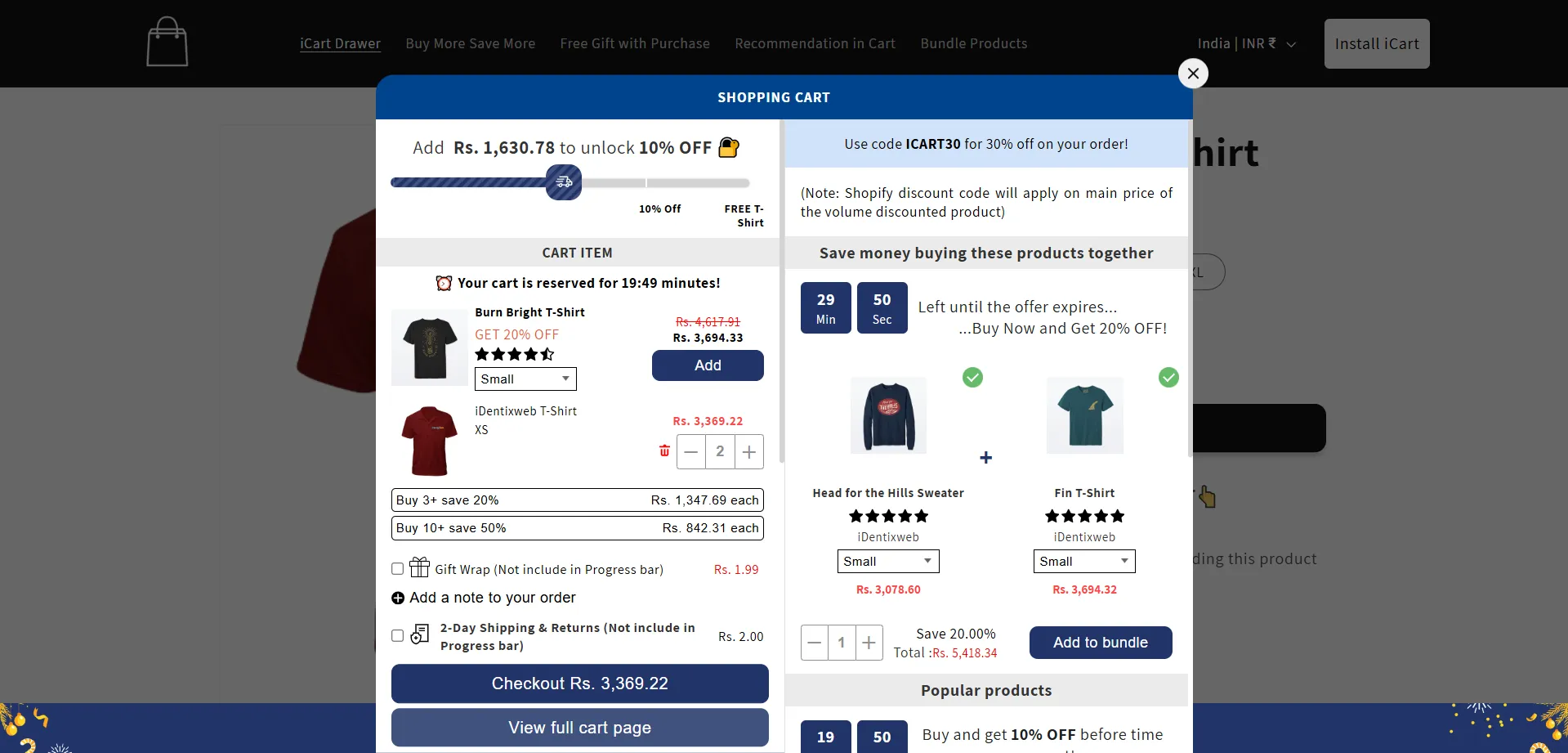
Source: iCart by Identixweb
For example, consider a clothing store where a customer has just added a stylish dress to their cart. Immediately, a pop-up appears on the screen suggesting related accessories, such as matching earrings, a necklace, or a handbag, offered at a 15% discount for a limited time.
The pop-up might feature a countdown timer and a message like: “Complete the Look! Add these accessories for 15% off for the next 10 minutes.”
This approach encourages the customer to consider how these additional items could complement their purchase, while the limited-time offer motivates them to act quickly.
Real Example: HelloFresh
During HelloFresh signup, after a customer picks a 3-meal plan, a modal pop-up appears: "Why not try 4 or 5 meals per week? Save $30 over your first 4 boxes." The pop-up shows the per-meal pricing breakdown, and the 4-meal plan is pre-selected with a green checkmark.
Why it works: The pop-up appears at the MOMENT OF COMMITMENT when the customer has already mentally committed to the br
Cart Page Upselling (The Upselling Example With the Highest Intent)
It is an effective strategy that shows upsell recommendations directly on the cart page, encouraging customers to add more items before checkout. By placing these offers in a visible spot, cart page upselling allows customers to easily add complementary products or upgrades to their cart with just a click.
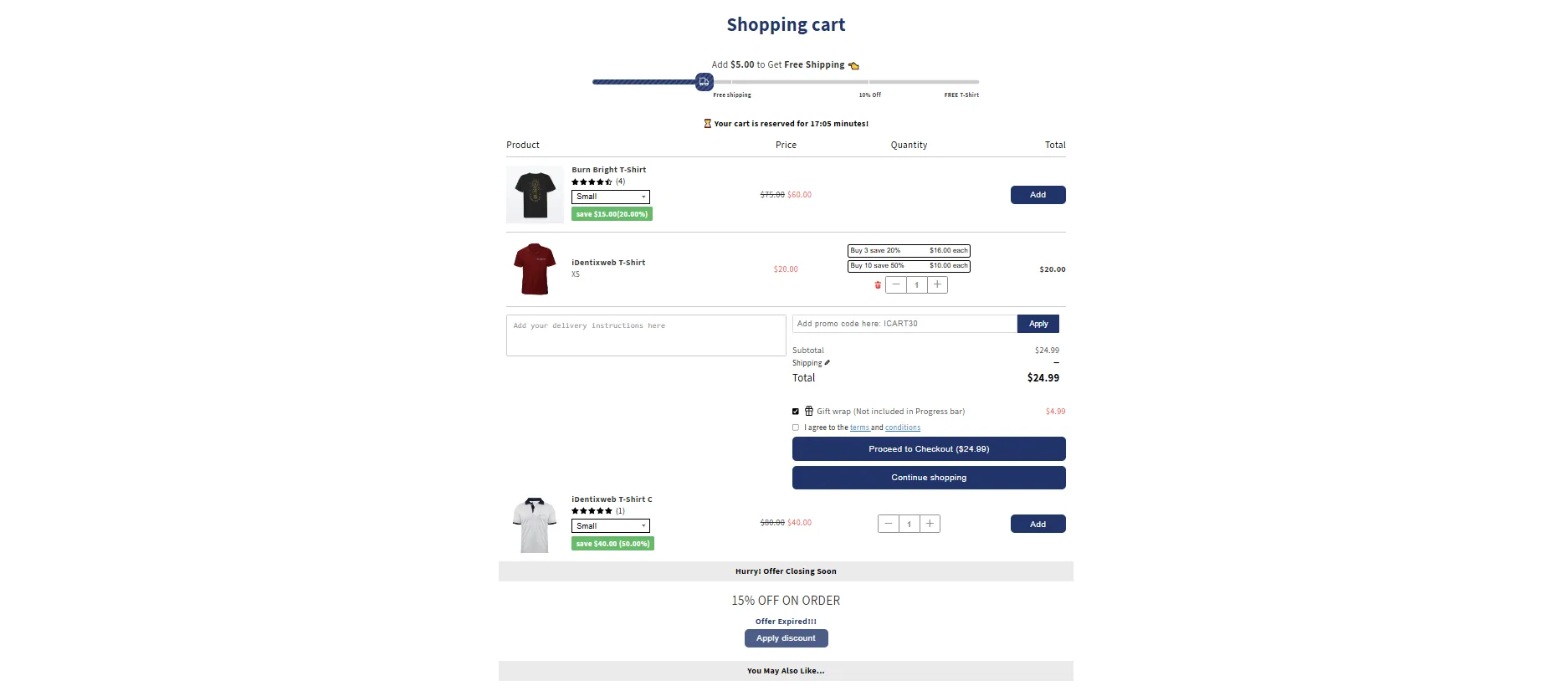
For example, if a customer has added fitness apparel to their cart, the cart page might show an offer for a discounted water bottle or sports towel, with messaging like, “Complete Your Workout Kit – Add a water bottle for only $5” This prompt encourages the customer to add an extra item at a lower price, which feels like a good deal while enhancing the customer’s original purchase.
Real Example: Magic Spoon
Magic Spoon's cart page shows a side-by-side comparison: "One-time purchase" vs "Subscribe & Save." The subscription option shows exact dollar savings per box ($8 off every order), with a visual checkmark on the recommended choice.
Why it works: Quantified savings beat percentage savings. "$8 off" is more concrete than "20% off". Same value, faster to process.
Cart Drawer Upselling
It is a technique where an upsell recommendation appears in a slide-out drawer or panel on the side of the screen as soon as a customer adds items to their cart.
Unlike traditional upselling examples that take customers to a new page, the cart drawer keeps them on the current page, displaying additional items or upgrades without interrupting their shopping flow.
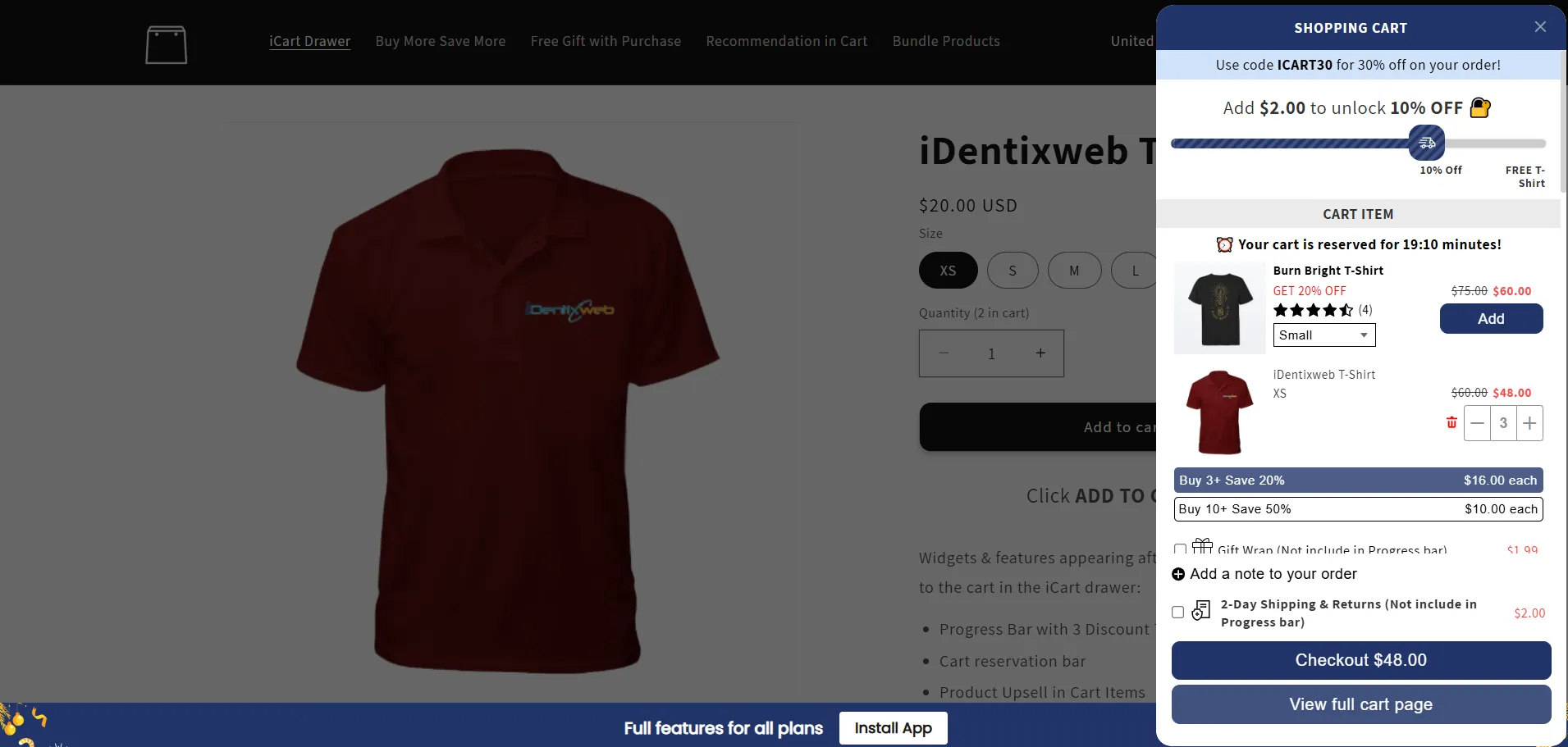
Source: Identixweb iCart
For example, imagine a customer browsing an electronics store and adding a laptop to their cart. As soon as they click “Add to Cart,” a cart drawer slides out from the side of the page, displaying the laptop along with tailored suggestions for related products:
- “Protect Your Investment! Add a Laptop Case for 10% Off.”
- “Upgrade Your Experience with additional memory – Only $30 for 8GB.”
- “Complete Your Setup: Wireless Mouse for Just $20.”
Real Example: Glossier
Glossier's cart drawer slides out from the right side of the screen with the customer's selected products at the top and a "You may also like" section below. Recommendations are based on what's already in the cart (e.g., adding Boy Brow suggests Lash Slick). Each recommendation has a single one-click "Add" button. No pop-up, no size selection, no extra confirmation step.
Why it works: The cart drawer is a high-attention surface (it appears on top of the page the customer is browsing). One-click add removes 95% of upsell friction.
Product Bundling Upselling
In this effective strategy, a store offers complementary products at a discounted price when purchased together, encouraging customers to buy multiple items instead of just one.
When customers view a product page or add an item to their cart, the store can suggest a related bundle that includes the item and complementary products.
This is often achieved through product clustering, where items frequently bought together are grouped into a bundle. The bundle is often presented with a discount to make it more appealing. Customers can see a clear breakdown of the individual items in the bundle, the original total price, the bundle price, and the overall savings.
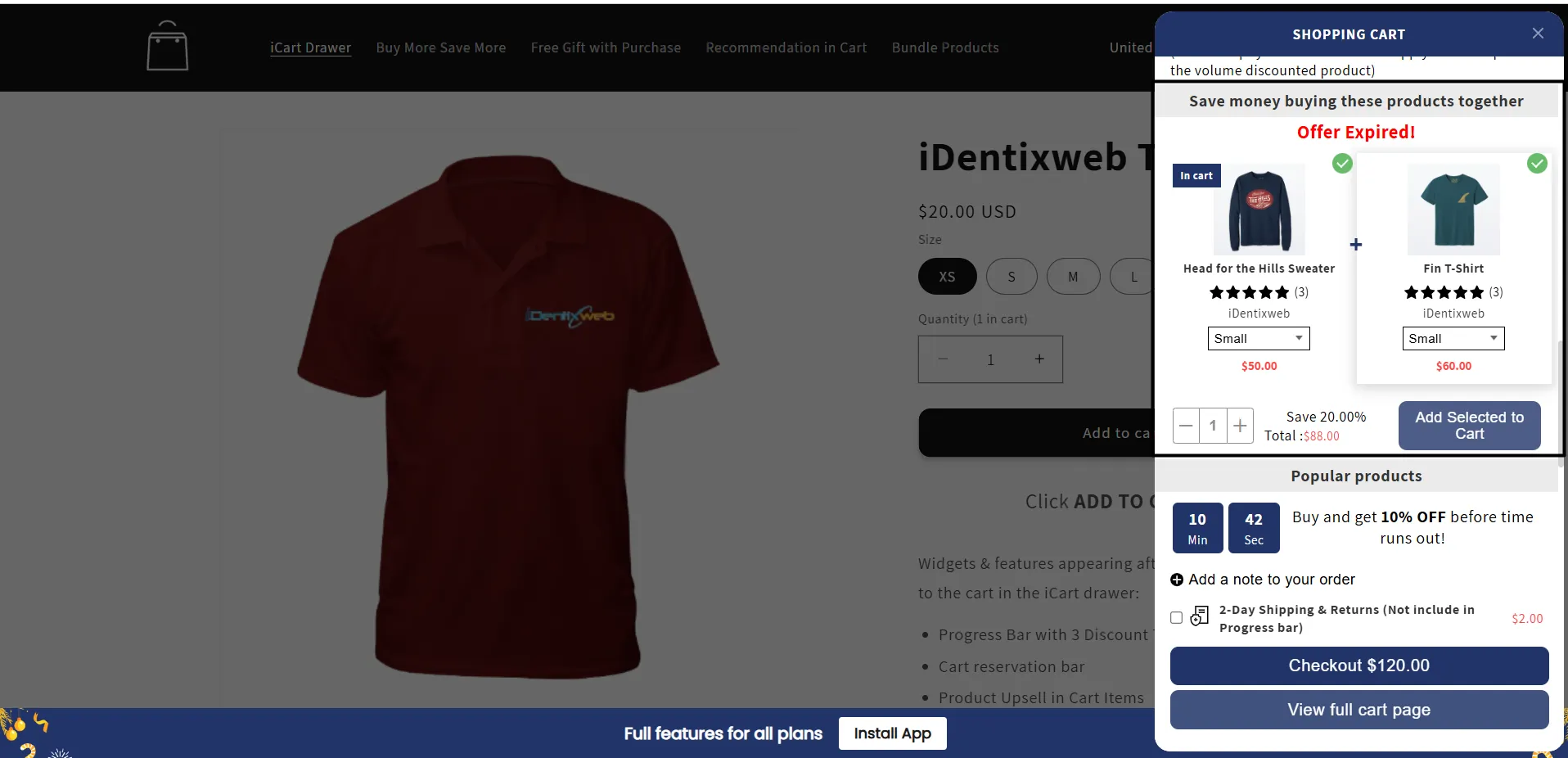
Source: Identixweb iCart
For example, imagine a customer browsing a beauty store’s website and adding a cleanser to their cart. On the product page or in a cart drawer, the store suggests a “Skincare Essentials Bundle” that includes:
- Cleanser (the product they were interested in)
- Moisturizer (to lock in hydration and protect skin)
- Serum (for targeted treatment of specific skin concerns)
The store displays the bundle with the tagline, “Save 15% on Your Complete Routine!” This lets the customer see the added value in purchasing the full set, which more comprehensively addresses their skincare needs.
Real Example 1: Bombas
Bombas' product detail page shows three buying options: 1 pair ($14), 4-pack ($53, save $3), 8-pack ($100, save $12). The 4-pack is pre-selected by default with a green "MOST POPULAR" badge above it.
Why it works: Anchoring + social proof. Pre-selecting the 4-pack as the default and labeling it "most popular" nudges customers into the larger bundle without forcing a choice.
Post Purchase Upsell
Post purchase upsell examples involve presenting additional offers to customers after they have completed their initial purchase. This technique capitalizes on when the customer has already committed to a purchase but is still engaged and may be open to adding more items to their order.
Post-purchase upsell examples include:
- Multi-product upsells that offer discounted bundles, while single-product upsells highlight one key item that complements their original order.
- An email upsell that might suggest related items that go well with what they bought.
- Subscription upsells that encourage them to switch to a recurring plan, often with a discount.
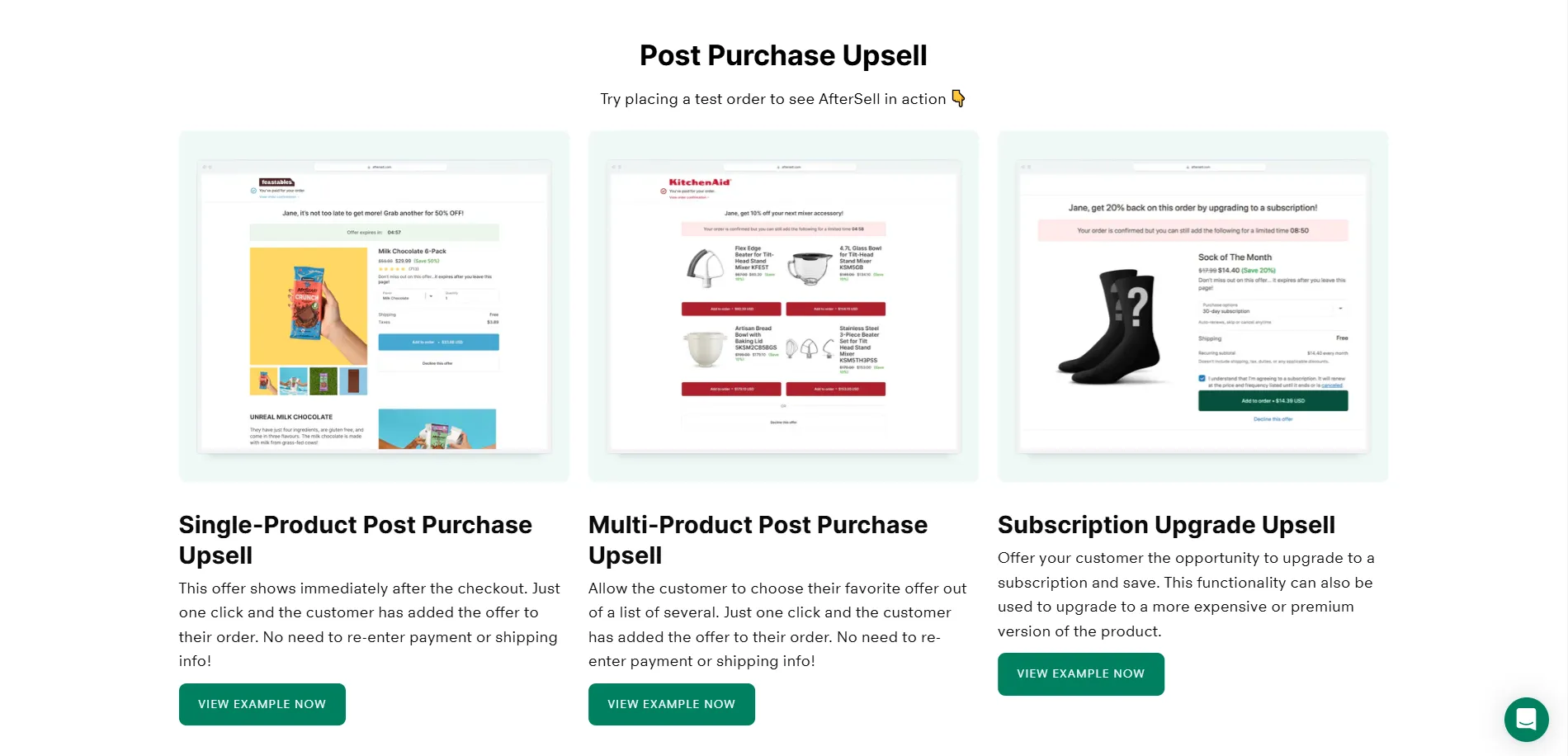
For Example,
After the customer buys a cleaner, they land on the thank-you page and see an upsell offer for a discount.
Since the toner complements their purchase, they will likely add it to their order, especially with the discount. The process is quick and easy, with no need to leave the page.
Post purchase upsell examples work because:
- The offer fits their needs (related product).
- It’s shown at the right time (right after purchase).
- The discount makes it appealing.
- It’s easy to add without interrupting their journey
Real Example: Allbirds
After completing a shoe order, Allbirds' post-purchase page shows a single one-click upsell: "Your shoes ship better with our socks. Add a pair for $9 (normally $14)." The customer can add the socks to the same order with one click, no payment re-entry.
Why it works: The order is already complete. There's zero risk of disrupting the original sale. The customer's wallet is figuratively still out. Take rates on this kind of post-purchase one-click offer reach 15–25%, multiples higher than any in-cart upsell.
Product Comparison Upselling
Product comparison upselling involves presenting customers with a side-by-side comparison of a base product and its premium counterpart, highlighting the more expensive option's additional benefits and features.
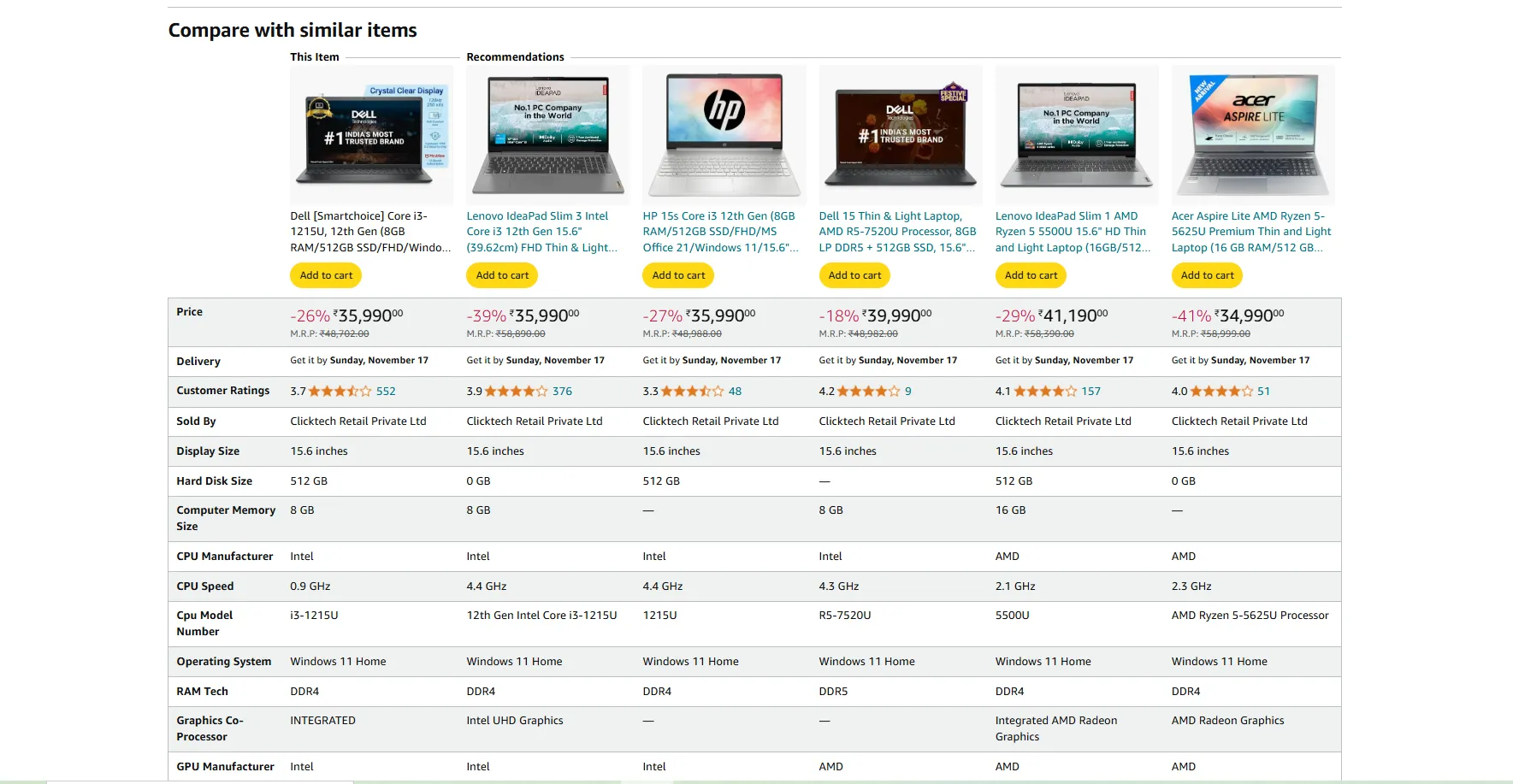
Source: Amazon
Real Example: AG1 (Athletic Greens)
AG1's checkout page presents two options side-by-side: monthly subscription ($79/month) or annual subscription ($789/year, "save $159"). The annual option is bordered in green, highlighted, and labeled "BEST VALUE." The per-day cost ($2.16) is shown beneath the annual price for additional context.
Why it works: Visual comparison forces a side-by-side mental calculation. The dollar savings ($159) are concrete. The "BEST VALUE" badge nudges the customer toward the option AG1 wants them to pick.
Free Shipping Upselling
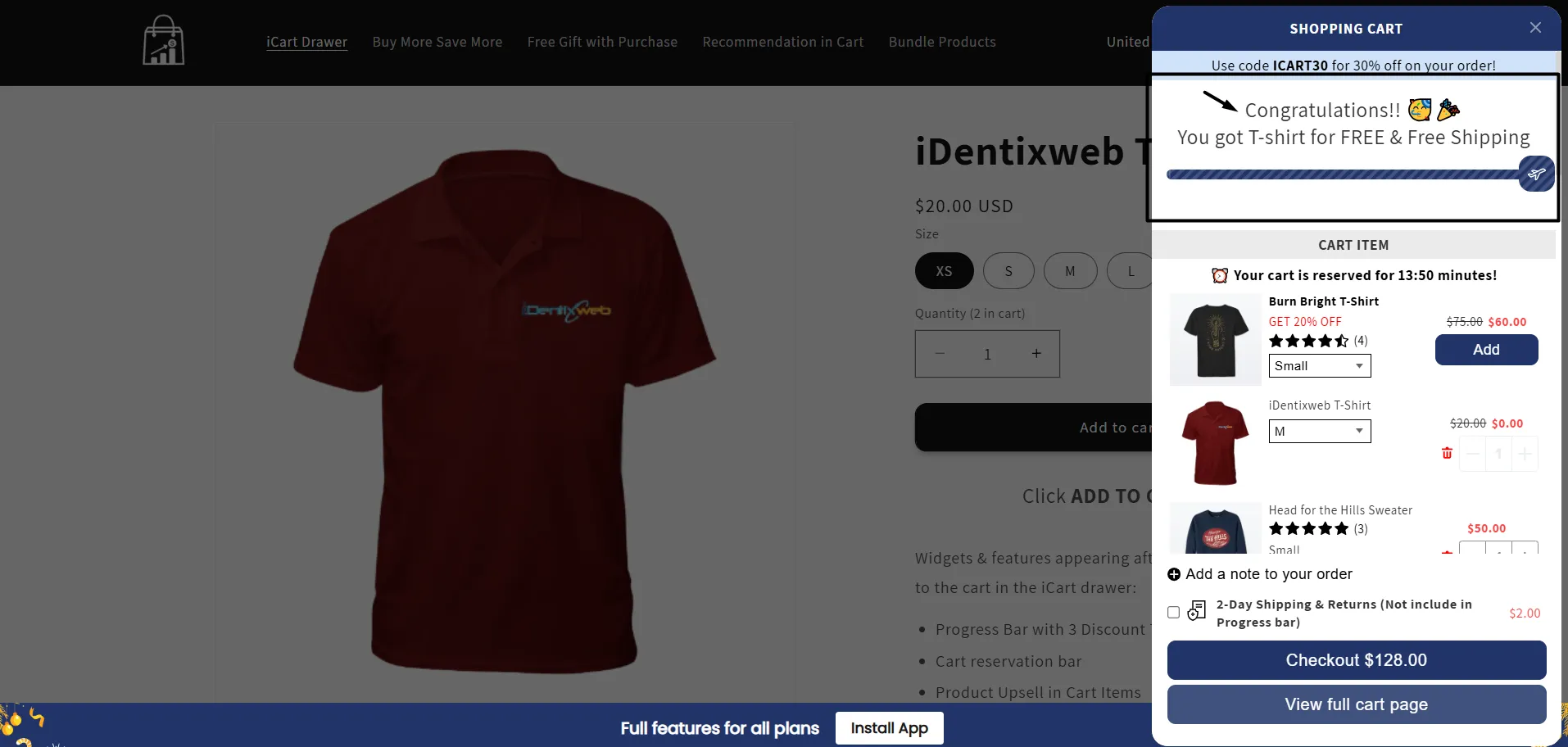
An effective strategy that nudges customers to add more items to their cart to qualify for free shipping. By setting a minimum spend threshold for free shipping, this technique creates a scenario where customers feel like they’re getting extra value by avoiding shipping fees while the store sees an increase in average order value.
Source: iCart by Identixweb
Real Example: Olipop
Olipop displays a free shipping progress bar at the top of the cart drawer: "You're $12 away from FREE SHIPPING." As the customer adds items, the bar fills up dynamically. Once the threshold is hit, the message changes to "🎉 You unlocked free shipping!" and the cart total adjusts automatically.
Why it works: The progress bar creates a visual goal customers can chase. Most shoppers will add a $10–$15 item rather than pay $7 in shipping, even though the math doesn't favor it. This is loss aversion at work.
Upselling Do's and Don'ts
After analyzing 500+ upsell funnels from top Shopify and DTC stores, the same patterns separate the high-converting strategies from the ones that hurt conversions. Here's the field-tested checklist.
✅ Do's
- Personalize the upsell to the cart. Recommend products complementary to what's already in the cart, not random catalog items.
- Time the upsell at peak intent. The cart and thank-you page (high intent moments) are where upsells convert best. The product listing page (browsing mode) is where they convert the worst.
- Keep upsell pricing under 25% of the base cart value. A $50 cart sees a $10–$12 upsell easily. A $30 add-on is a much harder sell. The customer's mental "budget for this purchase" is the constraint.
- Show savings in dollars, not percentages. "$8 off" feels more concrete than "20% off." Both are the same value, but the brain processes dollars faster.
- Limit to 1–2 upsell options per page. When you show 5 options, customers freeze and pick none. When you show 1 or 2, they pick.
- A/B test your offers continuously. Different audiences respond to different offers. Run 2 to 3 funnel variations per quarter and keep what wins.
- Track per-funnel performance. Don't just track total upsell revenue track take rate, AOV lift, and revenue per visitor per funnel. The "winning" funnel often surprises.
❌ Don'ts
- Don't stack upsells on top of upsells. One post-purchase upsell, then a refer-a-friend, then a survey, then a subscription nudge = abandonment. Pick ONE primary ask per page.
- Don't surprise the customer with new pricing. Upsells that add hidden shipping costs or unexpected charges at the last moment kill trust. Show all costs upfront.
- Don't interrupt the checkout flow. Mid-checkout popups asking "want to add X?" feel disruptive. Place upsells in the cart drawer (before checkout) or post-purchase (after checkout), never in between.
- Don't push unrelated products. Selling a phone case to a customer buying organic dog food makes you look like a clueless retailer. Train your upsell rules on category relevance.
- Don't over-explain the upsell. A 2-line description beats a 5-paragraph product page. Customers scan upsells. They don't read them.
- Don't force decisions with countdown timers on every upsell. Artificial urgency screams "manipulation." Reserve urgency for genuine limited-time offers.
- Don't ignore mobile UX. 70%+ of Shopify traffic is mobile, but most upsell apps were designed for desktop. Make sure your upsells work cleanly on a 375px screen, buttons reachable with a thumb, and text readable without pinching.
Wrapping Up
What makes these upselling examples effective? They are rooted in one core principle: offering customers more value.
By using personalized offers, timely suggestions, and helpful add-ons, upselling becomes a natural, value-driven part of the customer experience.
FAQs
1. What are good upselling examples?
Good upselling examples include one-click upsells for complementary items like a phone case, free shipping encouraging extra purchases, and a thank-you page upsell offering related products, like a toner after buying a cleanser.
2. What is upselling in Shopify?
Upselling in Shopify is encouraging customers to buy a more premium version or add-on to enhance their purchase and boost order value. This can include suggesting upgrades, bundles, or complementary products during checkout.
3. What are the benefits of upselling?
Upselling includes increased average order value, higher revenue per customer, improved customer satisfaction by offering relevant products, and enhanced customer loyalty through personalized recommendations.
4. Which are the best examples of Shopify upselling apps?
Some of the best Shopify upselling apps include iCart, Bold Upsell, AfterSell, and ReConvert.
5. Can you upsell on Shopify?
Yes, you can upsell on Shopify using various apps that offer upselling features like product recommendations, cart drawer upsells, and post-purchase offers, which can increase your store's average order value (AOV).



About the author
Bhavesha Ghatode
Explore Content with Bhavesha, a passionate and dedicated technical content writer with a keen understanding of e-commerce trends. She is committed to sharing valuable insights, practical assets, and the latest trends that can help businesses thrive in a competitive environment.