





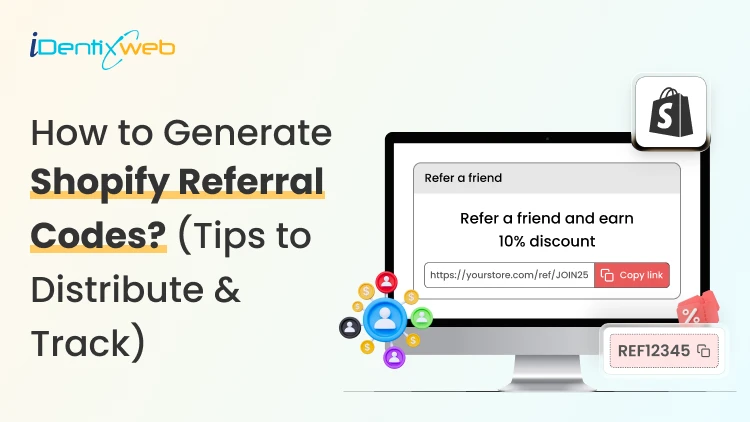

Shopify merchants can run creator affiliate programs through Shopify Collabs, which generates affiliate links and discount codes, tracks attributed sales, and manages commissions. For customer referrals, merchants can manually create a unique discount code for each referrer, add minimum-spend and usage limits, and track resulting orders through discount reports. Automated customer rewards, referral sharing, fraud controls, and advanced attribution generally require a dedicated referral app.
A Shopify referral code is one of the cheapest acquisition channels most stores never use.
I have set these up for stores doing 40 orders a month and stores doing 4,00, and the setup is far less technical than merchants expect.
Here is how referral works in your admin right now, what processes need an app, and how to track whether any of it is making you money.
What Is a Shopify referral code?
A Shopify referral code is a discount code tied to one specific person, so you know exactly who sent each new customer.
A generic code like SUMMER20 tells you nothing about who shared it. A referral code like SAM-15 tells you Sam brought that order in.
A referral code can be implemented as a Shopify discount code, but referral platforms may use unique links, customer accounts, or tracking methods.
The key difference is that a referral identifier connects the sale to a specific referrer.
I will explain the three formats that get mixed up.
- Referral code. An alphanumeric string the shopper types at checkout. Works for podcasts, in-person events, WhatsApp, and anywhere a link cannot travel.
- Referral link. A unique URL that attributes visits or purchases to a referrer. A Shopify shareable discount link can automatically apply the discount, while referral apps may use cookies, URL parameters, account matching, or other attribution methods.
- Discount code. The broad category both of the above sit inside.
Run both formats. Links convert better because there is no typing.
Does Shopify have a referral program?
Shopify has no built-in customer-to-customer referral program where your buyers refer their friends.
It does have two programs that reward people for referring new merchants to Shopify. One native app that handles affiliate-style referral codes for your store.
Three separate things carry the word "referral" in this ecosystem, and merchants confuse them weekly:
1. The Shopify affiliate program
This program is for creators, who refer new merchants to Shopify. Eligible affiliates can earn up to $150 USD for a qualified merchant who moves to a full-price Basic, Grow, or Advanced plan.
The merchant must start a free trial within 30 days of the qualifying affiliate click, and Shopify currently allows up to 125 days from the start of the trial for the referral to become eligible.
The minimum withdrawal balance is $10, reporting and payments are handled through Impact, and Shopify says applications are generally reviewed within five business days.
2. The Shopify partner program
This program is for developers, designers, agencies, app companies, and other commerce professionals.
Earnings vary by activity and may include merchant-referral revenue share, app or theme revenue, and service income.
3. Your own referral program
This is where existing customers refer friends to your store. Shopify’s native discounts and store credit can support a small manual pilot. But an automated customer-to-customer referral program requires an app or custom development.
The native tools for merchants
Shopify Collabs
Shopify Collabs is Shopify's own affiliate marketing app, and it generates unique discount codes and tracking links per creator, tracks the sales attributed to each one, and pays them out.
It is available on every Shopify plan except Starter and Retail. Shopify does not charge a monthly Collabs subscription fee, but it currently charges a 2.9% processing fee on automatic commission payments.
You can invite creators directly, run an open access program with an instant commission offer, or publish an application page on your online store.
If you are eligible for Shopify Flow, you can wire Collabs into automated workflows.
Native store credit
Store credit is a first-party feature in your admin, switched on by default.
You issue credit from any customer profile. It applies automatically at checkout for signed-in customers.
I see these four limits for this:
- It only works with new customer accounts.
- Only the full balance can be applied. Customers cannot spend part of it.
- The cap is under $15,000 USD per customer account.
- For stores created on or after May 12, 2025, third-party transaction fees apply to the portion of an order paid with store credit. Plus, stores using Shopify Payments are exempt.
Bulk unique code generation
Shopify supports bulk unique redeem codes through its Admin API and through third-party bulk-discount apps.
In the standard Shopify Admin, merchants can create individual discount codes and export discount data.
If you need hundreds or thousands of advocate-specific codes, I would advise using a bulk-discount app or a custom API workflow.
How to generate Shopify referral codes (Manual method)
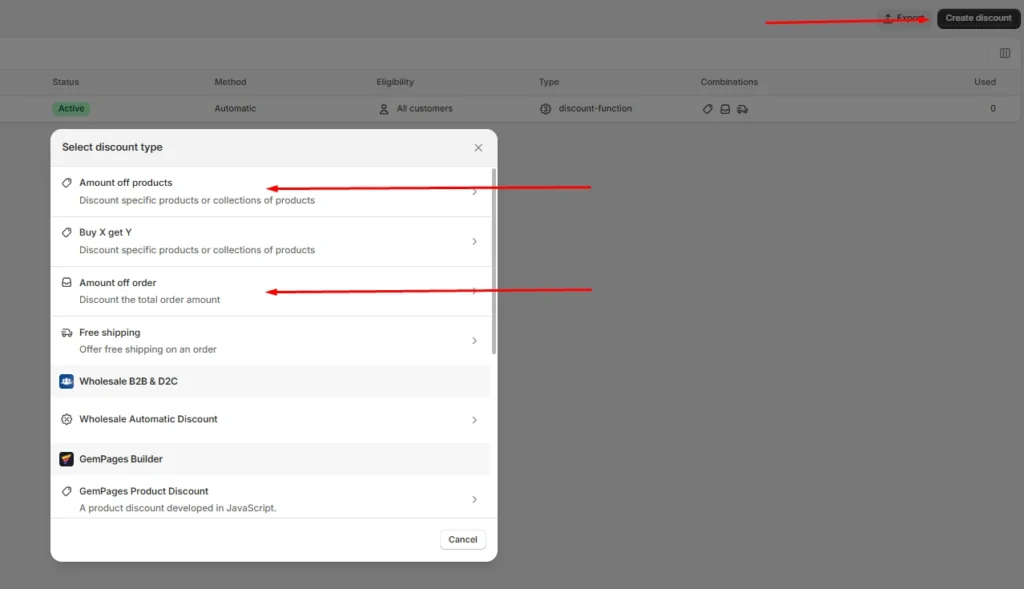
Step 1: Choose a discount type
Go to Shopify Admin > Discounts > Create discount, then select Amount off products or Amount off orders.
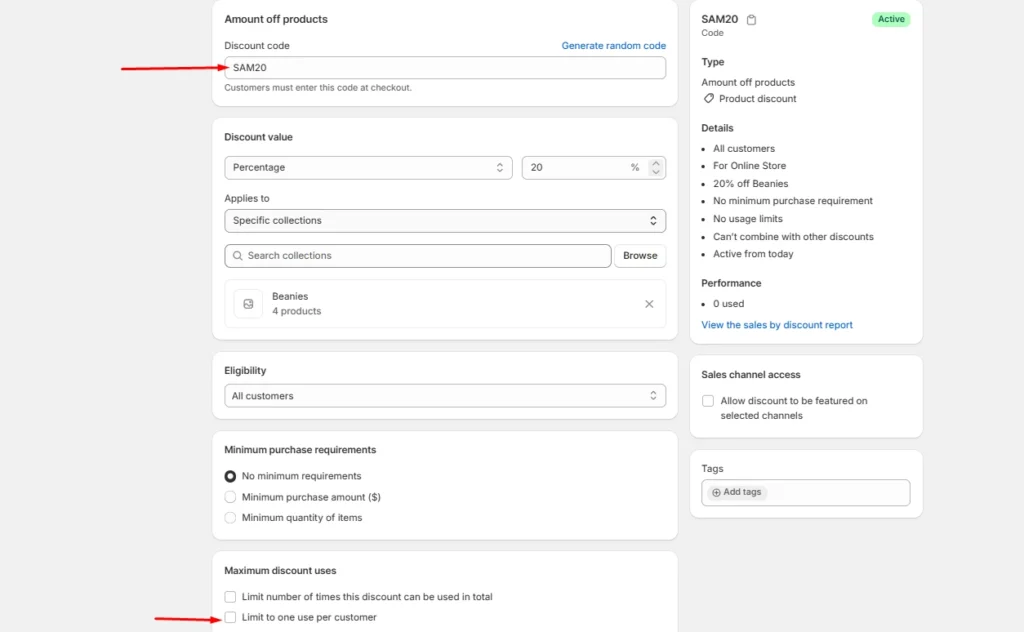
Step 2: Create the referral code
Under Method, select Discount code and enter a memorable code such as SAM20. Set the discount value, minimum purchase amount, and limit it to one use per customer.
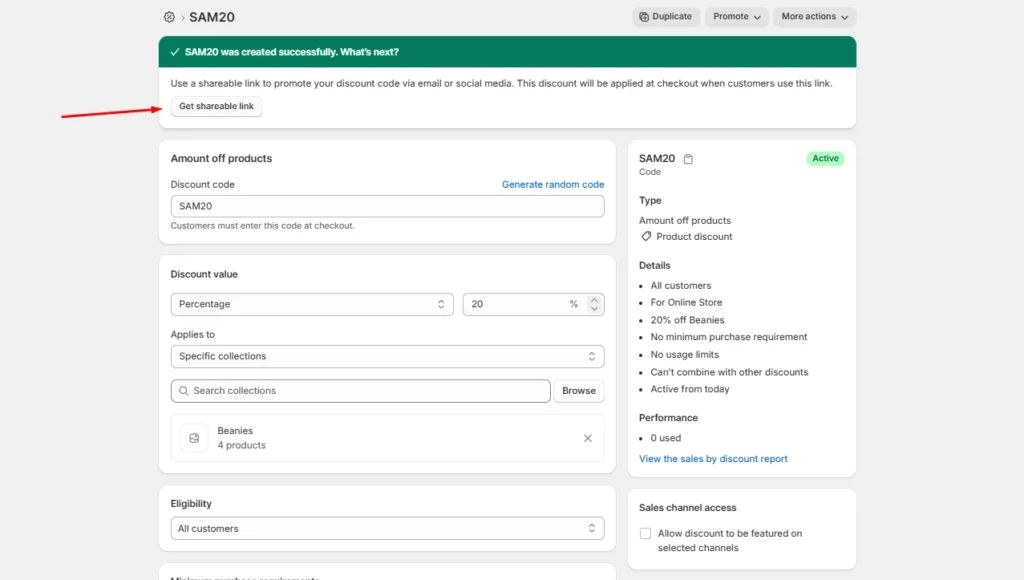
Step 3: Save and share
Save the discount and send the code to the referrer. You can later track orders and sales generated through that code.
Method 2: Shopify Collabs for creator and affiliate referrals
Install Collabs. Build your brand profile, set your commission structure as a percentage or a flat amount, decide which products qualify, and publish.
Codes and links generate per creator automatically. Attribution is handled by Shopify, so your revenue reporting stays simple.
This is best for stores where creators, not customers, drive word of mouth.
Method 3: A referral app
Referral-app pricing varies more than the monthly subscription alone suggests. Compare order limits, advocate limits, referral revenue fees, fraud controls, integrations, and reward automation before choosing an app.
How to distribute Shopify referral codes
Here’s how I distribute Shopify referral codes.
- Order confirmation page. Peak excitement and zero friction. One line and a copy button works here.
- Post-delivery email. Post-delivery email. Send it after customers have had enough time to experience the product. This may be seven to ten days for some products, but longer purchase and evaluation cycles may require different timing.
- Customer account page. Permanent place for the code so people can find it again without digging through email.
- Packaging insert with a QR code. Physical inserts convert well because the product is in their hands. My guide on creating Shopify QR codes covers the free native options.
How to track Shopify referral code performance
Discount reports
Go to Analytics > Reports, then look for sales by discount report. Shows orders, revenue, and average order value per discount. Compare referral-driven AOV against your store average.
Four numbers I always watch:
- Participation rate. Percentage of customers who claim a code.
- Share rate. How many of those actually share it?
- Referral conversion rate. Percentage of referred visitors who buy.
- Referral CAC. Total rewards paid divided by referred orders. Compare it to your paid ad CAC directly.
How to set rewards that do not make losses?
Rewards that benefit the referred friend, or both participants, can outperform referrer-only incentives in some situations.
Shared rewards will make the recommendation feel more helpful, but the best structure depends on your audience, margins, and product. A one-sided reward makes the referrer feel like they are profiting off a friend.
For example, on a $60 order with a 55% gross margin, a 20% friend discount leaves approximately $21 in gross profit before the referrer reward and other costs.
After assigning a $20 store-credit reward, the first order is close to break-even before payment fees, shipping, returns, app charges, and support costs.
I set these three margin rules:
- Add a minimum order value so referrals cannot be redeemed on your cheapest SKU.
- Pay the referrer in store credit, not cash. The reward returns to you.
- Check your discount combination settings. Shopify lets codes stack with automatic discounts, and a stacked referral code plus a seasonal promo can wipe out a full order's margin.
Start small and scale what works
A Shopify referral program does not need $200 monthly software. The first thing I would do is to create ten manual codes for your ten best customers and watch the discount report for 30 days.
If referred customers convert at a decent rate and your referral CAC beats your ad CAC, the case for a proper app makes itself.
A simple referral setup with clear promotion and regular measurement can outperform a more expensive platform that customers rarely see or use.
FAQs
1. How can Shopify users set up a referral program?
Install a referral app from the Shopify App Store, then configure the user reward, incentive, eligibility rules, sharing methods and fraud controls. Shopify’s native discount tools can create promotional codes, but a referral app is required for unique referral links, automatic rewards, attribution and performance reporting.
2. Is there a referral code for Shopify?
Shopify does not offer a referral code that gives every new merchant a discount on a Shopify plan. Approved Shopify Affiliates receive a unique referral link through the Shopify Affiliate Program, while merchants can create their own customer referral codes using Shopify Discounts or a referral app.
3. How to generate referral codes for Shopify?
From the Shopify admin, go to Discounts, select Create discount, choose the discount type and enter or generate a code. Set the reward value, eligible products or customers, minimum purchase requirement, usage limit and expiry date. Use a referral app when every user needs a unique code and automated reward tracking.
4. Which is the best referral app for Shopify?
ReferralCandy is a strong, dedicated option for referral and affiliate campaigns with attribution, tiered rewards, fraud protection and multiple reward types. Smile is another app that is better suited to merchants who want referrals combined with loyalty points and VIP tiers.
5. Does Shopify have a referral program?
Yes. Shopify operates an Affiliate Program through which approved affiliates share unique links and earn commissions for qualified merchants. However, Shopify does not provide a built-in customer refer-a-friend program for individual stores, so merchants must use a referral app or manage codes manually through Shopify Discounts.



About the author
Vineet Nair
Vineet is an experienced content strategist with expertise in the ecommerce domain and a keen interest in Shopify. He aims to help Shopify merchants thrive in this competitive environment with technical solutions and thoughtfully structured content.