





A customer scanning a code on your packaging or printed flyer can land on a pre-loaded checkout in seconds.
I have added a QR code in the Shopify store in under two minutes, and Shopify now offers more native options than ever before.
Whether you want a free Shopify QR code generator, a product-specific Shopcode, or a dynamic code with full scan analytics, I have covered every QR code Shopify merchants need in 2026.
What makes a QR code Shopify's most underused growth tool?
A QR code for Shopify is a scannable 2D barcode that links customers directly to a specific page in your store. It can be a product listing, a pre-loaded checkout, or a discount landing page. Every modern smartphone reads one through the camera app with no additional download required.
The numbers back this up. A GS1 US consumer survey found that 79% of shoppers are more likely to purchase a product with a scannable QR code.
For Shopify merchants specifically, the opportunity is clear. Every QR code Shopify merchants place in the physical world is a direct link to a sale.
There are two types of QR codes you should know about before choosing a method:
- Static QR codes encode a fixed URL. Once printed, the destination cannot be changed. Good for permanent product pages.
- Dynamic QR codes point to a redirect URL you control. You can update the destination without reprinting, and you get scan analytics, including scans, unique visitors, and location data.
Method 1: Free Shopify QR code generator
Shopify's free QR code generator lets you create a code in about 60 seconds with no Shopify account required. Enter a URL, your email address, and the tool sends you a downloadable code file.
Best for: Quick one-off codes for your homepage, a specific product page, a sale collection, or a campaign URL.
Key limitation: These are static codes. Once printed, the destination URL is locked. If the URL changes, you need to reprint.
Steps:
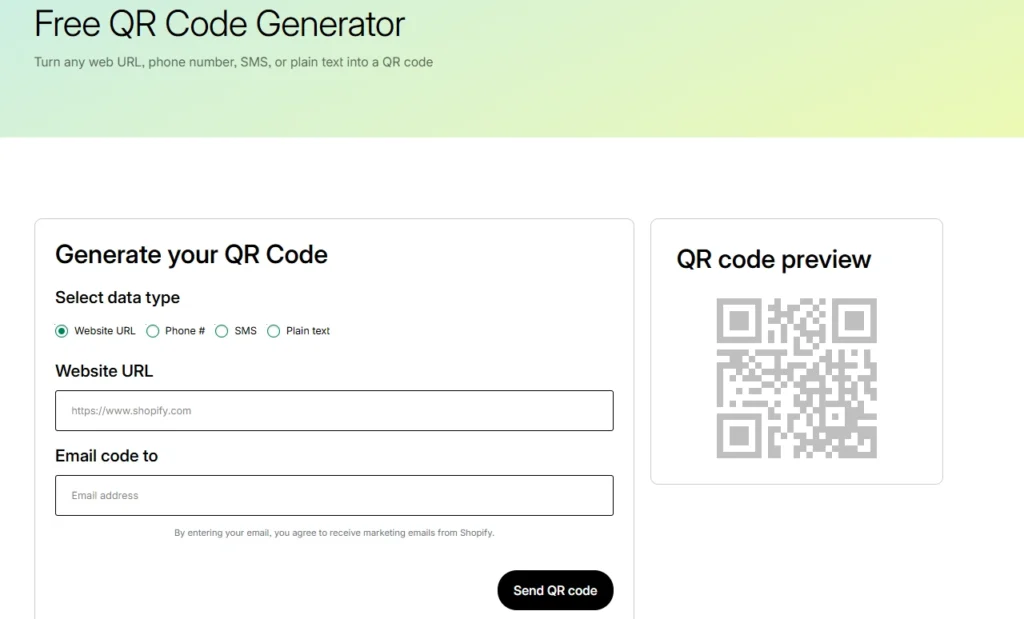
- Select your content type. The four options are website URL, phone number, SMS, and plain text. Website URLs are the most useful for store traffic.
- Paste your destination URL: product page, collection, homepage, or discount URL.
- Enter your email address.
- Click Send QR code.
- Download from your inbox and deploy.
The code never expires and has no scan limit. For a single campaign or permanent signage, this Shopify QR code generator's free option is all you need.
Method 2: Shopcodes, Shopify's native QR code creator
Shopcodes is Shopify's native QR code creator. Of all the Shopify QR code creator options available, Shopcodes is the most tightly integrated.
Unlike the free generator, Shopcodes ties codes to specific products and lets you attach a discount code to the scan destination.
Best for: Product-specific codes that send customers straight to a product page or a pre-loaded checkout.
Key limitation: Shopcodes generates standard codes with limited visual customization. You cannot add brand colors or logos to the code itself.
Steps to install and create a Shopcode:
- From your Shopify admin, go to Apps and search for Shopcodes.
- Click Install, then Install app.
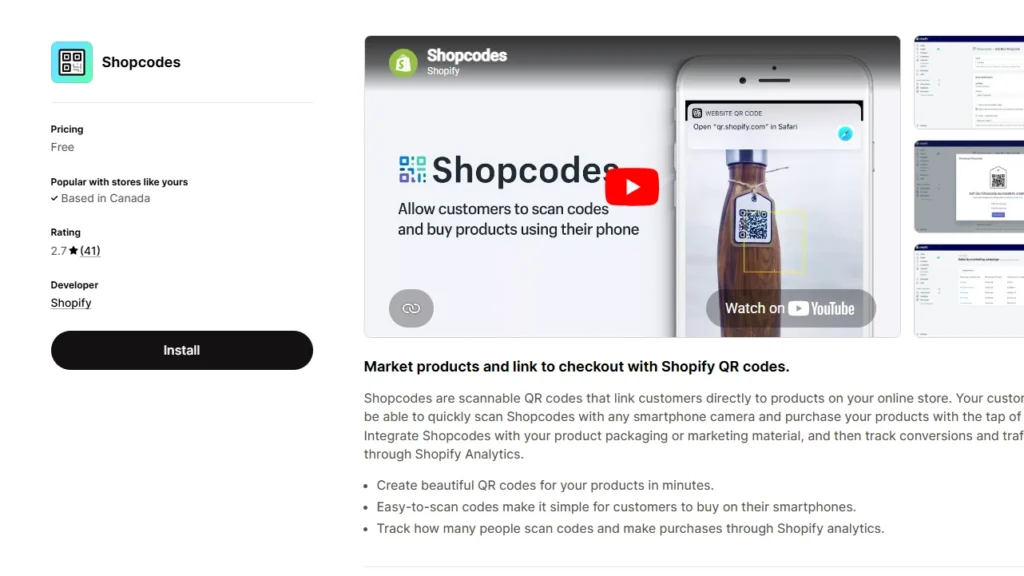
- Open the Shopcodes app and click Create Shopcode.
- Enter an internal title for the code.
- Under Scan Destination, choose one of the following:
> Link to a product page: Send the customer to the product listing.
> Link to checkout page with product in cart: Skips browsing entirely and puts the product in the customer's cart.
- If you selected checkout, optionally choose a specific variant.
- To attach a discount code, select one from the Discount section. Note: the discount attachment option only appears when you select the checkout destination, not the product page option.
- Click Save, then Download.
Downloaded codes come as a zip file containing a PNG for digital use and an SVG for print. For events, packaging inserts, or pop-up displays, the SVG is the version to give your printer.
Method 3: Third-Party Shopify QR code generator apps
When you need dynamic codes, bulk generation, or UTM tracking that flows into Google Analytics, I would always suggest a third-party app.
Best for: Marketing campaigns with multiple destinations, branded packaging, and bulk code creation across a large product catalog.
Here are three Shopify QR code apps that I have tried and tested.
- o2o – QR Codes Unlimited: Dynamic codes with customizable branding, bulk creation, discount integration, and detailed scan analytics. Free plan available.
- Spice QR Codes Generator: All codes are dynamic by default. Automatically generates UTM codes so scans show up correctly in Google Analytics. Also adds QR codes to invoices, packing slips, and post-purchase emails automatically.
- QodeVault QR Code Generator: Built for merchants who need bulk generation and real-time scan analytics across large catalogs.
Shopify gift card QR code
Every Shopify gift card automatically generates a unique QR code identifier. When a customer receives a digital gift card by email, Shopify adds a unique QR identifier into the card that can be scanned at POS.
Here is how the Shopify gift card QR code works:
- A customer purchases or receives a digital gift card from your store.
- Shopify emails the gift card with a redemption code and, if you have activated Apple Wallet Passes, an Add to Apple Wallet button.
- The Apple Wallet pass displays your store information, the gift card's active balance, and a unique QR code.
- At your physical store or event, staff can scan the QR code using a 2D scanner or the camera on an iPad running Shopify POS.
How to activate Apple Wallet Passes for your gift cards:
- Go to Shopify Admin > Settings > Payments.
- Scroll to the Apple Wallet Passes section and click Customize.
- Check Activate Apple Wallet Passes for gift cards.
- Optionally, customize the text, colors, and banner image that appear on the pass.
- Click Save.
6 high-converting ways to use QR codes in your store
1. Product packaging for repeat purchases
Place a QR code on your packaging that links to a pre-loaded checkout with the same product in the cart.
Attach a discount code to the Shopcode to reward repeat purchases. Shopcode app handles this natively.
2. Pop-up events and in-person markets
Running an event with limited stock on hand? Place a QR code at your booth that links to the full product collection on your Shopify store.
Customers who want a different size or color can order on the spot without you needing to carry every variant.
Shopify POS handles the in-person sales, and the QR code handles overflow orders.
3. Printed flyers and direct mail for discount campaigns
Flyers and direct mail benefit from QR codes because they eliminate the need to type a URL. Customers can scan the code, and the discount is already applied at checkout.
Merchants can use a dynamic code from a third-party app, so they can update the destination if a campaign extends or the discount changes.
4. Store window displays to sell after hours
A "Scan to shop" QR code in your window display lets your store make sales even when the doors are closed. Anyone walking by who stops to look can scan and browse the full collection on their phone.
Display a dynamic QR code here so you can change the destination for seasonal campaigns.
5. Out-of-stock products to capture interest
When a product runs out, place a QR code near it or on any empty shelf display. Link it to a waitlist form or to similar in-stock products. The interested shopper does not have to leave empty-handed. You capture the intent instead of losing it.
To wrap it up, here are the QR code best practices I use
- Minimum print size: A QR code needs to be at least 2 cm x 2 cm to scan reliably. For large format signage, size up proportionally. Smaller codes on packaging should still meet the minimum.
- Quiet zone: Keep a clear white border around the code equal to at least four modules (the small squares that make up the code).
- Contrast: A high contrast between the dark modules and the background is required. The safest option I have experience with is a dark code on a light background. Avoid reversing it to light on dark unless your code generator tests for readability.
- Add a CTA near every code: "Scan to shop," "Scan for 15% off," or "Scan to reorder" tells the customer why they should scan.
- Test on multiple devices before printing: Print a test copy at actual size and scan it with at least two different phones. What scans perfectly on a high-end device can fail on an older one.
- Use UTM parameters for trackability: Add UTM source, medium, and campaign tags to your destination URL. Dynamic QR code apps handle this automatically. For static codes, build the UTM URL manually using Google's Campaign URL Builder before generating the code.
FAQs
1. Are Shopify QR codes free?
Yes. Shopify has a free QR Code Generator that anyone can use, and it allows unlimited usage with no hidden costs or limitations. For Shopify merchants, the official Shopcodes app is also free
2. How do I create a QR code in Shopify?
For a general QR code, use Shopify’s free QR Code Generator, select the data type like website URL, phone number, SMS, or plain text, add the details, enter your email, and generate the code. For a product-based QR code inside Shopify, install Shopcodes, go to Apps > Shopcodes > Create Shopcode, choose whether it should open the product page or checkout with the product in cart, then download the QR code.
3. Does Shopify have a QR code?
Yes. Shopify has Shopcodes, an official Shopify app that creates scannable QR codes connected to specific products. These QR codes can send customers to a product page or directly to checkout, and Shopify also supports scan and conversion tracking through Shopify Analytics.
4. What is the best free Shopify QR code generator?
Shopify's own free QR code generator tool is the easiest option. It is completely free, requires no account, and delivers the code to your email in under a minute. The only limitation is that it creates static code. For dynamic codes with scan analytics, you will need the Shopcodes app or a third-party Shopify QR code generator app.
5. What is a Shopify gift card QR code?
Every Shopify digital gift card includes a unique QR identifier that can be scanned at Shopify POS. When you activate Apple Wallet Passes in Shopify Settings, gift card emails include an "Add to Apple Wallet" button. The wallet pass displays the balance and a QR code that staff can scan to apply the gift card at checkout.
6. Are Shopify QR codes dynamic or static?
Shopify's free QR code generator creates static codes only. Shopcodes creates static codes tied to a specific product destination. Third-party apps like o2o and Spice QR Codes Generator create dynamic codes by default, which means you can update the destination URL after printing and track scan analytics.
7. Can I track who scans my Shopify QR code?
With dynamic QR codes from third-party apps, you get scan data including total scans, unique scanners, scan timing, and geographic data. Shopcodes provides a basic analytics report inside your Shopify admin, showing scans and conversions. Static codes from the free Shopify QR code generator tool provide no native tracking.




About the author
Vineet Nair
Vineet is an experienced content strategist with expertise in the ecommerce domain and a keen interest in Shopify. He aims to help Shopify merchants thrive in this competitive environment with technical solutions and thoughtfully structured content.