

You can enhance your Shopify notification emails by adding download links for invoices, packing slips, or refunds. This feature allows recipients to easily access important order documentation, improving communication and transparency with your customers. To set this up, first choose the document type you want to link to, such as Invoice or Packing Slip.
Next, define the link text that will appear in the email, like “Download Invoice.” Then, copy the provided HTML or Liquid code snippet for the selected document type and paste it into the appropriate section of your email template in Shopify. Make sure to save your changes to ensure the download link is properly integrated without disrupting the email's formatting.
Adding Download Links for Invoice, Packing Slip, or Refund in Shopify Notification Emails
Select Document Type
Begin by determining the document type for which you wish to embed a download link in your Shopify notification emails. You have the option to choose from an Invoice, Packing Slip, or Refund. This selection will dictate the content of the download link that recipients will access.
Define Link Text
Next, specify the text that will serve as the hyperlink in your Shopify email notifications. This text should clearly indicate the purpose of the link, such as “Download Invoice,” “Access Packing Slip,” or “Retrieve Refund Document.” You can add the text in your language too.
Copy the Code Snippet
Locate the code snippet provided in the app for embedding download links. This snippet contains the necessary HTML or Liquid code to generate the download link for the selected doctype. Select and copy the code snippet to proceed to the next step.
Paste the Code into Email Template
Access the notification email template in Shopify where you intend to embed the download link. This may include order confirmation emails, shipping notifications, or refund confirmations. Within the email template editor, identify the appropriate section or location where you want the download link to appear.
Paste the copied code snippet into the designated area of the email template. Ensure that the code is inserted correctly and that it does not disrupt the formatting or functionality of the email. Save the changes to update the email template with the embedded download link.
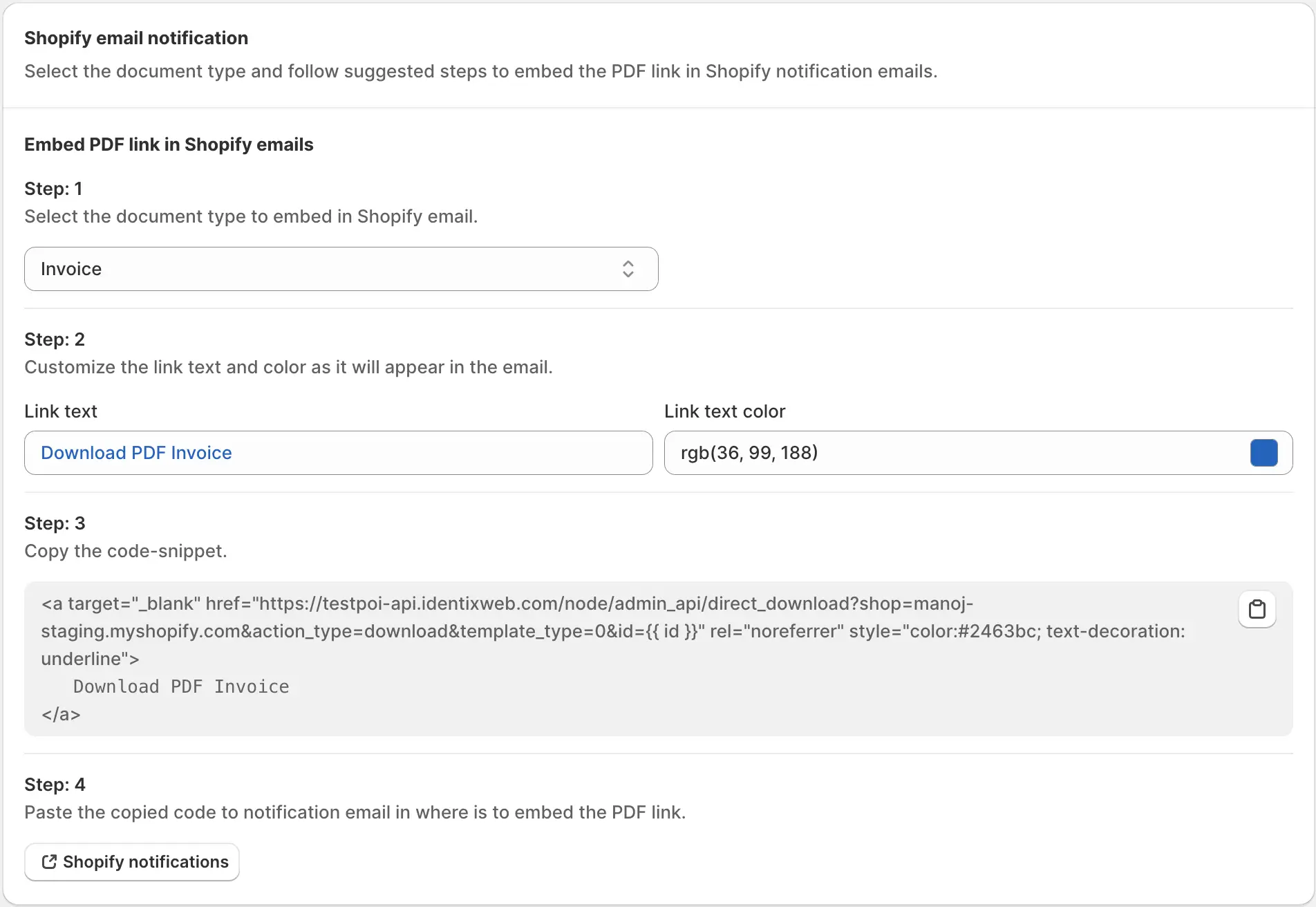
By following these step-by-step instructions, you can seamlessly integrate download links for invoices, packing slips, or refunds into your Shopify notification emails. This enhancement ensures that recipients have convenient access to essential order documentation, promoting transparency and facilitating efficient communication with your customers.