



The difference between Shopify Payments and PayPal can look tiny on a pricing page. Across hundreds or thousands of orders, it can become a serious operating cost.
I have seen merchants focus only on the processing rate while overlooking Shopify’s additional transaction fees, PayPal’s pricing structure, currency conversion, and dispute costs.
This comparison breaks down the numbers that matter in 2026 so you can see which option protects more of your margin.
Shopify Payments vs PayPal: The short answer
Shopify Payments is cheaper per order in almost every scenario. It is also the only way to avoid Shopify's extra transaction fee.
PayPal costs more but brings buyers who will not enter a card number in a store they have never heard of.
This is how I always use both these options. Shopify Payments as your processor with PayPal switched on as a wallet option.
Shopify Payments vs PayPal Comparison
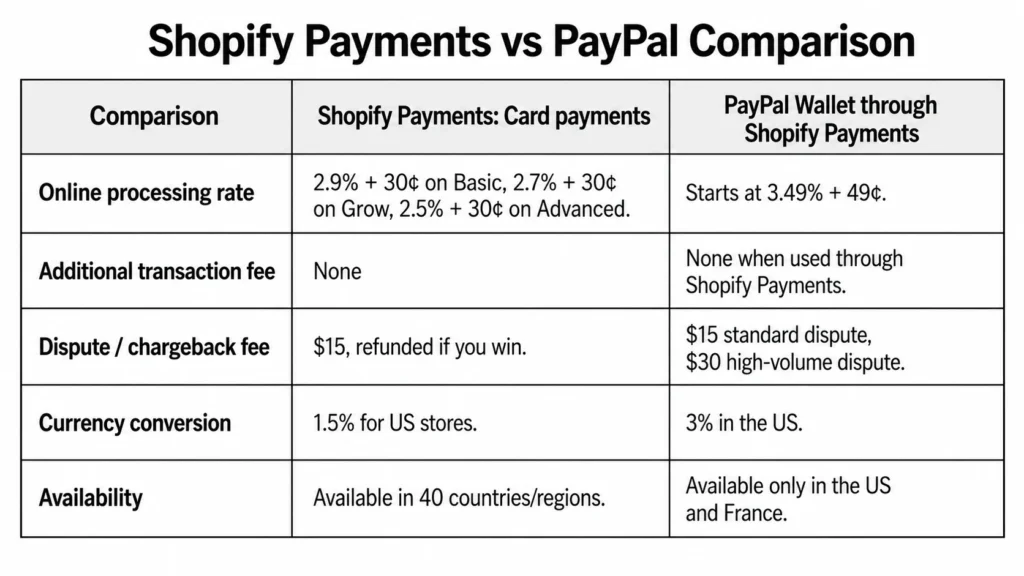
| Comparison | Shopify Payments: Card payments | PayPal Wallet through Shopify Payments |
| Online processing rate | Standard cards: 2.9% + 30¢ on Basic, 2.7% + 30¢ on Grow, and 2.5% + 30¢ on Advanced. Premium cards cost 3.5%, 3.3%, and 3.1% + 30¢, respectively. International cards add 1%. | Starting at 3.49% + 49¢ on Basic, Grow, and Advanced. |
| Additional transaction fee | None | None when PayPal is offered through Shopify Payments. PayPal transactions are excluded from Shopify’s third-party transaction fee when Shopify Payments is active. |
| Dispute or chargeback fee | $15 USD, returned if the merchant wins the chargeback. | $15 for a standard dispute and $30 for a high-volume dispute. |
| Currency conversion | 1.5% for US Shopify Payments stores when the payment currency differs from the payout currency. | 3% for PayPal Wallet through Shopify Payments in the United States. “Around 3% to 4%” is unnecessarily vague for this specific integration. |
| Availability | Shopify’s current supported-country page lists 40 countries and regions, not 39. | PayPal Wallet through Shopify Payments is available only in the United States and France. |
What Shopify Payments actually costs in 2026
Shopify Payments has no monthly fee and no setup cost. You pay a card processing rate that drops as you move up plans.
Shopify Payments Fees
- Basic: From 2.9% + 30¢
- Grow: From 2.7% + 30¢
- Advanced: From 2.5% + 30¢
- Plus: From 2.25% + 30¢
Chargebacks: Shopify Payments charges US merchants $15 when a customer files a chargeback. The disputed amount and fee are deducted from your account, but both are returned if the card issuer rules in your favour. Shopify lets you submit evidence through the admin, although the final decision is made by the customer’s bank, not Shopify.
What PayPal actually charges?
PayPal’s Fees
- PayPal and Venmo payments: 3.49% + $0.49
- Cards through PayPal Checkout: 2.99% + $0.49
- Expanded Checkout card processing: 2.89% + $0.29
- PayPal Pay Later: 4.99% + $0.49
- International commercial payments: Additional 1.5%
Chargebacks and disputes: PayPal account and guest-checkout transactions generally carry a $15 standard dispute fee, which rises to $30 for merchants classified as high-volume dispute sellers. Unbranded credit and debit card transactions can instead carry a $20 chargeback fee, so the cost is not the same across every PayPal payment type.
Shopify Payments vs PayPal credit card fees on a real order
Let me explain this with a simple example. Take a $75 order, US buyer, US store, Basic plan.
- Through Shopify Payments: $75 × 2.9% = $2.18, plus 30¢, for a total of $2.48. You keep $72.52.
- Through PayPal Checkout: $75 × 3.49% = $2.62, plus 49¢, for a total of $3.11. You keep $71.89.
The difference is only 63 cents, but if you run 1,000 orders a month, it is $630, or $7,560 a year.
There is a scenario where PayPal is better on price, and it is narrow: high-value orders where the percentage matters more than the fixed fee, processed as cards through Expanded Checkout at 2.89% + 29¢.
For most Shopify stores selling physical goods at normal price points, that is not the setup you are running.
PayPal checkout vs Shopify Payments: Which is better for conversions?
- PayPal earns its fee with a specific type of buyer. Someone who has never heard of your brand, is shopping on a phone, and does not want to type a 16-digit card number into a store they found through an ad.
For that shopper, the PayPal button is the reason the order happens at all.
- Shopify Payments has Shop Pay. This stores card and shipping details across the Shopify network and lets returning buyers check out in one tap.
What I would not do is treat the payment method as the only checkout variable.
Most stores lose orders to unexpected shipping costs, forced account creation, and slow pages. If your abandonment rate is high, work through the common Shopify checkout mistakes before you start adding gateways.
Payouts and cash flow
- Shopify Payments is faster and more predictable for most established stores. PayPal is faster if you have a PayPal balance and slower to your bank.
Payouts will arrive in a Shopify Balance account within one business day of the transaction processing date. New merchants can wait up to five business days. Standard bank payouts run 2 to 5 business days in the US, longer in the UK and EU.
- PayPal money hits your PayPal balance immediately. Getting it to your bank takes another 1 to 3 days, or you pay a fee for instant transfer.
New accounts are where both methods lag. A brand new PayPal account can hold funds for up to 21 days. A high-risk limitation can take 180 days.
Shopify has a similar onboarding window. It takes up to 21 calendar days between your first sale and your first payout. My advice is to keep both active.
Disputes and chargebacks
Shopify wins this one clearly.
It charges $15 per chargeback, and PayPal charges $20, and high-dispute accounts get bumped to $30 with no refund.
Shopify Protect offers free chargeback protection against fraudulent and unrecognized chargebacks on eligible orders. When an order is marked "Protected," Shopify covers the disputed amount and the chargeback fee automatically, without you filing a response.
The conditions are strict and worth reading before you count on it:
- US-based merchants using Shopify Payments only
- Shop Pay orders exclusively, not standard Shopify Payments checkout
- Physical products, fulfilled within the required window, with valid tracking from a supported carrier.
It will not cover every dispute. It covers the expensive category well, and it costs nothing to turn on.
PayPal counters with Seller Protection, and orders paid through PayPal Wallet on Shopify Payments are eligible for it. The dispute process runs differently, though.
You get 20 days to resolve an inquiry with the customer directly before PayPal steps in funds are held during that window, and once a decision is made, you cannot appeal it.
Payment Setup Is Part of the Bigger Picture
Payment setup also needs to be considered as part of the wider Shopify store configuration.
Identixweb helps merchants with Shopify store settings configuration, including payments, checkout, shipping and taxes, so these elements work together properly before the store starts processing orders.
Where each one genuinely wins
Shopify Payments wins on cost, chargeback, reporting, and operational simplicity. It is the right default for any store in a supported country.
PayPal wins on reach. Shopify Payments covers 39 countries and regions. PayPal operates in over 200 countries.
If your store is registered in India, Brazil, the UAE, Nigeria, Pakistan, or Indonesia, Shopify Payments wins easily. If you need a third-party gateway, PayPal is one of the stronger ones available.
PayPal also wins on buyer familiarity in specific markets and categories. High-consideration purchases, first-time buyers from paid social, and cross-border orders all convert better when a recognised wallet is on the page.
FAQs
1. Does Shopify Payments accept PayPal?
Yes, but the setup depends on your country. In the United States and France, PayPal Wallet is integrated directly into Shopify Payments. In other supported countries, PayPal is connected separately through PayPal Express Checkout.
2. Is PayPal better than Shopify?
Shopify is an ecommerce platform with its own payment processor, while PayPal is primarily a payment provider. For most Shopify merchants, Payments works better as the primary processor because payments, payouts, disputes, and reporting stay inside Shopify. PayPal remains valuable as an additional checkout option for customers who prefer it.
3. How to add PayPal to Shopify Payments?
For US and French stores using Shopify Payments, PayPal is available through the integrated PayPal Wallet rather than the Additional payment methods section. In other countries, go to Settings > Payments > Additional payment methods > PayPal > Complete setup, then sign in to PayPal and approve the connection.
4. How to collect PayPal payments on Shopify?
Activate PayPal Wallet or PayPal Express Checkout, after which eligible customers can select PayPal during checkout and pay using their PayPal balance, bank account, or card. US and French PayPal Wallet transactions are managed and paid out through Shopify Payments, while PayPal Express transactions are managed through the connected PayPal account.
5. Is Shopify cheaper than PayPal?
For US online payments, Shopify Payments is generally cheaper per transaction. Standard card rates currently start at 2.9% + 30¢ on Basic and decrease on higher plans, while PayPal Wallet rates start at 3.49% + 49¢. Shopify also charges a monthly platform subscription, so the lower-cost option depends on the store’s plan, payment mix, and sales volume.
6. How much does Shopify charge for Payments?
For US stores, Shopify Payments’ standard online card rates are currently 2.9% + 30¢ on Basic, 2.7% + 30¢ on Grow, and 2.5% + 30¢ on Advanced. Shopify Plus receives negotiated or more competitive rates. There is no separate setup or monthly Shopify Payments fee beyond the Shopify subscription.
7. How do I avoid Shopify transaction fees?
Use Shopify Payments instead of a direct third-party card processor to avoid Shopify’s additional third-party transaction fee. PayPal Express and manual methods are also excluded when Shopify Payments is active.



About the author
Vineet Nair
Vineet is an experienced content strategist with expertise in the ecommerce domain and a keen interest in Shopify. He aims to help Shopify merchants thrive in this competitive environment with technical solutions and thoughtfully structured content.