

Author: Nash Ogden
Gather knowledge about the latest insights, updates, tips, and tricks in the Ecommerce industry.

5 Min • 20 March 2026
How Anua Unlocked 5X AOV Growth with iCart’s Smart Cart Features
delivery customization Challenges Solutions drive results Scale business delivery customization Challenges Solutions drive results Scale business delivery customization Challenges Solutions drive results Scale business delivery customization Challenges Solutions drive results Scale business Anua is a globally recognized Korean skincare brand known for its minimalist philosophy and focus on gentle yet effective formulations. Built on the idea of simplifying skincare routines, Anua develops products that deliver visible results while avoiding harsh or irritating components, making them suitable for sensitive skin types. Initially using a traditional full cart experience, Anua transitioned to iCart’s side cart solution in August 2025, to create a more seamless and engaging shopping journey. This shift allowed customers to easily explore complementary skincare products without disrupting their browsing flow, making it more intuitive to discover items that fit into a complete routine. By surfacing relevant recommendations directly within the cart, the brand enhanced product visibility across its range. Challenges Before implementing iCart’s side cart solution, Anua faced limitations with their existing full cart experience, which created friction in the customer journey. The traditional cart setup redirected users away from product pages, interrupting their browsing flow and reducing opportunities to explore additional products. As a skincare brand built around routines rather than single-item purchases, this made it difficult to effectively showcase complementary products and encourage customers to build complete regimens. Additionally, the lack of in-cart personalization and strategic upsell opportunities meant that customers were often unaware of related products that could enhance their skincare results. This limited the brand’s ability to increase average order value (AOV) and fully leverage its diverse product range. Anua needed a more dynamic and intuitive cart experience that could seamlessly introduce relevant recommendations while maintaining a smooth and engaging shopping journey. ❌ Cart Value Barriers Low average order value (AOV) due to single-item focus Most customers completed purchases with one primary product instead of building multi-step routines. Cart abandonment near shipping thresholds Customers were not clearly informed or motivated to reach free shipping or discount thresholds. Missed savings opportunities Customers were unaware of potential value in purchasing bundled routines or multiple complementary products. ❌ Absence of Progress-Based Incentives No free shipping or discount progress bar Customers were not motivated to increase their cart value due to lack of visible incentives. Missing tiered rewards system There were no structured milestones (e.g., “Spend more to unlock offers”), reducing upsell opportunities. ❌ Ineffective Cart UI/UX (Pre-Side Cart) Full-page cart disrupted shopping flowCustomers had to leave their browsing journey, increasing friction and drop-offs. No quick add/remove functionality Users couldn’t easily modify their cart or add suggested products without navigating away. Solution To overcome these challenges, Anua implemented iCart’s side cart solution to transform their traditional cart into a high-converting, interactive experience. By replacing the full-page cart with a seamless side cart, the brand ensured that customers could continue browsing while viewing their cart, significantly reducing friction in the shopping journey. Additionally, features like product recommendations & progress bars for free shipping and discounts motivated customers to increase their cart value. By combining personalization, incentive-driven messaging, and a user-friendly interface, Anua successfully turned their cart into a powerful revenue-driving touchpoint rather than just a checkout step. To maximize their cart effectiveness, they implemented two powerful features: ✅ Progress Bar with Multi-Reward Incentives Implemented a tiered progress bar to encourage higher cart value Customers are guided with a clear message like “Add $3.10 to unlock secret offer,” motivating them to continue adding products. Generated over $5M+ in revenue through incentive-driven cart progression Used product-based rewards to align with customer intent Instead of generic discounts, Anua incentivized purchases with relevant skincare items like Dark Spot Pads and mini serums. Built visual motivation for routine expansion As customers add products, they can clearly track progress toward unlocking multiple rewards, encouraging them to build a complete skincare routine. ✅ Product Recommendations Implemented “Frequently Bought Together” recommendations Customers adding a single product (e.g., toner) are shown complementary items like serums, moisturizers, or pads to complete their routine. Generated over 275K revenue through in-cart recommendations Encouraged full skincare regimen building Instead of isolated purchases, the cart suggests step-by-step product combinations aligned with common skincare routines. Increased product discovery at the final stage By surfacing relevant items directly in the cart, Anua ensured customers explore more of their catalog without leaving the checkout flow. Results Achieved in Last 180 Days 22932 Total Store Orders 45101 Total iCart Orders 5X iCart Generated AOV 65.70% Upsell Affected Conversion Rate These improvements reflect a clear shift in customer behavior on Anua’s store. Cart abandonment reduced as shoppers discovered complementary skincare products and felt encouraged to build complete routines. Engagement also increased, with customers interacting more with in-cart recommendations and exploring relevant product pairings. Results & Impact And...Results is Our Main Clarification By implementing iCart’s cart drawer, product recommendations, and progress bar, Anua transformed its cart into a high-performing conversion touchpoint. Shopping Experience Enhancement The improved cart experience encouraged customers to discover complementary products and understand the value of sustainable beauty routines. For instance, the clear presentation of subscription savings alongside one-time purchase options helped customers make more informed decisions about their long-term hair care needs. As Anua continues to optimize its cart experience, the brand is closely monitoring: Routine-based purchasing behavior - tracking how customers move from single items to multi-step regimens Engagement with in-cart recommendations - measuring interaction with suggested products Cart value progression - analyzing how incentives influence higher spending [related_cases_slider] Ready to Write Your Success Story? Try icart App Join successful businesses like Anua and Master your delivery scheduling Delight customers with precise timing Grow your special occasion orders Expand your delivery reach
Read Blog
8 Min • 31 July 2026
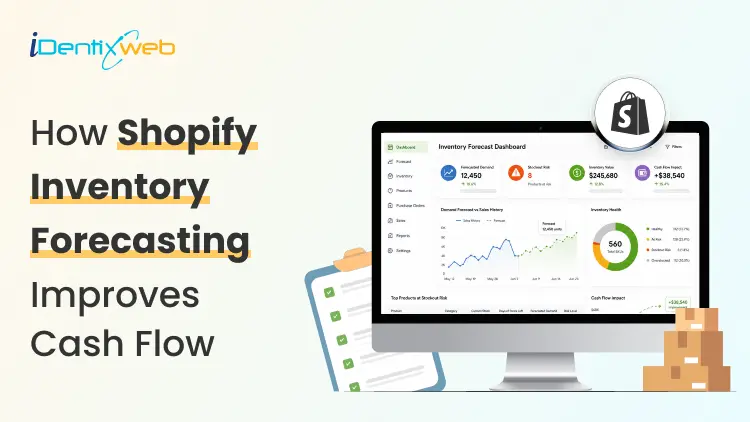
Complete Guide to Shopify Inventory Forecasting to Manage Cash Flow (+ Tools)
Shopify inventory forecasting is the process of estimating how much stock each product will need and when it should be reordered using sales history, supplier lead times, promotions, and current inventory levels. Accurate forecasting helps merchants avoid stockouts, reduce excess inventory, and keep more cash available for business expenses. Tools such as Sidekick, Prediko, Inventory Planner, and Assisty can automate inventory forecasting. If your ROI feels lower even when sales are good, your stock is usually the reason. Cash you've spent on inventory is cash you can't spend on ads, payroll, or the next order. Shopify inventory forecasting is working out how much stock you need and when to order it, so less of your money sits on a shelf. One thing worth knowing before anything else: Stocky, the free forecasting and purchase order app that came with Shopify POS Pro, stops working on August 31, 2026. If you order stock through Stocky, you've got a few weeks to sort out a replacement. What is Shopify inventory forecasting? Shopify inventory forecasting means predicting how many units of each product you'll sell over a future period. You use your sales history, supplier lead times, and whatever promotions you have planned. What you're after isn't the forecast itself. It's a list of purchase orders with dates and amounts against them. A forecast that never turns into an order hasn't done anything for you. Forecasting is really a cash question This is my philosophy: Stock is the biggest cheque you write and the slowest one to come back. You pay a deposit today, pay the balance six weeks later, pay duty when it lands, and only then do the units start selling. Every forecasting choice you make is a choice about how long your money is stuck. Two numbers tell you whether that's under control. Your cash conversion cycle The cash conversion cycle counts the days between paying your supplier and getting paid by your customer. CCC = Days Inventory Outstanding + Days Sales Outstanding − Days Payables Outstanding Days Inventory Outstanding is (Average inventory ÷ COGS) × 365. If you hold $120,000 of stock on average against $480,000 of annual COGS, that's 91 days. Days Sales Outstanding is quick for a normal Shopify store, since Shopify Payments in the US settles in about 2 to 5 business days. It climbs once you add wholesale on Net 30 or marketplaces with their own payout cycles. Days Payables Outstanding is how long your supplier lets you wait. On Net 30, that's 30. So: 91 + 3 − 30 = 64 days. Your money is tied up for a bit over two months on every dollar you put into stock. Most DTC brands land somewhere between 60 and 120 days, and under 60 is doing well. Pull these reports before you do anything else Go to Analytics > Reports and filter by Inventory. I look at four main reports here for forecasting. ABC product analysis grades every variant by how much revenue it brings in. A-grade products are the ones making up 80% of your revenue, B-grade the next 15%, C-grade the last 5%. It's worth knowing that the window is fixed for the last 28 days and you can't change it. If you sell seasonal products, run it at a few different points in the year instead of trusting one snapshot. Products by days of inventory remaining gives you days of stock left per variant, worked out from your average daily sales over the last 28 days. This is the best way to spot what's going to run out before your next delivery lands. Products by sell-through rate shows what share of available stock you sold in a period. There's about a two-day processing delay on it, so the newest data you can see is never today's. Month-end inventory value multiplies cost per item by ending quantity, which gives you your inventory cash position over time, and it's the number you need for the DIO calculation above. For a full walk-through of every report and what the columns mean, see my guide on how to pull a Shopify inventory report in 2026. How to do a Shopify inventory forecast? Clean up your sales history first Sales history and demand history aren't the same thing. Take out days when a product was out of stock, because zero sales that day tells you about your supply, not your demand. Check your product codes while you're in there. If one product exists under three different SKUs because of an old migration, you're splitting one demand pattern into three weak ones, and every forecast after that will be wrong. My guide on setting up SKUs in Shopify covers a naming system that survives growth. Split the catalogue with ABC Don't treat every product the same. Pull the ABC report and give each grade a different level of attention. A-grade products get looked at weekly and get tight reorder points. B-grade products get a monthly check. C-grade products get simple rules and a look every quarter. Create cash calendar Here’s something I do. Take each purchase order you're planning and put its payments on a calendar with real dates against them. An overseas order has four separate payments going out: the supplier deposit, often 30% up front, the balance when it ships, the freight, and then duty and customs when it lands. Lay twelve weeks out in a spreadsheet, one row per payment, and put your expected Shopify payouts in as money coming in. If any week goes red, you move an order, split it, or go back to your supplier about terms. Doing that once a month heads off nearly every cash crunch I see. Pre-orders flip the timing in your favour, since you're collecting money before you place the supplier order. You also get a real demand signal instead of a guess, which is worth almost as much. My walkthrough on setting up pre-orders on Shopify covers the setup and the apps. AI inventory forecasting on Shopify AI inventory forecasting on Shopify uses machine learning to find patterns across your sales history and outside signals that a spreadsheet formula would miss. It handles hundreds of products at once, retrains itself as new sales come in, and picks a different model per product without you telling it to. A model can spot that a product spikes three weeks after a particular campaign, or that two of your products eat into each other, without you knowing to look for it. Where I see it failing is bad data. Feed it sales history full of stockout periods, untracked variants and missing cost figures, and you'll get numbers that are wrong. Clean the inputs first. Sidekick sits in your admin. It can answer stock questions, flags what needs reordering and drafts the PO. It won't replace a proper demand planning tool if your forecasting is genuinely complicated. Inventory forecasting tools worth looking at in 2026 Prediko is a Shopify-native tool with SKU-level twelve-month forecasts, a buying table that tells you what to restock, a purchase order calendar and raw materials tracking. Pricing scales with your GMV from around $49 a month. Good fit for growing DTC brands. Inventory Planner This is a free-to-install app by Sage with usage-based pricing after that. It is strong on multi-location planning and automated replenishment. Cogsy This app is built around scenario modelling rather than one forecast. You can see where your stock lands under different growth assumptions. Assisty Assisty has AI forecasting and automated PO generation. Often the pick for people who want something that works without a long setup project. My guide to building a Shopify tech stack covers how the inventory category fits in your app stack. Where to start with forecasting in 2026 Shopify inventory forecasting gets much less complicated once you stop treating it as a math problem. Pull your ABC report and your days-of-stock report. Work out your cash conversion cycle. Redo safety stock on your ten biggest products. Most stores free up a decent chunk of money from that alone. FAQs 1. How to fix inventory not tracked in Shopify? Open Shopify Admin > Products, select the product or variant, and enable Track quantity in the Inventory section. Assign the correct stocking location, enter the available quantity, and save. For multiple products, use Products > Inventory or the bulk editor to enable tracking. 2. How do I add inventory to my Shopify store? Go to Products > Inventory, choose the relevant location, and enter the stock amount using Set to or Adjust by. You can also update quantities from an individual product or variant page, or import inventory in bulk using a CSV file. 3. Which is the best Shopify forecasting app? Prediko is currently a strong all-round option for growing Shopify brands, offering AI sales forecasting, purchase orders, inventory transfers, bundle planning, reports, and integrations with warehouses and 3PLs. Assisty is another great option with forecast demand with AI to predict future sales. 4. How much does Shopify forecasting cost? Shopify’s native demand-forecasting assistance through Sidekick costs nothing because Sidekick is included with Shopify plans. However, features and usage limits can vary. Dedicated forecasting apps cost extra; for example, Prediko currently starts at $49 per month, while simpler tools such as Assisty start at $19 per month. 5. Is Shopify good for inventory management? Yes. Shopify is suitable for most small and growing retailers. This is because it supports inventory tracking, location-based stock levels, adjustments, transfers, purchase orders, suppliers, sell-through reporting, and inventory-remaining insights.
![The Best Shopify Grocery Theme for Your Store in 2026 [Tried & Tested]](https://www.identixweb.com/wp-content/uploads/2026/07/10-Grocery-Store-Shopify-Themes-for-Faster-Orders.webp)
9 Min • 22 July 2026
The Best Shopify Grocery Theme for Your Store in 2026 [Tried & Tested]
A grocery store lives or dies on how fast a shopper finds what's on their list and gets to checkout. Pick the wrong grocery store Shopify theme and your sales will definitely drop. The theme decision shapes almost everything that comes after it, from how customers browse to how fast you can add new product categories. Here's a walkthrough of the best Shopify themes for grocery stores that I have come across as a Shopify expert. This is a mix of both free and paid themes. Grocery store Shopify theme comparison in 2026 ThemeTypePriceRatingBest forCraveFree Free33%New food and drink stores testing the marketTasteFree Free54%Smaller SKU count, story-driven brandsSavorFree Free21%Visual, magazine-style food brandingLocalPaid $38098%Stores with a physical location tooCanopyPaid $40095%Full-line supermarkets, large SKUsExpansePaid $40093%Multipurpose growth beyond groceriesEmpirePaid $34079%Large catalogs across multiple categoriesTaigaPaid $490100%Premium build, smaller review baseGroca / Vegist / OrganiciMarketplaceVariesVariesBudget-friendly, style-specific templates Free grocery store Shopify themes worth starting with 1. Crave When I evaluate free Shopify themes for grocery stores, Crave is usually one of the first options I consider. Its bold colors, prominent product cards, and mobile-optimized layout work well for stores selling snacks, beverages, fresh produce, packaged foods, or other visually appealing products. Key features: Mobile-optimized layouts Quick-buy functionality In-store pickup support Mega menu Product filtering and sorting Recommended products and cross-selling Shipping and delivery information Product videos, image zoom, and galleries Color swatches and swatch filters Rating: 33% Price: Free 2. Taste I recommend Taste when the grocery store needs to communicate product quality, sourcing, ingredients, or craftsmanship. Its spacious layout, large product cards, bold headings, and built-in FAQ capabilities make it especially suitable for specialty coffee, organic foods, gourmet products, bakeries, premium beverages, and artisan grocery brands. Key features: Large product cards and product highlights Custom FAQ pages Quick buy In-store pickup support Product recommendations and cross-selling Mega menu Product filtering and sorting Sticky header High-resolution images, galleries, and image zoom Product videos and slideshows Shipping and delivery information Rating: 54% Price: Free 3. Savor I would consider Savor for a grocery or food brand that wants a newer, more immersive storefront. As part of Shopify’s Horizon collection, it supports nested theme blocks, edge-to-edge imagery, large flexible product cards, and more advanced merchandising layouts. I find it particularly suitable for recipe-driven brands, speciality foods, premium ingredients, meal kits, beverages, and stores that rely heavily on visual storytelling. Key features: Flexible nested theme blocks Large, immersive product imagery Quick view and quick buy Slide-out cart In-store pickup support Product badges and stock counter Recently viewed products Infinite scroll Mega menu and in-menu promotions Product filtering, sorting, and swatch filters Recommended products and cross-selling Product videos, animations, and image galleries Rating: 21% Price: Free 4. Dawn Dawn is not designed specifically for grocery stores, but I still see it as one of the safest starting points for merchants who prioritize simplicity and flexibility. It keeps attention on product photography and can be adapted for produce, pantry products, beverages, household essentials, or smaller grocery catalogs. Key features: Minimalist, product-focused design Quick buy In-store pickup support Cart notes Mega menu Product filtering and sorting Recommended products and cross-selling Sticky header Product videos and high-resolution images Image zoom, rollover, and galleries Shipping and delivery information Color swatches and swatch filters Rating: 35% Price: Free To see successful stores using Dawn, here's my list of the best Shopify Dawn theme examples in 2026. If you're brand new to Shopify and want the fundamentals on themes, my guide on how to choose a Shopify theme for your online store covers the basics for merchants. Let Customers Choose When Their Groceries Arrive Stellar Delivery Date & Pickup helps grocery merchants who want customers to choose a convenient date and time for local delivery, store pickup, or shipping directly from the product or cart page. Losing orders because buyers want flexible delivery? A simple calendar at checkout fixes that. Start Your Free Plan You can also manage cut-off times, unavailable dates, delivery schedules, and pickup slots without rebuilding your theme. Best paid grocery store Shopify themes for bigger catalogs 1. Local When I evaluate premium Shopify themes for grocery businesses with physical locations, Local is usually the first one I recommend testing. It is designed specifically for food, beverage, and local retail businesses that sell online and in person. Its combination of in-store pickup, quick-buy tools, nutritional information, cross-selling, age verification, and flexible store sections makes it especially useful for grocery stores, cafés, bakeries, specialty food shops, and beverage brands. Key features: In-store pickup Quick buy Slide-out and sticky carts Pre-orders Cross-selling and recommended products Age-verification popup Back-in-stock alerts Product badges and stock counter Enhanced search Mega menu Product filtering and sorting More than 30 customizable sections Five ready-made presets Rating: 98% Price: $380 USD 2. Canopy I recommend Canopy when a grocery store has a large inventory, and shoppers need to find products quickly. Its Amazon-inspired layout places search and product discovery at the center of the experience, while the optional always-visible cart sidebar works well for customers building larger grocery orders. Key features: Prominent enhanced search Quick-order list Quick buy and quick view Slide-out and sticky carts In-store pickup Pre-orders Product filtering and sorting Infinite scroll Mega menu Collection-page navigation Recently viewed products Recommended products and cross-selling Back-in-stock alerts Product badges and stock counter Rating: 95% Price: $420 USD 3. Expanse Expanse stands out for its balance of merchandising, promotions, and large-inventory navigation. I would consider it for grocery businesses planning to expand into household essentials, personal care, kitchen products, or other adjacent categories because its design is not restricted to food alone. Key features: Cart upsells and cross-selling Recommended products Quick buy and quick view Slide-out cart In-store pickup Advanced promotional banners and tiles Product badges and stock counter Enhanced search Multi-category product filtering Mega menu Recently viewed products Product tabs and product videos Five ready-made presets Rating: 93% Price: $420 USD 4. Empire I usually shortlist Empire when a grocery store has hundreds or thousands of products and needs more structured catalog navigation. It is optimized for large collections and includes advanced filters, product comparison, a prominent mega menu, quick ordering, and shoppable imagery. In my assessment, its biggest strength is versatility: the same catalog-first structure can support groceries, household supplies, wholesale products, electronics, or fashion without forcing the merchant into a highly niche visual style. Key features: Advanced product filtering and sorting Product comparison Bold mega menu Slide-out cart In-store pickup Pre-orders Recently viewed products Product badges and stock counter Shoppable image hotspots Shipping and delivery information Multi-language and multi-currency support Rating: 79% Price: $360 USD 5. Taiga I would consider Taiga for a premium grocery or food brand that relies heavily on photography, video, and visual storytelling. It combines a modern, conversion-focused layout with more than 10 video sections and separate presentation controls for desktop and mobile. This makes it a strong option for premium beverages, organic foods, meal kits, supplements, specialty ingredients, and visually led direct-to-consumer food brands. Key features: More than 10 video-focused sections Separate visual controls for desktop and mobile Ingredients and nutritional information Quick buy and quick view Slide-out and sticky carts Pre-orders Cross-selling and recommended products Enhanced search Infinite scroll Mega menu Product filtering and sorting Recently viewed products Four ready-made presets Rating: 100% Price: $500 USD If $340 to $490 is more than your starting budget allows, my roundup of the cheapest Shopify themes worth buying in 2026 has lower-cost picks that still hold up for a smaller grocery catalog. Shopify grocery store templates from theme marketplaces Marketplaces like Envato are great for buying premium Shopify themes. The four below are the best ones for grocery stores. Groca, built specifically for grocery and supermarket stores, with multiple mega menu styles and built-in newsletter popups. Vegist, aimed at organic and vegetable-focused stores, with more than a dozen homepage layout variations. Organici, a newer Shopify 2.0 compatible option built for organic food and general grocery, with SEO-focused setup out of the box. Appetiza, designed around supermarket and delivery use cases, with a bright, multipurpose layout that can flex beyond food if needed. What to look for in a Shopify theme for grocery stores Advanced filtering and search. Shoppers need to narrow by category, brand, or price without loading a new page each time. Quick buy from the collection page. Grocery is list-shopping. Forcing every add-to-cart through a full product page slows people down and costs you sales. Clear variant display. A theme should show pack sizes, weights, or flavors without extra clicks. Mobile-first layout. Most grocery orders start on a phone, often while someone is standing in their kitchen checking what's missing. Room for delivery and pickup messaging. Shoppers want to know how they'll get their order before they finish checkout. Reorder-friendly structure. Best-selling grocery products get bought weekly. A layout that supports ‘buy again’ or subscription blocks pays off fast. Wrapping up The right grocery store Shopify theme is the one that matches your catalog size and your delivery model. Start free with Crave or Taste if you're testing the market. Move to Local, Canopy, or Empire once your SKU count increases, or look at a marketplace template if budget matters more than official support. FAQs 1. Where to find Shopify themes for grocery stores? Go to the official Shopify theme store and in the ‘Industry’ section on the left, select Food and drink. There will be 100+ themes you can choose from for your grocery store. 2. What is the best Shopify theme for a grocery store? For a smaller grocery store, Crave or Taste (both free) cover most needs. For a large, multi-category supermarket, Local, Canopy, or Empire handle bigger catalogs with stronger filtering and search. 3. Are there free Shopify themes built for grocery stores? Yes. Shopify offers Crave and Taste as free themes designed specifically for food and drink stores, along with a newer option called Savor. All three support features like nutritional information display and quick buy. 4. How much do paid grocery Shopify themes cost? Most paid themes for grocery stores range from around $150 for simpler options up to $490 for premium picks like Taiga. Local, Canopy, and Expanse typically fall between $380 and $420.
5 Min • 18 July 2026
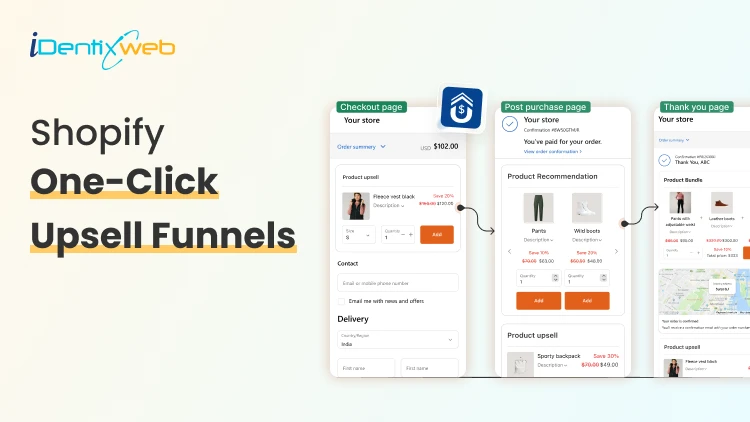
Shopify One-Click Upsell Funnels: 7 Proven Frameworks to Increase Revenue Per Order
You spend all day driving traffic to your store. The visitor lands, adds one product, checks out. Order confirmed. Thank you page. Done. That last step is where most stores quietly leave money on the table. A Shopify one click upsell fixes that. It shows the shopper one more offer right after they pay because there is no re-entering card details, no second checkout. One tap and the order grows. This post walks through 7 Shopify upsell funnel frameworks that work in 2026. What is a Shopify one click upsell? A Shopify one-click upsell is a post-purchase feature that lets customers add an additional item or upgrade to their cart after they check out, but before the final thank you page. The customer accepts with a single tap. No re-entering card info. No second checkout. 7 Proven Shopify One Click Upsell Funnels to Increase AOV Not every store needs every framework. Pick the ones that match your catalog and your average cart. 1. Complementary Product Funnel This shopify one click upsell offers a related product that matches the main purchase. A good funnel here should keep the add-on price low enough to feel like an easy yes. Example:Phone → Phone caseCamera → Memory cardCoffee maker → Coffee filters 2. Upgrade Funnel This upsell funnel should clearly explain why the upgraded version is better. It works well when the customer only needs to pay the difference and it’s best for premium product tiers. Example: Basic hoodie → premium hoodieSmall shampoo → salon-size bottle 3. Bundle Funnel This funnel turns one product into a bundle offer. It helps raise order value by giving shoppers a better deal on multiple products. This shopify bundle funnel is great for beauty, fashion, and home products. Example: Bought mascara → Offer mascara + eyeliner + primer bundle Want to create this type of shopify upsell funnel without making the post-purchase experience complicated? SellMore helps Shopify merchants build targeted funnels which you can show from checkout page to order status page. 4. The Stock-up Funnel The shopper just bought one bottle. You offer three more at a discount. Or you offer the 3-month bundle. BeeFriendly Skincare uses this exact Shopify one click upsell play. This funnel is best for products people use again and again, like skincare, coffee, supplements, or pet food. 5. The free shipping threshold funnel The shopper's order is $42. Your free shipping kicks in at $50. You offer a $12 add-on that pushes them over. They already know shipping is coming. Getting it free feels like a win. The add-on almost pays for itself in their head. This is one of the simplest funnels to run because the math is easy to explain in one sentence: "Add this and get free shipping." 6. The subscription conversion funnel The buyer paid full price. You show them the subscribe-and-save option right after. "Get this every month for 15% off." Same product, recurring order, lower price. Turn a one-time buyer into recurring revenue. 7. The category cross-sell funnel Different from a complementary add-on. This one moves the shopper into a category they haven't tried. Bought a face serum → try the eye cream. Bought running shoes → check out the recovery Conclusion A successful upsell strategy is not about showing more products; it is about presenting the right offer at the right moment. Whether you use upgrades, bundles, subscriptions, free-shipping offers, or downsells, each funnel should feel relevant and easy for the customer to accept. Start with one shopify one click upsell funnel that matches your product type and average order value. Track its acceptance rate, revenue per offer, and customer response, then improve the offer based on real performance. A simple, well-targeted funnel will usually deliver better results than multiple aggressive offers that interrupt the post-purchase experience. Frequently Asked Questions 1. What is a one-click upsell on Shopify? A one-click upsell on Shopify is an offer shown right after checkout, before the thank-you page. The shopper taps once to accept, and the item is added using the payment already on file. No re-entering card details. 2. Does Shopify have one-click upsell built in? Not out of the box. Shopify supports one-click post-purchase offers through Checkout Extensibility, but you need an app or a custom build to actually create and run the offers. Most stores use an app like SellMore to skip the code. 3. What's the difference between a one-click upsell and a thank-you page upsell? A one-click upsell shows on the post-purchase page between payment and the thank-you page one tap, no re-entry. A thank-you page upsell shows on the order confirmation page after the thank-you loads and usually requires a second checkout. Both work; the one-click version converts higher because the friction is gone. 4. How many one-click upsell offers should I show per order? One primary offer, plus one downsell if they decline. Chaining more than that starts to feel pushy and take rates fall off.
Nash Ogden
February 20, 2023
6713 Views