



Black Friday falls on November 27 this year, and Cyber Monday on November 30. Shoppers, as always, will show up expecting a real deal.
On Cyber Monday 2025, Adobe tracked peak discounts of 31% on electronics, 28% on toys, and 25% on apparel (Adobe).
Most Shopify merchants we work with focus on one question: “Should we offer 25% or 30% off?” But the discount percentage is only part of the decision. What matters more is what you want to achieve, whether that’s increasing order value, clearing inventory, or bringing in new customers.
There are four native types of discounts on Shopify, and choosing the right one can make a real difference to your BFCM sales.
Here's how to match each type to a BFCM goal, set it up in your Shopify admin, and avoid the rules that catch stores out every November.
The 4 Shopify Discount Types for BFCM (Black Friday Cyber Monday)
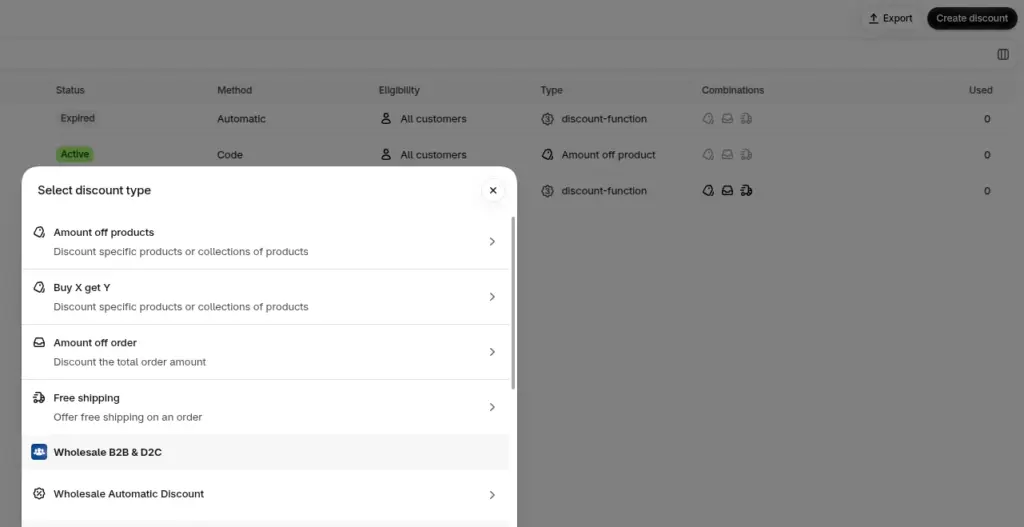
Shopify gives you four native discount types: amount off products, amount off order, buy X get Y, and free shipping. Any of them can run as an automatic discount or as a code.
| Discount type | What it does | BFCM use |
| Amount off products | Takes a % or fixed amount off chosen products or collections | A sale on one collection |
| Amount off order | Takes a % or fixed amount off the whole cart | Sitewide sale or spend tiers |
| Buy X get Y | Gives a free or discounted item when the shopper buys something | BOGO or a gift with purchase |
| Free shipping | Removes shipping costs on qualifying orders | Free shipping over a set amount |
Automatic discounts vs discount codes
An automatic discount applies in the cart by itself. Nobody has to find, copy, or remember a code.
For a public Black Friday sale, that's usually what you want, because there's nothing for shoppers to forget or mistype.
Here’s our guide on how to set up automatic discounts on Shopify in 2025.
Codes are better when you need to know where a sale came from, like your email list, an influencer, or a referral partner. You can also cap how many times a code gets used, which automatic discounts don't let you do.
Our guide to Shopify referral codes shows how to generate and track them.
Which Shopify Discount Type Should You Use for BFCM?
Pick the discount type based on the goal of your sale. A sale meant to clear old stock needs a different setup from one meant to raise order value.
Here are the Black Friday promotion ideas we usually recommend, based on what a merchant wants to achieve.
| Your BFCM goal | Discount type | Method | Watch out for |
| Clear slow or seasonal stock | Amount off products on one collection | Automatic | Keep best sellers out of it |
| Raise average order value | Amount off order with a minimum spend, in tiers | Automatic | Set the first tier above your current AOV |
| Protect a thin margin | Free shipping over a threshold, or a free gift | Automatic | Count what the gift costs you, not its price tag |
| Sell a second unit | Buy X get Y | Automatic | Shopify won't add the free item to the cart |
| Give VIPs early access | Amount off order for a customer segment | Automatic | Test it on a VIP test account before the email goes out |
| Track a channel | Any type, as a unique code | Code | Limit it to one use per customer |
Want to have a successful BFCM? Here are proven Black Friday strategies for this year
Run the margin calculation before you pick a number
Every discount comes straight out of your profit, so you have to sell more just to stay level.
Say a product sells for $100 and costs you $50. You keep $50 on every sale, so 10 sales in a normal week earn you $500.
At 20% off, it sells for $80 but still costs $50, so you keep $30. You'd need about 17 sales to earn the same $500.
| Discount | You keep per sale | Sales needed to earn $500 |
| No discount | $50 | 10 |
| 10% off | $40 | 13 |
| 20% off | $30 | 17 |
| 30% off | $20 | 25 |
Try it with your own price and cost. The thinner your margin, the faster those numbers climb.
How to Set Up Shopify Discounts for Black Friday
Every native discount starts in the same place: go to Discounts > Create discount in your Shopify admin and pick the type.
The settings below are the ones that matter most for a BFCM sale.
Amount off products or amount off order
Step 1: Choose the method. Pick Automatic discount and add a title, or Discount code and add a code.
Step 2: Set the Value as a percentage or a fixed amount.
Step 3: Under Applies to, choose the collection or products. Skip this step for an order discount.
Step 4: Add a Minimum purchase amount if you're building spend tiers. Create one discount per tier.
Step 5: Choose the Eligibility: all customers, specific customers, customer segments, or markets.
Step 6: Choose what it combines with. For spending tiers, don't let the tiers combine with each other. Shopify then applies whichever discount is best for the cart.
Step 7: Set the Active dates and save.
Planning to stack offers, like a sale plus free shipping? Our guide to Shopify discount combinations covers the pairings that protect your margin.
Buy X get Y for BOGO and gifts with purchase
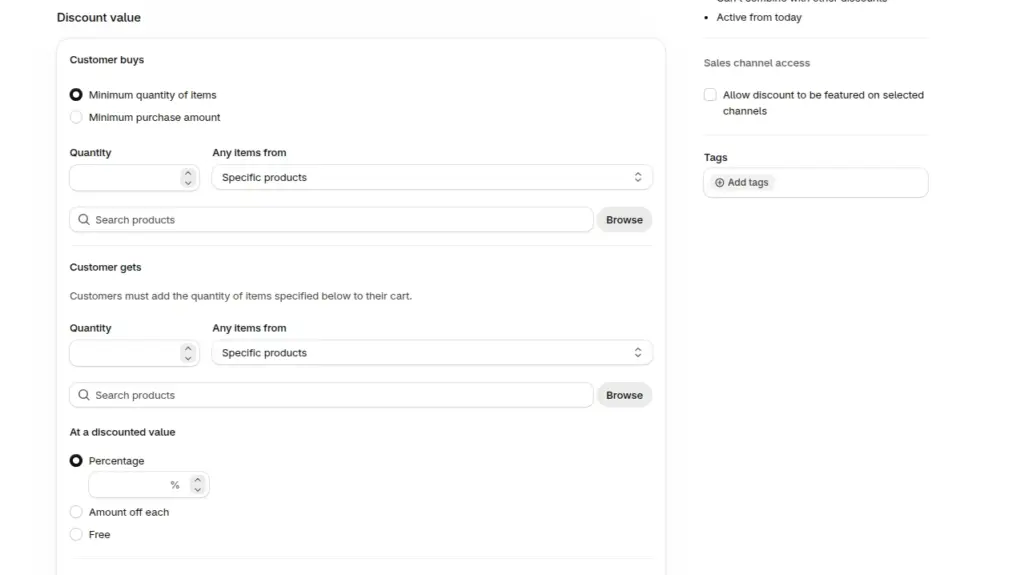
Step 1: Under Customer buys, choose Minimum quantity of items or Minimum purchase amount. Select the qualifying products or collections.
Step 2: Under Customer gets, set the quantity and choose which products or collections shoppers can receive at a discount.
Step 3: Set the Discounted value as Free, Percentage, or Amount off each item.
Step 4: Turn on Maximum uses per order. For a one-time BOGO offer, set it to 1 so shoppers can't keep claiming free items.
Step 5: Choose the Eligibility and Combinations settings. Check whether the offer should work alongside your other BFCM discounts.
Step 6: Set the Active dates and save.
Here's the part almost everyone misses: Shopify doesn't automatically add the free or discounted item to the cart. Shoppers must add it themselves.
If they don't know that, they could check out without their gift and email you about it later. Make the offer clear in your banner, or show the eligible gift in the cart.
A cart drawer can help here. With iCart – Cart Drawer Cart Upsell, you can show free-gift offers and a progress bar that tells shoppers how much more they need to spend to unlock a reward.
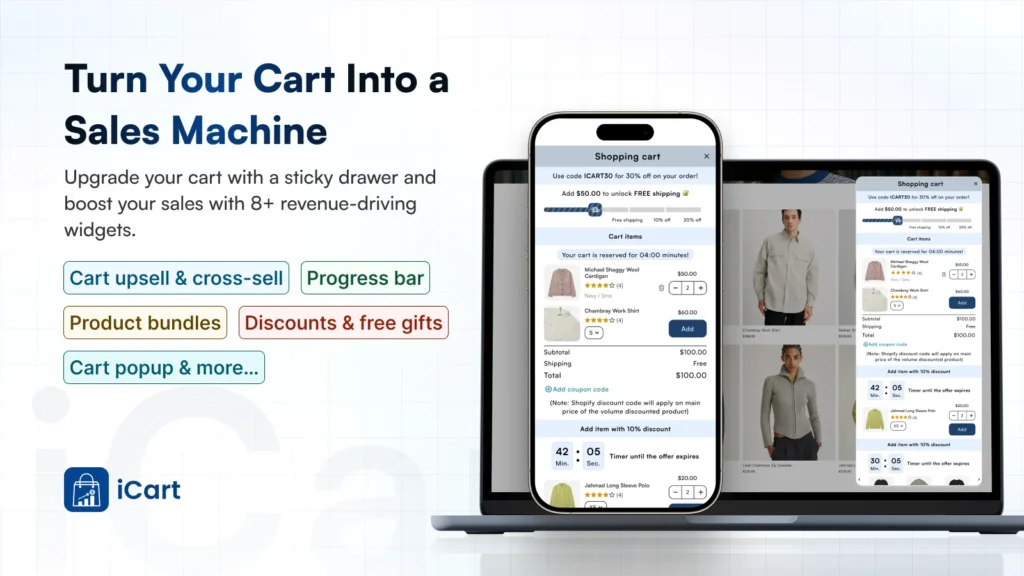
It's a useful way to keep your BFCM offer visible while shoppers are still adding products to their cart.
Free shipping
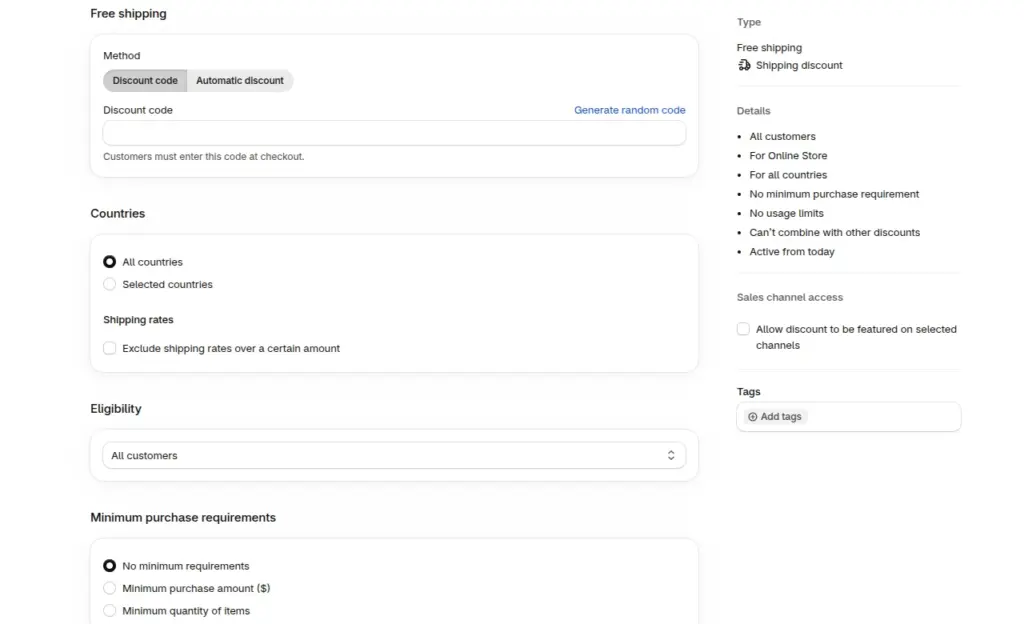
Step 1: Under Countries, choose All countries or select specific countries where you want to offer free shipping.
Step 2: Turn on Exclude shipping rates over a certain amount if you don't want expensive express delivery options to become free.
Step 3: Set the Minimum purchase requirements. Choose a minimum order amount or minimum quantity of items.
Step 4: Choose the Eligibility: all customers, specific customers, customer segments, or markets.
Step 5: Choose the Combinations settings. Allow free shipping to combine with your BFCM product or order discounts if that's part of your offer.
Step 6: Set the Active dates and save.
The BFCM Discount Call We Still Think About
Last November, about two weeks before Black Friday, we got on a call with a skincare brand selling in the US and Canada. Their plan was already set: 30% off everything with a code.
The ads were booked, and the launch email was written.

We asked for two numbers first: gross margin and average order value. Their margin was around 55%, and the average order was $48.
At 30% off, they'd have had to sell about 120% more units just to match the gross profit of a normal week.
Their sales data showed a bigger issue. Most orders had just one item, usually one of their two best sellers. Getting people to buy wasn't the problem. Getting them to buy a second product was.
So we changed the discount type as well as the number. We set up an automatic amount-off-order discount in two tiers: 15% off over $75 and 20% off over $110. We added a free travel-size cleanser through buy X get Y on orders over $110.
Shoppers didn't need a code, and the cart showed them how far they were from the next tier.
Results:
The average order went from $48 to $67.87 over BFCM weekend, and revenue was up 48.14% as compared to BFCM the previous year.
Keep Your Black Friday Discounts Honest
A discount is only real if the previous price was real. In the US, the FTC's pricing guides say a former price must be the actual, bona fide price you offered the public regularly, for a reasonably substantial period (16 CFR 233.1).
Raising compare-at prices in October to make November's discount look bigger is exactly what the guides warn against.
Selling into the EU? Any announced price cut has to show your prior price, which is the lowest price you charged in the 30 days before the sale.
Choosing Your Shopify Discounts for BFCM 2026
Start with the goal and leave the percentage for last. Match the goal to one of the four Shopify discounts, run the margin calculation, and only then set the number.
Schedule it in the right time zone, test it on a phone, and keep your compare-at prices honest.
More BFCM prep for your store:
- Best BFCM Social Media Campaigns to Learn From
- BFCM Checklist for Shopify Stores
- Black Friday vs. Cyber Monday: Which One is Better for Shopify Stores?
FAQs
1. What are the types of Shopify discounts to run during BFCM?
Shopify has four native types: amount off products, amount off order, buy X get Y, and free shipping. Each can run as an automatic discount or a discount code. Apps can add more, like tiered or mix-and-match offers.
2. Is an automatic discount or a discount code better for Black Friday?
For a public sale, automatic discounts are the simpler choice because shoppers don't need to enter anything. Use codes when you want to track a channel, like email or influencers, or limit how often an offer gets used.
3. Why isn't my free gift added to the cart automatically?
Shopify's buy X get Y discount never adds the free item for the shopper. They have to add it to the cart themselves. Say so in your BFCM sales banner, or use a cart drawer app that shows the gift as a reward tier.
4. Can I combine Shopify discounts during BFCM?
Yes. Product, order, and shipping discounts can combine if you allow it in each discount's combination settings. Two shipping discounts can't apply to the same order, though, and some combinations depend on your plan and checkout setup.

About the author
Vineet Nair
Vineet is an experienced content strategist with expertise in the ecommerce domain and a keen interest in Shopify. He aims to help Shopify merchants thrive in this competitive environment with technical solutions and thoughtfully structured content.