



Black Friday is November 27. Cyber Monday is November 30. You have five weeks.
Your ads, emails, and texts will send shoppers to your store, whatever you do. What decides your BFCM revenue is what those shoppers find when they land. That is the job of Shopify conversion rate optimization (CRO).
Last year, Shopify merchants sold $14.6 billion over BFCM with an average cart of $114.70. At that volume.
Why BFCM Traffic Converts Differently?
BFCM shoppers don’t behave like your regular visitors. They arrive with a deal in mind, usually on a phone, and they leave quickly if anything feels off.
Here’s what’s different about BFCM traffic:
- Most visitors land on a sale or product page from an ad or email, not on your homepage.
- Smartphones drove 56.4% of online holiday transactions in 2025, according to Adobe.
- Gift buyers want to know the gift will arrive in time and can be returned.
- Cross-border shoppers placed 16% of Shopify’s BFCM orders last year.
- Shop Pay was used on 32% of Shopify BFCM orders, so shoppers expect one-tap checkout.
Step 1: Find the Biggest Leak in Your Shopify Conversion Funnel
The first step in CRO for Shopify is finding out where shoppers leave your store. Before changing anything, check your conversion funnel in Shopify Analytics.
Go to Analytics > Report > Conversion rate breakdown
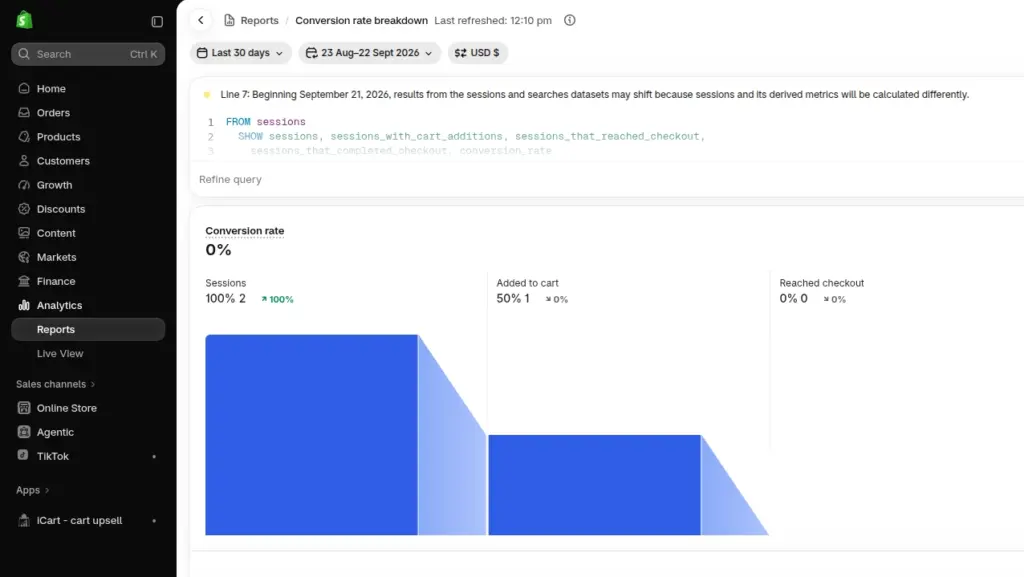
It follows visitors from session to add to cart, to checkout, to completed purchase.
Compare your BFCM week from last year with the last 30 days, then split the numbers by device, traffic source, and landing page.
Based on our experience, here are the reasons and their fixes.
| Where shoppers drop off | What it usually means | Start with |
| Low add-to-cart rate, worst on mobile | Shoppers can’t see the deal, price, or delivery date fast enough | Product page fixes |
| Good add-to-cart, few reach checkout | Surprise costs, or a cart that stalls | Cart fixes |
| Reach checkout but don’t buy | Payment, form, or trust problems | Checkout fixes |
| One traffic source far below the rest | The ad promises something the page doesn’t show | Landing page match |
For example, let's take a store with 20,000 sessions. Of those, 1,400 add to cart, 560 reach checkout, and 380 buy, for a 1.9% conversion rate.
Here the biggest problem sits between cart and checkout, since only 40% of carts make it through.
Lift that to 50%, and you’d get 475 orders instead of 380. At last year’s average BFCM cart of $114.70, that’s roughly $10,900 more from the same traffic.
Step 2: The Fixes, Stage by Stage
Start with the stage your data points to. Every fix below can be done by mid-November without a redesign.
1. Make the landing page match the ad
If someone clicks “30% off all serums,” the page they land on should say exactly that with the sale price showing. Send product ads to product pages and offer ads to a sale collection.
See our Black Friday landing page examples for more ideas.
2. Show the deal and the delivery date on the product page
Shopify applies automatic discounts in the cart and at checkout. Depending on your theme, your product page might still show the full price.
Check it on a real phone. If the discount isn’t visible, add a sale badge or a compare-at price with the savings right next to it.
Gift buyers also need a delivery date. Shoppers abandon checkout because delivery is too slow. Show an estimated arrival date and your holiday order cutoff on the product page.
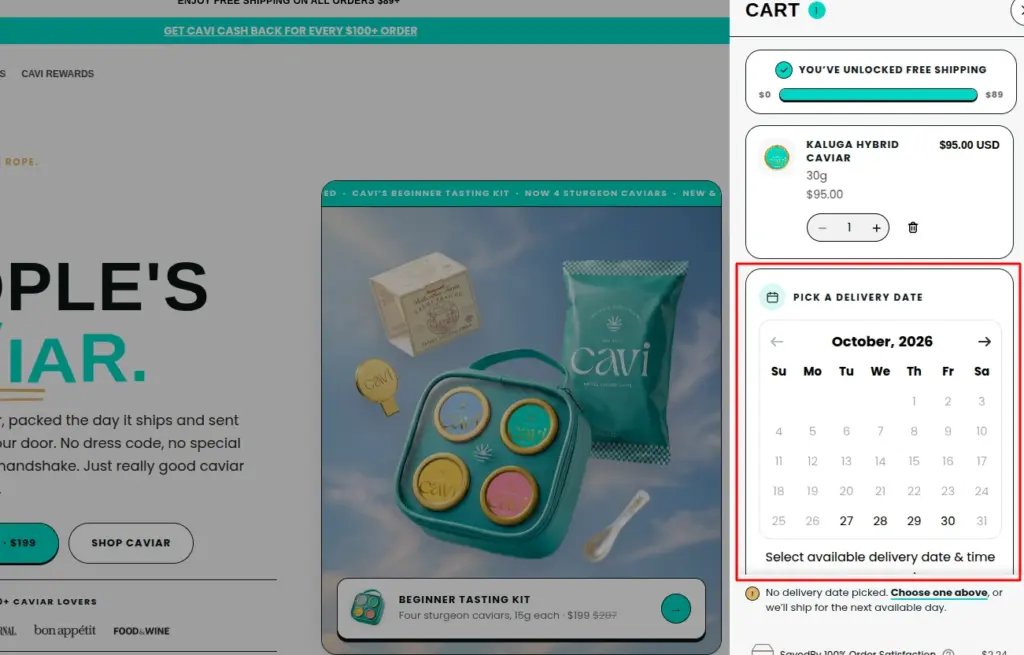
Above is a store using a delivery date calendar on their cart page.
3. Remove the cost surprise
Unexpected costs are the top reason people walk away from checkout.
Show your shipping costs or free shipping threshold in the cart. Set the threshold a little above your current average order value.
If you sell abroad, show local currencies and duties through Shopify Markets.
4. Turn the cart into a place to decide
A full-page cart pulls shoppers off your sale page. A slide-out cart drawer keeps them where they are.
Show the discount they’ve unlocked, how much they’re saving, and how close they are to the next reward. Suggest one relevant product. Keep express checkout buttons inside the drawer.
5. Make checkout a one-tap job
Turn on Shop Pay, Apple Pay, Google Pay, and PayPal, and show them on product pages and in the cart. Also, don’t force people to create an account.
6. Test every discount code on a phone
Make sure to test every discount code you’re promoting on your phone. A code that fails at checkout costs you the sale. Check expiry dates, time zones, minimums, and discount combination settings. Our guide to Shopify discount combinations explains how they interact.
7. Check your page speed
Run your key product pages and cart through Google PageSpeed Insights, especially on mobile. Compress large images, remove unused apps, and check for scripts slowing down your store. Test everything on a real phone. For more fixes, see our guide on what to check after installing Shopify apps.
If the store already feels slow, see what to check after installing Shopify apps.
Case study: How Anua turned its cart into an upsell engine
In August 2025, Anua, the Korean skincare brand, moved its Shopify store off a full-page cart and onto iCart, our cart drawer app. BFCM was three months away, and their cart had three problems.
- The cart page sent shoppers away from the product they were looking at.
- Most people bought one product instead of a full routine, so order values stayed low.
- Nobody could see how close they were to free shipping or a reward either.
A slide-out cart drawer replaced the cart page, and they upsell offers in the cart drawer itself.
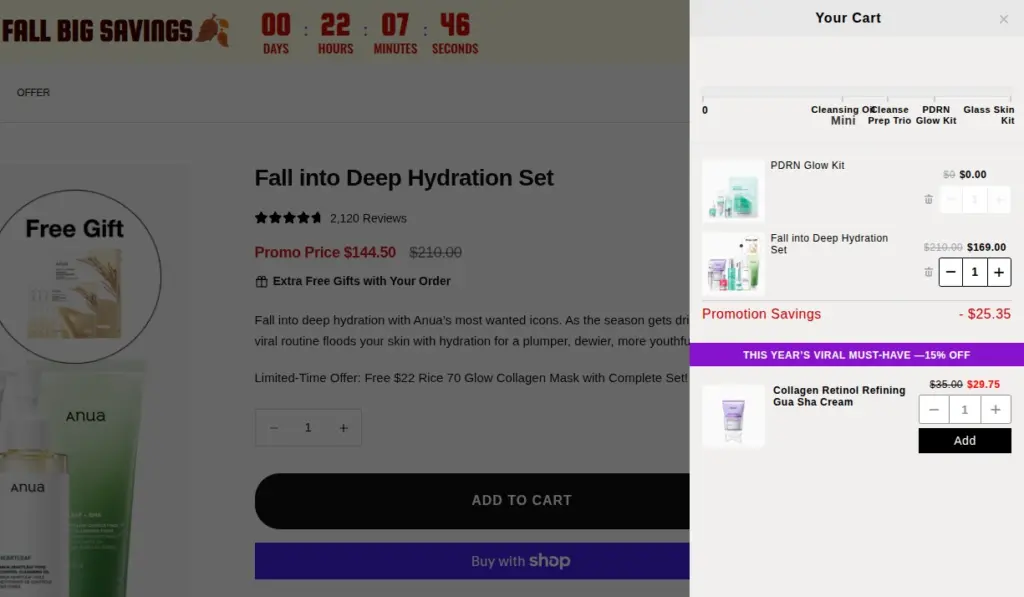
Anua’s cart drawer using iCart
What we like most is the timing. The new cart went live in August, so it had months of real shoppers behind it by the time November traffic arrived.
Results:
- $857,686.65 in store revenue during BFCM week
- Average order value: $116.81
- Share of orders with an upsell added: 7342
Your 5-week BFCM Conversion Plan
Here’s the plan we’d follow with five weeks left.
| Dates | What to do |
| Oct 26 to Oct 30 | Check tracking and run your funnel audit |
| Nov 2 to Nov 13 | Make your fixes. Theme edits and new apps stop on Nov 13 |
| Nov 16 to Nov 20 | Test on real phones and place test orders |
| Nov 20 to Nov 30 | No new ideas. Only fix what’s broken |
| Nov 27 to Nov 30 | Watch your numbers live |
Shopify’s Rollouts feature helps here. It’s available on Basic and up. You can schedule your BFCM theme to go live on November 27 and switch back on its own after Cyber Monday.
If your Shopify store has limited traffic, prioritize bigger improvements over small A/B tests. At a 2% conversion rate, detecting a 10% relative lift (from 2% to 2.2%) requires approximately 80,700 sessions per version.
Most stores won’t get there in five weeks, and a hidden shipping cost doesn’t need a test anyway.
Hold off on a new theme, a new payment provider, URL changes, or a batch of new apps until December.
If your store already feels slow, here’s our guide on what to check after installing Shopify apps.
What to Watch During BFCM Weekend
Check a few numbers every few hours so you can fix problems the same day. Last year, Shopify sales peaked at 12:01 PM EST on Black Friday, so be around then.
Watch revenue per session, not just conversion rate. A sudden increase in ad traffic can pull your BFCM conversion rate down even while revenue climbs.
| What you see | Likely cause | Quick fix |
| Revenue per session drops as sessions rise | Ad traffic landing on the wrong page | Check top landing pages and pause the weakest ad set |
| Mobile add-to-cart rate falls | A product page is broken, slow, or sold out | Open your top five products on a phone |
| Checkout conversion drops | A payment method or code is failing | Place a test order |
Start With the Biggest Drop-off, Not the List
Good Shopify conversion rate optimization before BFCM is mostly about orders. Check your Shopify Analytics and find the stage where you lose the most shoppers. Fix it, test it on a phone, and implement all your ideas by November 20.
After Cyber Monday, compare your BFCM funnel with a normal month and keep what worked.
Look beyond total sales. Check whether more shoppers completed checkout, whether your cart offers increased average order value, and which product pages performed better. These numbers will tell you what actually helped and what needs more work.
BFCM lasts four days, but the improvements you make to your Shopify store should keep helping you convert shoppers long after the sale ends.
FAQs
1. How early should I start conversion rate optimization before Black Friday?
Six to eight weeks ahead is ideal. With five weeks left, audit now, finish changes by mid-November, and implement all the strategies in your store a week before Black Friday.
2. What is a good Shopify conversion rate during Black Friday?
Anything between 3- 5% is good. Compare against your own BFCM week from last year, not an industry average. Revenue per session also tells you more than conversion rate during a sale weekend.
3. Why does my conversion rate drop on Black Friday when sales go up?
Ads and deals on sites bring in lots of first-time visitors who are comparing prices. Sessions grow faster than orders, so the rate dips. Check conversion by traffic source to find the channel pulling it down and optimize it.
4. How do I check that my Shopify conversion tracking still works?
Go to Shopify Admin > Settings > Customer events and use the Pixel Helper to test your tracking. Place a test order and check that the checkout completion event fires. Then verify the purchase event in GA4's Realtime report and Meta Events Manager's Test Events, if both platforms are connected.
Post Tags


About the author
Vineet Nair
Vineet is an experienced content strategist with expertise in the ecommerce domain and a keen interest in Shopify. He aims to help Shopify merchants thrive in this competitive environment with technical solutions and thoughtfully structured content.