



Lovable Shopify integration lets you build a full online store through a chat window.
You describe what you want, and the AI generates product pages, navigation, cart, and checkout. Shopify handles the commerce side: payments, inventory, and order management.
It sounds like a shortcut to launching a store without touching a theme editor or hiring a developer. That premise holds up, but there are important technical decisions buried inside this setup that every merchant should understand before they start.
This guide covers everything about the Lovable and Shopify integration: how to connect them, what Lovable can actually do with your store data, and how permissions work for teams.
What is Lovable, and how does it connect with Shopify?
Lovable is an AI-powered web app builder. You describe what you want in plain language, and it generates code for a working frontend.
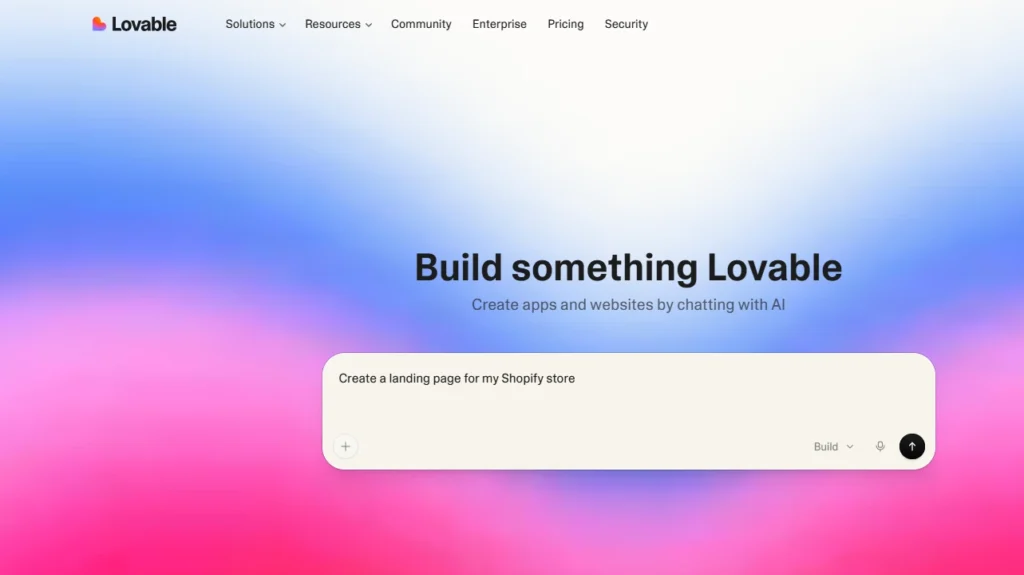
The Lovable Shopify integration pairs that frontend-building capability with Shopify's backend. Lovable becomes your storefront. Shopify controls transactions, inventory, and the admin.
When a customer places an order, Shopify processes it. Lovable plays no role in payment handling.
The integration was launched in October last year and has since expanded to support both creating new stores and connecting existing Shopify stores.
Who is the Lovable Shopify integration built for?
Founders and new merchants
This segment will get the most out of it. If you want a store to live within hours, do not want to learn Liquid, and have a simple product catalog, Lovable gets you there fast.
The sandbox environment means you can build, iterate, and test without any Shopify cost until you are ready to go live.
Creators building audience-first products
These people fit well, too. Subscription drops, limited-edition merch, digital products, and course sales all work within the standard Shopify checkout.
Lovable lets you build a branded frontend that feels custom without engaging a design team.
Existing Shopify brands
Shopify merchants can use Lovable to create additional surfaces. These can be landing pages for new product drops, community areas, custom onboarding flows, or seasonal campaign storefronts.
Where it is a harder sell: multi-person teams that need simultaneous write access to product data, businesses that rely heavily on third-party Shopify apps, and brands that want granular control over their storefront infrastructure.
Lovable X Shopify: How to build a store? New store vs existing store
If you are starting fresh
Start a new project in Lovable and prompt it with your store concept.
For example: "Build a Shopify store for a minimalist candle brand selling soy wax products." Lovable will generate the storefront design and prompt you to enable the Shopify connection.
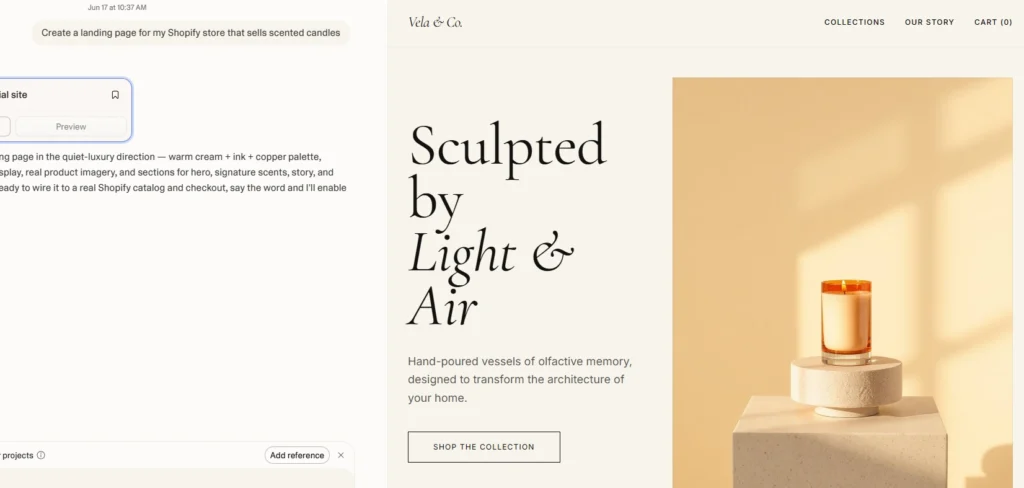
When you confirm, Lovable creates a sandbox development store at no cost.
You get full build-and-test access. Products, collections, cart, checkout, discount codes, all of it can be built and tested.
Real payments are not processed until you claim the store and activate a paid Shopify plan.
You can also start from a Lovable template. When restructuring, use a detailed prompt to replace the mock data with your real products, imagery, and branding.
One important timing decision: do not claim the store until you are fully ready to launch.
Claiming migrates the sandbox to your Shopify account, starts the 30-day free Shopify trial, and locks down collaborator write access.
Once you claim, the clock starts, and your Shopify subscription begins at the end of that trial period.
Already a Shopify merchant
If you have a live Shopify store, you can connect it to a Lovable project.
There is one hard requirement: your Lovable account email must exactly match the store owner's email on your Shopify account.
If those emails do not match, the connection will not work.
To connect, go to your Shopify Admin, copy the URL from your browser (it follows the pattern https://admin.shopify.com/store/{yourstore}), paste it into Lovable, and click Connect.
Shopify will prompt you to install the Lovable app. After installation, your store is connected, and Lovable can read and write your product data.
Projects that already have an active Shopify connection cannot be restructured. If you want to customize a project, disconnect the store first, customize the project, then reconnect.
What Lovable can do inside your Shopify store
Once connected, you manage your entire store through Lovable's chat interface. You type a prompt. Lovable interprets it and either updates the storefront design or writes data directly to Shopify.
Here is what Lovable can do with your Shopify data:
Products and inventory
- Create, update, and delete products
- Manage product variants
- Update product names, descriptions, and prices
Product images
- Generate AI images for products
- Upload your own images
- Pull images from external URLs
Store organization
- Create collections and assign products
- Build filtering functionality
- Add wishlist features
Discount codes
- Create percentage-based and fixed-amount discount codes
- Set validity periods and usage limits
Post-purchase and UX
- Add product review systems (verified purchases only)
- Build custom navigation and page layouts
Before You Build the Store, Plan How It Will Sell More
Launching a Shopify store is only the first step.
With iCart Cart Drawer Cart Upsell, merchants can add cart upsells, cross-sells, free gifts, product recommendations, and progress bars to increase order value without making the shopping experience complicated.
How permissions work in Lovable X Shopify?
- For new stores (before claiming): All collaborators have full read/write access to Shopify data. Anyone on the project can create products, update prices, and create discount codes.
- For new stores (after claiming): Only the person who claimed the store retains write access. Everyone else drops to read-only Shopify access. Collaborators can still build and edit the storefront design, but they cannot touch products, variants, or discount codes.
- For existing stores: Only the user who originally connected the store has write access. Collaborators get read-only Shopify access from the start.
What does this practically mean? Decide who your Shopify owner will be before the project reaches the claim or connection step.
If the wrong person claims the store, you are stuck with a setup where one user is locked out of write access permanently.
How to Go Live: Claiming and publishing your Shopify store
Step 1: Claim the store
Type "Claim the store" in Lovable. Click Claim. Shopify opens in a new tab and walks you through the migration process. This makes the claiming user the Shopify store owner.
Step 2: Complete Shopify Admin setup
After claiming, go to your Shopify Admin to activate payments and complete KYC verification. This step is required before you can accept real transactions. KYC can take time, so factor that into your launch timeline.
Step 3: Publish the Lovable project
Back in Lovable, publish your project. Your store is now live.
Step 4: Configure your domain
Shopify assigns a permanent yourstore.myshopify.com domain as the backend URL.
Your customer-facing store URL is your lovable.app subdomain by default, or a custom domain you connect through Lovable.
Your storefront lives on Lovable's infrastructure. Run a full end-to-end test before announcing your launch: add a product to cart, proceed to checkout, and confirm the order flow works correctly.
The headless architecture trade-off: Shopify apps may not work
What Lovable is building here is technically a headless commerce setup. It is the frontend, and Shopify is the backend. The two communicate through Shopify's APIs.
Headless is not a new concept. It is the same architecture used by enterprise brands building on Shopify Hydrogen.
The problem is that headless setups are incompatible with most theme-dependent Shopify apps.
A large portion of the Shopify App Store works by injecting code directly into Liquid themes. When there is no Liquid theme, those apps break.
Categories most affected:
- Review apps: Most popular review apps (Yotpo, Judge.me) are theme-injecting. You either build your own review system in Lovable (which the AI can do) or find an API-first provider.
- Upsell and cross-sell apps: Apps like iCart and Bold rely on theme injection. They will not work out of the box.
- Subscription apps: Recharge has some headless-friendly APIs, but the integration requires custom work.
- Loyalty and rewards apps: Most are theme-based and will not function.
If your store's revenue depends on a specific app's functionality, verify that the app has headless API support before you start.
Lovable AI vs Shopify's own AI store builder: What's different
| Aspect | Shopify AI Store Builder | Lovable AI |
| Core Output | Generates a full Shopify theme based on the prompt | Generates a custom frontend outside the Shopify theme system |
| Platform Ownership | Fully inside the Shopify ecosystem | Lives on Lovable’s own infrastructure |
| Hosting | Hosted on Shopify servers | Hosted externally via Lovable |
| Control & Editing | Editable in Shopify Theme Editor + Liquid support | Edited through AI chat/prompt-based iteration |
| App Compatibility | Full compatibility with Shopify apps | Most Shopify theme-based apps do not work |
| Technical Flexibility | Standard Shopify customization + developer handoff possible | High flexibility but limited to a Lovable environment |
| Dependency Risk | No external dependency | Dependent on the Lovable platform availability |
| Use Case Fit | Traditional Shopify stores, scalable brands | Experimental storefronts, custom UX, non-standard experiences |
| Backend Integration | Native Shopify checkout, payments, products | Requires integration with Shopify APIs |
| Best For | Merchants who want stability + ecosystem support | Builders wanting an AI-native, highly custom frontend |
Lovable vs standard Shopify themes
Lovable is faster to start, but creates long-term dependency on Lovable's platform. Standard Shopify themes are more constrained in design but give you complete infrastructure control.
| Aspect | Lovable AI | Standard Shopify Theme |
| Setup speed | Fast (minutes via prompting) | Moderate (theme editor + customization) |
| Design flexibility | High (fully custom frontend) | Medium (section/block-based) |
| App compatibility | Limited (API-first only) | Full Shopify App Store |
| Hosting | Lovable infrastructure | Shopify infrastructure |
| Storefront URL | lovable.app or custom domain | yourstore.myshopify.com or custom domain |
| Developer handoff | Requires Lovable knowledge | Any Shopify developer can pick it up |
| Ongoing management | Through Lovable chat | Shopify Admin + theme editor |
Standard themes are the right call when you need access to the full Shopify app ecosystem or plan to hand the store to a developer team that does not use Lovable.
Common mistakes to avoid with the Lovable Shopify integration
Claiming the store too early
Claiming starts the 30-day Shopify trial, triggers KYC verification, and locks down collaborator write access.
Stay in sandbox mode until your store is complete, all products are added, and you are genuinely ready to launch.
Email mismatch when connecting to an existing store
Your Lovable account email must exactly match the Shopify store owner's email. A mismatch blocks the connection entirely.
Assuming all your Shopify apps will work
Apps that inject code into Liquid templates will not function in a headless setup. Audit your app stack before you start building.
The wrong person is claiming the store
The user who claims the store becomes the permanent Shopify owner with sole write access. If the wrong person on your team clicks Claim, you cannot reassign write access without rebuilding the connection.
Forgetting to disconnect before remixing
Projects with an active Shopify connection cannot be remixed. Disconnect the store first, remix the project, then reconnect.
Skipping the end-to-end checkout test
Always complete a full add-to-cart → checkout → order confirmation test before launching. Issues with payment activation or domain configuration show up here before your customers find them.
So who should & should not use Lovable Shopify integration
Built with Lovable if
- You are a solo founder or small team launching fast
- Your product catalog is simple and does not depend on complex Shopify apps
- You want a highly customized frontend that would otherwise require a developer
- You are building a specialized store surface (drops, campaigns, digital products) alongside an existing brand
- You are validating a new product idea, and speed matters more than architecture
Look at alternatives if
- Your store relies on theme-based apps for reviews, upsells, subscriptions, or loyalty programs
- Multiple team members need simultaneous write access to products and inventory
- You want full control over your hosting infrastructure without platform dependency
- You plan to hand the store over to an external development agency
FAQs
1. What is the Lovable Shopify integration?
The Lovable Shopify integration lets you build a complete Shopify storefront using an AI chat interface. Lovable generates the frontend. Shopify handles payments, inventory, and order management on the backend. They connect via Shopify's API.
2. Does Lovable work with existing Shopify stores?
Yes. You can connect an existing Shopify store to a Lovable project. Your Lovable account email must match the Shopify store owner's email exactly. Once connected, you can build new storefronts for your existing products.
3. Do I need a Shopify subscription to use Lovable Shopify?
When you create a new store through Lovable, you get a 30-day free Shopify trial after claiming the store. After the trial, you need a paid Shopify plan to continue selling. Its pricing is separate and covers the builder and hosting.
4. Can collaborators edit products in a Lovable X Shopify project?
Before a new store is claimed, all collaborators have full write access. After claiming, only the person who claimed the store can create, update, or delete products, variants, and discount codes. For existing connected stores, only the connecting user has write access from the start.
5. Is the Lovable Shopify integration headless commerce?
Yes. This integration is a headless architecture, which means many theme-dependent Shopify apps will not be compatible out of the box.
6. What Shopify apps work with Lovable?
Only API-first Shopify apps work reliably in a headless Lovable setup. Apps that inject code into Liquid themes, which cover most review, upsell, subscription, and loyalty apps, will not function correctly.
7. Can I use a custom domain with a Lovable Shopify store?
Yes. Your customer-facing URL is your lovable.app subdomain by default, but you can connect a custom domain through Lovable. Your Shopify store still gets a myshopify.com backend domain, but customers never see that address.
8. How do I disconnect a Shopify store from Lovable?
You can disconnect by asking the Lovable agent directly ("Disconnect my Shopify store"), using the Shopify icon in the Lovable navbar, or going to Project Settings → Shopify → Disconnect.
9. What types of stores can I build with Lovable and Shopify?
Physical products, digital downloads, niche brand stores, dropshipping stores, seasonal campaigns, subscription products, and limited-edition drops all work within the Lovable Shopify framework.
10. How is Lovable Shopify different from Shopify's own AI Store Builder?
Shopify's AI Store Builder generates a standard Liquid theme that you own and host entirely within Shopify's infrastructure. Full app compatibility is preserved. Lovable generates a custom frontend outside Shopify's theme system, hosted on Lovable's infrastructure, with a headless architecture that limits app compatibility. Lovable offers more design freedom. Shopify's builder offers more ecosystem compatibility.




About the author
Vineet Nair
Vineet is an experienced content strategist with expertise in the ecommerce domain and a keen interest in Shopify. He aims to help Shopify merchants thrive in this competitive environment with technical solutions and thoughtfully structured content.