



If you think a Shopify redesign plan starts with colors, banners, or a new font, think again.
I have seen many merchants redesign their Shopify store because it “looks old.” After launch, the store looks better, but conversions drop.
A real Shopify website redesign setup is different. It improves how shoppers move from product discovery to checkout, removes confusion, builds trust, and makes the buying journey easier.
That’s why I always focus on revenue first when relaunching a store. Design comes after strategy.
Every time I perform a Shopify store redesign, I need answers to four questions:
- What do they sell?
- Why should shoppers trust them?
- Which product should they choose?
- How can they buy without friction?
It’s 2026. AI can make your store look good in minutes, but conversions are where merchants need to focus. If you are thinking about when you should revamp your store, here’s what I look for.
When should you redesign your store? Signs to look for
Your store gets traffic, but sales are low
Traffic without sales is a clear warning sign. It may be issues with navigation or a lack of a rewards system in your cart.
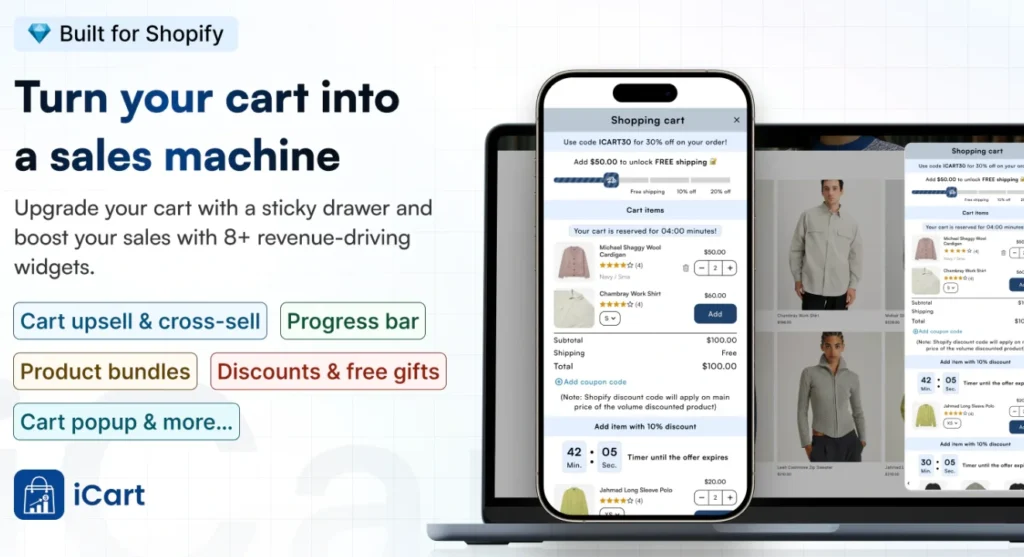
This is where a cart optimization app like iCart Cart Drawer Cart Upsell can help. It lets you modify a revenue-focused cart with upsells, cross-sells, progress bars, product recommendations, and cart offers that encourage shoppers to add more before checkout.
This helps to convert your traffic into recvenue.
When I audit a Shopify store for redesigning, I check the store experience before blaming traffic quality. If shoppers land on your store but do not add products to their cart, your pages may not be doing enough work.
Look at ecommerce metrics like conversion rate, add-to-cart rate, bounce rate, and cart abandonment rate. These numbers show where shoppers lose interest. This way, you will have a better Shopify redesign plan.
Your mobile experience feels weak
A desktop can look perfect and still fail if mobile shoppers struggle. Most shoppers browse Shopify stores from mobile. 70% of shoppers come through smartphones.
If your mobile store feels slow or hard to use, revenue will drop. I always review mobile first during a Shopify website redesign project.
Your product pages do not answer buying questions
From my experience being a Shopify expert, product pages carry the biggest sales responsibility.
A weak product page only shows images, price, variants, and a short description. A strong product page removes doubts before the shopper reaches checkout.
Your product page should answer:
- What makes the product useful?
- Who is it for?
- What size, color, or variant should I choose?
- When will it arrive?
- Can I return it?
- What do other customers say?
Your navigation is confusing
I have seen merchants add more collections, products, apps, and menu items over time. After a point, the store becomes harder to browse. Shoppers need to navigate too much before finding the right product.
In your Shopify redesign process, add a clear menu, simple collection structure, strong filters, and a search experience that improves product discovery.
Your brand has changed
This is a no-brainer. Your store may have started small, but over time, your products, pricing, audience, and positioning change.
If your store still looks like your first version, it may no longer match your current brand. A redesign helps you present the right message to the right shoppers.
Step-by-Step on how to redesign Shopify stores
Step 1: Audit your current store
Start with data. Review Shopify Analytics, GA4, heatmaps, session recordings, and customer feedback. Focus on the pages that affect revenue.
What I check most are the pages below:
- Top landing pages
- Best-selling products
- Product pages with high traffic but low sales
- Cart abandonment rate
- Mobile vs desktop conversion rate
- Page speed
Step 2: Set one clear Shopify redesign goal
Pick the main outcome before you start. Your goal may be to increase conversion rate, improve AOV, reduce cart abandonment, or improve product discovery
For example, if your AOV is low, customizing the cart and product pages around bundles, cross-sells, and product recommendations.
If your product pages get traffic but few add to carts, improve product copy, images, reviews, delivery details, and CTA placement.
Step 3: Rebuild your store structure around how shoppers buy
Your store structure should match shopper behavior. Start with your homepage, collections, product pages, cart, and checkout.
Every page should have a goal. For example, the homepage should guide shoppers to the right category, product, or offer. Collection pages should help shoppers compare products quickly.
Step 4: Choose the right Shopify theme
Keep your current theme if it is fast, flexible, mobile-friendly, and easy to customize. Switch themes if your current theme is slow, outdated, hard to customize, or poor on mobile.
Before buying a theme, check how it handles your catalog size. A fashion store, a one-product store, a beauty brand, a food store, and a large catalog store need different layouts.
Step 5: Redesign your homepage for direction
Use a clear hero section. Show what you sell, who it is for, and why someone should care. Add best-selling collections, featured products, social proof, brand benefits, reviews, and key offers.
Step 6: Customize collection pages for easier product discovery
Collection pages should help shoppers choose faster. Use clean product cards, filters, sorting options, visible pricing, review stars, product badges, and quick-add buttons where relevant.
If shoppers need size, color, material, or use-case filters, add them. I once added a comparison-friendly collection page when one of my customers had many similar products
Step 7: Redesign product pages to remove hesitation
For product pages, use strong images, clear product benefits, short descriptions, reviews, size guides, delivery information, and a visible add-to-cart button.
Keep important buying details close to the CTA. Do not hide shipping, returns, or sizing details at the bottom of the page.
A strong Shopify redesign plan gives product pages more selling power without making them too complicated.
Step 8: Focus on SEO during your Shopify website redesign
A redesign will definitely drop your traffic if SEO gets ignored. Keep important URLs the same when possible. Add 301 redirects for changed URLs. Preserve strong title tags, meta descriptions, heading structure, internal links, and collection copy.
Optimize images with alt text and compressed file sizes. Check broken links before launch and submit your sitemap after major changes.
Tips for a perfect Shopify store redesign
- Design for shoppers
Your store should match how customers buy, not just what you like. Use words your shoppers already use. Product pages feel more natural when the copy sounds like the customer’s own thinking.
Use clear copy, simple navigation, strong visuals, and easy actions. I always say this: A fancy design cannot save a confusing buying journey.
- Keep the first screen clear
The first screen should explain your product, value, and next step. Use a clear headline, strong visual, and direct CTA. I always avoid adding too many elements to the top section with too many offers.
- Remove apps that do not support revenue
Too many apps can slow your store. Keep apps that improve sales, trust, retention, or operations. Remove apps that add scripts without clear value.
Audit and redesign your store in 2026
A Shopify redesign plan should improve both revenue and appearance. Start with your current store data. Find where shoppers drop off.
Fix the pages that carry the most sales impact. Improve your homepage, collections, product pages, cart, mobile experience, speed, and SEO.
FAQs
1. Should I redesign my Shopify store?
You should revamp your website if you are getting traffic but not enough sales, your mobile experience feels weak, your product pages do not answer buying questions, or your cart has high abandonment.
2. How to redesign a Shopify website?
Start your Shopify website redesign by auditing your current store performance, including conversion rate, add-to-cart rate, cart abandonment, mobile speed, and checkout drop-offs. After that, improve your homepage, navigation, collection pages, product pages, cart experience, and SEO without changing important URLs unless needed.
3. How to redesign the product page in Shopify?
To modify the product page in Shopify, customize your product images, benefit-driven copy, reviews, size guides, delivery details, return policy, FAQs, and a visible add-to-cart button.
4. How to redesign the homepage in Shopify?
To revamp the homepage in Shopify, make the first screen clear with a strong headline, product value, and direct CTA. Add best-selling collections, featured products, trust signals, customer reviews, offers, and brand benefits, so shoppers quickly understand where to go next.




About the author
Vineet Nair
Vineet is an experienced content strategist with expertise in the ecommerce domain and a keen interest in Shopify. He aims to help Shopify merchants thrive in this competitive environment with technical solutions and thoughtfully structured content.