

Ecommerce
Gather knowledge about the latest insights, updates, tips, and tricks in the Ecommerce industry.

5 Min • 29 April 2026
How Anua Unlocked 5X AOV Growth with iCart’s Smart Cart Features
delivery customization Challenges Solutions drive results Scale business delivery customization Challenges Solutions drive results Scale business delivery customization Challenges Solutions drive results Scale business delivery customization Challenges Solutions drive results Scale business Anua is a globally recognized Korean skincare brand known for its minimalist philosophy and focus on gentle yet effective formulations. Built on the idea of simplifying skincare routines, Anua develops products that deliver visible results while avoiding harsh or irritating components, making them suitable for sensitive skin types. Initially using a traditional full cart experience, Anua transitioned to iCart’s side cart solution in August 2025, to create a more seamless and engaging shopping journey. This shift allowed customers to easily explore complementary skincare products without disrupting their browsing flow, making it more intuitive to discover items that fit into a complete routine. By surfacing relevant recommendations directly within the cart, the brand enhanced product visibility across its range. Challenges Before implementing iCart’s side cart solution, Anua faced limitations with their existing full cart experience, which created friction in the customer journey. The traditional cart setup redirected users away from product pages, interrupting their browsing flow and reducing opportunities to explore additional products. As a skincare brand built around routines rather than single-item purchases, this made it difficult to effectively showcase complementary products and encourage customers to build complete regimens. Additionally, the lack of in-cart personalization and strategic upsell opportunities meant that customers were often unaware of related products that could enhance their skincare results. This limited the brand’s ability to increase average order value (AOV) and fully leverage its diverse product range. Anua needed a more dynamic and intuitive cart experience that could seamlessly introduce relevant recommendations while maintaining a smooth and engaging shopping journey. ❌ Cart Value Barriers Low average order value (AOV) due to single-item focus Most customers completed purchases with one primary product instead of building multi-step routines. Cart abandonment near shipping thresholds Customers were not clearly informed or motivated to reach free shipping or discount thresholds. Missed savings opportunities Customers were unaware of potential value in purchasing bundled routines or multiple complementary products. ❌ Absence of Progress-Based Incentives No free shipping or discount progress bar Customers were not motivated to increase their cart value due to lack of visible incentives. Missing tiered rewards system There were no structured milestones (e.g., “Spend more to unlock offers”), reducing upsell opportunities. ❌ Ineffective Cart UI/UX (Pre-Side Cart) Full-page cart disrupted shopping flowCustomers had to leave their browsing journey, increasing friction and drop-offs. No quick add/remove functionality Users couldn’t easily modify their cart or add suggested products without navigating away. Solution To overcome these challenges, Anua implemented iCart’s side cart solution to transform their traditional cart into a high-converting, interactive experience. By replacing the full-page cart with a seamless side cart, the brand ensured that customers could continue browsing while viewing their cart, significantly reducing friction in the shopping journey. Additionally, features like product recommendations & progress bars for free shipping and discounts motivated customers to increase their cart value. By combining personalization, incentive-driven messaging, and a user-friendly interface, Anua successfully turned their cart into a powerful revenue-driving touchpoint rather than just a checkout step. To maximize their cart effectiveness, they implemented two powerful features: ✅ Progress Bar with Multi-Reward Incentives Implemented a tiered progress bar to encourage higher cart value Customers are guided with a clear message like “Add $3.10 to unlock secret offer,” motivating them to continue adding products. Generated over $5M+ in revenue through incentive-driven cart progression Used product-based rewards to align with customer intent Instead of generic discounts, Anua incentivized purchases with relevant skincare items like Dark Spot Pads and mini serums. Built visual motivation for routine expansion As customers add products, they can clearly track progress toward unlocking multiple rewards, encouraging them to build a complete skincare routine. ✅ Product Recommendations Implemented “Frequently Bought Together” recommendations Customers adding a single product (e.g., toner) are shown complementary items like serums, moisturizers, or pads to complete their routine. Generated over 275K revenue through in-cart recommendations Encouraged full skincare regimen building Instead of isolated purchases, the cart suggests step-by-step product combinations aligned with common skincare routines. Increased product discovery at the final stage By surfacing relevant items directly in the cart, Anua ensured customers explore more of their catalog without leaving the checkout flow. Results Achieved in Last 180 Days 22932 Total Store Orders 45101 Total iCart Orders 5X iCart Generated AOV 65.70% Upsell Affected Conversion Rate These improvements reflect a clear shift in customer behavior on Anua’s store. Cart abandonment reduced as shoppers discovered complementary skincare products and felt encouraged to build complete routines. Engagement also increased, with customers interacting more with in-cart recommendations and exploring relevant product pairings. Results & Impact And...Results is Our Main Clarification By implementing iCart’s cart drawer, product recommendations, and progress bar, Anua transformed its cart into a high-performing conversion touchpoint. Shopping Experience Enhancement The improved cart experience encouraged customers to discover complementary products and understand the value of sustainable beauty routines. For instance, the clear presentation of subscription savings alongside one-time purchase options helped customers make more informed decisions about their long-term hair care needs. As Anua continues to optimize its cart experience, the brand is closely monitoring: Routine-based purchasing behavior - tracking how customers move from single items to multi-step regimens Engagement with in-cart recommendations - measuring interaction with suggested products Cart value progression - analyzing how incentives influence higher spending [related_cases_slider] Ready to Write Your Success Story? Try icart App Join successful businesses like Anua and Master your delivery scheduling Delight customers with precise timing Grow your special occasion orders Expand your delivery reach
Read Blog
10 Min • 29 October 2026
Shopify Editions Fall 2026: What’s New in the Exponential Edition
Shopify Editions Fall 2026 went live on October 28, 2026, under the name "Exponential." The Fall '26 Editions page lists 222 updates across 11 categories, from AI agents and Sidekick to POS, payments, and developer tools. The timing is deliberate. Adobe expects US online holiday spending to reach $275.1 billion this season, with traffic from AI tools up 130% year over year. Most of the Fall '26 updates are built for that shift. What Is Shopify Editions Fall 2026? The Fall '26 Edition is Shopify's newest product release, announced on October 28, 2026. Shopify named it "Exponential" because every merchant, shopper, and developer on the platform makes the network stronger for the next one. Agentic commerce, payments, and developer tooling get the most attention. Vanessa Lee, Shopify's VP of Product, summed it up in the official announcement. "Every merchant that joins Shopify benefits from every other merchant that has ever been on Shopify." Here's how the 222 updates split by category: CategoryUpdatesDeveloper57Payments30Operations23Retail (POS)20Fulfillment19Agentic16Online store16Sidekick12Shop11Merchandising9Marketing9 Some features are live now. Others carry "coming soon" or "early access" labels, so check the admin before planning around any single feature. Shopify Editions 2026: How Fall '26 Fits the Year Shopify shipped three Editions in the 2026 cycle. Each one moved merchants a step closer to selling wherever shoppers use AI. Winter '26 "Renaissance" (December 10, 2025): 150+ updates, including Sidekick Pulse, SimGym, Rollouts, and Agentic Storefronts. Identixweb covered it in this Winter '26 Edition breakdown. Spring '26 "Everywhere" (June 17, 2026): 150+ updates, led by Shopify Catalog, the Universal Commerce Protocol, and Campaign Autopilot. The full recap sits in the Spring '26 Edition guide. Fall '26 "Exponential" (October 28, 2026): 222 updates listed on the Editions page. Agents can now complete checkout, Sidekick has been rebuilt, and network data powers fraud defense and discovery. Shopify Editions News: Agentic Checkout Leads the Fall Release The biggest Shopify Editions news this fall is checkout inside AI agents. Shoppers can find a product, approve the purchase, and pay with Shop Pay without leaving the chat. Orders still land in the merchant's admin with the customer's name, email, and shipping details. shop.md turns ChatGPT, Claude, or any other agent into a personal shopper. It searches more than a billion products, checks out with Shop Pay, and tracks orders. Shop Pay now works inside Muse from Meta, Claude Duet, Grok Bot, and Instinct. Google Search, AI Mode, and the Gemini app can sell products with checkout powered by Shopify. Compare-at-price flow to AI shopping agents through Shopify Catalog, so markdowns show up with no extra setup. Shopify connectors work with nine agents, so merchants can manage orders and inventory from ChatGPT, Copilot, Gemini, Perplexity, and others. Shopper behavior backs the push. Salesforce forecasts that 20% of 2026 holiday ecommerce traffic will come from AI chat agents. WebMCP makes every store ready for agents WebMCP tools now run on every Liquid and Hydrogen storefront and checkout. Browser agents get structured data to search products, update carts, and finish checkout once the buyer approves. Merchants don't need to install anything. The checkout tools went live on September 28, a month ahead of the Edition. Catalog eligibility and the knowledge base A new admin view shows whether a store qualifies for Shopify Catalog, the data source ChatGPT, Copilot, Meta, and other agents use. It also links to fixes for anything in the way. The knowledge base, under Sales channels > Agentic, lets merchants approve what agents learn about return windows and shipping. Nothing Shopify drafts reaches an agent until the merchant publishes it. Sidekick, Canvas, and the Redesigned Admin Sidekick was rebuilt for Fall '26. It can now run calculations, write code, search the web, and remember what a merchant teaches it. Every change needs the merchant's approval. Usage is climbing fast. Daily Sidekick sessions grew 4.2x year over year, and Sidekick made more than 25 million theme edits in the first half of 2026. It can now apply several changes from one approved plan, edit draft orders, and explain why a payout came in lower. Canvas shows the entire store on one surface. Merchants can edit it directly or ask Sidekick for anything from a small tweak to a full redesign. Canvas is in early access, and Shopify says stores go from no theme to launch 20% faster with it. Here’s our guide to Shopify Sidekick use cases for every merchant. New Theme Architecture: What It Changes for Storefront Builds Page structure now lives inside the Liquid template instead of a separate JSON file. Themes get blocks, typed contracts, partial updates, markdown files that guide AI agents, and Tailwind styling built in. Our team saw the problem this solves during a Horizon rebuild. After the Summer '25 Edition introduced Horizon themes and nested theme blocks, the team moved a client's product page onto the new framework. The merchant loved it. Size guides, care notes, and FAQ blocks could be rearranged in the theme editor with no developer ticket. The developers had a harder time. Each page was split between a JSON template and a tree of section and block files. Reviewing one product page meant opening several files and piecing them together. Handing the build to a second developer took a full walkthrough call. The Fall '26 architecture closes that gap. A developer, or a coding agent, can now read a whole page from top to bottom in one file. Shopify also now delivers only the CSS each page uses, so pages load faster. Hydrogen has been rebuilt to work with any framework, and Vercel Shop gives headless teams a ready Next.js template. Payments, Fraud, and Checkout Updates Payments got 30 updates, the most of any merchant category. The headline is Shopify Protect, a set of fraud and dispute tools that learns from signals across millions of stores. Shopify Payments stops more than 12,000 high-risk payments every minute, at no extra cost. High-risk orders are now blocked before payment is authorized. The Shopify Protect Rule Builder lets merchants write fraud rules and test them against past orders. AI drafts chargeback responses for each bank, and carrier proof of delivery attaches to disputes automatically. Seven local payment methods joined Shopify Payments: Alipay, WeChat Pay, MB WAY, OXXO, Satispay, Scalapay, and GrabPay. Checkout gets a tiled payment layout and custom fields for gift messages or delivery instructions. Apple Pay in any browser is coming soon. Shopify Managed Markets now offers prices that include duties and taxes with flat-rate shipping, and Shopify says brands saw 50% higher international conversion. For the basics, see our guide on Shopify fraud protection tips. POS, Shop App, and Marketing Highlights POS can now recognize more store customers who've paid with Shopify Payments elsewhere. A known customer at the counter has over 60% higher lifetime value than an unknown one. Carts sync across POS devices, and staff can open a known customer's abandoned online cart at the register. Universal Checkout on Shop lets shoppers buy from several brands in one cart, and Shop now has a web home at shop.com. Campaign Autopilot adds Microsoft Advertising, Snapchat, and SEO, with X Ads coming soon. Shop Campaigns expands to over 35 new markets. Shop Promise eligibility grew 20x, and badged products rank higher in Shop search and Shopify Catalog. Shopify Messaging adds WhatsApp automations and a ready-to-send Black Friday email campaign. Shopify now supports 13 more languages, including Bengali, Gujarati, Marathi, Tamil, and Telugu. Storefronts can now launch in Arabic, Hebrew, or Urdu. Developer and App Deadlines to Watch Two deadlines can break features on live stores if teams ignore them. Script tags. Since October 1, 2026, apps can't create or update storefront script tags. On March 1, 2027, Shopify will stop loading them, per the script tag deprecation notice. Apps must move to app embed blocks or web pixels. Expiring access tokens. All public apps must use expiring offline access tokens by January 1, 2027. Apps still on old tokens will hit authentication errors. Developers also get an app security check in the Shopify CLI and IP restrictions for API calls. Merchants should ask app vendors now whether these migrations are done. What to Act On Before The Holiday Season 2026 Not every update needs action this month. Focus on discovery, checkout, and fraud during peak traffic. Run the Shopify Catalog eligibility check and clear anything it flags. Review and publish the knowledge base facts agents will see. Set compare prices on sale items so agents show the markdown. Bundle the BFCM theme, discount, and catalog changes into one Rollout with automatic rollback. Turn on Shopify Protect tools and review risk rules before traffic spikes. Confirm no installed app still depends on script tags. Most store owners don’t have spare hours for these admin changes this close to peak season. Identixweb’s Shopify store setup and management team can take care of Catalog fixes, Rollout setup, and app checks while merchants focus on selling. What's Next After Shopify Editions Fall 2026 Shopify reports Q3 2026 results on November 3, 2026, its first earnings update since the Edition launched. Several features are still marked as coming soon, including Apple Pay in any browser and a store audit log. Shopify hasn't announced the next Edition date. One gap stands out for us: B2B. Only two of the 222 items mention B2B directly. Wholesale brands that need quoting or approval workflows will still rely on apps or custom builds. Shopify Editions Fall 2026 points in one clear direction. Stores need clean product data, published policies, and a checkout agents can complete. Merchants who tighten those basics before Black Friday will see the payoff first. FAQs 1. When was Shopify Editions Fall 2026 released? Shopify released the Fall '26 Edition, called "Exponential," on October 28, 2026. 2. How many updates are in the Shopify Fall '26 Edition? The Editions page lists 222 updates across 11 categories. Developer is the largest category with 57, followed by Payments with 30. 3. What’s new in the Shopify Editions Fall 2026? Major updates include Shop Pay checkout inside AI agents and WebMCP tools that let browser agents shop any store. Sidekick was rebuilt to write code and search the web, and Canvas lets merchants redesign a store with it. Shopify Protect brings new fraud and chargeback tools. 4. What is Shopify Canvas? Canvas is a design surface that shows a whole store on one screen. Merchants edit it directly or through Sidekick. It's currently in early access. 5. Do merchants need to set up WebMCP? No. WebMCP tools run by default on every Liquid and Hydrogen storefront and checkout. 6. Which AI agents support Shop Pay checkout? Shop Pay works in Muse from Meta, Claude Duet, Grok Bot, and Instinct. Shoppers can also use shop.md with ChatGPT, Claude, and other agents. 7. Which Fall ‘26 updates should I act on before Black Friday? Start with the updates tied to discovery, checkout, and fraud. Run the Shopify Catalog eligibility check, publish knowledge base facts, and compare at prices on sale items. After that, turn on Shopify Protect tools and group BFCM themes and discount changes into one Rollout. 8. Will the script tag and access token changes affect my store? Only if an installed app still relies on them. Apps can no longer create or update script tags, and Shopify stops loading them on March 1, 2027. Any widget or tracking code still using them will stop working. Public apps must also switch to expiring access tokens by January 1, 2027, while custom apps aren’t affected. Merchants should ask each app vendor to confirm both migrations are done.
8 Min • 24 July 2026
Shopify vs Volusion: The Full 2026 Comparison (And Where BigCommerce Fits In)
Shopify is a much better choice as compared to Volusion because of its superior features. Shopify offers unlimited products, a much larger app and theme ecosystem, stronger POS tools, and no GMV-based sales caps. Volusion is suitable for smaller stores that prefer simpler operations. Shopify vs Volusion comes up constantly when store owners start comparing ecommerce platforms. The gap between them has only gotten wider in 2026. Volusion still works for a small, specific type of merchant. Shopify has spent the past year adding AI-driven selling tools, a much bigger app store, and pricing built for real growth. I'll walk through pricing, features, and reliability for both platforms, and I'll show you exactly where BigCommerce lands if you're weighing all three. Shopify vs Volusion at a glance If you want the short version: Shopify is the better pick for almost every new store in 2026. Volusion still makes sense for merchants already running on it who don't want the hassle of switching or who genuinely need its low-transaction-fee structure at low sales volume. Here's the quick breakdown before we get into details. #ShopifyVolusionBigCommerceStarting price$39/mo ($29 annual)$35/mo$39/mo ($29 annual)Product limitUnlimited, all plans100 on entry planUnlimited, all plansPlatform transaction feesYes, unless using Shopify PaymentsNo gateway maintenance fee with preferred providers; 1.25%–0.35% on non-preferred gateways, depending on plan 0% with Embedded Payment Providers; 2%, 1% or 0.6% with Open Payment Providers, depending on plan App marketplace16,000+ apps84 marketplace listings, including integrations and services1,200+ appsSales cap per planNoneYes, by GMVYes, by GMV Shopify vs Volusion pricing compared Shopify costs more upfront. It does remove the sales caps that Volusion's plans have. Volusion is cheaper at the entry level and skips platform transaction fees entirely, but it locks lower tiers behind strict yearly revenue limits. Here's how the current plans stack up. Shopify Plans in 2026 PlanMonthly costAnnual costNotesStarter$5/moN/ABuy Button and social selling only, no full storefrontBasic$39/mo$29/moFull store, unlimited productsGrow$105/mo$79/moFormerly called the "Shopify" planAdvanced$399/mo$299/moLower card rates, more staff accountsPlusFrom $2,300/mo3-year termEnterprise checkout and B2B tools If you want a complete pricing breakdown, my guide to Shopify pricing breaks down which plan actually fits your store size. Volusion pricing in 2026 PlanMonthly costMax GMV/yearProduct limitStaff accountsPersonal$35/mo$50K1001Professional$79/mo$100K5,0005Business$299/mo$400KUnlimited15PrimeCustomUnlimitedUnlimitedUnlimited Pricing changes over time on every platform, so treat these numbers as a snapshot and confirm current rates before you commit. Volusion vs Shopify vs BigCommerce: Where does BigCommerce fit? BigCommerce sits in an interesting spot between the two. It matches Shopify's unlimited products and staff accounts, but it shares Volusion's feature of capping plans by yearly sales volume. If you're deciding between Shopify, Volusion, or BigCommerce, BigCommerce is usually the pick for merchants who want more built-in functionality and don't mind installing fewer apps overall. BigCommerce pricing in 2026 PlanMonthly costAnnual costGMV thresholdCore$39/mo$29/moAuto-upgrades above $30KGrowth$105/mo$79/moAuto-upgrades above $100KScale$399/mo$299/mo0.9% overage above $33,333/moPerformanceCustom pricingStarts at $1,499/month, billed annually Custom BigCommerce added a new Open Payment Provider Fee on self-service plans: 2% on Core, 1% on Growth, and 0.6% on Scale, charged on orders processed through a gateway outside its approved list (Stripe, PayPal/Braintree, Adyen, and Checkout.com are exempt). I don’t think BigCommerce's old "we never charge transaction fees" pitch against Shopify fully holds anymore unless you stick to an approved processor. I cover the full breakdown in my BigCommerce vs Shopify comparison if you want to weigh it against Shopify specifically. Features compared: Apps, payments, themes, and POS Shopify's app ecosystem is the biggest gap between all three platforms. Shopify's App Store now lists more than 16,000 apps. Volusion has more than 80 native integrations. BigCommerce lands in the middle with over 1,000+ marketplace apps and stronger native features that reduce how many apps you need in the first place. I noted a few other differences as well: > Payment gateways Shopify integrates with more than 100 payment providers. BigCommerce supports over 130 payment solutions, including 21 Embedded Payment Providers that avoid its Open Payment Provider Fee. Volusion also supports several established gateways. > Point of sale Shopify has the most developed POS ecosystem, with hardware you can buy directly and a POS Pro add-on for multi-location retail. Volusion's POS support exists but is far less polished. > Themes Shopify has the largest overall theme ecosystem, with 1,000+ free and premium themes. BigCommerce offers a smaller selection of free and paid themes, while Volusion provides 24 no-cost themes but has a more limited overall third-party theme ecosystem. Platform reliability and company history Shopify is publicly traded, has been profitable for several years, and continues investing heavily in its platform. Volusion filed for Chapter 11 in 2020 and was acquired by Newfold Digital, the company behind Bluehost and HostGator, in 2021. It's continued operating since under new leadership, and it's still PCI DSS compliant with a full security program in place, but that history is worth knowing if platform longevity factors into your decision. BigCommerce is also publicly traded and posted its first full year of GAAP profitability in 2026, which gives it a similar stability profile to Shopify. None of this means Volusion is unsafe to build on today. It means you're choosing a platform with a smaller team and a narrower recovery margin if things go wrong again. Shopify, Volusion, or BigCommerce: Which one is better? Choose Shopify if: You're starting a new store and want the largest app and theme selection. You plan to sell through multiple channels. You want built-in POS for a physical retail location. You expect meaningful growth and don't want a sales cap slowing you down. Pick Volusion if: Your sales volume is modest and predictable, and avoiding transaction fees matters more than app selection. You don't need a built-in blog or a large third-party app catalog. Choose BigCommerce if: You want more features built in in exchange for installing fewer apps. Your store has strong B2B or wholesale requirements. You're comfortable managing GMV thresholds and the new payment provider fee structure. Migrating to Shopify in 2026 If you are on Volusion and planning to migrate to Shopify, it’s easier than most merchants expect. You'll want to export your product catalog, customer records, and order history from Volusion, then map that data into Shopify's format before import. Rebuilding your theme and setting up 301 redirects for every changed URL protects the SEO equity you've already built. Most small to mid-sized stores complete this in two to four weeks. I've written a full walkthrough covering migrating from Volusion to Shopify step by step, from backup through launch. If BigCommerce is the platform you're leaving instead, my BigCommerce to Shopify migration guide covers that path in the same level of detail. The bottom line Shopify vs Volusion isn't really a close contest anymore. Shopify wins on apps, themes, payment flexibility, and growth. On the other hand, BigCommerce is a legitimate alternative if you want more built-in in exchange for a smaller app catalog. Volusion still has a place for merchants already comfortable there or who do not want transaction-fee-free sales. Whichever direction you go, run the numbers on your actual sales volume and app needs before committing. The up-front price rarely tells the whole story. FAQs 1. How to migrate from Volusion to Shopify? Export your products and customer records from Volusion, format them using Shopify’s CSV templates, and import them into your new Shopify store. For order history, custom fields or a large catalogue, use a Shopify migration app, then rebuild your theme, configure payments and shipping. Add 301 redirects and test the store before transferring your domain. 2. Who is Shopify's biggest competitor? WooCommerce is Shopify’s biggest competitor when measured by overall website adoption. BigCommerce is one of Shopify’s closest direct competitors in the hosted SaaS ecommerce market because both provide managed hosting, built-in commerce tools and plans for growing and enterprise businesses. 3. How much does it cost to migrate to Shopify? Shopify does not charge a fixed migration fee. A small store can migrate manually with CSV files at no additional cost beyond its subscription, which starts at $39 per month or $29 per month with annual billing. Migration apps will charge according to the number of products, customers and orders transferred, while Shopify Partners set their own prices for custom migrations. 4. Is Shopify better than Volusion in 2026? For most ecommerce businesses, Shopify is a better choice because it supports unlimited products across its main plans and offers more than 16,000 apps for extending store functionality. Volusion is a good fit for smaller stores, but its lower plans limit the number of products you can sell and how much revenue your store can generate
7 Min • 25 August 2026
Built for Shopify Apps Benefits: What Merchants Gain from the Badge
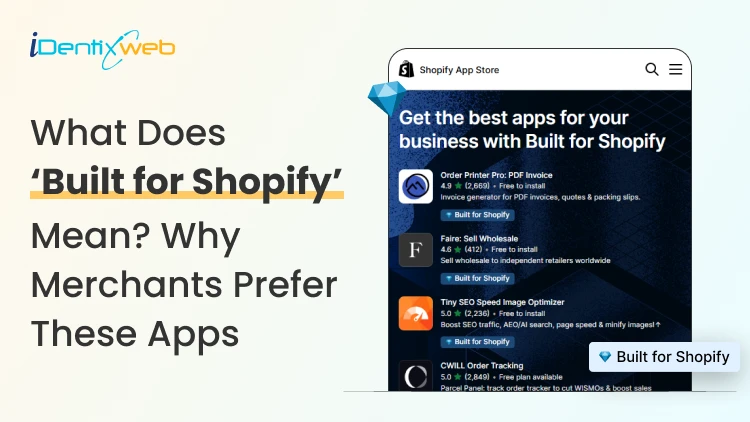
Built for Shopify apps give merchants a stronger quality signal when choosing apps. They are evaluated against Shopify’s standards for performance, design, integration, usability, and ongoing compliance. Benefits for 'Built for Shopify' apps include smoother admin workflows, simple storefront integration, better performance safeguards, and easier app discovery. The Shopify App Store gives merchants thousands of ways to add features that Shopify does not provide by default. The difficult part is deciding which app to install to make your life easier. That is where the Built for Shopify badge helps. It is Shopify's highest level of recognition for apps that meet its quality standards. Built for Shopify apps have their benefits, but it's more than that. That being said, I would not just choose an app because it has the badge. I would use it as a strong first filter, then compare functionality, pricing, reviews, support, permissions, and compatibility. What does Built for Shopify mean? Built for Shopify, often shortened to BFS, is Shopify's quality program for apps distributed through the Shopify App Store. Apps that earn the status must meet requirements such as performance, integration, design, App Store compliance, merchant adoption, reviews, and category-specific criteria. Shopify describes Built for Shopify as the highest level of recognition and achievement an app can reach. The badge appears on qualifying app listings and app cards in search results and category pages. Merchants can also filter App Store results to show only Built for Shopify apps. Above is an app, Delivery Date & Pickup Stellar. You can see it has a Built for Shopify badge just below its name. I’ve worked closely with Shopify merchants and been involved in developing Shopify apps around real store requirements. I know how much difference a well-built app can make to day-to-day store management. Built for Shopify apps: Benefits for merchants 1. You get a faster way to shortlist better apps Several apps offer similar features. The Built for Shopify badge helps you to filter apps that are helpful in a specific category. Instead of comparing every app only by listing content, pricing, and reviews, you can use the badge to quickly identify apps that meet Shopify's standards. It makes the selection process much easier. 2. You reduce the risk of choosing an app that hurts store performance Every app you install can affect your storefront or Shopify admin experience. Built for Shopify apps must meet Shopify's performance requirements. This includes limits around storefront and admin Web Vitals. For you as a merchant, this means the app has been evaluated against measurable performance standards rather than relying only on the developer's claims. 3. You get an app that feels more familiar inside Shopify Built for Shopify apps are expected to follow Shopify's UX and design standards. This includes clear navigation, responsive layouts, familiar controls, and admin behavior. For you, that can mean less time figuring out where settings are located and a smoother experience for team members navigating through the admin panel. 4. You can manage more of the app without leaving Shopify One of the biggest benefits of choosing a Built for Shopify app is better Shopify integration. Shopify expects the primary functionality of an embedded BFS app to work inside the Shopify admin where applicable. That means you are less likely to depend on completely separate dashboards for everyday tasks. If you use multiple apps, this will make daily store management more organized and easier to follow. 5. You get cleaner storefront installation and removal Apps that add storefront features can create problems if they make unnecessary changes to your theme. Built for Shopify requirements encourage apps to use Shopify's current extension architecture, including theme app extensions. These extensions are made to integrate more easily with themes and are removed when the app is uninstalled. For you, that means less risk of being left with unnecessary storefront elements after removing an app. 6. You choose apps that already have real merchant usage An app cannot qualify for the Built for Shopify badge without meeting Shopify's merchant adoption and review requirements. That means the app must already have real usage across active stores before it can earn the badge. For you, this provides confidence that the app has been used by actual merchants. 7. You get a quality signal that Shopify continues to review The Built for Shopify badge does not stay forever with the app. Shopify continues to monitor requirements and reviews BFS apps over time. If an app stops meeting the requirements, it can lose its status. This makes the badge more useful because it reflects ongoing compliance with Shopify's standards. Built for Shopify requirements merchants should understand AreaWhat Shopify checksWhy it matters to merchantsPrerequisitesApp Store compliance, Partner standing, installs, reviews, recent ratingGives Shopify merchant usage and quality signals to evaluatePerformanceAdmin Web Vitals, storefront impact, relevant checkout performancePlaces measurable limits around app performanceIntegrationEmbedded workflows, App Bridge, Shopify-based processesKeeps important workflows connected to ShopifyDesignFamiliar UX, responsive layouts, clear navigationMakes everyday app use more predictableCategory criteriaRequirements specific to an app's functionChecks whether apps use Shopify's expected functionality for their categoryOngoing complianceAutomated checks and recurring reviewsRequires apps to continue meeting current standards The exact criteria depend partly on what the app does. For example, a product review app does not necessarily have the same functional requirements as a fulfillment, subscription, returns, or product bundles app. This is why I would avoid one checklist as the complete BFS standard. Shopify maintains detailed developer documentation and updates category criteria as its platform changes. Should I install only ‘Built for Shopify’ apps I will advise this to merchants: A Built for Shopify app is not always the right choice for your store. It might lack an important feature, cost more than your budget, or request permissions you do not want to grant. The badge also should not be interpreted as a guarantee of perfect support, zero bugs, higher conversion rates, stronger SEO rankings, or specific revenue growth. Those outcomes are outside the scope of what Shopify says the BFS badge certifies. I’m also not saying a non-BFS app is automatically a bad app. A newer app might not yet meet the standard for the BFS badge, but it can definitely help your store grow. If budget is a major factor, compare options in my guide to free Shopify apps rather than choosing by badge alone. How to find Built for Shopify apps The simplest method is to look for the Built for Shopify badge on an app listing. You can also use the BFS filter on Shopify App Store search and category pages. That badge should be visible directly on the App Store listing, which makes it easy to verify before installing. Final takeaway The strongest benefit of Built for Shopify apps is the standards behind the badge. Shopify evaluates qualifying apps for performance, design, integration, merchant adoption, App Store compliance, and relevant category requirements. It also reviews these apps over time instead of giving a permanent badge. For merchants, I would use the badge as a shortcut to a better shortlist, not as permission to skip due diligence. Start with BFS apps when suitable options exist, then compare feature fit, permissions, reviews, pricing, support, and compatibility before making the final choice. At Identixweb, we provide Shopify app development services for merchants who need functionality that an existing public app cannot fully cover. FAQs 1. What does Built for Shopify mean? The Built for Shopify badge identifies Shopify apps that meet Shopify's highest quality standards. Shopify evaluates qualifying apps across performance, design, integration, prerequisites, and relevant category-specific requirements. 2. What are the main Built for Shopify requirements? Current requirements include Shopify App Store compliance, good Partner standing, merchant adoption and review criteria, performance thresholds, Shopify admin integration, design standards, simple installation practices, and category-specific rules. 3. Can an app lose the Built for Shopify badge? Yes. Shopify reviews BFS apps and monitors several requirements on an ongoing basis. Apps that stop meeting the criteria and fail to correct the issues can lose Built for Shopify status. 4. Are Built for Shopify apps always better than non-BFS apps? Not in every situation. The badge is a strong quality signal, but merchants should still compare features, pricing, support, permissions, integrations, reviews, and compatibility before choosing an app.

Sajini Annie John
9 Min • 12 November 2025
9084 Views
Sajini Annie John
6 Min • 13 October 2026
7376 Views

Sajini Annie John
9 Min • 10 February 2026
8828 Views
Sajini Annie John
3 Min • 10 February 2026
9552 Views

Sajini Annie John
4 Min • 27 January 2026
7506 Views
Sajini Annie John
9 Min • 9 June 2026
9063 Views

Sajini Annie John
7 Min • 3 September 2026
12444 Views

Sajini Annie John
13 Min • 20 May 2026
8602 Views
Sagarika Das
9 Min • 10 February 2026
11682 Views
![Headless Commerce: Excellent Examples List [2026]](https://www.identixweb.com/wp-content/uploads/2022/02/headless-commerce.png "Headless Commerce: Excellent Examples List [2026]")
Sajini Annie John
4 Min • 9 January 2026
6898 Views

Sagarika Das
6 Min • 27 August 2025
17414 Views
Sagarika Das
6 Min • 10 February 2026
14957 Views