

Author: Bidisha Saha
Gather knowledge about the latest insights, updates, tips, and tricks in the Ecommerce industry.

5 Min • 20 March 2026
How Anua Unlocked 5X AOV Growth with iCart’s Smart Cart Features
delivery customization Challenges Solutions drive results Scale business delivery customization Challenges Solutions drive results Scale business delivery customization Challenges Solutions drive results Scale business delivery customization Challenges Solutions drive results Scale business Anua is a globally recognized Korean skincare brand known for its minimalist philosophy and focus on gentle yet effective formulations. Built on the idea of simplifying skincare routines, Anua develops products that deliver visible results while avoiding harsh or irritating components, making them suitable for sensitive skin types. Initially using a traditional full cart experience, Anua transitioned to iCart’s side cart solution in August 2025, to create a more seamless and engaging shopping journey. This shift allowed customers to easily explore complementary skincare products without disrupting their browsing flow, making it more intuitive to discover items that fit into a complete routine. By surfacing relevant recommendations directly within the cart, the brand enhanced product visibility across its range. Challenges Before implementing iCart’s side cart solution, Anua faced limitations with their existing full cart experience, which created friction in the customer journey. The traditional cart setup redirected users away from product pages, interrupting their browsing flow and reducing opportunities to explore additional products. As a skincare brand built around routines rather than single-item purchases, this made it difficult to effectively showcase complementary products and encourage customers to build complete regimens. Additionally, the lack of in-cart personalization and strategic upsell opportunities meant that customers were often unaware of related products that could enhance their skincare results. This limited the brand’s ability to increase average order value (AOV) and fully leverage its diverse product range. Anua needed a more dynamic and intuitive cart experience that could seamlessly introduce relevant recommendations while maintaining a smooth and engaging shopping journey. ❌ Cart Value Barriers Low average order value (AOV) due to single-item focus Most customers completed purchases with one primary product instead of building multi-step routines. Cart abandonment near shipping thresholds Customers were not clearly informed or motivated to reach free shipping or discount thresholds. Missed savings opportunities Customers were unaware of potential value in purchasing bundled routines or multiple complementary products. ❌ Absence of Progress-Based Incentives No free shipping or discount progress bar Customers were not motivated to increase their cart value due to lack of visible incentives. Missing tiered rewards system There were no structured milestones (e.g., “Spend more to unlock offers”), reducing upsell opportunities. ❌ Ineffective Cart UI/UX (Pre-Side Cart) Full-page cart disrupted shopping flowCustomers had to leave their browsing journey, increasing friction and drop-offs. No quick add/remove functionality Users couldn’t easily modify their cart or add suggested products without navigating away. Solution To overcome these challenges, Anua implemented iCart’s side cart solution to transform their traditional cart into a high-converting, interactive experience. By replacing the full-page cart with a seamless side cart, the brand ensured that customers could continue browsing while viewing their cart, significantly reducing friction in the shopping journey. Additionally, features like product recommendations & progress bars for free shipping and discounts motivated customers to increase their cart value. By combining personalization, incentive-driven messaging, and a user-friendly interface, Anua successfully turned their cart into a powerful revenue-driving touchpoint rather than just a checkout step. To maximize their cart effectiveness, they implemented two powerful features: ✅ Progress Bar with Multi-Reward Incentives Implemented a tiered progress bar to encourage higher cart value Customers are guided with a clear message like “Add $3.10 to unlock secret offer,” motivating them to continue adding products. Generated over $5M+ in revenue through incentive-driven cart progression Used product-based rewards to align with customer intent Instead of generic discounts, Anua incentivized purchases with relevant skincare items like Dark Spot Pads and mini serums. Built visual motivation for routine expansion As customers add products, they can clearly track progress toward unlocking multiple rewards, encouraging them to build a complete skincare routine. ✅ Product Recommendations Implemented “Frequently Bought Together” recommendations Customers adding a single product (e.g., toner) are shown complementary items like serums, moisturizers, or pads to complete their routine. Generated over 275K revenue through in-cart recommendations Encouraged full skincare regimen building Instead of isolated purchases, the cart suggests step-by-step product combinations aligned with common skincare routines. Increased product discovery at the final stage By surfacing relevant items directly in the cart, Anua ensured customers explore more of their catalog without leaving the checkout flow. Results Achieved in Last 180 Days 22932 Total Store Orders 45101 Total iCart Orders 5X iCart Generated AOV 65.70% Upsell Affected Conversion Rate These improvements reflect a clear shift in customer behavior on Anua’s store. Cart abandonment reduced as shoppers discovered complementary skincare products and felt encouraged to build complete routines. Engagement also increased, with customers interacting more with in-cart recommendations and exploring relevant product pairings. Results & Impact And...Results is Our Main Clarification By implementing iCart’s cart drawer, product recommendations, and progress bar, Anua transformed its cart into a high-performing conversion touchpoint. Shopping Experience Enhancement The improved cart experience encouraged customers to discover complementary products and understand the value of sustainable beauty routines. For instance, the clear presentation of subscription savings alongside one-time purchase options helped customers make more informed decisions about their long-term hair care needs. As Anua continues to optimize its cart experience, the brand is closely monitoring: Routine-based purchasing behavior - tracking how customers move from single items to multi-step regimens Engagement with in-cart recommendations - measuring interaction with suggested products Cart value progression - analyzing how incentives influence higher spending [related_cases_slider] Ready to Write Your Success Story? Try icart App Join successful businesses like Anua and Master your delivery scheduling Delight customers with precise timing Grow your special occasion orders Expand your delivery reach
Read Blog
10 Min • 14 August 2026
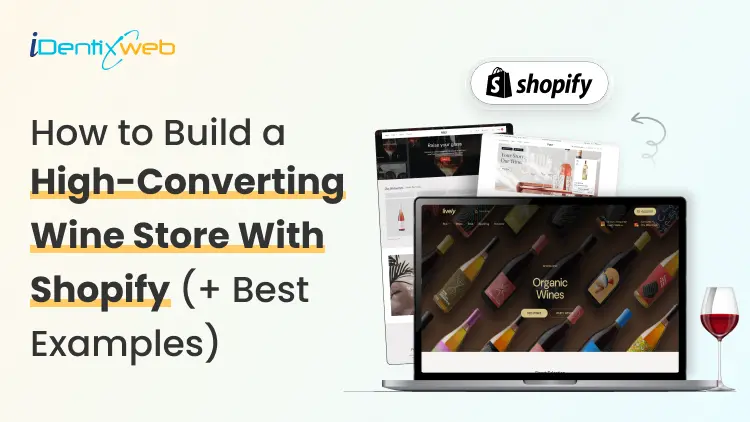
Shopify for Wineries: Features, Costs, Themes, and Examples for Selling Wine
Shopify gives wineries the core tools to sell wine online and in person, including a customizable storefront, secure checkout, Shopify POS, local pickup, subscriptions, and app integrations. Wine stores should also add age verification, product filtering, cross-selling, recommendations, memberships, wine clubs, and product allocations. Advanced wine-specific compliance, shipping rules, and club management typically require dedicated third-party apps alongside Shopify. If you're looking at Shopify for your winery in 2026, chances are you're trying to work out whether Shopify can handle the way a wine business operates. That means more than selling bottles online. You have age verification, state-by-state shipping restrictions, carrier requirements, wine clubs, subscriptions, POS, and compliance tools. I've spent the last few years working with Shopify wine stores, wine-specific apps, shipping requirements, carrier rules, and the limitations wineries are most likely to run into. In this guide, I'm breaking down what Shopify for wineries actually costs, what you'll need to make it work, and where it still falls short before you commit to a migration. Can I sell wine on Shopify? Yes, and Shopify publishes the rules You can sell wine on Shopify. Shopify maintains a dedicated alcohol compliance page in its Help Center covering the US, Canada, the EU, the UK, Australia, and New Zealand. For US merchants, Shopify lists four common requirements: Acquire and maintain every license needed to produce, market, sell, and deliver your products. Stay in full compliance with license requirements, including record-keeping. Run effective age verification so alcohol can't be bought or received by anyone under 21. Ship in full compliance with the laws of both your state and your customer's state. California sellers can also display a Prop 65 alcohol warning through Shopify's product disclosures feature. If you're new to the platform generally, my beginner's guide to how Shopify works covers the basics before you start your wine store. Selling wine on Shopify: The real monthly cost A Shopify wine store with one tasting room can realistically run $140 to $370+ a month in software before card fees. The Shopify plan itself is one of the smaller line items. Compliance can become the highest cost. Here's how the stack builds up on current 2026 US pricing: Shopify Basic is $19/month, or $14 billed annually. Grow is $52/month, or $39 annually. Advanced is $399/month, or $299 annually. Shopify's standard POS features are included with its plans. POS Pro is $89/month per location, or $79/month with annual billing. DRINKS ASSURE, the established alcohol tax and compliance app, is $250/month plus 1% of sales above $25,000. This comes with custom pricing above $200,000 in monthly sales and extra fees for third-party age verification. Wineport, a newer DTC wine compliance app. This runs $49/month for a single winery or $99/month for multi-brand, with a 15-day trial and agency-verified excise rates for 44+ states. Shopify's native Subscriptions app is free, which can cover straightforward recurring wine orders but isn't a replacement for a full winery-specific club and hospitality platform. Shopify for wineries: Online sales features you should have Wine subscriptions and recurring orders Shopify’s free Subscriptions app can handle straightforward recurring wine purchases, making it useful for repeat orders or simple subscription programs. Age verification Age-verification features can help stop underage visitors from entering the storefront. Wineries may need dedicated verification tools or checkout validation rules. Local pickup and tasting room sales If you sell both online and from a physical winery or tasting room, Shopify supports local pickup and Shopify POS. Product filtering and wine discovery Wine shoppers often browse by type, vintage, collection, price, or other bottle attributes. Strong product filtering and search make it easier for customers to find the right wine. Wine clubs, memberships, and allocations More established wineries may need features beyond basic subscriptions, including member pricing, loyalty tiers, club benefits, product allocations, and referrals. Shopify can support these through third-party apps like Winehub Commerce. Does the age-verification pop-up work? That pop-up asking visitors whether they're 21 is useful as a storefront warning. But it isn't the same thing as verifying someone's age. Most age-verification apps simply remember that a visitor clicked "Yes" using a cookie. That becomes even less reliable when customers reach checkout through custom storefronts. For rules that actually need to stop an order, Shopify's stronger option is Cart and Checkout Validation Functions. These validations run on Shopify's servers and can block checkout when a requirement isn't met. Shopify even lists age or ID verification as a use case. If you're building custom checkout rules yourself, my guide to how Shopify Functions work covers the architecture for customizing checkout. Best Shopify wine store examples for inspiration Splash Wines What I liked about Splash Wines is how quickly the store gets the important details out of the way. Its welcome pop-up asks visitors to select where they are shipping and confirm that they are 21 or older before they start shopping. The main navigation is also very purchase-focused, with options such as Curated Cases, Build Your Own Case, and Subscriptions. Robert Mondavi Winery The Robert Mondavi Winery store feels more like a premium winery experience than a typical ecommerce site. I liked how the navigation keeps things simple with Story, Shop, Visit, and Club, making it easy for someone to move between buying wine and exploring the physical winery experience. The homepage also gives equal importance to the brand story, estate visits, wine collection, and wine club. The Prisoner Wine Company What stands out about The Prisoner Wine Company is its bold, product-first approach. The homepage moves visitors quickly from its seasonal message into Best Sellers, with clear labels such as Best Seller, Exclusive, and New Release. I also liked how ecommerce and the winery experience are connected. Alongside wine shopping, visitors can explore tastings, events, and pairing experiences. SommPicks SommPicks does a great job with navigation for a store carrying a very large wine catalogue. Shoppers can browse by wine type, country, region, producer, and vintage, while the search bar specifically encourages searches by wine, region, or producer. I particularly liked the separate Producer Index and Vintage Index, which make exploring thousands of wines much easier. Choosing a Shopify wine theme Shopify's own Theme Store now has a theme built specifically with wineries in mind. Vincent Vincent, particularly its Oakland preset, is designed for wineries, vineyards, liquor, and wine stores and currently costs $340 USD. It includes a built-in age verifier without requiring a separate app and supports taste charts to make wine discovery easier. Area Area’s Winery preset comes with a built-in age verifier and advanced product filtering and search, both useful for wine stores. It also supports in-store pickup, which is useful for wineries selling both online and from a tasting room. Price: $100 USD Local Local’s Lively preset is designed specifically with food, beverage, and local retail businesses in mind. Its age verifier adds a 21+ entry check, while cross-selling and recommended products can help wineries suggest another bottle, complementary product, or gift alongside the shopper’s original choice Price: $380 USD Loka Pour is a wine-focused preset designed for wine, champagne, and premium bottle brands. Its age verifier gives wineries a built-in age-gate option, while product filtering and wine-focused collection layouts make it easier for shoppers to browse bottles by attributes such as vintage or collection. Price: $140 USD What Shopify can't do for a wine store? Shopify can run the storefront, checkout, and POS side of a wine business. But some of its biggest discovery channels still have limits around alcohol. Start with Shop. Age-restricted products, including alcohol, are prohibited on the Shop app. Your winery can still sell wine through its own Shopify storefront, but those products aren't eligible to be sold through Shop. Shopify's Agentic Storefronts can send eligible catalog data to ChatGPT, Microsoft Copilot, Google AI Mode, and Gemini. But each destination applies its own product rules. For example, OpenAI currently prohibits age-restricted products such as alcohol from ChatGPT commerce, and Google also excludes products requiring ID verification, including alcohol and tobacco, from direct purchases in AI Mode and Gemini. My breakdown of the Shopify Spring '26 Edition covers how Agentic Storefronts and the wider Catalog infrastructure work. The Right Setup Goes Beyond the Theme For wineries, the final Shopify setup often involves combining the storefront with apps and custom configurations for subscriptions, pickup, shipping, age verification and other wine-specific requirements. Identixweb provides Shopify store design and development around these operational needs instead of relying only on a standard theme setup. Before you launch: Wine compliance basics Shopify lets you sell wine online, but your winery is responsible for meeting the alcohol laws that apply where you operate and ship. Before launching, make sure you have the required licenses, age-verification process, and shipping setup for the states or regions you serve. Wine shipping rules can vary by location, and carriers such as UPS and FedEx also have specific requirements for licensed alcohol shippers. Once you're choosing carriers, my roundup of Shopify shipping apps covers label printing, shipping workflows, and carrier-calculated rates inside Shopify. Shopify for wineries: Deciding before December Shopify makes the most sense when you want more design freedom, a flexible app stack, and costs that don't rise as sharply with DTC revenue. I would ask three things before starting my Shopify wine shop What's your DTC revenue? How complex is your wine club? And who will own compliance when state rules change? Get your permits and compliance setup sorted before worrying about the perfect theme. A beautiful Shopify store is no help if your shipping rules aren't ready on launch day. FAQs 1. Can I sell wine on Shopify? Yes. Shopify allows alcohol sales, but you are responsible for meeting the licensing, age-verification, shipping, record-keeping, and other legal requirements in every jurisdiction where you sell. Alcohol products are prohibited from the Shop sales channel, so wine should be sold through your Shopify storefront. 2. What are some online sales features if I open a Shopify winery? A Shopify winery can use subscriptions for recurring wine orders, in-store pickup, Shopify POS, product filtering, cross-selling, recommended products, and age-verification features through compatible themes and apps. 3. Is Shopify good to start a wine store? Yes, especially if you want control over your storefront design, ecommerce experience, POS, and app integrations. The con is that Shopify is not winery-compliance software by itself, so you still need the right licenses, age-verification setup, shipping rules, and a dedicated compliance solution. 4. Which are the best Shopify wine themes to start my store? Three strong options in the Shopify Theme Store are Area – Winery ($100), Local – Lively ($380), and Loka – Pour ($140). All three include built-in age verifiers. Area focuses on conversion and product discovery. Local is strong for wineries combining ecommerce with physical locations, and Pour is designed specifically around wine and champagne merchandising. 5. What is Shopify Winehub Commerce? Winehub Commerce is a third-party Shopify app, built specifically for wine and beverage DTC businesses. It adds wine clubs, subscriptions, loyalty and membership tiers, product allocations, referrals, Shopify POS integration, and integrations with services such as ShipCompliant.

11 Min • 15 September 2026
How to Migrate WooCommerce to Shopify in 2026 Without Losing Orders or SEO
Migrating from WooCommerce to Shopify can be done through Shopify’s Store Migration app, CSV imports, third-party migration tools, or a custom API setup. Products, customers, and selected order data can move, while themes, plugins, and URLs need rebuilding or redirecting. After migration, configure payments, shipping, taxes, and checkout, test orders and key store functions, and verify and monitor SEO. Moving from WooCommerce to Shopify involves more than transferring your products. You’ll also need to migrate customer and order data, recreate key store features, maintain important URLs, and make sure your search rankings are not affected during the move. If you're moving from WooCommerce to Shopify in 2026, keeping your existing store running while you prepare, migrate, and test the new Shopify store can help prevent data loss and launch-day issues. This guide walks through the migration process, with particular attention to products, customers, orders, functionality, redirects, and SEO. Why do store owners migrate from WooCommerce to Shopify? Most people we consult aren't unhappy with WooCommerce. It is a very capable e-commerce platform. They move because managing hosting, plugin updates, security, and ongoing maintenance becomes increasingly time-consuming. Shopify is a hosted platform, so hosting and much of the underlying maintenance are handled for you. Features such as Shop Pay, Shopify POS, and its app ecosystem can also simplify day-to-day operations. If you're still weighing it up, my WooCommerce vs Shopify guide walks you through the complete comparison. What moves when you migrate WooCommerce to Shopify Not everything in a WooCommerce store is migrated in the same way. Products, customers, and some order data can be transferred, while themes and plugins need to be rebuilt or replaced, and existing URLs need to be redirected. DataWhat happens during migrationProducts and variantsStore Migration app, CSV import, or a migration appCustomersCustomer CSV, Store Migration app, or a migration appOrdersMigration app or the Shopify API onlyReviewsA reviews app like Judge.me, Loox, or YotpoBlog posts and pagesMatrixify, or copied over by handCouponsA migration app, or rebuilt in DiscountsTheme and designRebuilt on a Shopify themePluginsReplaced with Shopify apps or native featuresURLsNew format, so you need 301 redirects What to do before you move from WooCommerce to Shopify Back up everything. Use your host's backup or a plugin like UpdraftPlus to perform a full data export. Record your URLs and traffic. Export your top landing pages from Google Search Console for the last 90 days. You'll need them for redirects. List every active plugin. These can become Shopify apps or native settings, depending on the functionality it was used for in your store. Check your product attributes. Shopify allows three options per product. Flag anything using four or more. Review and clean your data. Remove duplicate or outdated records where appropriate, review discontinued products, and standardize complicated variant names before importing your data. How to migrate from WooCommerce to Shopify step by step 1. Build your Shopify store Set up your Shopify store, but keep your WooCommerce store live while you work. You still need the old store for checking data, URLs, images, and functionality during the migration. Shopify lets you select WooCommerce during signup. It also creates a starter theme based on your existing store URL. The generated theme uses Dawn and recreates parts of your current storefront. 2. Decide what you are moving and how Make a list of everything that needs to move: products, variants, customers, historical orders, reviews, pages, blog content, discounts, and any other store data you still use. Then choose the migration method for each. Shopify's Store Migration app is currently in early access for certain stores and can import WooCommerce products from the original WooCommerce CSV. For everything else, you can use Shopify CSV imports where supported, a third-party migration tool like Cart2Cart or LitExtension, a custom API migration, or a Shopify migration agency. If you cannot manage the move, Identixweb can handle the migration for you. Our Shopify migration service helps move your store data, rebuild required functionality, map redirects, review SEO risks, and test the new Shopify store before launch. 3. Export and prepare your WooCommerce data WooCommerce has a built-in CSV exporter for products under Products > All Products > Export. You can choose the products, columns, categories, and whether to include custom metadata in the export. What happens next depends on your migration method. The Store Migration app will accept the WooCommerce product CSV without reformatting it. If you use Shopify's product CSV importer, the WooCommerce columns need to be mapped to Shopify's format first. For customers, export their data and format it using Shopify’s Customer CSV template. Import them through Shopify Admin > Customers > Import. Historical orders need a migration app such as Matrixify, LitExtension, or Ablestar WooCommerce Importer. This is because Shopify does not offer a native order CSV importer. 4. Migrate products, customers, and orders in that order Move your products first, customers second, and historical orders last. We recommend this sequence so imported orders can connect to the right products and customers. Validate each data set immediately after importing it rather than waiting until the entire migration is complete. After the product import, compare prices, SKUs, variants, inventory, weights, images, and descriptions against WooCommerce. Shopify specifically recommends reviewing product data after import because incorrect data like prices can affect the store immediately. 5. Rebuild your storefront and replace WooCommerce plugins Your WooCommerce theme does not become a Shopify theme, and your WordPress plugins do not become Shopify apps. Build the storefront on a Shopify theme and recreate the parts of your WooCommerce setup that customers actually use. Go through the plugin list you made earlier and match each important function with a Shopify feature, app, or custom solution. Don't migrate plugins one-to-one. Instead, identify what each WooCommerce plugin does and determine whether the same functionality can be handled by Shopify's native features, an app, or a custom solution. 6. Set up payments, shipping, taxes, and checkout Set up your locations, shipping zones and rates, payment provider, tax settings, checkout preferences, store policies, fulfillment process, and customer notifications. Don't assume your WooCommerce settings can simply be copied to Shopify. Review each payment, shipping, tax, checkout, and fulfillment setting based on how the new store will operate. 7. Testing Before launch, test the Shopify store from the customer's perspective. Place test orders, check successful and failed payments, refunds, cancellations, fulfillment, customer emails, navigation, search, forms, product variants, discount codes, and shipping rates. 8. Run a final data check and switch the domain If your WooCommerce store remained open during the migration, check for products, customers, and orders created after your first transfer. Compare record counts and spot-check important orders before you switch traffic to Shopify. Once the Shopify store is ready, connect or transfer your existing domain and make Shopify the live storefront. After the switch, test your old URLs again to make sure the redirects reach the correct Shopify pages rather than returning 404 errors. How to migrate products from WooCommerce to Shopify The best migration method depends on your catalog size, product complexity, and the data you need to preserve. You can use Shopify's supported migration options, CSV imports, a third-party migration tool, or an API-based migration. WooCommerce columnShopify columnNameTitleDescriptionBody (HTML)Attribute 1 name/value (s)Option1 Name / Option1 ValueSKUVariant SKURegular priceVariant PriceStockVariant Inventory QtyWeight (lbs)Variant Grams (multiply by 453.6)ImagesImage Src WooCommerce can hold several attribute values in one cell. Shopify wants one option value per row, so each variant needs its own line. Shopify also raised the cap to 2,048 variants per product, so catalogs with lots of sizes and colors fit easily now. The limit of three options per product didn't change. If a product uses four attributes, move the extras into product metafields or use a product options app. Watch your images too. Product images are imported from their WordPress URLs, so keep the old site online until the import finishes. Images inside descriptions still point at your WordPress server. Matrixify can move them into Shopify Files, or they'll break when you cancel hosting. How to migrate orders from WooCommerce to Shopify Shopify's native CSV import can't handle orders, and the Store Migration app skips them too. You'll need a migration app like Matrixify, LitExtension, Ablestar, or Cart2Cart, or a custom build on the Shopify API. Order history is worth moving. Your team keeps a full buying history for support, returns, and reporting. But the export can fool you. A few months ago, I was on a call with a store owner. He sells coffee gear and has run WooCommerce for about eight years. He wanted every order moved, and he'd already done the export himself. His file had around 1,900 orders. His dashboard showed more than 11,000. He assumed the export had timed out. His export plugin hadn't been updated in years and was still reading WooCommerce's old order tables. We dropped the plugin and pulled orders through the WooCommerce API with a migration app. The counts matched on the first run. We also talked about what he actually needed. Failed checkouts from earlier years weren't helping anyone. We completed and refunded orders from the last three years, kept his original order numbers, and archived a full export of the rest. Before the real import, we switched off staff order notifications. Otherwise, his inbox would have taken thousands of "new order" emails in one afternoon. A few rules I follow on every order migration: Filter by status and date. Decide which order statuses and date ranges you actually need before importing historical orders. Silence notifications first. Prevent staff from receiving thousands of new-order emails during the import. Account for guest orders. Guest shoppers may not exist as customer records in WooCommerce, so check how your chosen migration method handles customer information stored against guest orders. Plan for order numbers. Check how your migration method handles existing WooCommerce order numbers and how new Shopify order numbers will be generated. Protect your SEO with a 301 redirect map Your URLs will change, and there's no way around it. Shopify uses fixed paths, so a clean 301 redirect map is what protects your traffic. WooCommerce URLShopify URL/product/mug//products/mug/product-category/mugs//collections/mugs/about//pages/about/pourover//blogs/news/pourover Keep your product slugs identical to your Shopify handles, so each redirect is a simple prefix swap. Build the map from a site crawl plus your Search Console export. Import it in bulk under Content > Menus > View URL redirects. Cover blog posts and category pages, not just products. Missed blog URLs are the gap I see most often. After launch, submit your sitemap and watch Search Console for 404s. Migrate your store, not the issues A meaningful WooCommerce to Shopify migration is a chance to clean up old data, replace unnecessary plugins, and simplify your store setup. It also makes sure customers and search engines land where they should after the switch. If your store has years of order history, custom WooCommerce functionality, a large catalog, or organic traffic, treat the migration as a proper project. FAQs 1. How to migrate from WooCommerce to Shopify? Create your Shopify store, export and prepare your WooCommerce data, then migrate products, customers, and historical orders using Shopify’s supported import options or a migration app. After that, rebuild your storefront, replace WooCommerce plugins, configure payments and shipping, set up 301 redirects, test the store, and switch your domain to Shopify. 2. How to import products from WooCommerce to Shopify? Export your products from WooCommerce > Products > Export as a CSV file. You can import that file using Shopify’s Store Migration app, or reformat the data to Shopify’s product CSV structure and upload it through Shopify Admin > Products > Import. 3. Should I move from WooCommerce to Shopify? Consider moving to Shopify if you want a hosted ecommerce platform where hosting, maintenance, and the technical infrastructure are managed for you. If you depend heavily on WordPress, need backend customization, or want direct control over hosting and code, WooCommerce is a better fit. 4. How much will it cost to migrate my store from WooCommerce to Shopify? There is no fixed migration cost because it depends on your product count, customers, historical orders, functionality, design work, apps, and SEO requirements. DIY migrations can use CSV imports and migration tools at relatively low cost, while the charges of apps such as Matrixify and Ablestar depend on the data being migrated. 5. Can WooCommerce work together with Shopify? Yes, but WooCommerce and Shopify don't natively operate as one shared ecommerce backend. You can, for example, add Shopify Buy Buttons to a WordPress site or use third-party integrations to sync selected products, inventory, customers, or orders between the two platforms.
9 Min • 28 October 2026
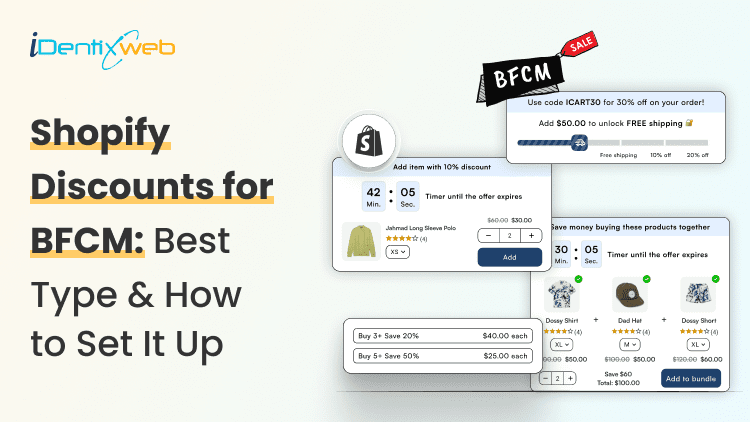
Shopify Discounts for BFCM: Which Discount Type to Use and How to Set It Up
Black Friday falls on November 27 this year, and Cyber Monday on November 30. Shoppers, as always, will show up expecting a real deal. On Cyber Monday 2025, Adobe tracked peak discounts of 31% on electronics, 28% on toys, and 25% on apparel (Adobe). Most Shopify merchants we work with focus on one question: “Should we offer 25% or 30% off?” But the discount percentage is only part of the decision. What matters more is what you want to achieve, whether that’s increasing order value, clearing inventory, or bringing in new customers. There are four native types of discounts on Shopify, and choosing the right one can make a real difference to your BFCM sales. Here's how to match each type to a BFCM goal, set it up in your Shopify admin, and avoid the rules that catch stores out every November. The 4 Shopify Discount Types for BFCM (Black Friday Cyber Monday) Shopify gives you four native discount types: amount off products, amount off order, buy X get Y, and free shipping. Any of them can run as an automatic discount or as a code. Discount typeWhat it doesBFCM useAmount off productsTakes a % or fixed amount off chosen products or collectionsA sale on one collectionAmount off orderTakes a % or fixed amount off the whole cartSitewide sale or spend tiersBuy X get YGives a free or discounted item when the shopper buys somethingBOGO or a gift with purchaseFree shippingRemoves shipping costs on qualifying ordersFree shipping over a set amount Automatic discounts vs discount codes An automatic discount applies in the cart by itself. Nobody has to find, copy, or remember a code. For a public Black Friday sale, that's usually what you want, because there's nothing for shoppers to forget or mistype. Here’s our guide on how to set up automatic discounts on Shopify in 2025. Codes are better when you need to know where a sale came from, like your email list, an influencer, or a referral partner. You can also cap how many times a code gets used, which automatic discounts don't let you do. Our guide to Shopify referral codes shows how to generate and track them. Which Shopify Discount Type Should You Use for BFCM? Pick the discount type based on the goal of your sale. A sale meant to clear old stock needs a different setup from one meant to raise order value. Here are the Black Friday promotion ideas we usually recommend, based on what a merchant wants to achieve. Your BFCM goalDiscount typeMethodWatch out forClear slow or seasonal stockAmount off products on one collectionAutomaticKeep best sellers out of itRaise average order valueAmount off order with a minimum spend, in tiersAutomaticSet the first tier above your current AOVProtect a thin marginFree shipping over a threshold, or a free giftAutomaticCount what the gift costs you, not its price tagSell a second unitBuy X get YAutomaticShopify won't add the free item to the cartGive VIPs early accessAmount off order for a customer segmentAutomaticTest it on a VIP test account before the email goes outTrack a channelAny type, as a unique codeCodeLimit it to one use per customer Want to have a successful BFCM? Here are proven Black Friday strategies for this year Run the margin calculation before you pick a number Every discount comes straight out of your profit, so you have to sell more just to stay level. Say a product sells for $100 and costs you $50. You keep $50 on every sale, so 10 sales in a normal week earn you $500. At 20% off, it sells for $80 but still costs $50, so you keep $30. You'd need about 17 sales to earn the same $500. DiscountYou keep per saleSales needed to earn $500No discount$501010% off$401320% off$301730% off$2025 Try it with your own price and cost. The thinner your margin, the faster those numbers climb. How to Set Up Shopify Discounts for Black Friday Every native discount starts in the same place: go to Discounts > Create discount in your Shopify admin and pick the type. The settings below are the ones that matter most for a BFCM sale. Amount off products or amount off order Step 1: Choose the method. Pick Automatic discount and add a title, or Discount code and add a code. Step 2: Set the Value as a percentage or a fixed amount. Step 3: Under Applies to, choose the collection or products. Skip this step for an order discount. Step 4: Add a Minimum purchase amount if you're building spend tiers. Create one discount per tier. Step 5: Choose the Eligibility: all customers, specific customers, customer segments, or markets. Step 6: Choose what it combines with. For spending tiers, don't let the tiers combine with each other. Shopify then applies whichever discount is best for the cart. Step 7: Set the Active dates and save. Planning to stack offers, like a sale plus free shipping? Our guide to Shopify discount combinations covers the pairings that protect your margin. Buy X get Y for BOGO and gifts with purchase Step 1: Under Customer buys, choose Minimum quantity of items or Minimum purchase amount. Select the qualifying products or collections. Step 2: Under Customer gets, set the quantity and choose which products or collections shoppers can receive at a discount. Step 3: Set the Discounted value as Free, Percentage, or Amount off each item. Step 4: Turn on Maximum uses per order. For a one-time BOGO offer, set it to 1 so shoppers can't keep claiming free items. Step 5: Choose the Eligibility and Combinations settings. Check whether the offer should work alongside your other BFCM discounts. Step 6: Set the Active dates and save. Here's the part almost everyone misses: Shopify doesn't automatically add the free or discounted item to the cart. Shoppers must add it themselves. If they don't know that, they could check out without their gift and email you about it later. Make the offer clear in your banner, or show the eligible gift in the cart. A cart drawer can help here. With iCart – Cart Drawer Cart Upsell, you can show free-gift offers and a progress bar that tells shoppers how much more they need to spend to unlock a reward. It's a useful way to keep your BFCM offer visible while shoppers are still adding products to their cart. Free shipping Step 1: Under Countries, choose All countries or select specific countries where you want to offer free shipping. Step 2: Turn on Exclude shipping rates over a certain amount if you don't want expensive express delivery options to become free. Step 3: Set the Minimum purchase requirements. Choose a minimum order amount or minimum quantity of items. Step 4: Choose the Eligibility: all customers, specific customers, customer segments, or markets. Step 5: Choose the Combinations settings. Allow free shipping to combine with your BFCM product or order discounts if that's part of your offer. Step 6: Set the Active dates and save. The BFCM Discount Call We Still Think About Last November, about two weeks before Black Friday, we got on a call with a skincare brand selling in the US and Canada. Their plan was already set: 30% off everything with a code. The ads were booked, and the launch email was written. We asked for two numbers first: gross margin and average order value. Their margin was around 55%, and the average order was $48. At 30% off, they'd have had to sell about 120% more units just to match the gross profit of a normal week. Their sales data showed a bigger issue. Most orders had just one item, usually one of their two best sellers. Getting people to buy wasn't the problem. Getting them to buy a second product was. So we changed the discount type as well as the number. We set up an automatic amount-off-order discount in two tiers: 15% off over $75 and 20% off over $110. We added a free travel-size cleanser through buy X get Y on orders over $110. Shoppers didn't need a code, and the cart showed them how far they were from the next tier. Results: The average order went from $48 to $67.87 over BFCM weekend, and revenue was up 48.14% as compared to BFCM the previous year. Keep Your Black Friday Discounts Honest A discount is only real if the previous price was real. In the US, the FTC's pricing guides say a former price must be the actual, bona fide price you offered the public regularly, for a reasonably substantial period (16 CFR 233.1). Raising compare-at prices in October to make November's discount look bigger is exactly what the guides warn against. Selling into the EU? Any announced price cut has to show your prior price, which is the lowest price you charged in the 30 days before the sale. Choosing Your Shopify Discounts for BFCM 2026 Start with the goal and leave the percentage for last. Match the goal to one of the four Shopify discounts, run the margin calculation, and only then set the number. Schedule it in the right time zone, test it on a phone, and keep your compare-at prices honest. More BFCM prep for your store: Best BFCM Social Media Campaigns to Learn From BFCM Checklist for Shopify Stores Black Friday vs. Cyber Monday: Which One is Better for Shopify Stores? FAQs 1. What are the types of Shopify discounts to run during BFCM? Shopify has four native types: amount off products, amount off order, buy X get Y, and free shipping. Each can run as an automatic discount or a discount code. Apps can add more, like tiered or mix-and-match offers. 2. Is an automatic discount or a discount code better for Black Friday? For a public sale, automatic discounts are the simpler choice because shoppers don't need to enter anything. Use codes when you want to track a channel, like email or influencers, or limit how often an offer gets used. 3. Why isn't my free gift added to the cart automatically? Shopify's buy X get Y discount never adds the free item for the shopper. They have to add it to the cart themselves. Say so in your BFCM sales banner, or use a cart drawer app that shows the gift as a reward tier. 4. Can I combine Shopify discounts during BFCM? Yes. Product, order, and shipping discounts can combine if you allow it in each discount's combination settings. Two shipping discounts can't apply to the same order, though, and some combinations depend on your plan and checkout setup.

Bidisha Saha
June 14, 2024
4619 Views

Bidisha Saha
March 6, 2024
5326 Views

Bidisha Saha
May 9, 2024
4431 Views

Bidisha Saha
August 16, 2024
3476 Views
Bidisha Saha
January 30, 2024
4260 Views

Bidisha Saha
June 5, 2024
4631 Views
![Complete Guide to E-commerce Conversion Rate Optimization [2026]](https://www.identixweb.com/wp-content/uploads/2023/09/image4-8.png "Complete Guide to E-commerce Conversion Rate Optimization [2026]")
Bidisha Saha
March 27, 2024
5359 Views
Bidisha Saha
February 9, 2024
5420 Views
Bidisha Saha
March 20, 2024
6037 Views
Bidisha Saha
April 26, 2024
4517 Views
Bidisha Saha
September 6, 2024
3334 Views

Bidisha Saha
August 7, 2024
3465 Views