

Most Viewed Blogs
Gather knowledge about the latest insights, updates, tips, and tricks in the Ecommerce industry.

5 Min • 20 March 2026
How Anua Unlocked 5X AOV Growth with iCart’s Smart Cart Features
delivery customization Challenges Solutions drive results Scale business delivery customization Challenges Solutions drive results Scale business delivery customization Challenges Solutions drive results Scale business delivery customization Challenges Solutions drive results Scale business Anua is a globally recognized Korean skincare brand known for its minimalist philosophy and focus on gentle yet effective formulations. Built on the idea of simplifying skincare routines, Anua develops products that deliver visible results while avoiding harsh or irritating components, making them suitable for sensitive skin types. Initially using a traditional full cart experience, Anua transitioned to iCart’s side cart solution in August 2025, to create a more seamless and engaging shopping journey. This shift allowed customers to easily explore complementary skincare products without disrupting their browsing flow, making it more intuitive to discover items that fit into a complete routine. By surfacing relevant recommendations directly within the cart, the brand enhanced product visibility across its range. Challenges Before implementing iCart’s side cart solution, Anua faced limitations with their existing full cart experience, which created friction in the customer journey. The traditional cart setup redirected users away from product pages, interrupting their browsing flow and reducing opportunities to explore additional products. As a skincare brand built around routines rather than single-item purchases, this made it difficult to effectively showcase complementary products and encourage customers to build complete regimens. Additionally, the lack of in-cart personalization and strategic upsell opportunities meant that customers were often unaware of related products that could enhance their skincare results. This limited the brand’s ability to increase average order value (AOV) and fully leverage its diverse product range. Anua needed a more dynamic and intuitive cart experience that could seamlessly introduce relevant recommendations while maintaining a smooth and engaging shopping journey. ❌ Cart Value Barriers Low average order value (AOV) due to single-item focus Most customers completed purchases with one primary product instead of building multi-step routines. Cart abandonment near shipping thresholds Customers were not clearly informed or motivated to reach free shipping or discount thresholds. Missed savings opportunities Customers were unaware of potential value in purchasing bundled routines or multiple complementary products. ❌ Absence of Progress-Based Incentives No free shipping or discount progress bar Customers were not motivated to increase their cart value due to lack of visible incentives. Missing tiered rewards system There were no structured milestones (e.g., “Spend more to unlock offers”), reducing upsell opportunities. ❌ Ineffective Cart UI/UX (Pre-Side Cart) Full-page cart disrupted shopping flowCustomers had to leave their browsing journey, increasing friction and drop-offs. No quick add/remove functionality Users couldn’t easily modify their cart or add suggested products without navigating away. Solution To overcome these challenges, Anua implemented iCart’s side cart solution to transform their traditional cart into a high-converting, interactive experience. By replacing the full-page cart with a seamless side cart, the brand ensured that customers could continue browsing while viewing their cart, significantly reducing friction in the shopping journey. Additionally, features like product recommendations & progress bars for free shipping and discounts motivated customers to increase their cart value. By combining personalization, incentive-driven messaging, and a user-friendly interface, Anua successfully turned their cart into a powerful revenue-driving touchpoint rather than just a checkout step. To maximize their cart effectiveness, they implemented two powerful features: ✅ Progress Bar with Multi-Reward Incentives Implemented a tiered progress bar to encourage higher cart value Customers are guided with a clear message like “Add $3.10 to unlock secret offer,” motivating them to continue adding products. Generated over $5M+ in revenue through incentive-driven cart progression Used product-based rewards to align with customer intent Instead of generic discounts, Anua incentivized purchases with relevant skincare items like Dark Spot Pads and mini serums. Built visual motivation for routine expansion As customers add products, they can clearly track progress toward unlocking multiple rewards, encouraging them to build a complete skincare routine. ✅ Product Recommendations Implemented “Frequently Bought Together” recommendations Customers adding a single product (e.g., toner) are shown complementary items like serums, moisturizers, or pads to complete their routine. Generated over 275K revenue through in-cart recommendations Encouraged full skincare regimen building Instead of isolated purchases, the cart suggests step-by-step product combinations aligned with common skincare routines. Increased product discovery at the final stage By surfacing relevant items directly in the cart, Anua ensured customers explore more of their catalog without leaving the checkout flow. Results Achieved in Last 180 Days 22932 Total Store Orders 45101 Total iCart Orders 5X iCart Generated AOV 65.70% Upsell Affected Conversion Rate These improvements reflect a clear shift in customer behavior on Anua’s store. Cart abandonment reduced as shoppers discovered complementary skincare products and felt encouraged to build complete routines. Engagement also increased, with customers interacting more with in-cart recommendations and exploring relevant product pairings. Results & Impact And...Results is Our Main Clarification By implementing iCart’s cart drawer, product recommendations, and progress bar, Anua transformed its cart into a high-performing conversion touchpoint. Shopping Experience Enhancement The improved cart experience encouraged customers to discover complementary products and understand the value of sustainable beauty routines. For instance, the clear presentation of subscription savings alongside one-time purchase options helped customers make more informed decisions about their long-term hair care needs. As Anua continues to optimize its cart experience, the brand is closely monitoring: Routine-based purchasing behavior - tracking how customers move from single items to multi-step regimens Engagement with in-cart recommendations - measuring interaction with suggested products Cart value progression - analyzing how incentives influence higher spending [related_cases_slider] Ready to Write Your Success Story? Try icart App Join successful businesses like Anua and Master your delivery scheduling Delight customers with precise timing Grow your special occasion orders Expand your delivery reach
Read Blog
16 Min • 16 September 2021
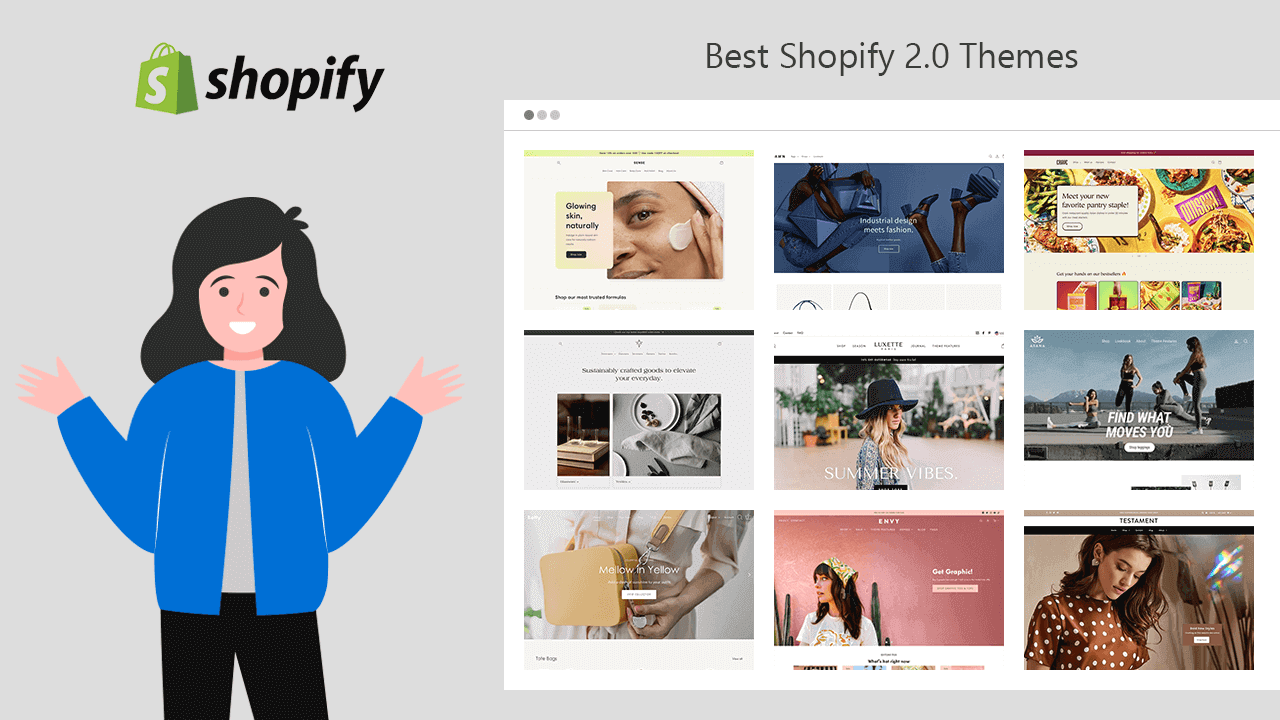
Best Shopify 2.0 Themes: Overview, Features & Review
Shopify 2.0 Themes Raise your hand if you want a better theme for your Shopify store. Therefore, you should go for Shopify Online Store 2.0 Themes. Shopify has launched Online Store 2.0 in Unite 2021, with some major changes in the vintage themes to improve the overall shopping experience of your customers. Shopify Online Store 2.0 Features See what additional you get when you choose Online Store 2.0 Themes for your Shopify store: Sections is available on every page like the Home page, product page, collection page, collection list page, cart page, etc. App Block helps you to relocate or move Shopify apps within the template without touching the code files. Shopify Metafields lets you add dynamic information about your products, variants, collections, customers, orders, blogs, and many more in your store. Collection and search filters allow to filter products and search results by availability, price, vendor (brand), color, and many more. Let’s learn more about the free and paid Online Store 2.0 Shopify Themes available in the Shopify theme store. Free Shopify Online Store 2.0 Themes Dawn Dawn theme is the first reference theme design of Online Store 2.0 by Shopify. It’s again the first free Online Store 2.0 Theme available in the Shopify theme store. Dawn offers you flexible design and customization options to create a store that looks sleek and elegant. Highlights of Dawn theme Free Online Store 2.0 Shopify Theme 1 Theme style Media-forward product page Cross-selling capabilities Store Categories: Clothing and accessories, Health and beauty, Home and garden Preview Get It Now Crave Next comes, the Shopify Crave theme is an ideal Online Store 2.0 theme for food and beverage businesses, no matter what size of product catalog you have. Its mobile-friendly layouts and dynamic checkout choices are ideal for on-the-go buying. Highlights of Crave theme Free Online Store 2.0 Shopify Theme 1 Theme style Flexible design and customization settings Cross-selling capabilities Product filtering and sorting Store Categories: Food and beverage Preview Get It Now Sense The Sense Shopify theme is the perfect OS 2.0 theme to build professional health and beauty stores. Sense theme offers new styling options to create a storefront that stands out of crowd. Highlights of Sense theme Free Online Store 2.0 Shopify Theme 1 Theme style Detailed product information Cross-selling capabilities Product filtering and sorting Store Categories: Health and beauty Preview Get It Now Craft The Shopify Craft theme is the best Shopify 2.0 theme for telling your narrative of creativity and excellence. Using this elegant theme, you can bring life to your home and garden stores of any size. Highlights of Craft theme Free Online Store 2.0 Shopify Theme 1 Theme style Visual brand storytelling Enhanced search Product filtering and sorting Store Categories: Home and garden Preview Get It Now Paid Shopify Online Store 2.0 Themes Impulse Impulse is a flexible fashionable Shopify theme designed by Archetype Themes, especially for high-volume stores. Impulse is a vintage theme recently updated for Online Store 2.0. Highlights of Impulse theme Paid theme with an unlimited free trial 3 Theme styles Powerful promoting options 96% Positive reviews Store Categories: Clothing and accessories, Health and beauty, Sports and recreation Preview Get It Now Top 6 Shopify Themes for Clothing Stores in 2024 Read Now Symmetry Symmetry is one of the popular themes by Clean Canvas that is updated for OS 2.0. It offers beautiful layouts and easy navigation for your online store that can make it look seamless. Highlights of Symmetry theme Paid theme with an unlimited free trial 4 Theme styles Cart upselling and Cross-selling options 94% Positive reviews Store Categories: Clothing and accessories, Health and beauty, Sports and recreation Preview Get It Now Streamline The Streamline theme, designed by Archetype Themes offers modern fonts, designs, and layouts for your Shopify store to give it a premium look. It helps you showcase your products and brand with style. Highlights of Streamline theme Paid theme with an unlimited free trial 3 Theme styles Powerful promoting options 94% Positive reviews Store Categories: Clothing and accessories, Health and beauty, Sports and recreation Preview Get It Now Showcase The Shopify Showcase theme, by Clean Canvas, offers you layouts for creating big product imagery that highlights every detail and craftsmanship of the product. Starting from the loading icon to every single corner of the page is made to give an elegant and sophisticated look to your brand. Highlights of Showcase theme Paid theme with an unlimited free trial 4 Theme styles Seamless video integration 97% Positive reviews Store Categories: Clothing and accessories, Health and beauty, Sports and recreation Preview Get It Now Venue Venue is a simply stunning theme designed by Safe As Milk. The Shopify Venue theme lets you create a visual storytelling experience with its video-text integration feature. Highlights of Venue theme Paid theme with an unlimited free trial 3 Theme styles Best compatible with age-restricted products 98% Positive reviews Store Categories: Clothing and accessories, Home and garden, Food and drink Preview Get It Now Envy Envy is one of the best OS 2.0 Shopify themes by Eight that adds style and luxury to online stores. It offers multi-level navigation options making it easy for your customers to browse your products easily. Highlights of Envy theme Paid theme with an unlimited free trial 4 Theme styles Flash deals and other promoting options Supports multiple languages 91% Positive reviews Store Categories: Clothing and accessories, Home and garden, Health and beauty Preview Get It Now Icon The Icon Shopify theme by We are Underground lets you create your exceptional online stores with its unparalleled layouts and features. Merchants who are willing to create dropshipping stores in Shopify can try this theme. Highlights of Icon theme Paid theme with an unlimited free trial 4 Theme styles Product pickup availability display Cross-selling options 92% Positive reviews Store Categories: Clothing and accessories, Health and beauty, Home and garden Preview Get It Now Canopy Canopy is an eye pleasing Shopify theme made by Clean Canvas specifically for physical stores. This theme will help you to build a clean, modern, and easy to navigate online store. Highlights of Canopy theme Paid theme with an unlimited free trial 3 Theme styles 97% Positive reviews Store Categories: Food and drink, Home and Garden, Health, and beauty Preview Get It Now Testament The Testament theme, designed by We are Underground, allows you to add high-resolution images to your storefront to give a bold look and create a great visual experience for online shoppers. Highlights of Testament theme Paid theme with an unlimited free trial 3 Theme styles Product 3D AR models Supports multiple languages Pickup location visibility 96% Positive reviews Store Categories: Clothing and accessories, Health and beauty, Home and garden Preview Get It Now Kingdom One more theme from Krown Themes, Kingdom, comes with 3 theme styles: King, Queen, and Prince giving a royal look and feel to the store. This theme offers a vertical sidebar for site navigation which makes your storefront distinguishable from thousands of other eCommerce sites. Highlights of Kingdom theme Paid theme with an unlimited free trial 3 Theme styles Signature sidebar and vertical slideshow 96% Positive reviews Store Categories: Business equipment and supplies, Clothing and accessories, Toys and games Preview Get It Now Fashionopolism The Fashionopolism theme, created by We are Underground, helps you make your store more appealing. Big product imagery will let your customers imagine themselves with the product. Highlights of Fashionopolism theme Paid theme with an unlimited free trial 4 Theme styles Sticky Navigation Surface pickup with locations 96% Positive reviews Store Clothing and accessories, Health and beauty, Home and garden Preview Get It Now Vantage Vantage, a Shopify theme by We are Underground, offers you smart layouts and a large number of customizable elements to create a great shopping experience for your online shoppers. Highlights of Vantage theme Paid theme with an unlimited free trial 4 Theme styles 93% Positive reviews Store Categories: Clothing and accessories, Food and drink, Sports and recreation Preview Get It Now Mr Parker The next theme by We are Underground is Mr. Parker, a beautiful and fully featured theme. It offers lots of in-build customization options with an easy setup so that you don't have to waste your time and money on third party apps. Highlights of Mr Parker theme Paid theme with an unlimited free trial 4 Theme styles Powerful promoting options Product page surface pickup with locations 94% Positive reviews Store Categories: Clothing and accessories, Home and Garden, Pet supplies Preview Get It Now Cascade Cascade, a theme by Switch, offers a unique way to represent your store and product collections. This theme has a big image carousel section on the homepage which makes it more attractive and appealing. Highlights of Cascade theme Paid theme with an unlimited free trial 3 Theme styles 100% Positive reviews Store Categories: Home and Garden, Clothing and accessories, Health and beauty Preview Get It Now Masonry The next Clean Canvas theme, Masonry helps fashion brands to create a classy storefront for their online customers. Masonry is an OS 2.0 Shopify theme with many design possibilities bringing the products to life. Highlights of Masonry theme Paid theme with an unlimited free trial 4 Theme styles 89% Positive reviews Store Categories: Clothing and accessories, Health and beauty, Business equipment and supplies Preview Get It Now Sunrise The Sunrise theme by Rawsterne Web Design & Illustration provides colorful and playful layouts to address your need for funky storefront design. With the side navigation bar of the Sunrise theme, you can help your customers browse the products easily. Highlights of Sunrise theme Paid theme with an unlimited free trial 4 Theme styles 96% Positive reviews Store Categories: Toys and games, Pet supplies, Sports and recreation Preview Get It Now Avatar Designed by Skup, Avatar is a simple and clean Shopify theme with a large search box on the header. The Avatar theme helps you to build a store that focuses more on conversion. Highlights of Avatar theme Paid Theme with an unlimited free trial 2 Theme styles 83% Positive reviews Store Categories: Art and entertainment, Clothing and accessories, Health and beauty Preview Get It Now Colors The Colors theme by Small Victories is my favorite one! It’s flawless, fantastic, and offers plenty of customization options for your store. This theme immediately adds modern design techniques to your website, while still giving you control. Highlights of Colors theme Paid theme with an unlimited free trial 3 Theme styles Powerful promoting options 92% Positive reviews Store Categories: Clothing and accessories, Sports and Recreation, Health, and beauty Preview Get It Now Baseline Baseline is a typography based theme by Switch specially designed for Shopify merchants who want a distinctive or extraordinary storefront. The bookstores can find it a good match for their storefronts. Highlights of Baseline theme Paid theme with an unlimited free trial 3 Theme styles 100% Positive reviews Store Categories: Art and entertainment, Clothing and accessories, Home and garden Preview Get It Now Boost The Boost theme made by Clean Canvas helps you to design a Shopify store that focuses more on conversion. The perfectly crafted layouts improve the shopping experience of the customers and take the brand to the next level. Highlights of Boost theme Paid theme with an unlimited free trial 3 Theme styles 98% Positive reviews Store Categories: Clothing and accessories, Sports and Recreation, Toys and games Preview Get It Now Motion More animation means more refreshment from the boring store layout. One more theme by Archetype Themes, the Motion Shopify theme offers you to add visual effects to your store with animations and videos that help you to grab the attention of your visitors. Highlights of Motion theme Paid theme with an unlimited free trial 3 Theme styles Eye-catching animation Flexible collection collage options 98% Positive reviews Store Categories: Clothing and accessories, Health and beauty, Business equipment and supplies Preview Get It Now Modular Spark is designed by Presidio Creative to appear excellent on the tablet, mobile, and desktop, responding to the needs of your customers. It's ideal for designers who want a storefront with a lot of high-quality images and a lot of granular customizations. Highlights of Modular theme Paid theme with an unlimited free trial 3 Theme styles 96% Positive reviews Store Categories: Clothing and accessories, Health and beauty Preview Get It Now Palo Alto One more theme by Presidio Creative, Palo Alto offers a professional look and feel to your store. This Shopify theme lets your customers know your brand and product's quality with big imagery. Highlights of Palo Alto theme Paid theme with an unlimited free trial 3 Theme styles 97% Positive reviews Store Categories: Clothing and accessories, Health and beauty, Business equipment and supplies Preview Get It Now Prestige The Prestige theme, designed by Maestro, helps you to create an elegant store. With the help of high quality pictures, you can enrich the storefront and overall shopping experience of your customers. In other words, the Prestige Shopify theme takes your brand to the next level. Highlights of Prestige theme Paid theme with an unlimited free trial 3 Theme styles Helps you bring your physical store online 92% Positive reviews Store Categories: Clothing and accessories, Health and beauty, Business equipment and supplies Preview Get It Now Highlight The Highlight theme, designed by Krown Themes, allows you to represent your brand and catalog in a unique way. The design-centric layouts and features create a sense of interaction for the store visitors. Consequently, it makes an overall remarkable impression of your store. Highlights of Highlight theme Paid theme with an unlimited free trial 3 Theme styles 89% Positive reviews Store Categories: Art and entertainment, Clothing and accessories, Health and beauty Preview Get It Now Editions One more theme from Pixel Union, the Edition Shopify theme gives a classy look to your store and takes your brand to the next level. With the gorgeous layouts of the Editions theme, you can offer a luxurious shopping experience to your customers. Highlights of Editions theme Paid theme with an unlimited free trial 3 Theme styles 95% Positive reviews Store Categories: Clothing and accessories, Food and drink, Health and beauty Preview Get It Now Foodie The Foodie theme by We are Underground is specially designed for Shopify merchants who have physical stores. It also supports the sale of age-restricted products such as lottery tickets, alcohol, tobacco, etc. Highlights of Foodie theme Paid theme with an unlimited free trial 3 Theme styles Powerful promoting options Store Categories: Business equipment and supplies, Food and drink, Home and garden Preview Get It Now Spark Are you new to the e-commerce industry? The Spark theme by Fluorescent Design Inc. is specially designed for you. Spark Shopify theme helps you to build a fully expressive website with stunning in-built features. Highlights of Spark theme Paid theme with an unlimited free trial 3 Theme styles Product Videos and 3D Models Product Reviews Integration 100% Positive reviews Store Categories: Clothing and accessories, Health and beauty, Sports and recreation Preview Get It Now Flow Flow is a theme by Eight that focuses more on storytelling yet a conversion-ready theme. With a sleek sticky header, customers can navigate your website no matter where they are. Highlights of Flow theme Paid theme with an unlimited free trial 3 Theme styles 90% Positive reviews Store Categories: Food and drink, Clothing and accessories Preview Get It Now Warehouse Are you a dropshipper? If yes, then the Warehouse Shopify Theme can be the best fit for your store. One more popular theme by Maestrooo, the Warehouse theme is specially designed for merchants who want to showcase large product collections. Highlights of Warehouse theme Paid theme with an unlimited free trial 3 Theme styles Supports flash deals options, international selling, etc. 87% Positive reviews Store Categories: Electronics, Home and Garden, Sports and recreation Preview Get It Now Expanse Want a template for huge product collections? You can go for the Expanse OS 2.0 Shopify theme by Archetype Themes. Expanse lets you create a clean and well-organized storefront for your customers. Highlights of Expanse theme Paid theme with an unlimited free trial 3 Theme styles 5 highly flexible promotion types 73% Positive reviews Store Categories: Food and drink, Health and beauty, Home and garden Preview Get It Now Empire Want to create a store like Amazon, Flipkart, etc.? The Empire theme can help in that as it’s an Amazon-inspired theme designed by Pixel Union. It offers mobile-optimized layouts for your online store that helps you to create a unique storefront for web as well as mobile shoppers. Highlights of Empire theme Paid theme with an unlimited free trial 3 Theme styles Customizable promotion tiles Instagram-inspired shoppable images 73% Positive reviews Store Categories: Business equipment and supplies, Electronics, Home and garden Preview Get It Now Broadcast Broadcast is a Shopify OS 2.0 theme by Invisible Themes that helps you to create a trustful online store. The Broadcast theme has unique layouts for product collections that let your store stand out from the crowd. Highlights of Broadcast theme Paid Theme with an unlimited free trial 3 Theme styles Product upsells and other promotional features Pre-built content pages for your store 92% Positive reviews Store Categories: Clothing and accessories, Health and beauty, Art and entertainment Preview Get It Now Pipeline The pipeline is a Shopify theme by Groupthought specially designed to enhance the shopping experience of mobile shoppers. Add this theme if you desire a clean and professional look for your store with advanced features. Highlights of Pipeline theme Paid Theme with an unlimited free trial 3 Theme styles Cart upsell options 100% Positive reviews Store Categories: Clothing and accessories, Health and beauty, Sports and recreation Preview Get It Now Avenue The Avenue OS 2.0 theme by Red Plug Design Co. is specialized in easy navigation. Avenue comes with swatches, filters, background videos, pop-ups, and more that reduce the need for third-party Shopify apps. Highlights of Avenue theme Paid theme with an unlimited free trial 3 Theme styles 97% Positive reviews Store Categories: Clothing and accessories, Food and drink, Hardware and automotive Preview Get It Now Capital One more theme from Eight, Capital allows you to build a stylish store. The Capital theme offers you many innovative layouts to showcase your product collections with more creativity. Highlights of Capital theme Paid theme with an unlimited free trial 3 Theme styles 93% Positive reviews Store Categories: Home and Garden, Clothing and accessories, Health and beauty Fresh A theme by Eight, Fresh is the perfect starting point for Shopify merchants who own food and drink stores. The Fresh Shopify theme helps you create a storefront that gives fresh vibes to the site visitors. Highlights of Fresh theme Paid theme with an unlimited free trial 3 Theme styles 100% Positive reviews Store Categories: Food and drink Preview Get It Now Focal One more theme by Maestro, Focal is a sleek theme perfect for lifestyle stores. Focal is a theme that combines elegance and need, allowing you to get things moving with only a few clicks. Highlights of Focal theme Paid theme with an unlimited free trial 2 Theme styles Cross-selling capabilities 99% Positive reviews Store Categories: Clothing and accessories, Electronics, Health and beauty Preview Get It Now
18 Min • 17 July 2021
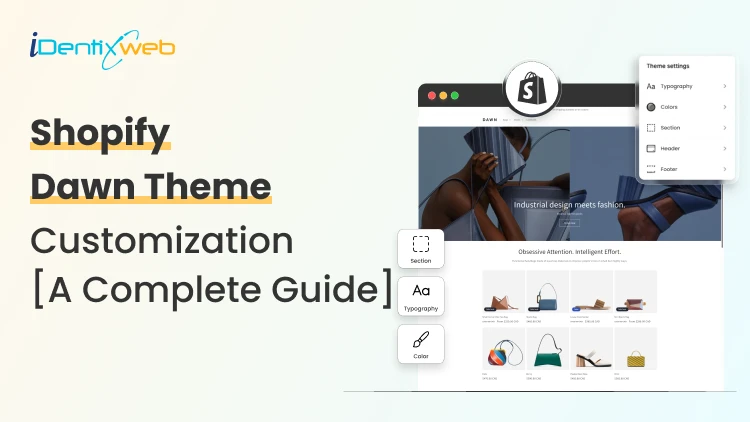
Dawn Theme Shopify Guide: Theme Customization, Template Preview, Demo
After Shopify introduced online store 2.0, everyone is excited about the Dawn Theme. You might be wondering, “There are already tons of themes available for your online store in the Shopify theme store. So why did Dawn come into the picture?” Let’s learn more about this theme and discover how you can enhance the shopping experience for your site visitors using Shopify Dwan Theme. Dawn Theme Shopify: All About an Introduction The “Dawn Theme Shopify” is specially built for better performance, flexibility, and ease of use. The best thing about Shopify Dawn is that it utilizes all the new features available in online store 2.0, which was announced at Shopify Unite 2021. After replacing the debut theme, Shopify Dawn will become the default theme for newly created Shopify stores. This indicates that something is inspiring about this theme. Until now, Debut has been one of the most widely used themes. If you are already a Debut theme user, you might be excited to know which theme is better. Also check out this blog on Dawn Theme vs Debut Theme: Which Theme You Should Select Add a Conversion-Optimized Cart Drawer to Dawn for Free Customizing Dawn to add in-cart upsells manually means hours of theme code editing. iCart Cart Drawer Cart Upsell drops all of those features into your Dawn theme with no code. Most carts only show products... iCart can show revenue-boosting offers. Try Free Till 100 Orders It works as a sticky cart drawer, popup, or a full cart page (your choice), and adds AI-powered product upsells, multi-tier progress bars, BOGO offers, volume discounts, and free-gift triggers directly to your cart experience. Dawn's design language stays intact. iCart's drag-and-drop editor matches your colors and fonts automatically. What Are the Key Features of Dawn Theme Shopify? Let’s explore the fantastic features of the Shopify dawn theme: An Open Source Theme Shopify 2.0 Dawn theme is the first open-source Shopify design open source theme. It is built with semantic markup with HTML and CSS to create great experiences on all browsers. So if you want to give your Shopify store a new design, then Dawn is the best theme for you. Yes, you can customize it and make it more attractive for your customers by adding useful and fully-featured Shopify apps like iCart Cart Drawer Cart Upsell to give better shopping options. Offers Better Performance When we say about, we mostly mean it by speed. The dawn theme is 35% faster in loading websites than the Debut theme - the best theme of Shopify themes. It automatically removes all the unnecessary or unused scripts or codes from the theme templates. Therefore it loads faster when compared to other themes. If you choose the dawn theme for your store then you automatically choose better performance for your store visitors. Easy to Use The sections are made global in Online Store 2.0. Therefore, not only the homepage, if you want to customize your product page, blog page, collection page, or any page, you can easily do that. Using metafields, Shopify makes it easy for you to manage your content. More Flexible The App block lets you move the app anywhere on the page without touching the theme files. Besides, the section and blocks offer great flexibility to your store design and content. You can now connect the dynamic data source to your store using Shopify metafields. Stellar Made for Dawn to Solve Delivery Scheduling For florists, bakeries, food brands, gift shops, and grocery stores Dawn alone doesn't solve the delivery scheduling problem. Losing orders because buyers want flexible delivery? A simple calendar at checkout fixes that. Start Your Free Plan Stellar Delivery Date & Pickup fills the gap. It adds a styled date picker, time slot selector, and pickup option directly to your Dawn-themed product pages without touching theme code. Florists, bakeries, and food sellers running Dawn typically see a 20–30% drop in pre-purchase abandonment after installing Stellar. What's New in Dawn Theme Shopify Editor We will explore Dawn's editor. If your store uses a different version of the Dawn theme, the options and editor layout mentioned in this guide may vary. If you have not updated your version yet, it’s time to update and take advantage of the newly launched features of the theme. As you can see, I am ready to start our journey with the Dawn theme editor. Let’s get started! By clicking on the Customize button, you would be able to enter the theme editor. Here, you can witness a drastic change in the template editor of the dawn theme. The Dawn theme template editor is categorized into 3 parts: Left Panel The left panel displays the layout or structure that reflects the sequence of sections on your store page. Here, you can quickly locate each section on the page and add sections or blocks (inside the sections) whenever needed. By default, it shows the layout of the homepage. You can change the template using the drop-down menu above the preview section. Preview Section The theme template editor offers the preview section with three different preview options: (1) Mobile (2) Desktop (3) Full-screen. Right Panel It is the place where you actually customize your store or theme template. When you select any section in the left panel, all the options under that section will appear on the right panel. Check out 25 Best Shopify Dawn Theme Examples Dawn Theme Shopify Customization I know your goal is to get listed among the top 10 Shopify stores or the 10 best eCommerce websites. To achieve this, you must explore every corner of the theme template editor and experiment with your creativity. Do check Why 95% Shopify Store Fails Before customizing the theme, let’s examine the page templates already available in Dawn. Pre-requisites: Create pages: About us, FAQ, Terms of use, Blog (optional). Add Products to your store. Add some collections and add products to them. Main menu: Link the main categories to the menus and the FAQ page. I would suggest you remove the Home menu. Footer menu: Link About us, Contact, Terms of use, Blog pages to footer menus. You can also link the collections here. Template Pages To open the list of page templates, click on the templates drop-down list above the preview. Home page Product Collections Collections list Pages Blogs Blog Posts Cart Checkout Contact Classic customer accounts Others Pages Dawn theme Shopify: All About the Home Page The homepage creates the first impression of your store. Therefore, it requires more focus. Let’s start step-by-step customization: Announcement Bar The announcement bar is designed to greet site visitors with an enticing offer that inspires them to purchase. The new theme updates of Online Store 2.0 allow you to add multiple announcement bars to your store. How to Customize the Announcement Bar section: Steps to Follow 1. Click the arrow beside the Announcement Bar on the left panel. 2. Select the Announcement Bar and set the color scheme, and adjust the necessary settings using the available options for the announcement bar. 3. You can also use Custom CSS to add styles to this section. To further customize the announcement bar, follow these steps: 1. Click on the inner option of the announcement bar and go to the right panel. 2. Enter the announcement text and an optional link. 3. (Optional) Click on "Add Announcement" to create a new announcement bar. 4. Save the button once you’re done with the changes. You can create up to 12 announcement bars according to your requirements and enable or disable them by clicking on the eye icon beside the announcement, depending on the offer you want to show to your visitors. Header The header section is a tiny space including the store name or logo and important links to other pages on your store. Therefore, make sure to add main links and organize them precisely. How to Customize the Header Section: Steps to Follow 1. Choose one of the four available options for positioning your logo. 2. Go to the theme settings to upload your logo image. This will replace the store name text with the picture. 3. Click the "Select" menu to customize and create drop-down menus if needed. 4. Select the sticky option to keep the header visible on the screen as users scroll. 5. If you want to display a separator line, keep the "Show separator line" option enabled. 6. Select the color scheme that best matches your store's branding. 7. Activate the option to show your website in different languages for various countries. 8. Adjust the logo position for the mobile layout. 9. Fine-tune the spacing and section padding to ensure a polished look. 10. Click the Save button to apply your customizations. Note: You can skip the text or button in the Image banner section. Want a seamless Shopify header that enhances your store’s look? Check out this Shopify Header Customization Guide for a step-by-step walkthrough! I have modified the header section. Here’s how it will look: Image Banner This section helps you show the big picture of your brand to your customers. Dawn theme shopify theme enhances the banner's impact by allowing you to add multiple images to a single image banner. You can also add multiple Image Banners to your site. The image banner size of 1600 x 1050 px can work better with the desktop. Steps to customize the Image Banner Section: You can also add multiple image banners to your site. An image banner size of 1600 x 1050 px works well for desktop displays. How to Customize the Banner Section: Steps to Follow 1. Click the "Select Image" button to upload the first image for the banner. 2. If desired, add a second image to the banner (optional). 3. Adjust the opacity of the image overlay as needed. 4. Check the "Adapt section height to the first image size" option if you want the section height to match the size of the first image. 5. Adjust the text position for desktop and enable "Show container" if you want to display it. 6. Customize the content position and color scheme for desktop view. 7. Apply animation effects to the image if desired. 8. Adjust the content alignment for mobile view. 9. Click on the heading under the image banner in the left panel and set the heading in the right panel. 10. Update the text in the image banner section as needed. 11. If desired, click the "Add Block" button to include additional text blocks. 12. Save button to apply your customizations. Let’s see how the image banner looks: Featured Collection The Featured Collection section helps us to showcase the best or trending products to the store visitors. You can also use it to show product collections. How to customize the features collection section: steps to follow 1. Update the heading to reflect the specific collection if desired. 2. Choose the size of the heading to fit your design. 3. Include a description for the featured collection section. 4. Toggle "Show collection from the admin" to make the collection visible. 5. Customize the style of the description text. 6. Choose the collection to display related products in the section. 7. Specify the number of products to show, with a maximum limit of 25. 8. Choose the number of product columns to display on the desktop, up to 5 columns. 9. Enable the option to make products full-width, if desired. 10. If the collection has more products, enable the “View All” button to display all products when clicked. 11. Turn on the carousel feature for desktop view if you want a sliding product display. 12. Select a color scheme for the featured collection section. 13. Adjust settings for the product card, including image ratio and shape. 14. Enable the "Show second image on hover" option to change the image when users hover over the product. 15. Check the option to display vendor information on the products. 16. Enable the option to show product ratings if desired. 17. Enable the quick add button option for faster product additions. 18. Choose the number of product columns to display on mobile, with a maximum of 2 columns. 19. Check the "Enable swipe on mobile" option to allow users to swipe through products in mobile view instead of scrolling. 20. Fine-tune the padding for the section to fit your design needs. 21. Save button to apply your customizations. Let’s check the output- Image with text This section can help you to make your store informative for your customers. You can describe something about your brand or new product category, etc. Steps to customize the Image with text Section: 1. Click the Image with text section on the left panel.2. Go to the right panel and add the image in the section by clicking the Select image button.3. Set the image height, width, and position.4. Select the content position you want to show in desktop or mobile.5. Set the content layout and add the color scheme you want to give for the section.6. You can add image animation to make your section more impressive.7. Set the content alignment for the mobile layout.8. Adjust the section padding9. Click on the Save button to save the changes.Note: You can skip the text or button in the Image with text. Let’s check the output of the image with the text section: Footer The footer section is part of your site, providing a consistent place for important links and information. Adding key links here improves navigation and helps visitors easily access critical pages such as contact information, privacy policies, and site maps. How to customize the footer section: steps to follow 1. Select the Color Scheme: Choose a suitable color scheme for your store's footer. 2. Keep the "Show email signup" option checked if you want customers to subscribe to newsletters and promotional emails. 3. Enable the "Follow on Shop" option to allow customers to follow your store on the Shop app from your storefront. 4. If you have social media accounts, enable the "Show social media icons" option to display them in the footer. To add social media accounts, go to Theme Settings > Social Media. 5. Keep the "Enable country/region selector" option checked to let visitors choose their region. 6. Enable the language selector to allow visitors to choose their preferred language. 7. Enable the "Show payment icons" option to display all payment icons added to your store. 8. Add links to your privacy policy if applicable. 9. Fine-tune the spacing and section padding to fit your design needs. 10. Save button to apply your customizations. This is how I have customized the footer section of my store. We have explored the default sections included in the Dawn theme Shopify homepage. You can add more sections anywhere in your store using the “Add Section” option.Let’s explore all the theme sections available in the Shopify Dawn theme. Dawn theme Shopify: Theme Sections When you click "Add Section" in the left panel of the theme editor, you'll find a variety of theme sections available for your store. These include Featured Collections, Featured Products, Collection Lists, rich text, Images with Text, Image Banners, Slideshows, Collages, Multicolumns, Multirows, Collapsible Content, Email Signups, Contact Forms, Videos, Blog Posts, Custom Liquids, and Pages. These theme sections are accessible across all store pages, thanks to Shopify’s Online Store 2.0! Checkout our blog on Top Shopify 2.0 Themes: Overview, Features & Review Product Pages in Dawn Theme Shopify Shopify’s default product page is quite impressive as it consists of almost everything you may want to have on your product page. In case you need a different layout, you can create your own using the Create template option. As shown in the image above, two additional sections are available beyond the Home page. Here’s a detailed look at these sections: Product Information This section gives you all access to the product block so that you can easily choose which block to show and where to show it without editing the code. You can add three more blocks to this section by clicking the Add block option. Related products This block allows you to show related products to the visitors when they explore any product. You can also customize the product details in the product recommendation section from the right panel. Collection Page in Dawn theme Shopify The collection page displays all products within a particular collection. This template includes two additional sections beyond those found on the Home page. Let’s explore these sections in detail below: Collection Banner The image you uploaded while creating the collection will be displayed as the collection banner. Product Grid The product grid section offers various options for customizing the product list. You can adjust the settings according to your requirements to enhance the display and functionality of your product grid. Collection List in Dawn theme Shopify This page displays all the collections you have created in your store in a grid layout. On the right panel, you will find options to customize the collection list page to fit your store's needs and design preferences. Contact Page The contact page has two sections by default: Page and Contact Form. You can add other sections to this page based on your store's requirements. Blogs Page The blog page on your online store is the perfect place to showcase all your blog posts to visitors who enjoy reading. This page automatically organizes the blog posts, making it easy for readers to browse the content based on the number of blogs you have published. Blog Posts Users will be redirected to the designated blog post page when they open any blog post. This page is specifically designed to display the content of individual blog posts in an organized and reader-friendly manner. Cart Page The cart page displays the products users have added to their shopping cart. This page is a step in the online shopping experience, allowing customers to review their selected items before checkout. Users can view detailed information about each product on the cart page, including the name, price, quantity, and any chosen options, such as size or color. In the Shopify Dawn theme, you can modify the cart page where you can add featured collections as product recommendations or upsell at the bottom of the Subtotal section. It saves you from spending on apps. Are you looking for more upselling or cross-selling options to increase your store revenue? Then, you should add the iCart Shopify app to your store. The iCart Upsell app has many unique features, including product upsells, cross-sells, discount tiers, time-sensitive offers, product bundles, and much more! Checkout Page The checkout page offers no sections, but you can customize it at Theme Settings > Checkout. Classic customer accounts Here, you get the page templates related to Customer accounts, such as customer account, customer activated account, customer address, customer login, customer order, customer register, and customer reset password. Others Page templates Here, you get the page templates for Password, 404 Page, Search, and Gift Card, along with the default layout and theme template customizing options available for each page. Password 404 Page Search Gift Card Theme Settings If you have built your online store with Shopify before, you might be familiar with the Theme Settings available in Shopify’s theme template editor. Shopify allows you to customize the theme template from one place: Theme Settings. You can find all the controls for your theme template here. Logo: This section allows you to add the logo and favicon image. Buttons: From this section, you can change the border and shadow of the buttons in your theme. Variant pills: This section provides options to display your product variants. Inputs: You can set the border and shadow of the inputs from this section. Product cards: This section allows you to change the style, alignment, and color scheme of the product cards. Collection cards: This section allows you to change the style, alignment, and color scheme of the collection cards. Blog cards: This section allows you to change the style, alignment, and color scheme of the blog cards. Content containers: This section allows you to change and customize the content containers. Media: This option allows you to change the appearance of media. Dropdowns and pop-ups: This option allows you to change the look of dropdowns. Affects areas like navigation dropdowns, pop-up modals, and cart pop-ups. Drawers: This section gives you customization options for the drawers. Badges: This section lets you change the position and color scheme of badges. Brand information: You can add a brand description to your store’s footer with an image. Cart: This section allows you to change the type of the cart. Custom CSS: This option allows you to add custom styles to your entire online store. This guide concludes here. I hope you’ve found some valuable insights to enhance your store. For more in-depth information and tips, explore our blog section.
5 Min • 27 September 2019
How to Attract New Customers to Your Business
Are you an entrepreneur? Need more traffic to your small business? You have come to the right point. No matter how large your business is you can’t gain money until customer’s purchase your products. Most of the business fails due to the reason that customers are unaware of their products. For small and large business marketing and advertising is a big issue. We are living in an era where every 30secs on FM or social media are highlighted with advertising. I have seen many small businesses running on top because customers know their brand through various Media. Thanks to social media as they provide a wide range of platform for giving ads and promoting the brand. Here are some of the tips which will help you to attract new customers to your business. Customer Acquisition Customer Acquisition is the process of studying or analyzing the perspective of customers to buy products from your store. Various methods are there to find out new customers and target them on social media. Marketing is in your hands. You need to know all the tactics of marketing and understand every customer’s interest in buying your products. Target the right audience because marketing to the wrong audience will not bring any profit to your business. It may take some time to earn profit but don’t pause in the middle. Try to interest users with exciting features and offers for them. Also read How to Reduce Customer Acquisition Cost on Shopify Usage of paid advertising I think that one of the best ways to attract new customers is through paid advertising on social media. The reason is that people tend to visit your online store on Facebook as they are spending half of their time on Social Media. Google and other platforms are also best to run ads. Talking about online advertising facebook ads and Google Ads are the best providers for paid traffic. Although each paid advertising platform has its functionalities, they mainly charge for CPMs. It allows advertisers to select their targeted audience based on demographics, interests and other traits. Usually paid advertising is mainly best for businesses with a high budget. Creating an email list Lead generation is the starting task for customer acquisition. Creating leads involves includes collection of information from valuable customers so that you can re-target your audience through new exciting features and offers. Most of the time visitors don’t tend to buy during the first visit to your store. Gathering email address is one of the best ways to generate leads for customer acquisition in most of the business. There are many ways to create an email list. Once your email list is created you can run email campaigns and can send emails automatically to the targeted audience. These emails can be personalized whenever you want as per your requirement. Maintain regular cleaning of the email list otherwise, it will be considered as an “unengaged list”. A B2B email marketing agency helps businesses set up and manage marketing campaigns efficiently and create automated workflows that nurture leads over time based on user behavior, lead scoring, and engagement. Search Engine Optimization (SEO) Online shopping starts with searching, and that search often begins on Google. Customers look for products or services by entering relevant queries, making search visibility essential for businesses. Understanding how much to invest in SEO through an SEO Budget Guide can help companies improve their online presence and compete effectively in search results. The ranking of our website in those searches is known as Search Engine Optimization. The best way to start SEO is by doing keyword research. You need to know the keywords that are suitable for your small business. Find out those keywords for which customers will be searching for your products or services. Don’t choose those keywords with high competitors. Choose those keywords which have high search volume and low competitors. The main factor for SEO ranking will be based on the content of your website or store. Your content should be very rich and relevant that is matching to your topic. Users should be able to understand the content and also it should attract them. Generate Online Audience With the coming of social media platforms like Facebook, Instagram, YouTube and many more. There are many ways to create an audience on Social Media. For doing this the main thing you need is time, consistency, patience, and content for attracting new customers. Generating an online audience not only increases brand authority but also will help you to gain more sales and you can promote your new products to the existing customers. To make the most of this audience, you can use printable flyer templates to create attractive and helpful flyers. These can be shared online or in-store, helping businesses attract more customers and show them new products.