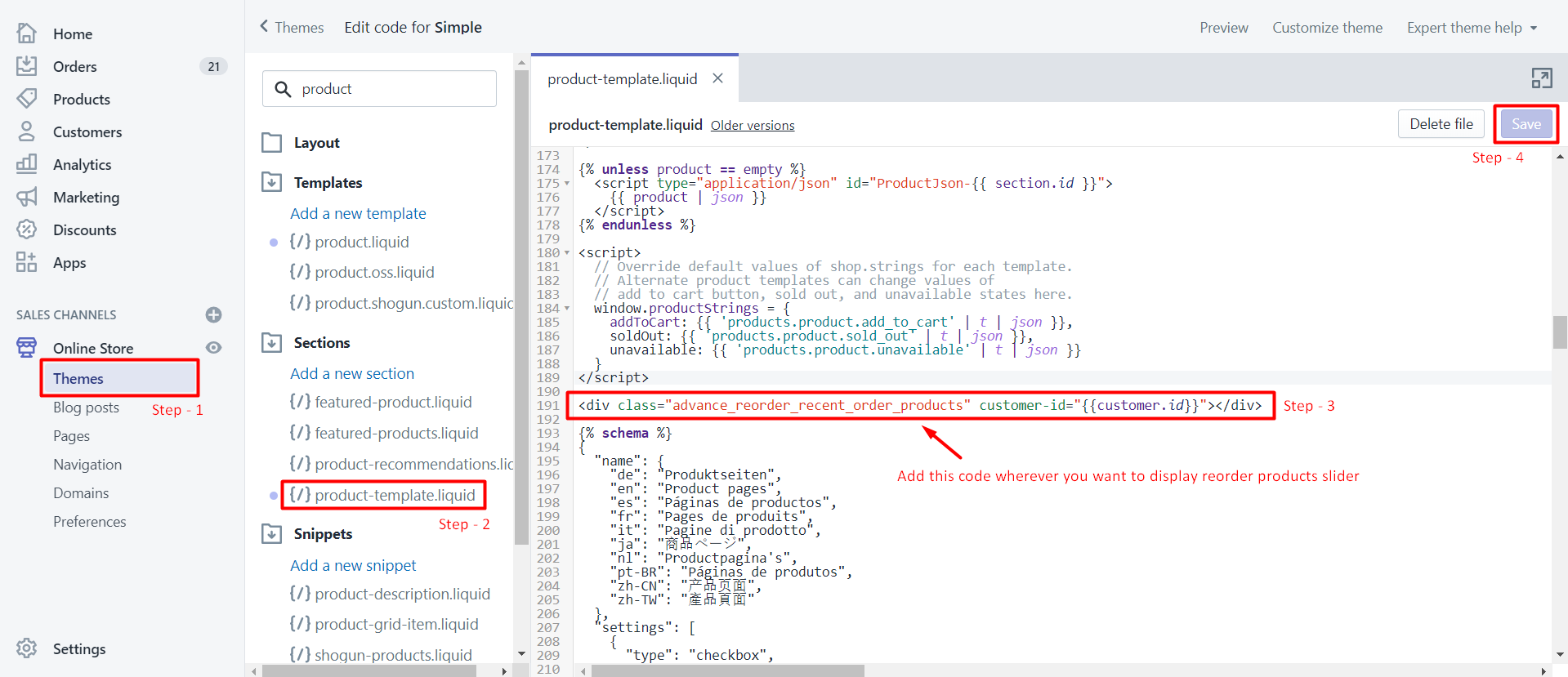
You can display a Recent Order Products widget slider on various pages of your store, including product, cart, account, order, collections, and blog pages. To set this up, you need to insert a specific code snippet into the appropriate liquid file. To implement the widget, log into your Admin panel, navigate to Online Store, and select Themes.
In the left sidebar, find and click on the "product-template. liquid" file under the Sections list. Insert the code at your desired location within the file and save your changes to display the Recent Reorder widget slider.
Show Recent order products widget slider in any pages like product page, cart page, account page, order page, collections, pages, blogs & so on. It needs to insert the below code in the liquid file.
For an example of the product page, product-template.liquid file path: Login into Admin panel-> left side menu select Online store -> select Themes.
Now left sidebar load with file list. Check at Sections list “product-template.liquid” file, click on it.
Insert below code where you want to show the Recent reorder widget slider at this position in the file and save it.
<div class="advance_reorder_recent_order_products" customer-id="{{customer.id}}"></div>