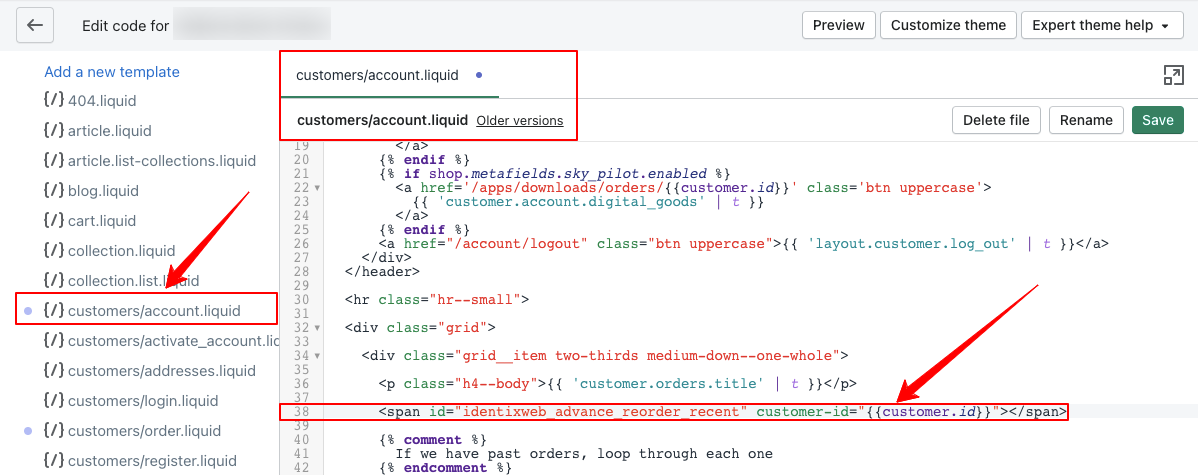
You can enhance your customer experience by adding a Recent Reorder button to the My Account page of your store. This feature allows customers to quickly access their recent orders, making it easier for them to reorder products they have purchased before. To set this up, log into your Admin panel and navigate to Online Store, then select Themes.
In the left sidebar, find and click on the "customers/account. liquid" file. Insert the provided code, ``, at the desired location within the file and save your changes to display the Recent Reorder button effectively.
Setup Recent Reorder Button.
Show the Recent order product button in your customer myaccount page needs to insert below code in customers/account.liquid file.
Customers/account.liquid file path: Login into Admin panel-> left side menu select Online store -> select Themes.
Now left sidebar load with file list. Check at Sections bottom of the list “customers/account.liquid” file, click on it.
Insert below code where you want to show the Recent order product button at this position in the file and save it.
<span id="identixweb_advance_reorder_recent" customer-id="{{customer.id}}"></span>