

Shopify Apps
Gather knowledge about the latest insights, updates, tips, and tricks in the Ecommerce industry.

5 Min • 29 April 2026
How Anua Unlocked 5X AOV Growth with iCart’s Smart Cart Features
delivery customization Challenges Solutions drive results Scale business delivery customization Challenges Solutions drive results Scale business delivery customization Challenges Solutions drive results Scale business delivery customization Challenges Solutions drive results Scale business Anua is a globally recognized Korean skincare brand known for its minimalist philosophy and focus on gentle yet effective formulations. Built on the idea of simplifying skincare routines, Anua develops products that deliver visible results while avoiding harsh or irritating components, making them suitable for sensitive skin types. Initially using a traditional full cart experience, Anua transitioned to iCart’s side cart solution in August 2025, to create a more seamless and engaging shopping journey. This shift allowed customers to easily explore complementary skincare products without disrupting their browsing flow, making it more intuitive to discover items that fit into a complete routine. By surfacing relevant recommendations directly within the cart, the brand enhanced product visibility across its range. Challenges Before implementing iCart’s side cart solution, Anua faced limitations with their existing full cart experience, which created friction in the customer journey. The traditional cart setup redirected users away from product pages, interrupting their browsing flow and reducing opportunities to explore additional products. As a skincare brand built around routines rather than single-item purchases, this made it difficult to effectively showcase complementary products and encourage customers to build complete regimens. Additionally, the lack of in-cart personalization and strategic upsell opportunities meant that customers were often unaware of related products that could enhance their skincare results. This limited the brand’s ability to increase average order value (AOV) and fully leverage its diverse product range. Anua needed a more dynamic and intuitive cart experience that could seamlessly introduce relevant recommendations while maintaining a smooth and engaging shopping journey. ❌ Cart Value Barriers Low average order value (AOV) due to single-item focus Most customers completed purchases with one primary product instead of building multi-step routines. Cart abandonment near shipping thresholds Customers were not clearly informed or motivated to reach free shipping or discount thresholds. Missed savings opportunities Customers were unaware of potential value in purchasing bundled routines or multiple complementary products. ❌ Absence of Progress-Based Incentives No free shipping or discount progress bar Customers were not motivated to increase their cart value due to lack of visible incentives. Missing tiered rewards system There were no structured milestones (e.g., “Spend more to unlock offers”), reducing upsell opportunities. ❌ Ineffective Cart UI/UX (Pre-Side Cart) Full-page cart disrupted shopping flowCustomers had to leave their browsing journey, increasing friction and drop-offs. No quick add/remove functionality Users couldn’t easily modify their cart or add suggested products without navigating away. Solution To overcome these challenges, Anua implemented iCart’s side cart solution to transform their traditional cart into a high-converting, interactive experience. By replacing the full-page cart with a seamless side cart, the brand ensured that customers could continue browsing while viewing their cart, significantly reducing friction in the shopping journey. Additionally, features like product recommendations & progress bars for free shipping and discounts motivated customers to increase their cart value. By combining personalization, incentive-driven messaging, and a user-friendly interface, Anua successfully turned their cart into a powerful revenue-driving touchpoint rather than just a checkout step. To maximize their cart effectiveness, they implemented two powerful features: ✅ Progress Bar with Multi-Reward Incentives Implemented a tiered progress bar to encourage higher cart value Customers are guided with a clear message like “Add $3.10 to unlock secret offer,” motivating them to continue adding products. Generated over $5M+ in revenue through incentive-driven cart progression Used product-based rewards to align with customer intent Instead of generic discounts, Anua incentivized purchases with relevant skincare items like Dark Spot Pads and mini serums. Built visual motivation for routine expansion As customers add products, they can clearly track progress toward unlocking multiple rewards, encouraging them to build a complete skincare routine. ✅ Product Recommendations Implemented “Frequently Bought Together” recommendations Customers adding a single product (e.g., toner) are shown complementary items like serums, moisturizers, or pads to complete their routine. Generated over 275K revenue through in-cart recommendations Encouraged full skincare regimen building Instead of isolated purchases, the cart suggests step-by-step product combinations aligned with common skincare routines. Increased product discovery at the final stage By surfacing relevant items directly in the cart, Anua ensured customers explore more of their catalog without leaving the checkout flow. Results Achieved in Last 180 Days 22932 Total Store Orders 45101 Total iCart Orders 5X iCart Generated AOV 65.70% Upsell Affected Conversion Rate These improvements reflect a clear shift in customer behavior on Anua’s store. Cart abandonment reduced as shoppers discovered complementary skincare products and felt encouraged to build complete routines. Engagement also increased, with customers interacting more with in-cart recommendations and exploring relevant product pairings. Results & Impact And...Results is Our Main Clarification By implementing iCart’s cart drawer, product recommendations, and progress bar, Anua transformed its cart into a high-performing conversion touchpoint. Shopping Experience Enhancement The improved cart experience encouraged customers to discover complementary products and understand the value of sustainable beauty routines. For instance, the clear presentation of subscription savings alongside one-time purchase options helped customers make more informed decisions about their long-term hair care needs. As Anua continues to optimize its cart experience, the brand is closely monitoring: Routine-based purchasing behavior - tracking how customers move from single items to multi-step regimens Engagement with in-cart recommendations - measuring interaction with suggested products Cart value progression - analyzing how incentives influence higher spending [related_cases_slider] Ready to Write Your Success Story? Try icart App Join successful businesses like Anua and Master your delivery scheduling Delight customers with precise timing Grow your special occasion orders Expand your delivery reach
Read Blog
![Which Shopify Cart Type Works Best In 2026? [Backed by Real Merchant Data]](https://www.identixweb.com/wp-content/uploads/2026/02/13-02-Fri-Blog-Which-Shopify-Cart-Type-Sells-More_-Based-on-Merchant-Data-Compressify.io_.webp)
7 Min • 19 February 2026
Which Shopify Cart Type Works Best In 2026? [Backed by Real Merchant Data]
According to our Shopify Cart Type Benchmark Report, Cart Drawer outperformed Full Cart and Pop-up Cart in terms of revenue generation. If you just launched your Shopify store, you’re probably thinking about themes, product pages, and ads. But it is your Shopify cart type that quietly decides your revenue. In our 2026 Shopify Cart Type Benchmark Report, we analyzed 10,000+ Shopify merchants using iCart from January to December 2025. We tracked what happened inside different cart experiences and how those choices translated into revenue. Merchants generated a 2.57X increase in revenue before checkout & 73.8% AOV boost with iCart's smart cart upsells. Not from new traffic. Not from new products. From the cart experience itself. But the wrong cart type can hurt you: This article is about one thing: Which Shopify cart type generates more revenue? [Backed by Real Merchant Data] By the end of this article, you’ll know exactly which cart type fits your stage, your niche, and your revenue goals. Why Cart Optimization Delivers Faster ROI Than Ads? Most Shopify merchants focus on traffic acquisition, but cart optimization delivers compounding returns with no incremental ad spend. According to our Shopify 2026 commerce trends report, on cart type, a 10% improvement in cart conversion outperformed a 20–30% increase in paid traffic. This is because: The shopper already has intent Cart-level decisions happen in seconds Upsells don’t increase CAC In our report, merchants who optimized cart experience first saw revenue lifts within 14 days, compared to weeks or months for ad optimization. Across cart-level interactions analyzed in our dataset, stores using optimized cart experiences recorded an average cart-to-checkout conversion rate of 5.66% compared to the global ecommerce average of 3%. Upsell Placements (Where Do Merchants Sell Products?) The Average Order Value (AOV) of Shopify comes between the range of $85 - $92, depending on the niche and age of the store. Because AOV is calculated as total revenue divided by the number of orders, increasing what each customer spends becomes a powerful growth lever. That makes upsell placements critical in the buying journey. What you show, and where you show it, can significantly shift cart value. Key Placements for Upsell & Why They Work? PlacementWhy It’s ValuableProduct PageRight when the shopper is deciding, showing relevant upgrades or complementary items influences what goes into the cart.Cart DrawerOnce items are added, the customer is already engaged. This is a strong moment to suggest related gifts, add-ons or higher-value alternatives. Full Cart PageThis gives a full view of the cart. Complementary items make upsells more attractive, especially if the total crosses a threshold. CheckoutAn ideal moment for “one-click upsell” because the user is already in a buy mindset.Thank You PageBuyers are done with payment. This is a good time to offer add-on deals or subscription/upsell offers for the next purchase. For the Shopify cart type, there are different Shopify cart examples that merchants use. A Shopify store, Dice Dungeons, using iCart's cart drawer. In our Shopify commerce trends 2026 report on cart type, we saw some staggering revenue generated from the placements of products using iCart. PlacementGrowth MultipleFull Cart2.2XCart Drawer3.2XPopup Cart1.95XFull + Side2.75XFull + Popup2.75X It is pretty evident that for the discussion on Shopify cart page vs drawer, cart drawer wins. The cart drawer feature of iCart has been the number one choice for the Shopify cart type for merchants. This is because: It avoids page reloads, reducing friction Keep shoppers anchored in the buying flow Create a “micro-decision moment” without commitment pressure Our report also found that our AOV through iCart is staggering at $1578.88. Cart Experience. How to Optimize Your Shopping Cart? Swad, a Shopify food and beverage store, is using cart items and the product recommendations feature of iCart. Shopping cart optimization is the process of improving every element inside the cart to reduce cart abandonment, increase AOV, and guide shoppers smoothly toward checkout. By enhancing key components, you turn the cart from a drop-off point into a revenue engine. ElementWhy is it valuable?Cart ItemsDisplays the products added to the cart and is the best place to highlight quantity options, variants, and suggestions.DiscountLet shoppers apply or unlock discounts and increase the likelihood of completing the purchase.Checkout ButtonGuides the customer toward completing the order, making it a crucial point for reducing drop-offs.Product RecommendationSuggests related or high-value items the customer is likely to buy based on what’s already in the cart.Product UpsellOffers an upgraded, premium, or higher-value version of the item already in the cart.Progress BarMotivates customers to complete purchases by showing rewards or milestones like free shipping or discounts. According to our survey, the progress bar generated the highest revenue, followed by the product upsell feature. WidgetRevenue IncreaseCart Items85%Discount140%Checkout Button110%Product Button95%Product Recommendation165%Product Upsell190%Progress Bar260% How Should Shopify Merchants Prioritize Their Cart Optimization? Number #1 Progress Bar Drives urgency without discounting and sets clear rewards. A Shopify clothing store, Garb Classics, is using the progress bar feature of iCart Number #2 Product Upsells (In-Cart) Works best for apparel, beauty, and accessories where bundles feel natural. Number #3 Product Recommendations Anua is a Shopify beauty store that is using iCart for the product recommendation feature. Expands discovery without increasing decision fatigue. Shopify Commerce Trends 2026 Report on Cart Type: Key Findings 1️⃣ Your Shopify Cart Type Directly Impacts Revenue 10,000+ Shopify merchants increased their revenue by 2.57X before checkout & boosted their AOV by 73.8% with iCart's smart cart upsells That revenue didn’t come from more traffic. It came from better cart experiences. 2️⃣ Cart Optimization Beats Traffic Growth A 10% improvement in cart conversion outperformed a 20–30% increase in paid traffic. 3️⃣ Cart Drawer (Slide Cart) Outperformed Everything Revenue generated by Cart Drawer is significantly higher than that of the Full Cart and Pop-up Cart. 4️⃣Progress Bar Generated the Most Revenue The Progress Bar feature outperformed every other feature. Close second and third are Product Upsell and Product Recommendations FAQs for Shopify Cart Type 1. Shopify cart type drawer or page, which one should merchants go for? If you’re a new store, start with a cart drawer because it keeps shoppers in the buying flow and reduces “back-and-forth” friction. Still keep a cart page accessible for shoppers who want a full review before checkout. 2. What is the difference between cart type drawer and page? A cart drawer (mini cart) slides in without leaving the product/collection page, so shoppers can adjust quantities and checkout faster. A cart page takes shoppers to a page where they get a fuller, more detailed summary of items just before checkout. 3. How to change the cart style in Shopify? Go to Online Store > Themes > Edit Theme, then open Theme settings > Cart, and choose Drawer, Page, or Popup notification (if your theme supports it). 4. What is the cart feature on Shopify? Shopify’s cart is the place where shoppers review items, update quantities, see totals, and move toward checkout. Many stores also use accelerated checkout buttons (like Shop Pay, Apple Pay, Google Pay) to reduce steps for buyers who want a faster path. 5. What is the best Shopify app for cart customization? If you want fast setup with strong revenue features, look for an app that supports drawer + page layouts, in-cart upsells, and a progress bar. Options merchants commonly use include iCart (drawer/popup/page, upsells, bundles, progress bar), UpCart, and Rebuy Smart Cart for cart personalization.
![How to Create Upsell in Shopify Without an App [2026 Tested]](https://www.identixweb.com/wp-content/uploads/2026/02/27-02-Fri-Blog-How-to-Create-Upsells-in-Shopify-Without-an-App_.webp)
5 Min • 28 February 2026
How to Create Upsell in Shopify Without an App [2026 Tested]
Yes. You can add an upsell in Shopify without an app. But you need a little coding expertise. If you have it, you can create upsells in just a few minutes using metafields and meta objects. Do you want to add upsells in Shopify that lift AOV without an app? Most upsell apps do two things you don’t need right now: They add a monthly cost They add extra scripts to your store’s pages that slow the page load time. If you want to save money and stop your dependency on upsell apps, this is the guide for you. I have a tested method that helps you add an upsell on Shopify without installing an app. You’ll use your theme, Shopify’s native features, and your coding expertise for this. The best way to add upsells without an app that I found is by using metafields and meta objects. You can create a pop-up upsell easily with just a few steps. Here’s how it's done. How to add upsell in Shopify without an app [Step-by-step guide] Step 1: Create a product metafield to link the upsell product Go to Settings > Metafields and metaobjects > Products > Add definition Here, add the details below: Name: upsell_product Type: Product Allow: Single product (not a list) Click Save. Step 2: Create a metafield for the upsell pop-up message In the same section (Products), create another definition: Name: custom.upsell_message Type: Rich text Step 3: Assign the upsell to the product Go to Products and open the product you want to trigger the upsell on (the cheaper product). Scroll down to the products' metafields section, and you will see the metafields you have set. Here in the upsell_product: Select the upgraded product In the custom.upsell_message: Add your text (example: “Upgrade to the Pro version for better performance.”) Click Save. Step 4: Add the upsell pop-up section to your theme Add a new section file in your theme that reads those metafields and triggers a pop-up on add-to-cart. Go to Online Store → Themes → … → Edit code. Open Sections, then create a new file: File name: upsell-popup.liquid Paste the upsell pop-up section code into this file (the code usually includes the pop-up HTML, styling, and JavaScript that checks the metafields and swaps the product when the shopper clicks “Yes”). This is where you need coding expertise. Once you have pasted the code in this section, save the file. Step 5: Load the upsell popup section site-wide (in theme.liquid) In the Edit code, open layout/theme.liquid. Find the closing </body> tag. Right above it, render the section you created. For example: </> {% section 'upsell-popup' %} Save. This makes the pop-up available across the storefront. Step 6: Preview and test the upsell Open your duplicated theme preview and test it like a shopper: Click on the selected product Click Add to cart Confirm the pop-up shows your upsell message If you do not have coding experience, what to do? Adding upsells on Shopify without an app does help you with reducing monthly costs. But you cannot track, analyze or customize the upsells easily. With in cart upsell Shopify apps like iCart Cart Drawer Cart Upsell, you can easily customize your cart with simple drag and drop features. You can even add upsells in the cart drawer, full page, and pop-up within minutes and analyze your sales easily to customize based on your goals. Read more methods to add upsells: 1️⃣ How to add frequently bought together in Shopify? 2️⃣ How to create bundles with and without an app? To wind it up: You can add upsells without an app Upsells can be created without an app in Shopify. You just need the right method and coding expertise. The best way is to use metafields and meta objects. Once you have created the upsells, test them properly by adding the product as a shopper. Make sure to duplicate the theme before you add upsells with this method. FAQs for Upsell in Shopify 1. Are there any free upsell apps for Shopify? Yes, there are a number of upsell apps that offer a “free plan available” or “free to install,” usually with limits like order caps. For example, apps like iCart Cart Drawer Cart Upsell offer a free plan for up to 100 orders for a lifetime. 2. How to add an upsell in Shopify? The best approach is to place the upsell where it feels natural: on the product page (complementary products) and inside the cart (one-click add-on). Shopify supports adding upsells in the store with and without an app. 3. How to add an upsell on Shopify without an app? The best way is to use metafields and meta objects and create upsells as a pop-up when the user clicks on the cheaper product. You can find this by navigating to Settings > Metafields and metaobjects > Products > Add definition 4. Should I use an app for Shopify upselling? If you have coding experience, you can add upsells in Shopify without an app. But the major drawback is that you cannot track the upsells or customize it based on your needs. Shopify upsell apps will help you easily add upsells without any coding knowledge.
5 Min • 28 May 2026
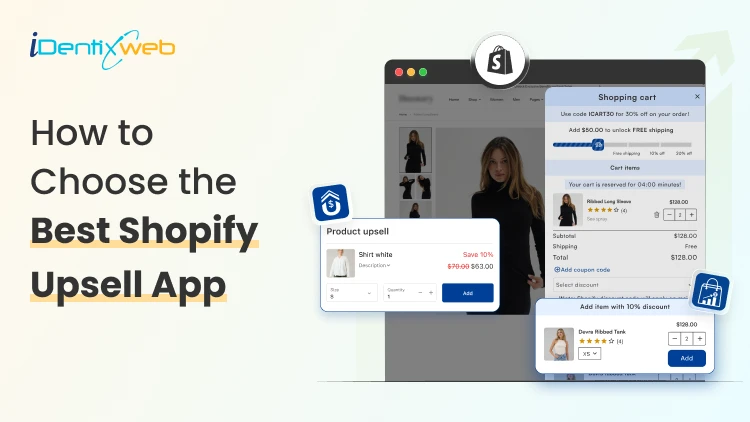
How to Choose the Best Shopify Upsell App for Your Store (9 Decision Factors That Impact ROI)
Are you making the most out of every single visitor that comes to your store? Most Shopify merchants focus almost entirely on getting more traffic. But the real revenue lever? It's often right there in your existing checkout flow, hidden in plain sight. That's exactly where the best Shopify upsell app comes in. But here's the catch: not every Shopify upsell app is built the same. In this guide, we will see 9 key decision factors that separate a high-ROI upsell app from one that just sits there collecting dust. The 9 Decision Factors That Determine ROI From Your Shopify Upsell App Before you install any app from the Shopify App Store, run it through these 9 filters. They're the factors that will determine whether your upsell app earns its keep or just adds noise to your store. Decision FactorWhat It MeansWhy It Impacts ROIUpsell PlacementWhere offers appear (cart, product, post-purchase)Wrong placement = ignored offersTrigger LogicRules that fire an upsell offerIrrelevant triggers = poor conversionsAOV ImpactAverage order value lift potentialCore ROI metric - track weeklyA/B TestingAbility to test offer variantsNo testing = leaving money on tableAnalyticsRevenue, CTR, conversion reportingBlind decisions without good dataStore SpeedPage load impact after app installSlow store = higher bounce rateDesign CustomizationMatch your brand look and feelJarring UI reduces trust & CTRPricing ModelFlat fee vs revenue shareRevenue share hurts at scaleSupport QualityResponse time and helpfulnessBad support = expensive downtime 1. Upsell Placement Options Placement is everything. An upsell shown at the wrong moment feels like an interruption. Shown at the right moment, it feels like a helpful suggestion. The best Shopify upsell apps give you multiple placement options: Product page upsells (before add-to-cart) Cart drawer or cart page upsells Checkout page upsells (available with Shopify Plus) Post-purchase / Thank You page upsells Order status page upsells For most stores, in-cart and post-purchase placements deliver the highest conversion rates because shoppers are already committed to buying. So, if you want a better app for that then you can try iCart & SellMore app because compared to other apps it is affordable and at the same time these apps provide multiple features to boost AOV & conversions. 2. Trigger Logic & Targeting Rules Showing the right upsell to the right customer at the right time is the whole game. A Shopify upsell app with smart trigger logic lets you set rules like: Show this upsell only when Cart contains Product X Trigger this offer when cart value exceeds $50 Display this bundle only to first-time visitors Upsell Product B specifically to buyers of Product A The more granular the targeting, the better your conversion rate. Apps with basic "show to everyone" logic will always underperform compared to apps that let you build conditional, product-specific rules. Irrelevant upsells don't just fail to convert, they actively annoy customers. 3. AOV Impact Your Average Order Value (AOV) is the clearest indicator of how well your upsell strategy is working. When evaluating an app, check its case studies and Shopify App Store reviews specifically for mentions of AOV improvement. Real merchant results are more reliable than vendor marketing claims. 4. A/B Testing Capabilities Even the best upsell offer can be made better. A/B testing lets you compare two versions of an upsell and see which one converts more. Without A/B testing, you're essentially guessing. With it, you're making data-driven decisions that compound over time. Ask these questions before choosing an app: Does the app support split testing of upsell offers? Can you test different placements against each other? Are test results presented clearly in a dashboard? 5. Analytics & Reporting Revenue is the goal, but you need data to get there reliably. The best Shopify upsell apps give you a clean dashboard showing: Total upsell revenue generated Click-through rate (CTR) on each offer Conversion rate by offer and placement AOV before and after upsell implementation Top-performing offers and products An app with great analytics allows you to double down on what works and cut what doesn't 6. Store Speed Impact Here's something merchants often overlook: upsell apps run JavaScript on your store. A poorly coded app can add hundreds of milliseconds to your page load time and that adds up fast. Before installing any app, check: GTmetrix or PageSpeed Insights scores after installation Whether the app uses lazy loading for its scripts Reviews on the Shopify App Store mentioning speed/performance 7. Design Customization Upsell popups and widgets that look out of place are a trust signal problem. Shoppers are sharp, they notice when something looks bolted on. The best Shopify upsell apps give you: Custom color, font, and button styling Fully responsive mobile design Control over popup timing and animation Drag-and-drop or code-level layout editing Always check if the app has design customization options before committing. 8. Pricing Model Most Shopify upsell apps charge in one of two ways: a flat monthly fee, or a percentage of the revenue generated through the app. Both models have tradeoffs. ModelBest ForWatch Out ForFlat Monthly FeePredictable costs, scales well at high revenueFixed cost even during slow monthsRevenue ShareLow upfront risk for new storesGets expensive fast as revenue grows 9. Support Quality Even the best-coded Shopify apps occasionally run into issues like theme conflicts, display bugs, feature questions. Responsive, knowledgeable support is what separates a minor hiccup from a full revenue-impacting outage. Before choosing an app, check: Average response time mentioned in reviews Whether live chat or email support is available If there's a help documentation library How the developer responds to negative reviews in the App Store Final Thoughts: Choosing the Best Shopify Upsell App Run every shortlisted app through the 9 decision factors in this guide - placement, trigger logic, AOV impact, A/B testing, analytics, speed, design, pricing, and support. Those 9 filters will cut through the noise and point you to the right choice.
Sajini Annie John
4 Min • 8 January 2026
338 Views
Bhavesha Ghatode
12 Min • 30 March 2026
953 Views
Bhavesha Ghatode
16 Min • 27 August 2025
919 Views
![Top 10 Shopify Product Reviews App in 2026 [Tried & Tested]](https://www.identixweb.com/wp-content/uploads/2025/08/12-08-Tue-Blog-Top-10-Shopify-Product-Reviews-App-in-2025-Tried-Tested-.webp "Top 10 Shopify Product Reviews App in 2026 [Tried & Tested]")
Vineet Nair
9 Min • 21 July 2026
1086 Views
Bhavesha Ghatode
12 Min • 16 January 2026
993 Views
Bhavesha Ghatode
11 Min • 6 February 2026
1034 Views

Bhavesha Ghatode
12 Min • 23 June 2026
1138 Views
Bhavesha Ghatode
10 Min • 23 March 2026
1035 Views
Bhavesha Ghatode
14 Min • 14 May 2026
1144 Views
Vineet Nair
11 Min • 11 August 2026
1174 Views
Bhavesha Ghatode
13 Min • 23 January 2026
1350 Views
![How to Add Estimated Delivery Date and Time on Shopify [Updated 2026]](https://www.identixweb.com/wp-content/uploads/2024/11/26-11-Wed-Blog-How-to-Show-Estimated-Delivery-Date-Time-on-Shopify_.webp "How to Add Estimated Delivery Date and Time on Shopify [Updated 2026]")
Bhavesha Ghatode
6 Min • 23 January 2026
2377 Views