






You have a Shopify store, you keep watching products blow up on TikTok, and you want in. The good news is the TikTok Shopify integration is free, and it just needs one app.
The TikTok for Shopify app, listed simply as TikTok in the Shopify App Store, connects your store to TikTok Shop. Your products, prices, and stock levels sync automatically.
Shoppers buy inside the TikTok app without ever visiting your website, and those orders drop into your Shopify admin.
eMarketer put TikTok Shop as the fastest-growing social media channel with US sales at $15.82 billion in the previous year.
I have walked new store owners through this setup enough times to tell you the connection part is easy. The tough part is getting your product data clean before you connect.
My guide covers what you need before you start, the full setup, exactly what syncs and what does not, and what selling on TikTok Shop really costs you.
What does the TikTok Shopify integration actually do?
- Your Shopify products, prices, and inventory push to TikTok Shop automatically, and updates you make in Shopify carry over.
- TikTok Shop orders are stored in your admin alongside every other order, tagged with TikTok as the sales channel.
- Fulfillment status and tracking sync back to TikTok, and the buyer gets shipping notifications inside the app.
- Sales tax on US orders is collected and remitted by TikTok, because TikTok is the marketplace facilitator on those sales.
The part worth understanding before you start: The customer checks out inside TikTok. You get the order and the money, but TikTok owns the checkout and the customer relationship. That trade is the whole reason the channel converts as well as it does.
What are the requirements to connect TikTok Shop to Shopify
- Your Shopify store has to be based in one of the markets where TikTok Shop supports the Shopify sales channel: the United States, United Kingdom, Spain, Ireland, France, Italy, Germany, Mexico, Japan, or Brazil.
- Your store address in Settings > Locations has to be real and verifiable. TikTok checks it against Google Maps. If your Shopify address does not match what Google Maps shows, your product sync will fail.
- Your location name has to be 35 characters or fewer. Your phone number has to be 10 digits. Your zip code has to be 5 digits. P.O. Box addresses are not accepted as warehouse locations.
- You need a published return policy page on your store. TikTok will not approve a shop without one.
- You need a TikTok for Business account.
- Your products need to meet TikTok's prohibited products policy for your market. Read the one for where you sell before you sync anything.
- TikTok also requires three product fields that Shopify treats as optional. Fill them in before you sync, or your listings will bounce: Product weight, product dimensions, product certification.
- TikTok's own listing standards ask for at least 5 high-resolution images per product and titles between 25 and 200 characters.
The one you need to understand: One Shopify store connects to exactly one TikTok Shop account.
How to add TikTok Shop to your Shopify store
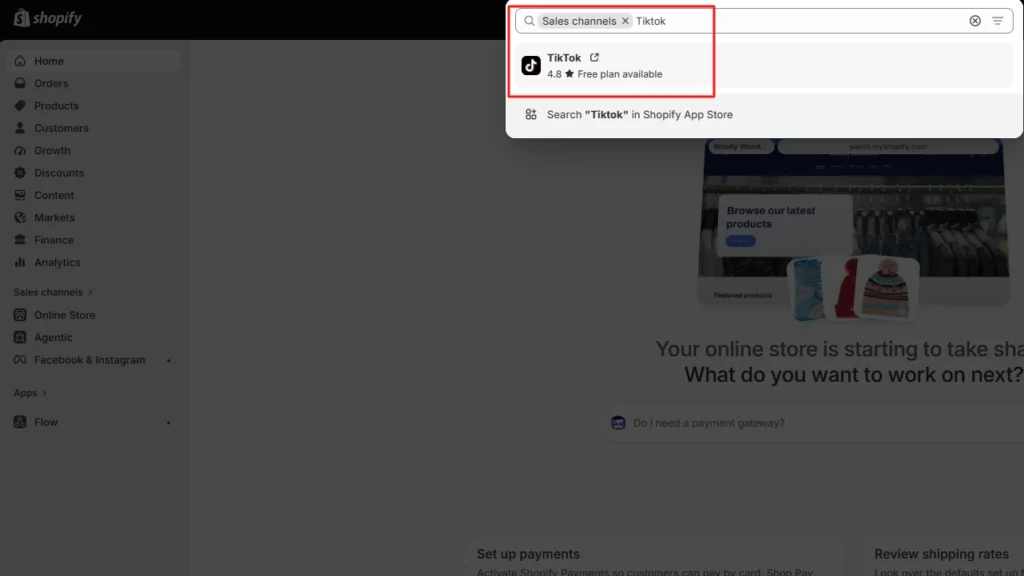
Step 1: Install the TikTok app
From your Shopify admin, go to Sales channels and search for TikTok.
Step 2: Connect or create your TikTok Shop account
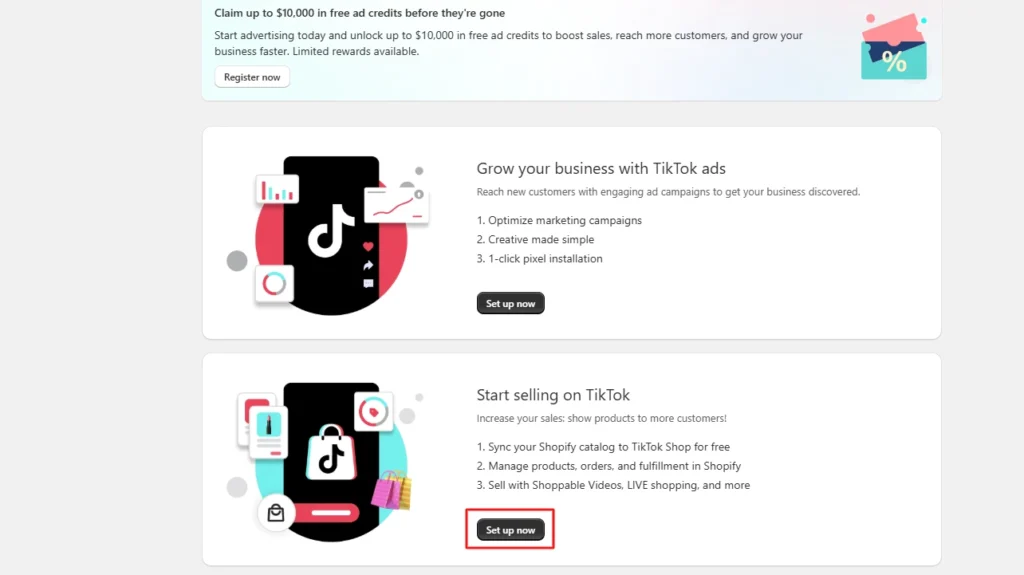
Open the app and click Set up now on the ‘Start selling on TikTok’ card.
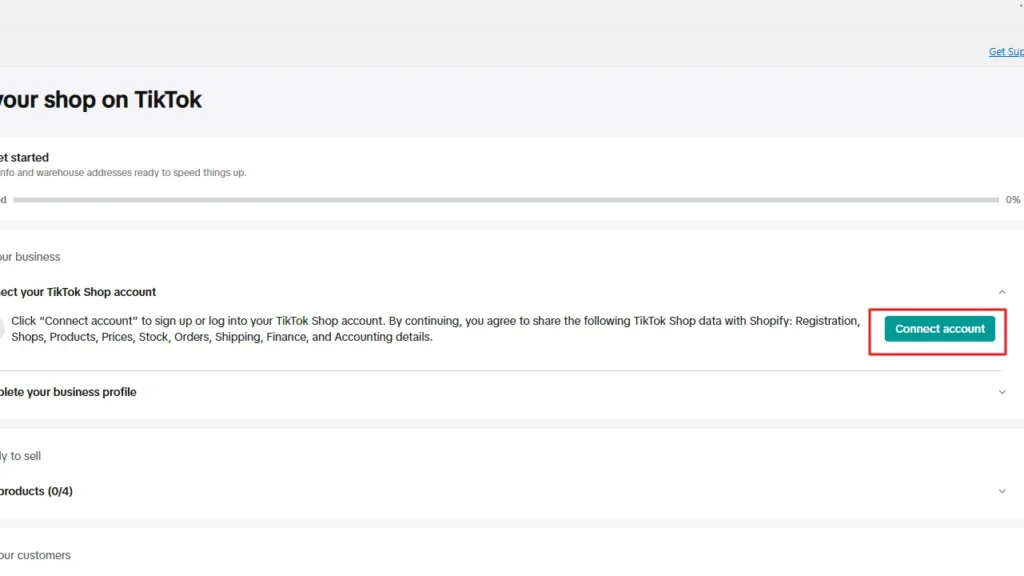
If you already have a TikTok Shop, you can connect your account and log in.
Step 3: Verify your business
Click Complete profile and enter your business details. You will upload identification documents, and TikTok will review them.
Plan for it to take a couple of days before your shop status moves from Pending account review to Ready.
Step 4: Set up warehouses and shipping
Click Add warehouse. The app pulls the locations you already have saved in Shopify and maps them as your TikTok Shop warehouse and return address.
You choose which of your Shopify locations sync to TikTok Shop, so you are not forced to expose every warehouse.
New US sellers default to TikTok Shipping, where you generate labels in TikTok Seller Center rather than in Shopify.
You can switch to Shipped by Seller in Seller Center under Shipping Options if you would rather use your own carriers and 3PL. If you go that route, complete your shipping fee template before you upload products.
Step 5: Sync your product catalog
The first sync runs automatically during onboarding. Later, you can add products, change prices, edit descriptions, adjust inventory- all of it in Shopify.
Changes push to TikTok Shop automatically. Edits you make inside TikTok Seller Center get overwritten on the next sync.
If you were already selling on TikTok Shop before connecting Shopify, you have to map your existing Seller Center listings to the matching Shopify products before setup will finish.
What syncs between Shopify and TikTok Shop
Syncs automatically from Shopify to TikTok Shop
- Product fields, including title, description, images, and price.
- Product variants, including additions and deletions.
- Inventory levels.
- Publishing status, so unpublishing a product from the TikTok channel removes it from your shop.
- Promotions and discounts, in supported cases.
Syncs from TikTok Shop back to Shopify
- New orders, which appear in your Shopify orders list with TikTok in the Channel column.
- Order status changes, including cancellations.
- Fulfillment status, when TikTok Shipping generates the label.
- Tax breakdown at line-item level, with a flag showing whether TikTok or you is responsible for remitting.
Does not sync
- Returns and refunds.
- Your affiliate program, commission rates, and creator collaborations.
- Your ad campaigns.
- Shop performance metrics and account health.
How to get your first TikTok Shop sale
Shoppable videos
Post a video, tag a product, and a product card appears under it. Viewers tap and buy in the app.
In my experience, phone footage that looks like a real person talking outperforms polished brand content, consistently. Show the product doing the thing it does in the first two seconds.
The affiliate program
This is where most of TikTok Shop's volume comes from.
You set a commission rate in the Seller Center, and creators promote your products for a cut of each sale. There are two modes.
- Open Collaboration lists your product publicly at one rate, and any approved creator can pick it up without asking you.
- Targeted Collaboration lets you invite specific creators at a custom rate, usually higher.
Start with Open Collaboration to see whether creators bite at all, then move your best performers into Targeted deals.
TikTok LIVE
Live selling converts well because you can answer objections in real time and demo the product properly.
It is also a real-time commitment. I would not make it your first move, but it is worth testing once you have products that are already converting from video.
Shop Ads with GMV Max
When you want to pay for reach, GMV Max is the campaign type. You set a daily budget and a target return, and TikTok's system picks the creative, the audience, and the placements.
The limitation here is that there is no manual audience targeting, keyword list, or bid adjustments.
The sequence I would follow: post organic content first and let it run for a day or two, find whichever videos are getting genuine traction, then put the budget behind those.
Starting with GMV Max on cold creative tends to burn money while the system figures out what works.
Is TikTok Shopify integration worth setting up?
For most Shopify merchants, TikTok Shop is worth testing if your products are visual, easy to demonstrate, or already suited to short-form content.
The TikTok Shopify integration keeps your catalog, inventory, orders, and fulfillment connected, so you can focus more on content and sales instead of managing two separate systems.
Get your product data, shipping settings, and policies right first, then connect the TikTok app and start testing what your audience responds to.
FAQs
1. Do you need Shopify for TikTok?
No, you do not need Shopify to sell on TikTok Shop. TikTok Shop allows merchants to sell directly through TikTok, but connecting Shopify can help manage products, inventory, orders, and customer data from one centralized dashboard.
2. Can you link your Shopify to TikTok Shop?
Yes, you can connect Shopify with TikTok Shop using the official TikTok sales channel app available in the Shopify App Store. Once connected, you can sync products, manage TikTok orders, run ads, and track performance without maintaining separate catalogs.
3. How to integrate Shopify with TikTok?
To integrate Shopify with TikTok, install the TikTok sales channel from Shopify, connect your TikTok Business account, and configure your product catalog, shipping settings, and payment details. The integration allows automatic product syncing, TikTok Pixel setup, and campaign management directly from Shopify.
4. How to advertise a Shopify store on TikTok?
You can advertise a Shopify store on TikTok by connecting Shopify with TikTok Ads Manager and creating campaigns using product catalogs, videos, or dynamic product ads. Successful TikTok ads usually focus on short-form videos, creator-style content, and product demonstrations that match how users consume content on the platform.
5. How to add the TikTok Pixel to Shopify?
You can add the TikTok Pixel to Shopify by installing the TikTok sales channel app and connecting your TikTok Business account, which automatically enables tracking in many cases. Alternatively, you can manually add the pixel through Shopify’s customer events settings or theme code, but the official integration is recommended because it supports better event tracking for Shopify actions like product views, add-to-cart, and purchases.

About the author
Sagarika Das
Sagarika Das is a content writer with a passion for the ecommerce world. She crafts engaging, SEO-friendly content that helps online businesses connect with customers and grow.