



A Shopify store can run with just a theme, products, payments, and basic shipping settings.
But once orders start coming in, you quickly realize one thing: a store needs more than a good-looking website.
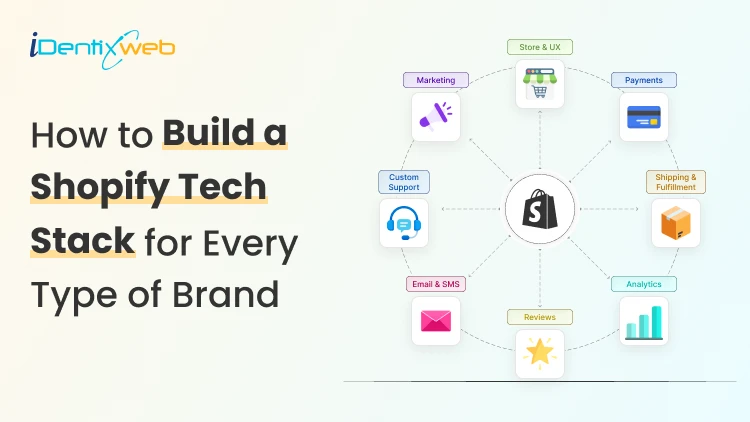
A Shopify tech stack is the set of tools, apps, and systems you use to run your store. It includes tools for design, marketing, customer support, fulfillment, analytics, inventory, automation, and backend operations.
For me, the best Shopify tech stack is the one that solves the right problems without making the store slow, expensive, or hard to manage.
In my years of experience in the Shopify domain, here’s my suggested Shopify tech stack for key areas of operation in your store.
A quick overview of my recommended Shopify tech stack
| Ecommerce Tech Stack Area | Recommended Tools |
| Store Design & Frontend | Shopify Themes, PageFly, Shogun, Shopify Translate & Adapt, Shopify Hydrogen |
| Cart & Checkout | iCart, SellMore, Shopify Plus Checkout |
| Marketing | Klaviyo, Judge.me, Loox, Shopify Collabs, ReferralCandy, Yotpo |
| Customer Support | Shopify Inbox, Gorgias, Zendesk, Tidio |
| Shipping & Fulfillment | Stellar Delivery Date & Pickup, ShipStation, Shippo, Easyship, AfterShip |
| Backend & Automation | Shopify Flow, Matrixify, Mechanic, NetSuite, Cin7, Brightpearl |
| Analytics & Reporting | Shopify Analytics, GA4, Google Tag Manager, Microsoft Clarity, Hotjar, Triple Whale |
| Inventory Management | Shopify Search & Discovery, Matrixify, Stockie, Sumtracker |
| Payments & Accounting | Shopify Payments, PayPal, Stripe, QuickBooks, Xero, A2X, Avalara, TaxJar |
| Shopify Plus Stack | NetSuite, SAP Business One, HubSpot, Salesforce, Wholesale Hero, Wholesale Club, Shopify Markets |
For frontend and store design
Your frontend is what customers see first. It includes your homepage, product pages, collection pages, navigation, images, menus, and mobile layout.
For a new Shopify store, I would start with a fast Shopify theme and keep the design simple. Useful frontend tools can include:
- Shopify themes
- Page builders
- Product filter apps
- Image optimization tools
- Translation and currency apps
Tools like PageFly, Shogun, and Shopify Translate & Adapt can help when your store needs more control. Shopify also groups apps under categories like store design, marketing, orders and shipping, and store management, which shows how wide a Shopify tech stack can become.
For a Shopify Plus tech stack, brands use Headless Commerce Tech with Shopify Hydrogen or a custom frontend when they need more speed, design control, and flexibility.
Cart and checkout tools
The cart is one of the most important parts of your Shopify tech stack. For growing stores, I usually recommend improving the cart before adding advanced tools everywhere else. You can use cart tools for:
- Product recommendations
- Cart page upsells
- Cross-sells
- Product bundles
- Free shipping progress bars
- Discount offers based on cart value
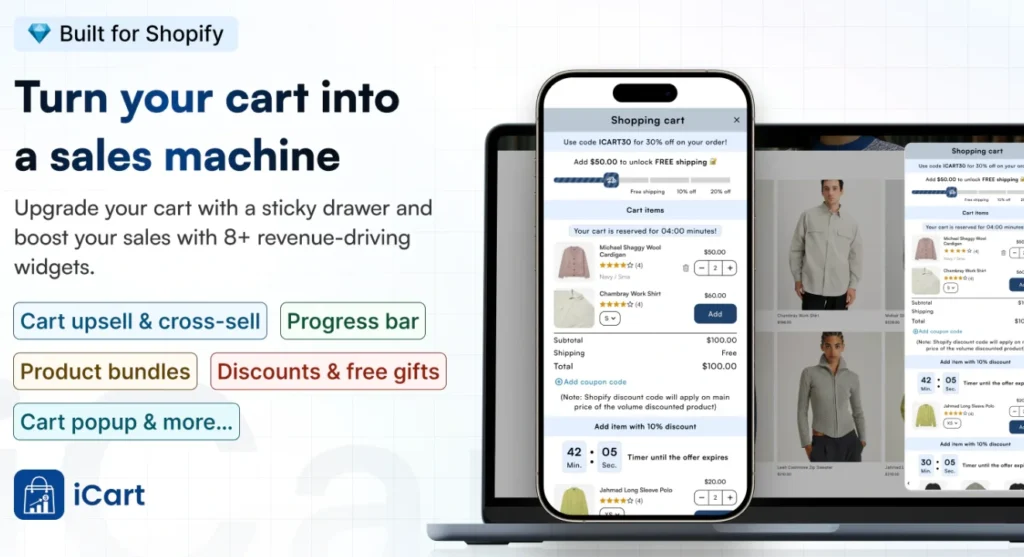
For example, apps like iCart Cart Drawer Cart Upsell can help with cart page upsells, progress bars, product bundles, and cart-based offers.
Shopify Plus stores may also need checkout customization, B2B checkout rules, custom promotions, or advanced payment flows.
For regular stores, a simple cart experience with relevant offers often works better than a crowded checkout journey.
Marketing tools
It helps you bring shoppers back, collect leads, recover abandoned carts, and build customer relationships.
A basic marketing stack should include email capture, abandoned cart emails, review requests, and campaign tracking. After your store grows, you can add SMS, loyalty, referrals, segmentation, and advanced customer journeys.
Common tools I use in the Shopify tech stack include:
- Klaviyo for email and SMS
- JudgeMe or Loox for reviews
- Shopify Collabs for creator campaigns
- ReferralCandy for referrals
- Yotpo for loyalty and reviews
Customer support tools
Customer support becomes important faster than many store owners expect. As soon as customers start asking about shipping, returns, product details, and order status, you need a better way to manage replies.
Here’s my Shopify tech stack for customer support:
- Shopify Inbox
- Gorgias
- Zendesk
- Tidio
All these tools have been tried and tested. You can pick and choose which one suits you best.
Order fulfillment and shipping tools
Fulfillment tools help you move orders from the store to the customer without confusion. For small stores, Shopify’s basic shipping setup may be enough. As order volume grows, fulfillment becomes harder to manage manually.
Shipping and fulfillment tools can help with:
- Shipping labels
- Tracking updates
- Returns
- Local delivery
- Store pickup
- Delivery date selection
- Warehouse and 3PL connections
The most useful tool I used for this is Stellar Delivery Date & Pickup because of how easy it is to set up local delivery and pickup in the storefront.
ShipStation, Shippo, Easyship, and AfterShip are also good choices.
Backend and automation Tools
Backend tools help you manage the store behind the scenes. They save time by reducing manual tasks.
A simple backend stack can include tools for bulk editing, inventory alerts, tagging, fraud checks, and internal notifications. Larger stores may need ERP, OMS, PIM, warehouse tools, and deeper integrations.
Popular backend and automation tools include:
- Shopify Flow
- Matrixify
- Mechanic
- NetSuite
- Cin7
- Brightpearl
Analytics and reporting tools
Analytics tools show what is working and what is wasting money. Without tracking, store owners often make decisions based on guesses.
There are a lot of basic analytics and reporting tools you can add to your Shopify tech stack
- Shopify Analytics
- GA 4
- Google Tag Manager
- Microsoft Clarity
- Hotjar
- Triple Whale
Track the basics first: conversion rate, average order value, traffic source, cart abandonment, repeat purchase rate, and product performance.
Inventory and product management tools
Inventory problems can hurt customer trust. Overselling, wrong stock levels, missing variants, and poor product data can create refund requests and support tickets.
I have my fair share of problems with tech stacks in inventory. From my years of experience, I have narrowed down these tools.
- Shopify Search & Discovery
- Matrixify
- Stockie inventory management
- Sumtracker inventory manager
Payments, finance, and accounting Tools
Payments and finance tools sit at the core of your Shopify tech stack. They help you track money, taxes, invoices, fees, profit, and reconciliation.
Common tools include Shopify Payments, PayPal, Stripe, QuickBooks, Xero, A2X, Avalara, and TaxJar.
My advice for new stores is to set up payments, tax settings, and accounting properly from day one. Growing stores should automate reconciliation because manual finance work becomes messy as orders increase.
Shopify Plus tech stack tools
A Shopify Plus tech stack is built for stores that need more control, automation, and stronger backend systems. At this stage, a basic app setup is usually not enough because the store may be handling higher order volume, multiple markets, B2B buyers, custom checkout needs, or complex fulfillment workflows.
For Shopify Plus stores, the tech stack can include tools for ERP, CRM, checkout customization, international selling and B2B. Here are the tools that I usually add in Shopify Plus tech stack.
- ERP tools like NetSuite or SAP Business One
- CRM tools like HubSpot or Salesforce
- Checkout customization tools like SellMore or Shopify Plus checkout
- B2B tools like Wholesale Hero or Wholesale Club
- Local and International selling tools like Shopify Markets
Build your Shopify ecommerce tech stack in 2026
A strong Shopify tech stack should make your store easier to run and easier to buy from.
Start with a clean theme, basic marketing, reviews, analytics, support, and shipping. Growing stores should focus on cart optimization, email, fulfillment, automation, and reporting.
Shopify Plus stores should invest in stronger backend systems, B2B workflows, checkout flexibility, and deeper integrations.
FAQs
1. What is a tech stack for Shopify?
A Shopify tech stack is the group of tools, apps, and integrations you use to run your online store. It can include tools for store design, marketing, customer support, cart upsells, fulfillment, analytics, inventory, payments, and backend automation.
2. Which is the best technology stack for my Shopify store?
The best technology stack for your Shopify store depends on your store size, product type, budget, and current growth stage. As a Shopify expert, I always suggest starting with the basics first, like a good theme, email marketing, reviews, analytics, customer support, and fulfillment tools, before adding advanced apps.
3. How much should I spend on my Shopify ecommerce tech stack?
Your tech stack budget should match your sales volume and business needs. New stores should keep the stack simple and affordable, while growing stores can invest more in cart optimization, automation, analytics, support, and fulfillment tools that directly save time or improve revenue.
4. What should a common Shopify tech stack look like?
A common tech stack for Shopify should include tools for storefront design, email marketing, product reviews, customer support, shipping, analytics, payments, and basic automation. As the store grows, you can add tools for upselling, product bundles, loyalty, returns, inventory management, and advanced reporting.




About the author
Vineet Nair
Vineet is an experienced content strategist with expertise in the ecommerce domain and a keen interest in Shopify. He aims to help Shopify merchants thrive in this competitive environment with technical solutions and thoughtfully structured content.