



Shopify has completed one of its biggest checkout customization changes.
Shopify Scripts stopped running on June 30, 2026, and Shopify Functions are now the main way to add custom business rules to carts and checkout.
Merchants on any Shopify plan can use public apps built with Shopify Functions. This gives more stores access to advanced discounts, product bundles, delivery rules, payment controls, and checkout validation without asking merchants to manage code themselves.
What are Shopify Functions?
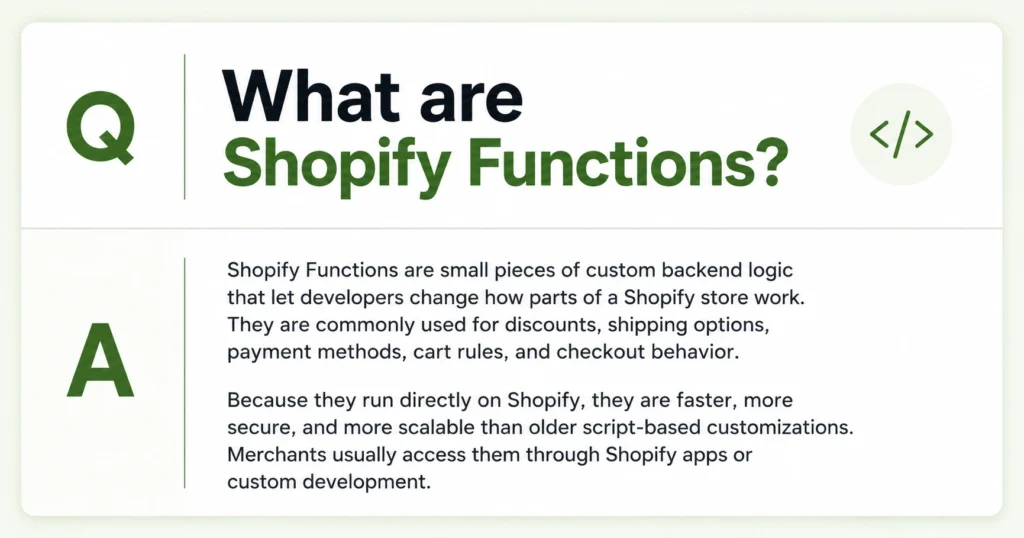
Shopify Functions are small pieces of backend logic that change how Shopify handles important parts of the buying process.
A Function can tell Shopify to:
- Apply a discount when a cart meets specific conditions
- Combine several products into a bundle
- Hide an unsuitable shipping option
- Stop checkout when an order breaks a business rule
- Choose how an order should be routed or fulfilled
The Function runs on Shopify’s infrastructure during the cart or checkout process. It receives information about the cart, applies the business rules, and sends Shopify a list of actions to perform.
What is the latest Shopify Functions update?
The most important current update is that Shopify Scripts are gone.
Shopify stopped merchants from editing or publishing Scripts on April 15, 2026. All remaining Scripts stopped executing on June 30, 2026.
Now merchants need to recreate rules using:
- A public app built with Shopify Functions
- A custom app using Shopify Function APIs
This update makes the customization system easier to distribute and manage. Shopify Functions are packaged inside apps, and it follows a simple process:
- A customer changes their cart or moves through checkout.
- Shopify sends the Function the information it needs.
- The Function checks that information against its rules.
- It returns an instruction to Shopify.
- Shopify applies that instruction to the cart or checkout.
For example, a merchant may create a tiered discount with these rules:
- Spend $100 and receive 10% off
- Spend $150 and receive 15% off
- Spend $200 and receive free shipping
The Shopify Functions app reads the cart value and returns the correct discount. Shopify then applies it during the buying process.
Functions run in a specific order. Cart transformations happen first, followed by product and order discounts, fulfillment logic, delivery rules, shipping discounts, payment changes, and checkout validation.
This order matters when several apps are changing the same cart.
What can merchants customize with Shopify Functions?
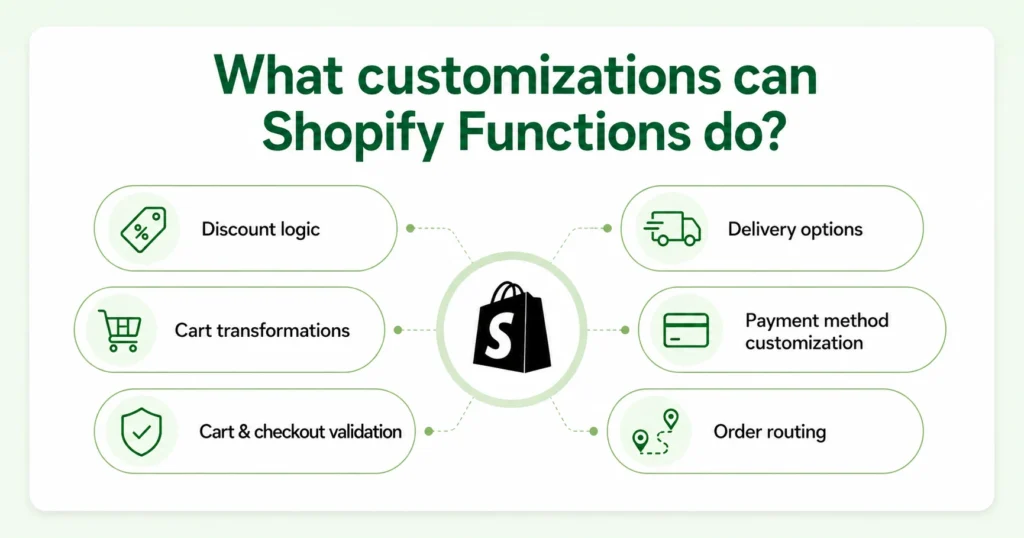
1. Product, order, and shipping discounts
The current Discount Function API can create discounts across three areas:
- Products
- The complete order
- Shipping or delivery
Use cases for merchants include:
- Tiered discounts
- Quantity breaks
- Buy X, get Y offers
- Customer-tag discounts
- Discounts for selected products or collections
- Shipping discounts based on cart value
- Discounts for products with custom properties
This gives merchants more control than Shopify’s standard discount settings when the offer depends on several conditions.
2. Product bundles and cart changes
Cart Transform Functions change how products appear and behave inside the cart.
Apps can use them to:
- Merge multiple products into one bundle
- Expand a bundle into its individual components
- Add required products or services
- Change how bundle items are presented
- Build mix-and-match bundles
Shopify allows Cart Transform apps on different plans. So check the app’s plan requirements instead of assuming every Cart Transform feature is available on every plan.
3. Delivery option customization
Delivery Customization Functions can rename, reorder, or hide delivery options at checkout.
A merchant could use these rules to:
- Hide express shipping for products that require preparation
- Place local delivery above standard shipping
- Hide delivery methods for particular customer groups
- Remove unsuitable options for specific addresses
- Prioritize a preferred delivery service
Shopify currently allows up to 25 active delivery customization Functions on a store. Availability may still depend on the app, checkout surface, shipping setup, and the data available to the Function.
4. Payment method customization
Payment Customization Functions control which payment choices customers see and how those choices are presented.
They can help merchants:
- Hide cash on delivery for high-value orders
- Hide a payment option in selected countries
- Add payment terms for eligible B2B customers
- Send qualifying B2B orders for review
Wallets such as Shop Pay, Apple Pay, and Google Pay have specific limitations. For example, wallets can be removed from certain checkout sections but cannot be reordered, and their branded names cannot be changed.
5. Cart and checkout validation
Validation Functions prevent customers from completing an order when the cart does not meet the merchant’s rules.
Examples include:
- Limiting the quantity of a high-demand product
- Requiring a minimum order amount
- Preventing incompatible products from being purchased together
- Checking a purchase order number
- Restricting purchases based on billing information
- Displaying an error message when a rule fails
These validations run on Shopify’s backend. They can also apply to accelerated checkouts such as Shop Pay, PayPal, Apple Pay, and Google Pay.
6. Fulfillment and order routing
Shopify Functions can help determine how an order should be fulfilled after checkout.
A merchant may use them to:
- Prioritize a warehouse
- Prevent an order from being split across several locations
- Apply fulfillment restrictions
- Route orders based on stock, destination, or operational rules
- Choose a different fulfillment location for particular orders
These features are useful for merchants with multiple warehouses, retail stores, and regional fulfillment centers.
7. Local pickup and pickup options
Functions include tools for generating local pickup options, pickup-point delivery options, and local pickup charges.
This can support cases where a merchant needs to:
- Generate pickup choices based on the customer’s location
- Provide pickup points from an external network
- Charge a fee for selected pickup services
What is the Shopify Functions app?
A Shopify Functions app is an app that includes one or more Shopify Functions.
The app developer writes the backend logic and creates a merchant-facing interface for configuring it. The merchant can then install the app and create rules without editing the Function’s source code.
For example, a discount app might allow a merchant to choose:
- Eligible products
- Customer tags
- Minimum quantities
- Discount values
- Campaign dates
- Market or country conditions
The app converts those settings into configuration data that its Function can use when Shopify processes a cart.
Are Shopify Functions available on all Shopify plans?
Yes, it is. Public Shopify Functions apps can be used by stores on any Shopify plan, except where Shopify places a restriction on a particular API, operation, checkout feature, or app.
However, merchants should still review:
- The app developer’s supported plans
- Restrictions for the specific Function operation
- Checkout and sales-channel compatibility
- Whether the app requires Shopify Plus features
- Limits involving subscriptions, POS, draft orders, or accelerated checkout
Are Shopify functions available only on Shopify Plus?
No. Shopify Functions are not available only on Shopify Plus.
Stores on any plan can use approved public apps from the Shopify App Store that contain Functions. However, Plus is required for specific advanced operations. Here’s a breakdown.
| Requirement | Plan availability |
| Install a public Functions app from the Shopify App Store | Any Shopify plan, subject to feature restrictions |
| Build and install a custom app containing Shopify Functions | Shopify Plus |
| Use advanced operations marked as Plus-only | Shopify Plus |
| Use restricted network access for some Function targets | Shopify Plus or Enterprise, depending on the API |
How does the latest Functions update help merchants?
More customization without managing code
Shopify Functions can be delivered and configured through apps. Therefore, most merchants can use advanced rules without seeing or editing the Function code.
Better performance during busy sales
Shopify says Functions execute in under 5 milliseconds on its WebAssembly platform. This is helpful during the busiest shopping days of the year.
Easier maintenance
A Functions app can be updated and distributed by its developer. Merchants do not need to copy updated code into every store. This can make ongoing maintenance easier.
More consistent backend rules
Theme customizations may behave differently across online storefronts, accelerated checkout buttons, mobile apps, and other sales channels.
Functions operate in Shopify’s backend, which can make business rules more reliable across supported surfaces. However, each Function API has its own compatibility table, so merchants must still verify whether it supports POS, subscriptions, draft orders, accelerated checkout, and other relevant channels.
Shopify Scripts to Shopify Functions migration guide
Step 1: Open the Shopify Scripts customizations report
From Shopify admin:
- Go to Apps
- Open the Script Editor app (Only available till July 30, 2026)
- Find the Replace your Shopify Scripts banner
- Click Replace Shopify Scripts
The report lists previously active customizations under areas such as product discounts, shipping, and payment gateways.
It may also provide recommended apps and relevant Shopify Functions tutorials.
Step 2: Decide which rules still matter
Do not recreate every old Script automatically.
For each customization, ask:
- Is the rule still used?
- Does it still support the current sales strategy?
- Does Shopify now provide a native feature for it?
- Can one app replace several Scripts?
- Did the Script conflict with other discounts or checkout apps?
Step 3: Document the original behavior
Write down the exact conditions and results for every rule you want to keep.
Include:
- Eligible customers
- Eligible products
- Minimum cart values
- Quantity requirements
- Discount amounts
- Shipping conditions
- Payment conditions
- Markets and currencies
- Exclusions
- Combination rules
- Error messages
Do not select a replacement app based only on a similar feature name. Confirm that it can reproduce the complete business rule.
Step 4: Choose a public app or custom development
A public app is usually suitable when the requirement involves common use cases such as:
- Tiered discounts
- Free gifts
- Bundles
- Shipping rules
- Payment restrictions
- Quantity limits
Custom development may be necessary when the logic depends on proprietary workflows, unusual data, complex B2B rules, or several connected systems.
Remember that a custom app containing Shopify Functions requires Shopify Plus.
Step 5: Rebuild the rules
Configure the replacement using the chosen Shopify Functions app or custom app.
Keep the first version as close as possible to the original Script behavior. Avoid adding unrelated changes during migration because that makes problems harder to identify.
Step 6: Test every important scenario
Test more than one successful checkout.
Cover:
- Eligible and ineligible customers
- Minimum and maximum cart values
- Discount combinations
- Different countries and currencies
- Mobile and desktop checkout
- Shop Pay and other accelerated checkouts
- Subscriptions
- Draft orders
- Local delivery and pickup
Shopify documents different compatibility levels for each Function API. A rule that works during standard online checkout may behave differently with subscriptions, draft orders, order editing, or POS.
Step 7: Monitor live orders
After launch, monitor:
- Discount amounts
- Shipping charges
- Payment availability
- Checkout errors
- Bundle inventory
- Order routing
- Customer support tickets
- App execution errors
Pricing and checkout logic should be treated as revenue-critical functionality. Review it after app updates, Shopify API changes, theme changes, and major campaign launches.
Important Shopify Functions limitations
Functions have resource limits
Shopify sets limits on compiled size, memory, input size, output size, and execution instructions. Functions must be efficient because they run during key purchase steps. This means extremely complex rules may need to be simplified or split into a better data structure.
App conflicts are still possible
Several discount Functions can run at the same time, but they do not communicate directly with each other.
Shopify evaluates its results using the discount combination settings attached to each discount. Check the combinations between discount, bundle, gift, subscription, shipping, and checkout apps before launching a major campaign.
Do you need a developer to use Shopify Functions?
You do not need a developer when a public Shopify Functions app already supports your use case.
A developer becomes useful when:
- No existing app matches the rule
- The logic depends on custom data
- Several systems need to work together
- Your store has complex B2B requirements
- You are replacing heavily customized Shopify Scripts
- The rule affects several checkout stages
- You need a custom Functions app on Shopify Plus
Final thoughts
Shopify Functions have moved advanced commerce logic away from the old Script Editor and into a faster, app-based system.
Merchants can create more relevant discounts, flexible bundles, safer checkout rules, clearer delivery options, and better payment experiences without coding.
Shopify Functions are also available across Shopify plans, while custom Functions apps and some advanced capabilities remain restricted to Plus or Enterprise.
Start with the business rule you need, confirm the app and plan compatibility, and test the complete customer journey before publishing it.
FAQs
1. What are Shopify Functions?
Shopify Functions are backend rules that customize how Shopify handles discounts, carts, delivery, payments, validation, fulfillment, and other parts of checkout. They are delivered through apps and run on Shopify’s infrastructure when customers shop.
2. What is a Shopify Functions app?
A Shopify Functions app is a public or custom Shopify app that contains one or more Functions. It gives merchants an interface for configuring the Function’s rules without editing its underlying code.
3. Are Shopify Functions available on all Shopify plans?
Public apps containing Shopify Functions can be installed on any Shopify plan unless the app or specific Function capability has additional restrictions. Merchants should check the app listing and Shopify API documentation for plan and checkout compatibility.
4. Are Shopify Functions available only on Shopify Plus?
No. Public Shopify Functions apps can work on Basic, Grow, Advanced, and Plus plans. Shopify Plus is required for custom apps containing Shopify Functions and for some advanced operations.
5. What replaced Shopify Scripts?
Shopify Functions replaced Shopify Scripts for custom discount, shipping, payment, cart, and checkout logic. Shopify Scripts stopped executing completely on June 30, 2026.
6. What is the difference between Shopify Functions and Shopify Scripts?
Shopify Scripts used Ruby code in the Script Editor and were available only to Shopify Plus merchants. Shopify Functions run through apps on Shopify’s backend, and public Functions apps can be used across Shopify plans. Functions are faster, easier to maintain, and support more customization areas, while Scripts were fully discontinued on June 30, 2026.



About the author
Vineet Nair
Vineet is an experienced content strategist with expertise in the ecommerce domain and a keen interest in Shopify. He aims to help Shopify merchants thrive in this competitive environment with technical solutions and thoughtfully structured content.