



I ran a Shopify store years ago before becoming an expert in the Shopify domain. So I know how hard it becomes to manage when small tasks start piling up every day.
One customer asks about delivery. Another leaves the cart. A product goes out of stock. A repeat buyer does not get any special offer. The team forgets to tag an order. Someone has to check the low inventory again.
I have experienced this a lot while being a merchant and now working with Shopify store owners. The store is growing, but the backend still runs manually.
That is where Shopify automation make a real difference.
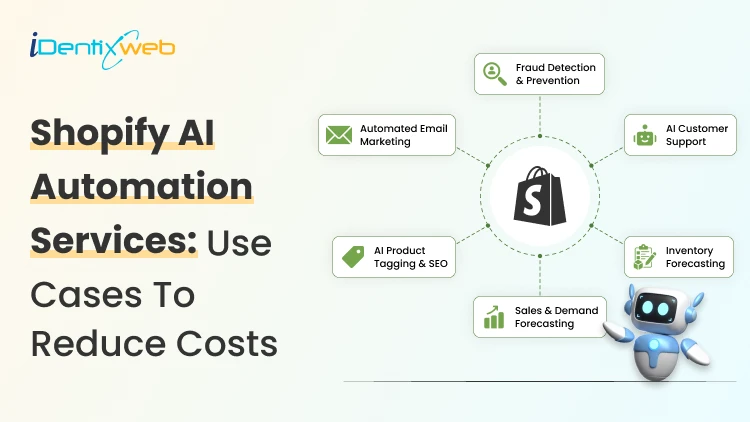
Shopify AI automation is about removing repeated work from your daily routine. AI adds more value by helping with faster replies, better product copy, smarter customer segmentation, and more useful marketing flows.
By the end of this blog, you will understand the areas where you can automate your workflow and how a good automation setup helps you reduce cost and manual work.
What can I automate in my Shopify store?
To understand the workflows you can automate in your system. First, you need to note down the process. Here’s what I do for that.
Step 1: Start with the tasks that waste time
Always start with your daily routine. Write down every task you or your team repeats. Check where time is going. Look for tasks that happen again and again.
Common examples include:
- Sending cart reminders manually
- Checking low stock
- Tagging customers
- Answering common questions
- Updating teams about order status
One of the easiest workflows to automate is email follow-up. Shopify automation emails can handle abandoned cart reminders, welcome emails, review requests, and win-back messages without manual effort. Klaviyo is a great tool to use to automate this process.
Step 2: Build one workflow at a time
I have seen multiple automation workflows that complicated matters for me to optimized the automation tasks. Many store owners try to automate everything at once. Do not do that. Start small.
Use a simple logic:
- Trigger: What starts the automation?
- Condition: What rule should be checked?
- Action: What should happen next?
Example:
A customer places an order. The order value is above $200. The store tags the customer as high value.
Step 3: Choose tools based on the job
A new store does not need ten automation apps. Use apps based on the workflow you need.
For example:
- Shopify Flow for backend workflows
- Klaviyo for Shopify automation emails and SMS
- iCart for AI-powered product recommendations
iCart can help you show AI-powered product recommendations inside the cart based on what shoppers add.
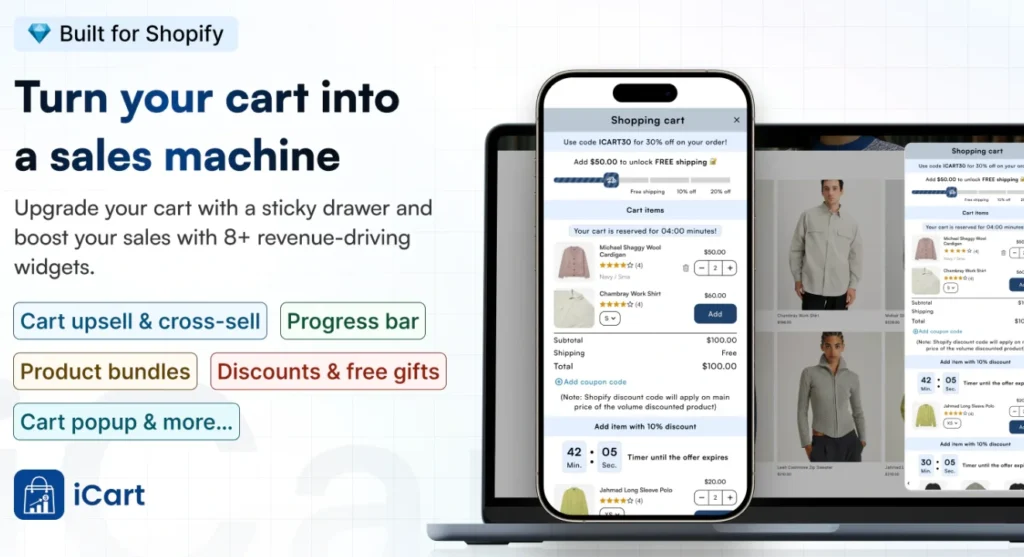
Instead of showing random products, you can guide customers toward useful add-ons, bundles, or higher-value options. This makes the cart feel more helpful and can improve average order value without adding extra manual work.
Expert tip for marketing automation for Shopify
Customer journeys perform better when they follow real customer actions. With marketing automation, you can create separate messages for first-time buyers, repeat customers, cart abandoners, and high-value customers.
It keeps your emails relevant, reduces generic promotions, and helps you reach customers when they are more likely to buy.
Step 4: Test before making it live
Wrong automation can create a bad customer experience. This is why you always check your automation workflow.
This is a checklist of questions I ask myself before going live:
- Is the trigger working?
- Is the right customer getting the message?
- Are tags applying correctly?
- Are duplicate emails going out?
Step 5: Measure what changed
If you are using Shopify AI automation, you need to know if it's actually benefiting you or not. Track ecommerce metrics like:
- Bounce rate
- Cart recovery rate
- Email revenue
- Repeat purchase rate
- Support tickets reduced
- Order processing speed
- Manual errors reduced
What are the key aspects of good Shopify automation?
Workflow planning before setup
Good Shopify automation start with understanding how the store works.
The service always checks the store process first. How are orders handled? How are customers tagged? How are emails sent? Where does the team waste time? Where do customers drop off?
Top Shopify AI automation agencies always set up and plan a detailed workflow of your tasks before setting up automations.
Store-specific automation
Every store needs a different setup.
A fashion store may need size-based campaigns. A beauty store may need replenishment reminders. A food store may need delivery reminders. A B2B store may need approval workflows and bulk order alerts.
Research on what your brands specifically need in automating workflows. Your final automation should match your products, customers, and operations.
AI with human control
This needs to be heard by every merchant. AI is useful only when you control it.
Use AI to speed up drafts, ideas, replies, and recommendations. Keep human review for anything that affects customers directly.
For example, if your AI is not able to solve a customer query, make sure the workflow has a system where it can route it back to a human agent.
Cost reduction
This is an obvious one. Automation reduces cost by removing repeated manual work. A small team can handle more when the system manages routine tasks. You save time on emails, order checks, customer tagging, stock monitoring, and basic support.
Hiring more people is not always the first answer. Better automated workflows can solve many early-stage problems.
When to hire a Shopify automation service agency?
You can set up basic workflows yourself. Shopify Flow is a fantastic tool for that.
Shopify automation only make sense when your store has too many manual steps, too many automation apps, or unclear customer data.
A good Shopify automation expert will simplify your store operations before adding more tools.
Stop manual work. Implement automation right away
Shopify automation are useful when they remove real work from your store.
A new Shopify store does not need a huge automation system. It needs a few strong workflows that save time and reduce cost.
Start with abandoned cart emails, welcome emails, low-stock alerts, order tagging, customer segmentation, and basic support automation.
Once the store grows, upgrade your automation systems with content, marketing, support, and smarter recommendations.
FAQs
1. When should I go for Shopify automation?
Go for automation services when daily tasks start taking time away from growth. If you or your team manually send follow-up emails, tag customers, check stock, filter orders, or answer the same questions every day, automation can save time and reduce errors.
2. Can I automate my workflows myself, or do I need a Shopify automation agency?
You can automate basic workflows yourself using tools like Shopify Flow, which uses triggers, conditions, and actions to automate tasks. A Shopify automation agency makes more sense when your workflows need custom logic, multiple app integrations, advanced email flows, or AI-based automation with proper testing.
3. How much do Shopify automation services cost?
The cost depends on how many workflows you need, how complex your store setup is, and whether you need custom app integrations. Basic automation costs less, but advanced workflows for email marketing, fulfillment, customer segmentation, inventory, and reporting need more planning and expert setup.
4. What are some of the best tools to automate my Shopify workflows?
Start with Shopify Flow for backend workflows like order tags, inventory alerts, fraud checks, and fulfillment rules. For emails and marketing automation, tools like Shopify Email and Klaviyo are useful because they support flows such as abandoned cart, browser abandonment, welcome emails, win-back campaigns, segmentation, and product recommendations.




About the author
Vineet Nair
Vineet is an experienced content strategist with expertise in the ecommerce domain and a keen interest in Shopify. He aims to help Shopify merchants thrive in this competitive environment with technical solutions and thoughtfully structured content.