



I have been auditing Shopify stores for years. Although the first few things I always look at are conversion rate, AOV, orders, sessions, repeat customers, and fulfillment speed, Shopify store revenue benchmarks are where I focus on the most.
A store doing strong monthly sales can still leak money if ads are expensive, AOV is low, or customers do not come back.
Shopify store revenue benchmarks help you compare your store against similar stores. You can see where your store stands, what needs work, and which metric can unlock the next revenue jump.

How to see benchmarks on the Shopify admin panel?
Go to Shopify Admin > Analytics > Reports. Benchmark comparisons are available inside charts for selected reports.
Click the Comparison menu and choose Benchmarks. Shopify compares your store with similar stores based on order volume, primary market country, and product categories sold over the past 30 days.
The median shows the middle point. The 25th percentile shows weaker performance. The 75th percentile shows stronger performance.
I suggest new stores use the median as a reality check and the 75th percentile as the growth target.
Shopify benchmark reports can cover online store conversion, sessions, average order value, orders, total sales, customer retention rate, time to fulfill, time to ship, and time to deliver.
Monthly Shopify store revenue benchmarks for Stores
Monthly revenue benchmarks are tricky because Shopify stores vary a lot.
For example, a handmade jewelry store and an electronics store cannot share the same revenue target. Product price, traffic source, repeat purchase rate, and margin change everything.
Still, revenue ranges help new Shopify store owners understand where they stand.
Insight 1: Growing stores need better systems
Shopify stores between $5,000 and $25,000/month are in between what I would call the ‘winning’ section. What they need is proper email flows, product bundles, cart offers, customer reviews, and better merchandising.
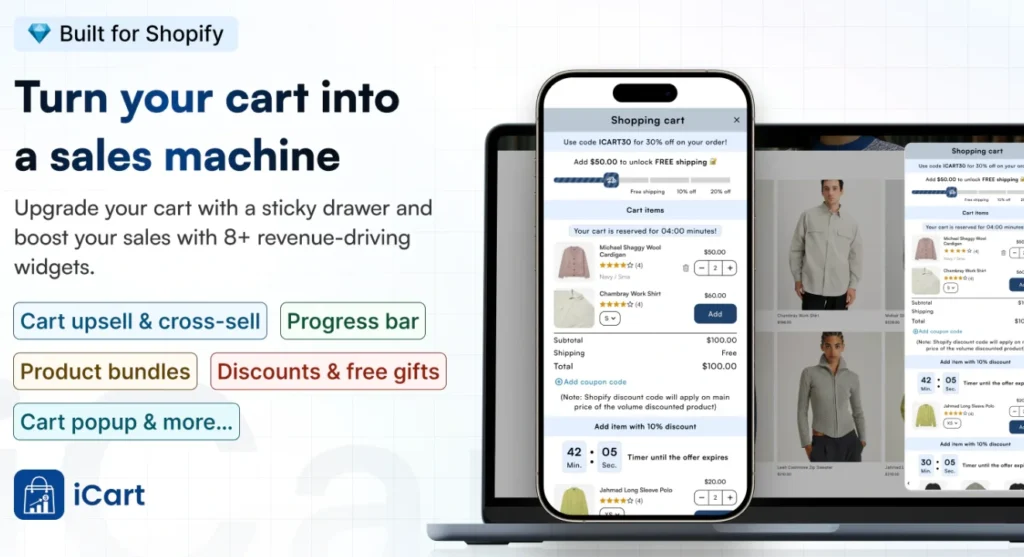
At this stage, cart optimization also becomes important. Tools like iCart Cart Drawer Cart Upsell can help Shopify stores show product bundles, cart offers, upsells, and progress bars inside the cart experience without making the buying journey feel heavy.
Insight 2: New stores usually sit in the testing stage
A new Shopify store's revenue benchmarks are between $0 and $1,000/month. This is because they are testing product demand, pricing, traffic, and trust signals.
If I were a new store in 2026, I would not worry too much about revenue. I would focus on the product page and how easy it is for customers to complete checkout.
Insight 3: Revenue starts when sales become consistent
Stores around $1,000 to $5,000/month have some working traffic but still need stronger conversion and retention.
A good tip here from my experience is this: The main goal here is simple. Find what is already selling and improve that path.
Insight 4: Serious growth starts after the revenue formula works
A simple formula explains Shopify revenue:
Monthly revenue = Sessions × Conversion rate × Average order value
When I use shopify store revenue benchmarks, I always connect them with this formula because revenue improves only when sessions, conversion rate, and average order value move in the right direction.
For example, 10,000 visitors, a 2% to 3% conversion rate, and a strong AOV can create a clear revenue forecast.
I would advice new stores in 2026 to fix conversion and AOV first because traffic gets expensive fast.
Insight 5: Top stores operate in a different league
Clean Commit’s analysis of top Shopify stores found lower-revenue benchmark stores around $141,000/month, mid-revenue stores around $300,000/month, and top-performing stores around $3.4M/month.
Don't panic by looking at these numbers. Do not compare your store with these brands too early. Instead, use them to study patterns that you can apply to your store.
Insight 6: Revenue without profit can mislead you
High revenue from your store doesn't matter if you are not making a profit. A store making $10,000/month can still struggle if product costs, ads, shipping, returns, and app costs are too high.
I always tell Shopify store owners to benchmark gross revenue and profit together. Remember that revenue shows demand, and profit shows business health.
Key performance benchmarks to focus on in 2026
Revenue grows when the right performance metrics improve. Here are the Shopify average ecommerce conversion rate benchmark numbers and store metrics I check first.
Insight 7: Shopify conversion rate is the first signal
Shopify says global ecommerce conversion rates often sit around 2% to 3%, but the number changes by industry, device, price point, and traffic source.
Littledata found the average Shopify conversion rate was 1.4%. Stores above 3.2% entered the best 20%, and stores above 4.7% entered the best 10%.
A low conversion rate usually points to weak product pages, poor mobile experience, missing trust badges, or low-quality traffic.
Insight 8: Mobile conversion needs special attention
Littledata also found that mobile Shopify conversion averaged 1.2%, while desktop conversion averaged 1.9%.
Most Shopify traffic comes from mobile, so I always check the mobile product page before the desktop. The add-to-cart button, images, reviews, price, delivery info, and cart drawer must feel easy on a small screen.
Insight 9: AOV shows how well your store sells more per order
Growth Suite reported the average Shopify store AOV in 2026 is around $85 to $95, while the top 20% stores sit above $120.
AOV improves when shoppers buy bundles, add related products, unlock free shipping, or accept relevant cart offers. Small AOV improvements can lift monthly revenue without buying more traffic.
Learn from these insights to grow your store revenue
Shopify store revenue benchmarks are useful when you use them the right way.
Do not chase one perfect number. Compare your store against similar stores first. Check monthly revenue, conversion rate, AOV, retention, and fulfillment together.
If your traffic is good but sales are weak, fix conversion. If conversion is good but revenue feels low, improve AOV. If first orders are strong but repeat sales are poor, work on retention.
The best Shopify stores always use benchmarks, find the gap, fix one metric, and repeat the process every month.
FAQs
1. How to access benchmarks on Shopify?
To access benchmarks on Shopify, go to Shopify Admin > Analytics > Reports and open a report that supports benchmark comparison. Click the Comparison menu and select Benchmarks to compare your store data with similar Shopify stores.
2. Which Shopify store revenue benchmarks should I look for to grow my store?
Focus on revenue-related benchmarks like total sales, orders, AOV, online store conversion rate, sessions, customer retention rate, and fulfillment speed.
3. What is a good Shopify ecommerce conversion rate benchmark?
A good Shopify ecommerce conversion rate benchmark is usually around 2% to 3%, but it depends on your product type, pricing, traffic source, and industry. If your store is below this range, start by improving your product pages, mobile experience, trust signals, cart flow, and checkout experience.




About the author
Vineet Nair
Vineet is an experienced content strategist with expertise in the ecommerce domain and a keen interest in Shopify. He aims to help Shopify merchants thrive in this competitive environment with technical solutions and thoughtfully structured content.