





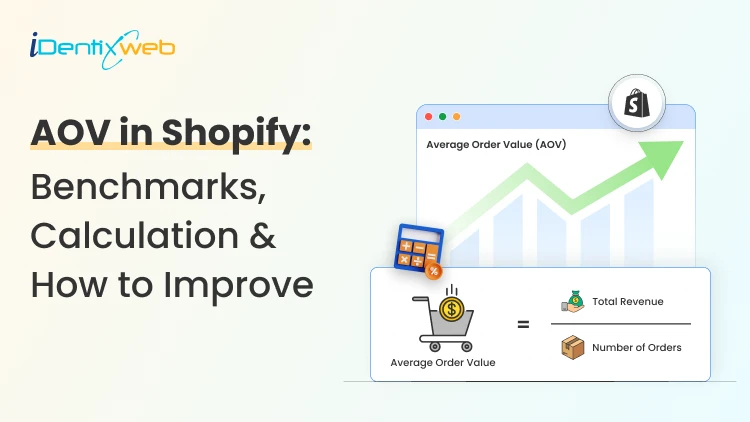

To calculate Shopify AOV, divide your total revenue by the total number of orders. In Shopify’s Average order value over time report, AOV is calculated as (gross sales - discounts) ÷ orders, which can differ slightly from a quick manual calculation. To find AOV in Shopify, go to Analytics > Average Order Value Over Time.
A lot of new Shopify store owners think they have a sales problem when they actually have an average order value problem.
The Shopify merchants I work with do get excited because orders are coming in, but the cart value size stays too small.
That usually shows up in one metric: AOV and you need to know how to calculate it.
AOV stands for average order value. It tells you how much a customer spends, on average, every time they place an order.
It’s very important to know how to calculate your Shopify AOV, benchmarks in your industry, and how to find it in your admin panel. The Shopify AOV (average order value) calculation is easier to understand than most new store owners think.
In this guide, let’s break all of these down so new Shopify store owners can manage their sales.
What is Shopify AOV in very simple terms?
In simple terms, Shopify AOV tells you how much money a customer spends on average every time they place an order.
For example, if 10 people place 10 orders and your store makes $1,000, your AOV is $100.
I like this metric because it answers a very practical question for stores:
Are customers building bigger carts, or am I only getting more orders? This difference matters.
A store with high AOV can usually spend more on acquisition, recover shipping costs more easily, and grow faster without depending on offers.
Shopify AOV: Average Order Value Calculation Formula
The simplest Shopify AOV calculation formula is this:
- AOV = Total Revenue ÷ Number of Orders
That is the version I use first when I explain it to beginners because it is easy to understand. Here is a quick example:
- Total revenue: $2,400
- Total orders: 30
- AOV: $2,400 ÷ 30 = $80
So your average customer order is worth $80.
Now comes an interesting bit. Shopify’s own Average Order Value over time report uses a more specific definition. Shopify calculates AOV as:
- AOV = (Gross Sales - Discounts) ÷ Orders
This formula excludes post-order adjustments. That means the number you see in Shopify reports can differ from a rough AOV calculation if you are counting edited orders, returns, or later changes.
If you are checking AOV inside Shopify reports, use the number for monthly reports. If you are doing a manual check, use revenue divided by orders.
But make sure you are using the same date range and the same type of revenue each time.
- Use the basic formula to understand AOV fast.
- Use the Shopify report formula when you are generating monthly reports.
Calculated your AOV? Now know how to grow it.
Finding your AOV in Shopify tells you where you stand. But improving it usually comes from giving customers a reason to add more before checkout.
That is where apps iCart Cart Drawer Cart Upsell help store owners. With in-cart upsells, bundles, cross-sells, and free shipping progress bars, it gives Shopify merchants simple ways to lift average order value after you know your AOV figure.

How to find AOV in Shopify admin panel?
Inside the Shopify admin, you can view the average order value over time through Shopify’s analytics tools.
- Just go to Shopify admin > Analytics > Average order value over time
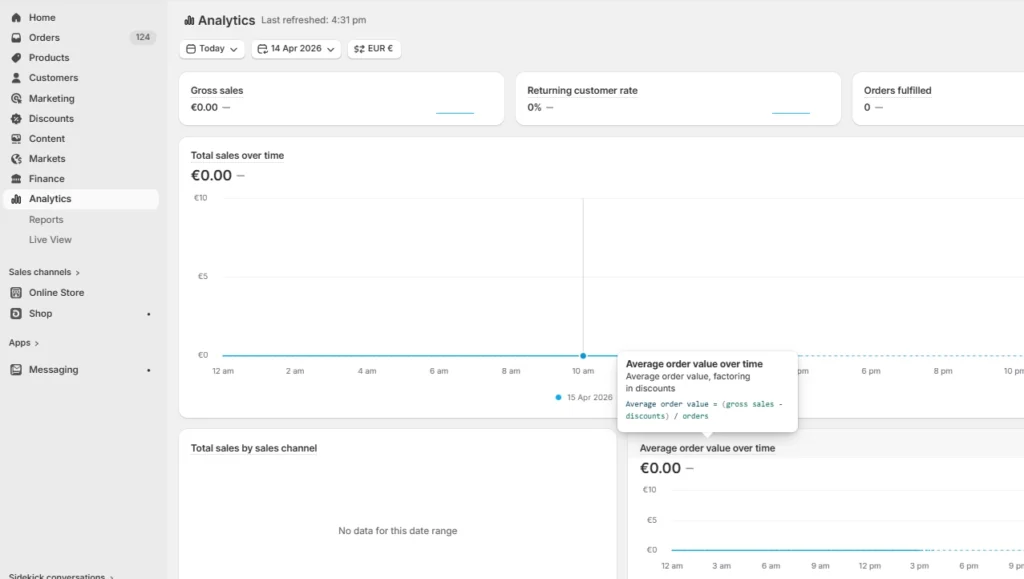
This report is better because it shows movement over time instead of just giving you a single number.
You can group it by hour, day, week, month, quarter, year, or even by day of the week or month of the year. That helps a lot when you are trying to spot patterns instead of reacting to one random dip.
For a newer store, I usually would not check AOV daily unless order volumes are huge. Weekly and monthly checking of your store’s AOV is much better.
Once you have the report open, change the date range. Check the last 7 days, then 30 days, then 90 days. After that, compare periods.
Also, prepare a sheet of the updates you have made to increase AOV. This will help you track if an uptick in AOV happened when you did something specific.
- Did AOV go up after you added a bundle?
- Did it drop after I implemented a big discount strategy?
- Did it improve during a product launch?
Key benchmarks for Shopify AOV based on industries
Not every niche will have the same benchmark for average order value. There is no universal “good AOV.” A snack brand, a fashion brand, and a furniture or B2B parts store are never going to look the same.
Product price, audience, market, and even country change the benchmark. Still, benchmark data gives you a rough place to start.
A report by Littledata found that the average AOV for Shopify stores is $85, while the broader ecommerce average is $101.
Doofinder’s benchmark report shows how widely AOV can vary by category. For example,
- Fashion sits at $81.74
- Food at $97.54
- Sports at $122.33
- DIY, Construction, and Decor $162.85
- Computers and Electronics at $348.96
- Home and Decoration at $372.71
- Education at $495.74
- Jewelry and Accessories reach $1,057.80.
- Food Delivery is $36.22
- Leisure and Free Time is $36.35
This is exactly what I’m talking about. AOV is only useful when you compare it to the right thing. The best comparison is usually this order:
- Your own past performance
- Stores similar to yours inside Shopify benchmarks
That order gives you much better data on where you stand.

One last thing about Shopify AOV
If you are a new Shopify store owner, AOV is one of the first numbers you need to look into.
Start with the basic Shopify AOV calculation formula. Then check the actual number inside the Shopify admin in the Analytics section. Then compare it over time instead of staring at one value and trying to guess what it means.
That is how I’d approach it in a real store, too.
Because once you understand the Shopify AOV (average order value calculation), it becomes easier to track store performance. You can see more clearly whether you need better pricing, better bundles, stronger cart offers, or simply a better product mix.
FAQs
1. How to find AOV in Shopify?
You can find AOV in your Shopify admin under Analytics by opening the Average order value over time report.
2. How to calculate Shopify AOV (average order value)?
The basic formula is simple: AOV = total revenue ÷ total number of orders. If your store made $2,000 from 20 orders, your average order value is $100.
3. How does Shopify calculate average order value?
In Shopify’s Average order value over time report, AOV is calculated as (gross sales - discounts) ÷ orders. Shopify also excludes post-order adjustments like edits or exchanges in that report, so the number may differ slightly from a basic AOV calculation.
4. Does Shopify’s average order value include shipping?
In the sales report version, Shopify defines AOV as gross sales minus discounts divided by orders, which does not include shipping.




About the author
Vineet Nair
Vineet is an experienced content strategist with expertise in the ecommerce domain and a keen interest in Shopify. He aims to help Shopify merchants thrive in this competitive environment with technical solutions and thoughtfully structured content.