





If you are reading this, you are already thinking about the BigCommerce to Shopify migration.
And why not?
Shopify’s ecosystem is a major reason for this shift. You get a smoother checkout, stronger app integrations, cleaner themes, and way more control over how your store converts.
Why more merchants are switching from BigCommerce to Shopify in 2026
The interest in moving from BigCommerce to Shopify in 2026 comes down to cost.
In June 2026, BigCommerce introduced an Open Payment Provider Fee that adds roughly 0.6%–2% on orders processed through payment gateways outside its embedded list, with the heaviest charge falling on its lower-tier plans.
Around the same time, it tightened the GMV caps on those plans, which pushed growing stores to upgrade sooner than they planned. For merchants running non-embedded checkout or B2B flows, that's a direct hit to margin.
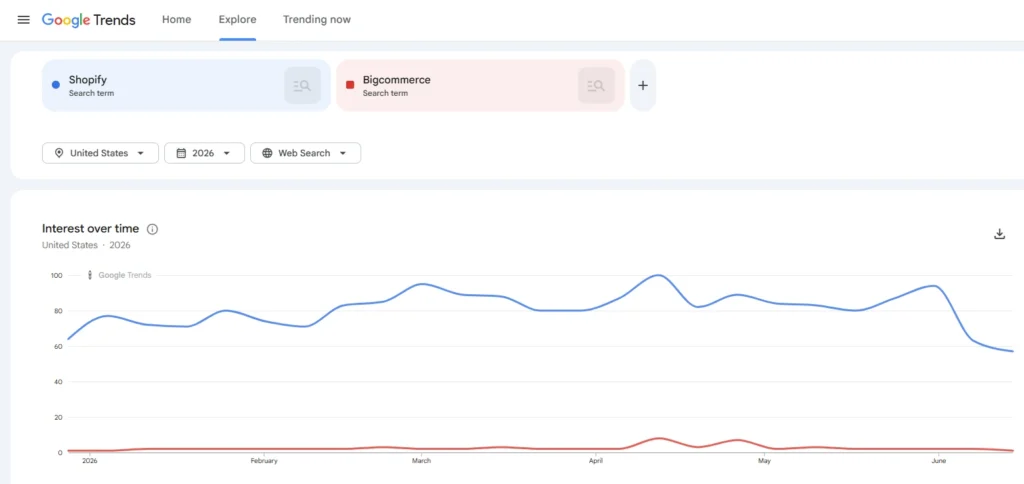
Shopify's pull is the other half of the story: a faster, conversion-tuned checkout, a far deeper app ecosystem, and pricing that stays predictable as you scale. Merchants are beginning to switch from Bigcommerce to Shopify, which is exactly why searches for Shopify have significantly increased in 2026 as compared to Bigcommerce.
If you’re thinking about switching platforms or comparing Shopify or BigCommerce, this guide will walk you through the entire process in a way that feels easy to follow.
Quick BigCommerce to Shopify migration checklist
- Back up all BigCommerce data.
- Set up your Shopify store and choose a theme.
- Export products, customers, orders, and categories from BigCommerce.
- Import your data into Shopify using a tool like LitExtension or Shopify’s importer.
- Rebuild your navigation, pages, and storefront design.
- Install Shopify apps to replace your BigCommerce integrations.
- Configure payments, taxes, and shipping in Shopify.
- Set up 301 redirects to protect your SEO.
- Test your entire store and checkout flow.
- Connect your domain and launch.
Let’s first understand what can be migrated from BigCommerce to the Shopify platform.
What can you migrate from BigCommerce to Shopify?
Store data
- Products: Including titles, descriptions, variants, pricing, images, inventory levels, and SKU mapping.
- Categories/Collections: So your product structure stays consistent after migration.
- Product options and modifiers: So your shoppers can choose sizes, colors, and styles.
Customer & order data
- Customer profiles: Including names, emails, addresses, and account statuses.
- Order history: So you maintain full records for reporting, tax filing, and customer service.
- Customer groups: Supported by migration tools to help you rebuild loyalty or wholesale flows.
Content & SEO assets
- Blog posts and articles: To maintain your existing content marketing footprint.
- Static pages: Such as About Us, Contact, FAQs, and policies.
- SEO metadata: Including titles, descriptions, and URL slugs, for better ranking continuity.
- 301 redirect maps: To retain traffic and prevent SEO drops after moving to Shopify.
Store settings
- Tax configurations: Making it easier to match your existing sales tax logic in Shopify.
- Shipping zones and rules: Including rates and delivery methods.
- Payment methods: You can replicate your existing payment method in Shopify.
Things to know before you migrate from BigCommerce to Shopify
1. Back up all your BigCommerce data
Export your products, customers, orders, pages, and SEO details so you have a safe copy of everything.
2. Set up your Shopify store
Create your Shopify account, pick the right plan, and choose a theme that fits your brand.
3. Decide whether you’re migrating manually or using a tool
You can migrate with CSV files, but it’s time-consuming if you have a large catalog. A migration tool like LitExtension can automate the process and reduce errors.
4. Identify apps you’ll need on Shopify
Not all your BigCommerce apps will have equivalents, so list their functions and find Shopify alternatives.
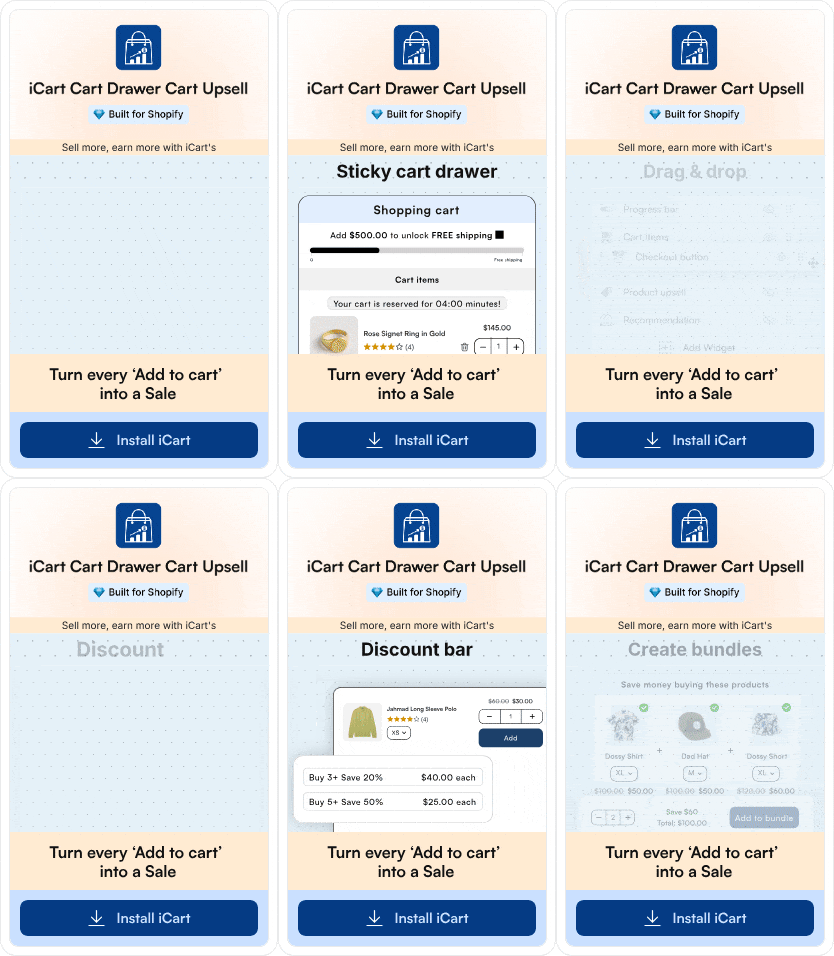
For example, sales are everything store owners strive for. Shopify upsell apps like iCart help you with upselling, cross-selling, and BOGO offers to increase your revenue instantly.
What won't transfer automatically (And how to plan for it)
Most of your core data moves cleanly, but a few things never transfer on their own. Knowing these upfront saves you the scramble after launch:
- Your theme. BigCommerce themes are built in Stencil, and Shopify themes run on Liquid, so there's no direct port. You'll pick a Shopify theme (free or roughly $180–$350+ for a premium one) or have one built and rebuild the design from there.
- Blog and CMS content. This is almost always a manual or semi-manual job, even with a migration tool. Plan time to move and reformat posts and pages.
- High-variant products. Shopify now supports up to roughly 2,000 variants per product on Basic and above (up from the old 100-variant cap), but it's still capped at 3 option types, so very complex catalogs may need restructuring or a variants app.
- Apps and integrations. As discussed in step 4, not all apps migrate. You'll match each BigCommerce app to a Shopify equivalent.
Now, let’s understand step-by-step how to easily migrate from BigCommerce to Shopify.
How to Migrate From BigCommerce to Shopify in 7 Easy Steps
Step 1: Set Up Your Shopify Store
- Start by creating your Shopify account and choosing the right plan based on your current and projected sales volume.
- If you’re running a high-volume on BigCommerce, you’ll want to seriously consider Shopify Plus for more control over managing operations.
- Once your account is ready, install a Shopify theme that gets you close to your current brand look.
Step 2: Export Your Data From BigCommerce
Log in to your BigCommerce dashboard and export:
- Products (including variants, options, SKUs, and images)
- Customers
- Orders
- Categories
- Pages and blog content (where available)
Most of this happens through BigCommerce’s built-in export tools. You can download it in CSV or XML formats.
Step 3: Choose Your Migration Method (Manual or Tool)
- Manual CSV import: You prepare and import CSVs into Shopify for products, customers, and orders. Good for smaller catalogs, but time-consuming and error-prone if you’re larger.
- Third-party tools (like LitExtension): These tools map BigCommerce entities to Shopify structures, automate much of the transfer, and often handle things like orders and SEO better than a simple CSV flow.
If you are struggling with technical expertise, you should contact Shopify migration service agencies. You will get a seamless migration with no data loss.
Step 4: Import Products, Customers, and Orders Into Shopify
- Products: Bring in titles, descriptions, variants, pricing, inventory, SKUs, and images. Double-check variant logic like sizes and colors, so they display properly in Shopify.
- Customers: Import customer profiles with names, emails, shipping and billing addresses where possible.
- Orders: Depending on your method, you can migrate historical orders for reporting, support, and accounting purposes.
Step 5: Rebuild Your Storefront Design on Shopify
- Set up your main navigation and mega menus.
- Build core pages like Home, About, Contact, FAQ, and Policy pages.
- Design your product and collection pages for a clean, conversion-focused layout.
Step 6: Protect Your SEO With Redirects and URL Strategy
BigCommerce and Shopify use different URL structures, so your job is to:
- Map your old URLs to the new Shopify URLs (products, collections, pages, and blog posts).
- Set up 301 redirects in Shopify so customers and search engines land in the right place.
Step 7: Connect Your Domain and Go Live
Once you’re confident in how everything works:
- Update your DNS settings so your primary domain points to your Shopify store.
- Verify that all redirects are working and key pages are indexed correctly over time.
- Monitor Shopify analytics, GA4, and Search Console in the first weeks to catch any SEO or conversion issues early.
“GMV up 32%, revenue up 32%, free cash flow margin at 18%. Retail’s busiest season is here, and, as always, Shopify merchants are built for it.”
Harley Finkelstein — President of Shopify
How much does it cost to migrate from BigCommerce to Shopify?
There's no single price. It scales with your catalog size, how much custom work you need, and whether you do it yourself or hire help. As a 2026 ballpark:
- DIY with a migration tool (LitExtension, Matrixify, Cart2Cart): roughly $80–$500, depending on how much data you move.
- Mid-tier / managed migration: around $5,000–$15,000 for stores that want hands-off data transfer plus some theme and setup work.
- Full agency or enterprise / Shopify Plus builds: $25,000–$250,000+, typically for large catalogs, B2B, ERP/OMS, or heavy customization.
On top of the migration itself, budget for your ongoing Shopify plan and a theme.
How long does a BigCommerce to Shopify migration take?
Timelines depend almost entirely on complexity:
- Small stores (smaller catalogs, standard setup, tool-based transfer): about 1–4 weeks.
- Mid-size stores with custom theme work: roughly 4–8 weeks.
- Enterprise / Shopify Plus migrations with B2B, multi-store, or deep app stacks: around 12–24 weeks.
The "zero-downtime weekend migration" stories you'll see online are real, but only for small, simple catalogs with an embedded checkout. For most stores, a phased approach, migrating in waves and QA-ing each batch before moving on, is what keeps the move clean.
Will you lose SEO rankings when moving from BigCommerce to Shopify?
This is the question that keeps most store owners up at night, and the honest answer is: only if you skip the redirects.
BigCommerce and Shopify use different URL structures, so without a full 301 redirect map, search engines lose track of your pages, and your rankings drop.
Stores that map every indexed URL and keep their metadata and content intact typically retain the large majority of their organic traffic and stabilize within a couple of months. Stores that botch or skip redirects can lose a serious chunk of organic visibility for weeks.
Make the 301 redirect map your single highest-priority task, not a last-minute one.
Should you migrate yourself or hire an agency?
DIY makes sense when you have a smaller catalog, a standard app stack, and the time to handle a tool-based transfer plus QA. A migration tool like LitExtension handles most of the heavy lifting here.
Professional help becomes worth it once you're dealing with a large catalog, B2B pricing, custom checkout logic, ERP/OMS connections, or a complex redirect map across thousands of URLs in situations where a small mistake gets expensive.
Post-migration checklist
Don't consider the move "done" at launch. Run through this in the first week:
- Spot-check 20–30 random products for correct variants, pricing, SKUs, and images.
- Confirm every 301 redirect resolves to the right Shopify URL.
- Test the full checkout flow end to end, including payments, taxes, and shipping rates.
- Verify customer accounts and order history are imported correctly.
- Resubmit your sitemap in Google Search Console and watch indexing.
- Monitor Shopify analytics, GA4, and Search Console for the first few weeks to catch SEO or conversion dips early.
- Reconnect your sales channels, email/SMS flows, and reviews.
Final thoughts on moving from Bigcommerce to Shopify
Switching from BigCommerce to Shopify is a big move. Once you break the process into clear steps, it becomes far more manageable than most store owners expect.
The migration tools, themes, and workflows available today make the transition smoother, even for stores with large catalogs or custom setups.
If your store has outgrown BigCommerce or you're ready for a more powerful setup, this is a good time to make the switch. A well-planned migration puts you in a stronger position to grow, optimize, and compete without the platform limitations holding you back.
FAQs
1. Which is better, Shopify or BigCommerce?
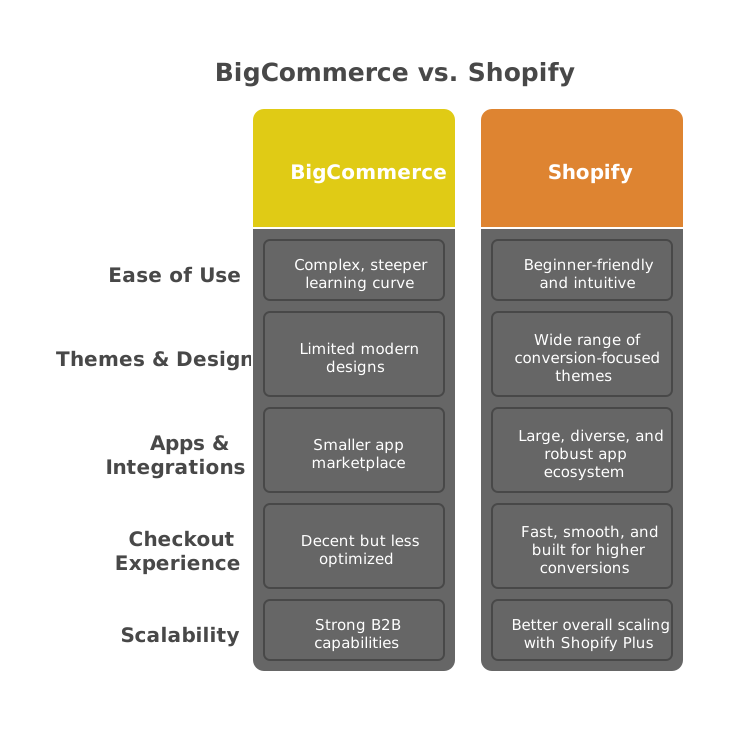
Both platforms can handle serious ecommerce. For most small to mid-sized brands, Shopify is the better choice because it’s easier to use, has a stronger app ecosystem, and a more optimized checkout. BigCommerce can work well for certain B2B stores, but Shopify tends to win on scalability, conversion tools, and day-to-day usability.
2. Can I transfer my data from BigCommerce to Shopify without loss?
Yes. Core data like products, customers, orders, and content transfers reliably as long as the migration is planned and executed carefully. The most common loss point is SEO traffic, and that's preventable with a complete 301 redirect map.
3. How would I migrate from BigCommerce to Shopify?
You need to back up your BigCommerce data, set up your Shopify store, export your products/customers/orders from BigCommerce, and then import them into Shopify using CSVs or a migration tool.
4. What is the difference between BigCommerce and Shopify?
BigCommerce leans more toward built-in features and can feel more technical, while Shopify focuses on simplicity, a powerful app ecosystem, and a highly optimized checkout experience.
5. Does Shopify integrate with BigCommerce?
There’s no native setup where both platforms run side by side as one store. Instead, you typically migrate from BigCommerce to Shopify and then connect Shopify to your sales channels, apps, and tools, rather than trying to directly integrate both platforms.
6. Which tools should I use to transfer my data from BigCommerce to Shopify?
Many merchants use dedicated migration tools like LitExtension to move data from BigCommerce to Shopify with fewer errors and less manual work.
7. How much does it cost to move from BigCommerce to Shopify?
It ranges from roughly $80 to $500 if you want to do it yourself, $5,000 to $15,000 for a managed mid-tier migration, and up to $25,000+ for complex or enterprise builds. Your Shopify plan and theme are separate ongoing costs.
8. How long does it take to migrate from BigCommerce to Shopify?
Small stores can be done in 1 to 4 weeks with a migration tool, mid-size stores with custom design take 4 to 8 weeks, and enterprise or Shopify Plus migrations run 12 to 24 weeks.
9. Will I lose my SEO rankings when switching from BigCommerce to Shopify?
Not if you set up 301 redirects for every old URL and keep your metadata and content intact. Stores that do this keep most of their organic traffic; stores that skip redirects can lose significant visibility.
10. What doesn't transfer automatically from BigCommerce to Shopify?
Your theme (BigCommerce Stencil doesn't port to Shopify Liquid), blog and CMS content (usually manual), apps and integrations, and very high-variant products may need restructuring.

About the author
Vineet Nair
Vineet is an experienced content strategist with expertise in the ecommerce domain and a keen interest in Shopify. He aims to help Shopify merchants thrive in this competitive environment with technical solutions and thoughtfully structured content.