




Shopify Sidekick is an AI assistant that helps merchants run their stores more efficiently. To use it, simply log into your Shopify store, open the Sidekick icon, and enter your tasks or prompts to create product descriptions or automate repetitive tasks and more.
Shopify Sidekick is an all-in-one Shopify Sidekick AI assistant built directly into your admin. It is free for all paid Shopify merchants and designed to help you manage day-to-day tasks and grow your store without switching between tools or tabs.
With the Spring '26 Edition launched on June 17, 2026, Sidekick is now available on every screen in the Shopify app, so you can use a voice prompt or a few taps to get things done.
But does this AI assistant deliver in practice? Let's walk through every capability, including the ones that just launched.
What is Shopify Sidekick?
Sidekick is an AI-powered assistant built into the Shopify admin that helps merchants create content, automate repetitive tasks, analyze store data, and take action inside the admin through a plain-language chat interface.
Unlike a standalone chatbot, Shopify Sidekick works in context with your actual store data, so every answer it gives reflects your real products, orders, inventory, and settings.
As of the Spring '26 Edition, Shopify Sidekick AI is available on every screen in the Shopify app via typing or voice, with no full-screen takeover.
This means you can stay in context while Sidekick works in the background. It also now connects to 15+ partner apps, runs proactive store recommendations through Sidekick Pulse, and can even answer quick business questions from your Apple Watch.
Key use cases of Shopify Sidekick for Shopify stores
Online Store Editor in Mobile
With the Shopify Spring '26 Edition, Shopify has completely rebuilt the mobile Online Store Editor to make real storefront customization possible on a small screen.
The store canvas now stays visible while you edit. Settings open in a compact sheet that does not cover your storefront view, so you always know exactly what you are changing. Tap any section or block directly on the canvas to open its settings and see your changes applied in real time.
All controls have been redesigned for touch: larger targets, clearer states, and consistent behavior across iOS and Android. A new layer map shows your store's full structure, every section, block, theme setting, and app embed, so you are never hunting through nested menus for the right element.
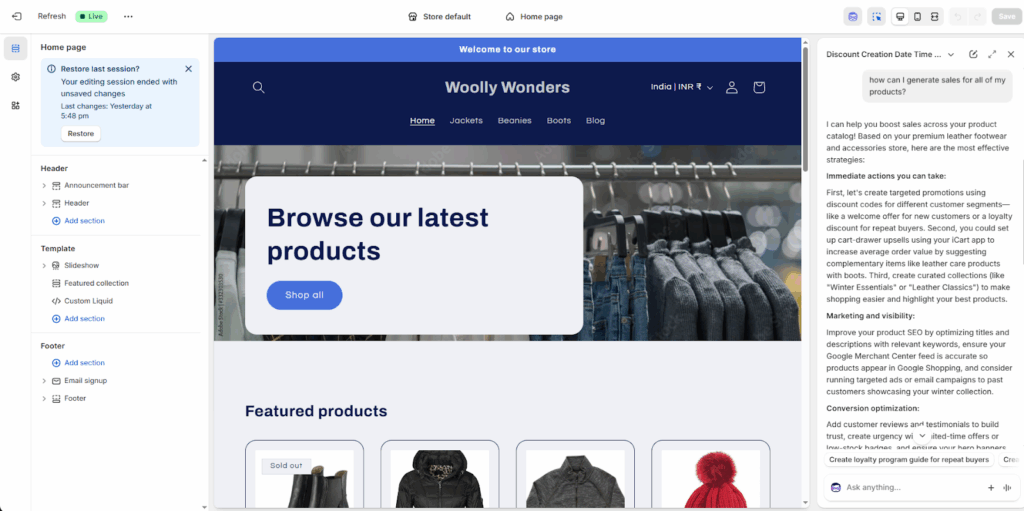
Sidekick is fully integrated into the editor. Ask a question or request a store edit from anywhere inside the editor.
Better still: when you select a specific section or block, a contextual Sidekick input appears that already knows what you are looking at, so your prompts do not need to re-explain the context.
I tested this by tapping directly on a homepage banner section and asking Sidekick to tighten the copy. It made the change in seconds without me needing to navigate to any settings panel.
Content Creation
Before the launch of Shopify AI Sidekick, creating content was time-consuming. But now the AI Sidekick makes it easy for Shopify store owners to create engaging product descriptions, email templates, blog posts or other promotional campaign content based on your brand’s voice. This can save hours and manual work for merchants.
I have tested this feature to create a description for one of my products, and yes, it has written exactly what I needed!

Image Creating & Editing
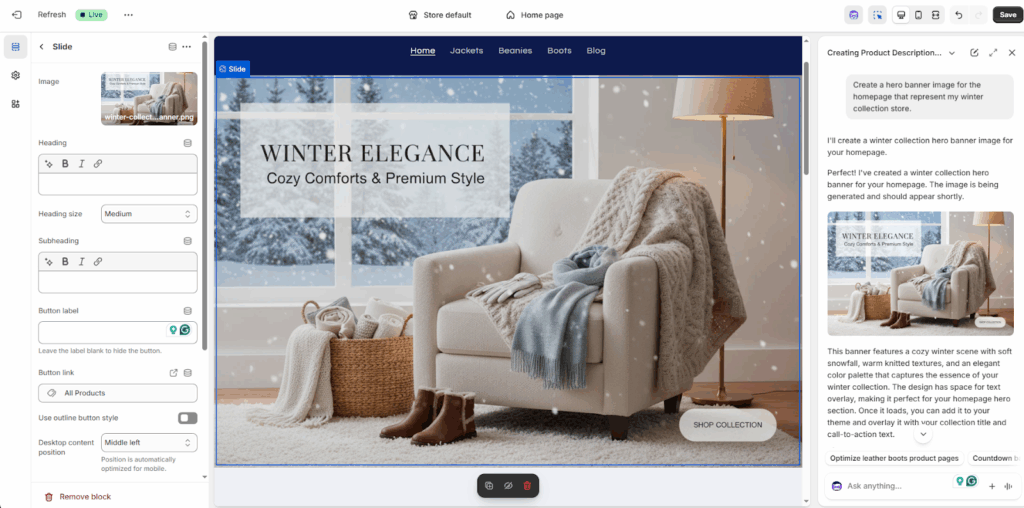
Do you believe that Shopify AI Sidekick creates high-quality designs much better than human ones? Yes, Sidekick helps you to create visually appealing images that help merchants to maintain a highly professional storefront. You can even improve your product images or other images of your store using specific prompts as per your needs. I have tried to change my hero banner image on the homepage and see how it turned out!
Theme Editing
Edit or customize your Shopify themes easily with Shopify AI Assistant Sidekick. It will suggest beautiful layouts, design elements that you can use to improve your store’s UI/UX experience. Based on your brand identity, it suggests you design elements recommendations like colors, typography, layouts, etc.
Additionally, it is fully compatible with Dawn theme version 11.0.0 and above, enabling smooth customization without requiring technical skills. I tried to edit my theme, and this is the result I got within seconds with zero effort!

Data Analysis & Insights
Analyze your store data and get actionable insights to make data-driven decisions. You can add any prompt to measure your store’s performance, or see sales trends, customer behavior and more. It will give you smarter insights, which you can use to make the best decisions for your store to improve the performance & conversions.
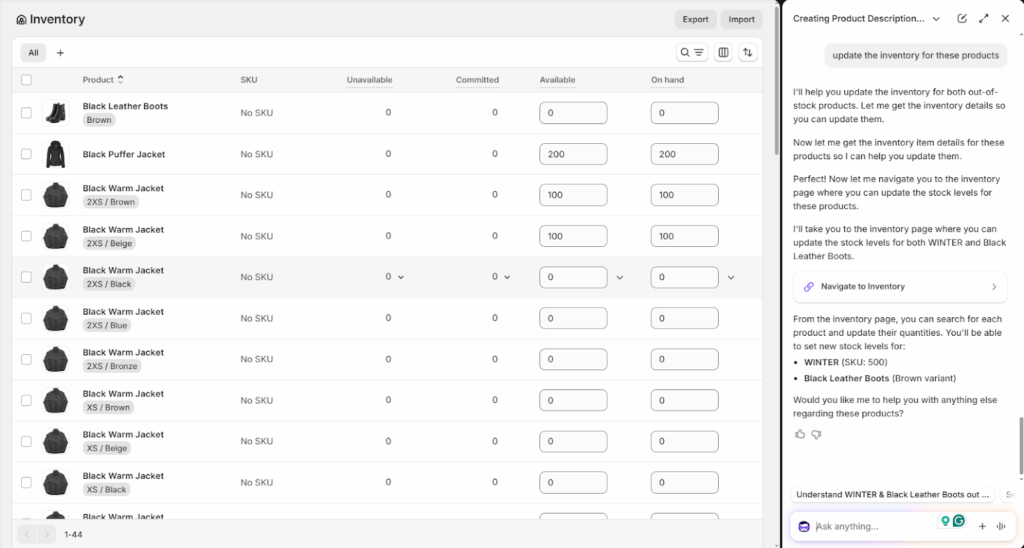
I have asked Shopify sidekick about my out-of-stock products from the last 30 days, which need to be updated, and below is the result I got.
Sidekick Pulse
Beyond answering data questions you ask, Shopify Sidekick now proactively surfaces what you should do next.
Sidekick Pulse analyses your store's sales, traffic, and inventory data in the background and converts it into prioritized next best actions.
These recommendations are displayed on a redesigned Admin home that puts Sidekick front and center in your daily workflow, so from the moment you log in, you see the most relevant actions for your store that day.
Automated Store Operations
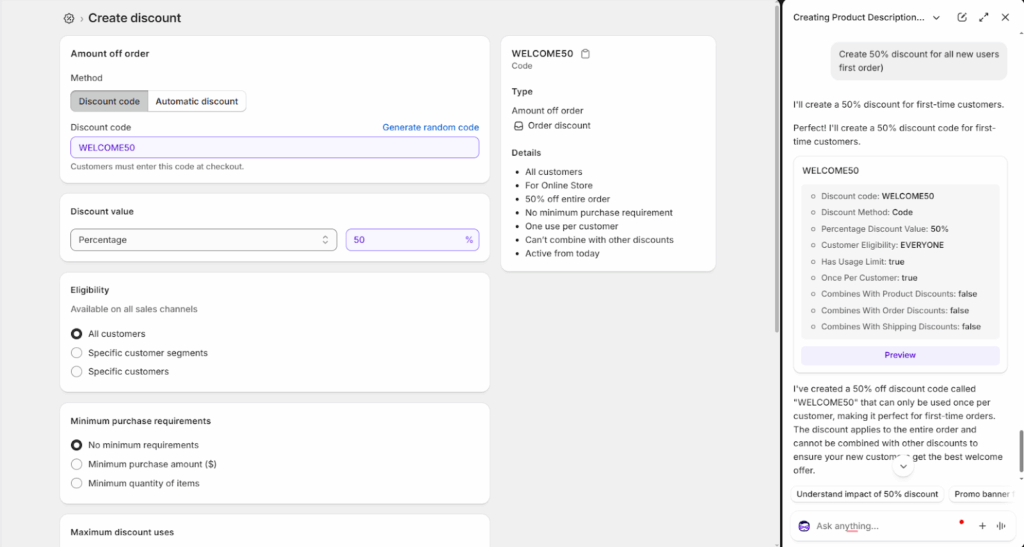
You can save hours of time by automating repetitive tasks. Want to create a discount or launch a product collection. Just add your prompts, and it will perform the action exactly as you wanted to do.
Voice & Screen Sharing
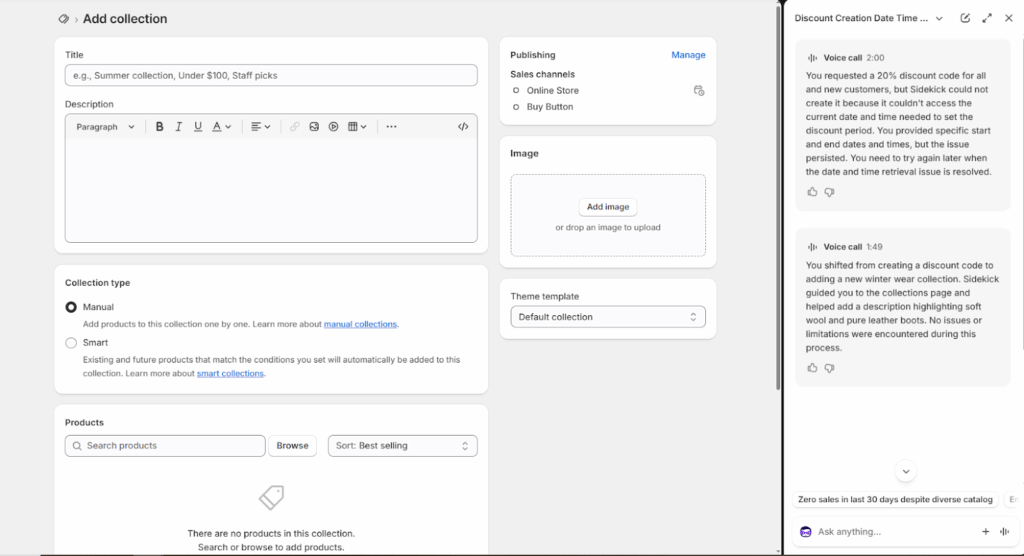
Voice mode lets you speak directly to Shopify Sidekick instead of typing. This is useful for quick actions when you are on mobile and do not want to type out a full prompt.
As of the latest edition, Sidekick works on every screen in the Shopify app without a full-screen takeover, so you keep the context of what you are working on while you query it.
One standout new addition, which I loved, is that you can now ask Shopify Sidekick quick business questions from your Apple Watch. A sales total, an inventory check, and a traffic number without pulling out your phone at all.
Sidekick also now multi-tasks. It keeps working in the background even if you switch tabs, open a new chat, or close the window. This helped me to do longer tasks without blocking my workflow while I kept doing other things.
There is also a screen-sharing mode (currently early access, desktop only) that lets Sidekick see your screen and guide you step by step through a task, almost like having a live Shopify expert on a call with you.
Instant support & guidance
Shopify Sidekick acts as an always-available assistant, answering questions and providing step-by-step guidance on Shopify features, settings, and best practices. This helps merchants resolve issues faster without searching through documentation.
Custom App Building
You can use Shopify Sidekick to build custom apps directly within your Shopify admin.
Simply explain what you need, and Sidekick will generate the app from your initial prompt and refine it through follow-up instructions.
Sidekick App Extensions
One of the biggest additions in the Spring '26 Edition is that Shopify Sidekick AI can now connect directly to your third-party apps through Sidekick App Extensions. Shopify launched this with 15+ named partners, including Klaviyo, Loop, Smile, JudgeMe, Yotpo, Matrixify, and Seguno. There are two types of extensions:
- Data Extensions pull your partner app's data into a Sidekick conversation so you can ask about Klaviyo email performance, Smile loyalty points, or Judge.me review scores without leaving the Shopify admin.
- Action Extensions route you to the right place inside a partner app and stage changes for you to confirm before they go live.
To wrap it up...
I think Shopify Sidekick is going to be the new trend in ecommerce in the coming months. Because it saves hours of manual work and effort for Shopify merchants in operating their tasks. From content creation to theme editing and custom app development, Sidekick AI Assistant is a lifesaver for Shopify store owners.
By giving the right prompts and leveraging its capabilities, merchants can easily manage their day-to-day store operations seamlessly.
People also ask
1. What is Shopify Sidekick?
Shopify Sidekick is a free AI assistant built into the Shopify admin, powered by Shopify Magic, that helps merchants create content, automate tasks, analyze store data, and manage their store through a conversational interface. As of Spring '26, Shopify Sidekick AI is available on every screen in the Shopify mobile app via typing or voice, including quick business queries from an Apple Watch.
2. How to use Sidekick on Shopify?
To access Sidekick, go to your Shopify admin and click on the Sidekick icon seen on the top right corner and add your prompts in it.
3. Is Shopify Sidekick free?
Yes. Shopify Sidekick is included free with all paid Shopify plans. That said, features and usage limits do vary by plan. For example, building custom apps with Sidekick is available on the Grow plan and above, with hourly and weekly generation quotas applied. For most day-to-day tasks like content creation, data analysis, theme editing, and store automation, Sidekick is fully available on all plans at no extra cost.
4. When did Shopify launched Sidekick?
Sidekick launched in beta in June 2024, with a full public release in the Winter '24 Edition in December 2024. It has since received significant updates. The Winter '26 Edition in December 2025 introduced the Sidekick app generation and Sidekick Pulse, and the Spring '26 Edition in June 2026 added App Extensions and availability across every screen of the Shopify mobile app.
5. What’s the difference between Shopify Sidekick and Shopify Magic?
Shopify Magic is the AI technology built into Shopify that helps with tasks like writing product descriptions, emails, and code. Shopify Sidekick is a conversational AI assistant that acts like a business helper, answering questions, giving insights, and guiding merchants inside the Shopify admin.
6. What are Shopify Sidekick App Extensions?
Sidekick App Extensions let Shopify Sidekick work directly with your third-party apps. Data Extensions pull partner-app data (like Klaviyo email stats, Smile loyalty points, or Judge.me review scores) into your Sidekick conversations. Action Extensions route you to the right place inside a partner app and stage changes for your approval before anything goes live. Shopify launched this feature in the Spring '26 Edition with 15+ partners, including Klaviyo, Loop, Smile, Judge.me, and Yotpo.
7. What's new in Shopify Sidekick in 2026?
The Spring '26 Edition (June 17, 2026) made Sidekick available on every screen in the Shopify app. It also includes voice queries from Apple Watch, background multitasking, and auto-filling customer forms from plain-language descriptions. New capabilities include: Sidekick Pulse (proactive next best actions on a redesigned Admin home), Sidekick App Extensions (connect to 15+ partner apps), and an AI Sales Associate in Shopify Inbox for your storefront.



About the author
Sajini Annie John
Meet Sajini, a seasoned technical content writer with a passion for e-commerce and expertise in Shopify. She is committed to helping online businesses to thrive through the power of well-crafted content.