





You’re doing what you set out to do: you’re getting orders. But when those orders start coming in more, you are not able to handle the workload.
That’s the growth trap. You boost your Shopify sales but your team can't handle the pressure. So the work gets stuck in places nobody sees: picking items, packing boxes, printing labels, updating tracking, answering customer questions.
Here’s the truth for new Shopify stores in 2026.
You don’t need to hire staff just because orders doubled. You need a solution that lets customers schedule their own delivery.
In this guide, you’ll learn how to boost your Shopify sales by letting the customers choose when and how they want their orders to be delivered.
What are the signs you are in a growth trap?
If you run a Shopify store, there are some common signs to look for to check if you are in a growth trap.
- People are adding items to your cart, but abandoning them because of scheduling issues.
- You’re stuck answering “Where’s my order?” all day.
- Local delivery turns into a “text me your address” situation.
Floral stores, bakeries, and grocery stores are affected the most in these situations. A simple explanation of this is “Every new order adds stress instead of profit”
Let’s see a real-world example of this. You run a local bakery powered by Shopify. You go from 10 orders a day to 25 after viral TikTok videos.
Now customers want delivery “today,” “tomorrow morning,” or “after 5.” But Shopify doesn’t magically organize those requests for you, so you end up juggling messages, notes, and last-minute changes.
That’s where giving control to your customers helps you the most. With Stellar, the delivery date app for Shopify, customers can pick a delivery date and time (or pickup) during checkout.
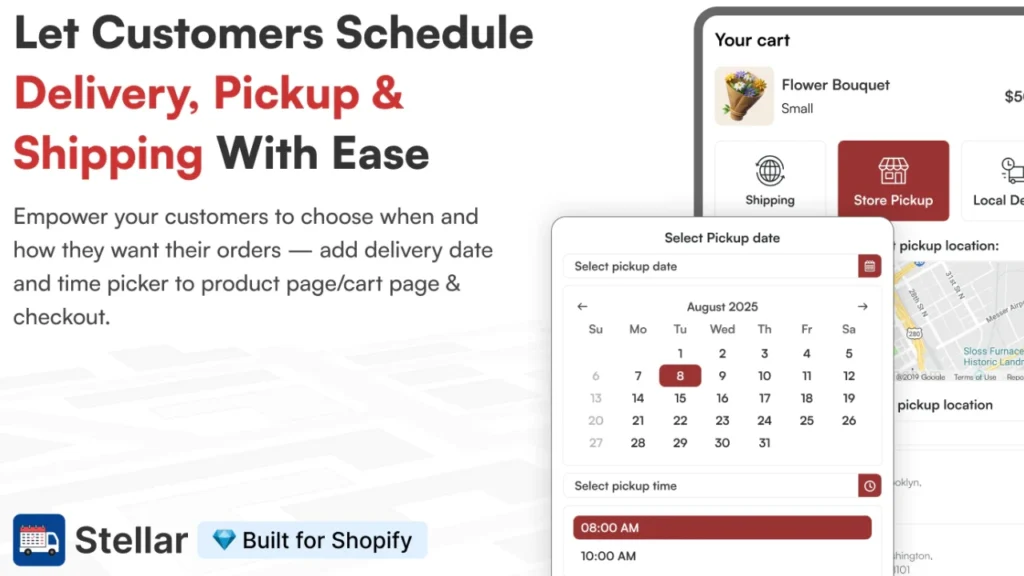
- Set order limits by time slot, so you don’t book 15 deliveries into the same hour.
- For local deliveries, the route planner helps you batch deliveries smarter.
- Store owners can group orders by slot, then run deliveries in a clean route instead of zig-zagging across town.
Even better, customers can reschedule from the thank you page or their account. This helps merchants reduce order delivery-related Shopify support tickets.
Why does delivery scheduling help you escape the growth trap
When orders increase for perishable items, the biggest problem is randomness. Customers order whenever they want, then expect you to deliver whenever they want.
Delivery scheduling apps fix that by turning this problem into a calendar with a delivery date and time selector.
Customers pick a date and time slot up front, so your team can fulfill orders in a planned way.
The features to help you boost sales on Shopify without hiring staff
Order limits per slot
Shopify's delivery time slots protect your volume. You can set order limits, for example, 30 deliveries for a 2-hour window to fulfil more orders.
Cutoff and prep times
When it comes to flowers, bakery items and groceries, the most common query from customers is “Can you deliver today?”
You can create a simple rule like “order after 1 PM for next-day delivery,” so that your fulfillment stays predictable.
Route planning for local delivery
For local deliveries, route planning helps in turning 10 stops into one efficient run. That saves time, miles, and driver mistakes without adding staff to manage local deliveries.
Rescheduling options
Customers change plans. If they can reschedule through the thank-you page or their order page, you avoid back-and-forth support and keep the team focused on packing and dispatch.
Blockout dates
You block holidays, fully booked days, or days you cannot deliver. This prevents refunds and angry messages from the customers.
One dashboard for scheduled orders
A single place to view scheduled orders helps you manage orders by date and slot. That is how you boost sales in Shopify without hiring.
| Feature | What it helps you do | Why it matters at 2× orders |
| Order limits per slot | Cap deliveries per time window (example: 30 deliveries in a 2-hour slot) | Prevents overbooking and keeps fulfillment realistic |
| Cutoff + prep times | Set rules like “orders after 1 PM ship next day” | Stops last-minute rush requests and keeps your day predictable |
| Route planning for local delivery | Turn multiple stops into one efficient delivery run | Saves time, miles, and reduces delivery mistakes |
| Rescheduling options | Let customers reschedule from the thank-you page or order page | Cuts support back-and-forth and protects your packing time |
| Blockout dates | Block holidays, fully booked days, or no-delivery days | Avoids refunds and frustrated customer messages |
| One dashboard for scheduled orders | View and manage orders by date and time slot in one place | Makes batching easier, so you fulfill more without hiring |
Conclusion: You Don’t Need More Staff To Boost Shopify Sales
Doubling your order volume doesn’t mean you need to double your team. It usually means your current workflow is starting to break under pressure.
If you keep fulfilling orders the same way, you’ll spend more time handling pressure than growing your store.
The fix is simple: make fulfillment predictable. Give your customers control over how and when they want their orders to be delivered.
When you control the flow, you fulfill more orders with the same people. You ship faster, you deal with fewer “where’s my order?” messages, and you protect your reviews. That’s how you boost sales on Shopify without hiring more people.
People Also Ask
1. How to fulfill orders in Shopify?
In your Shopify admin, go to Orders, open the order, then click Mark as fulfilled. If you’re shipping a lot, use bulk fulfillment from the Orders list to mark multiple orders faster.
2. How to increase conversion rate in Shopify?
Focus on removing friction: improve the value proposition on the product page, add social proof, and make the checkout flow simple. Then A/B test one change at a time (shipping messaging, store layout, checkout steps) so you know what actually moved the needle.
3. How to increase AOV in Shopify?
The quickest wins are upsells, cross-sells, and bundles that feel like a better deal than buying items separately. You can also add a free shipping or free gift threshold that nudges customers to purchase more.
4. How to add a calendar with a delivery date and time in Shopify?
The best way to add a calendar to your Shopify store is to use apps like Stellar Delivery Date & Pickup. It easily helps store owners add a calendar with a date and time selector for local delivery, store pickup, and shipping.
5. How to add a local delivery option to Shopify?
Go to Settings > Shipping and delivery, then enable Local delivery for a location and set your delivery area using a radius or ZIP/postal codes.
6. How to grow my Shopify store?
Many factors help to grow Shopify stores. All the best Shopify stores have one thing in common. They create content that helps to easily answer all the buyers' questions.
7. How to display the estimated delivery date on Shopify?
You can use delivery date apps like Stellar to set up an estimated delivery date option just before checkout to increase conversions.



About the author
Vineet Nair
Vineet is an experienced content strategist with expertise in the ecommerce domain and a keen interest in Shopify. He aims to help Shopify merchants thrive in this competitive environment with technical solutions and thoughtfully structured content.