






A well-designed ecommerce website is essential for any online store. It is also necessary for Shopify merchants. Changing the background color of particular sections is a simple and attractive way to improve your store's design. A carefully chosen background color can convert your store's appearance, making it more inviting and aligned with your brand's personality.
In this guide, we will explore why background color customization matters. It will also provide you with a step-by-step guide.
Step by Step Process of Changing the Background Color of a Section in Shopify
You can change the background color of a section on Shopify using the built-in theme editor. This simple and flexible option lets you customize your store based on your design preferences and skill level.
Step 1. Access the Theme Editor
- Log in to your Shopify Admin Panel.
- Go to Online Store > Themes > Customize.

Step 2. Change the default color
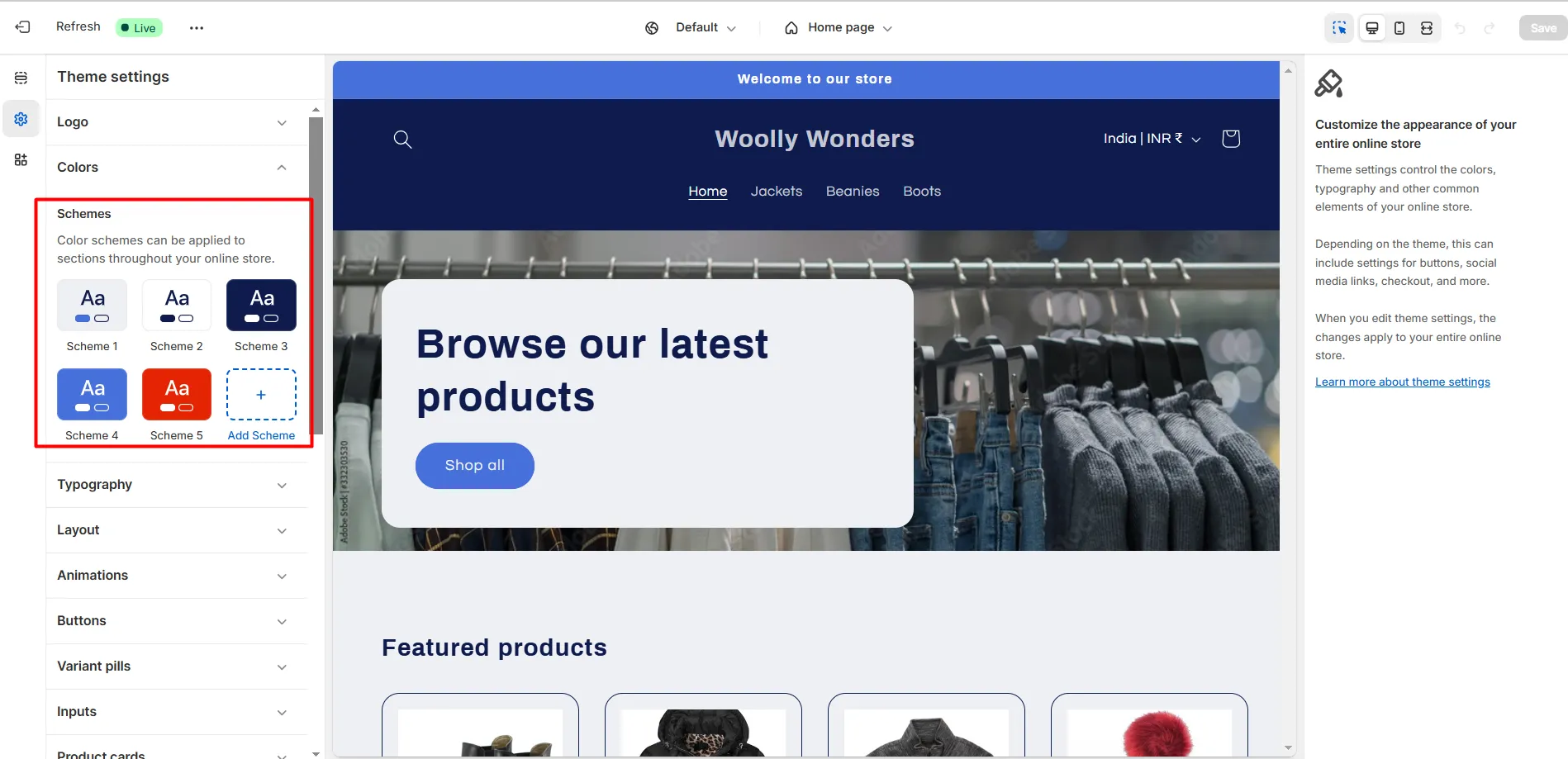
- On the theme editing page, select Theme Settings.
- When you select Color, all the colors in your theme will be displayed. You can adjust them to suit your preferences.
Step 3. Select the Section
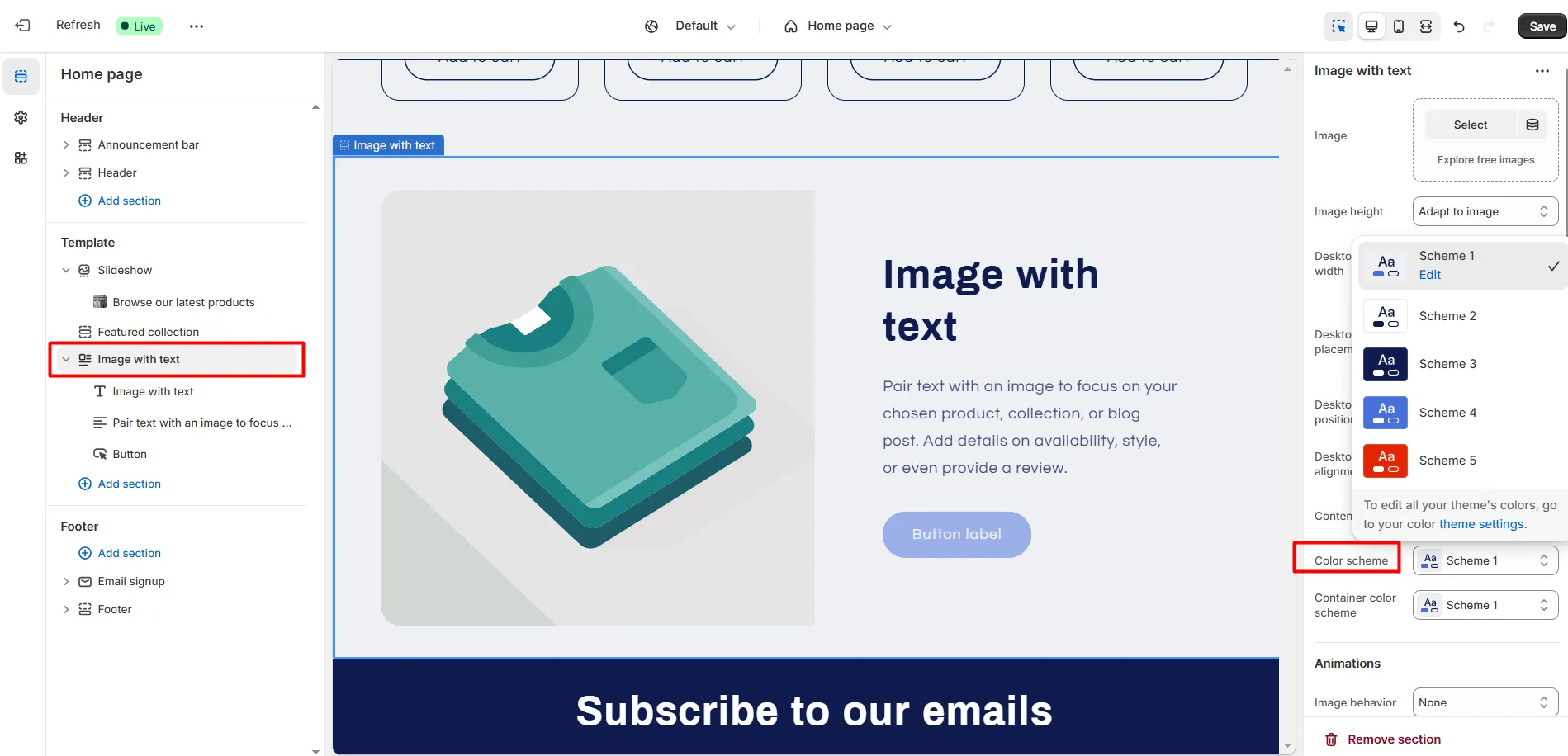
In the theme editor, navigate to the section where you want to change the background.
Click the section to reveal customization options.
Step 4. Change the Background Color
- Look for background color settings (commonly found under “Style” or “Design” tabs).
- Choose a color from the palette or enter a hex code (e.g., #EFF0F5).
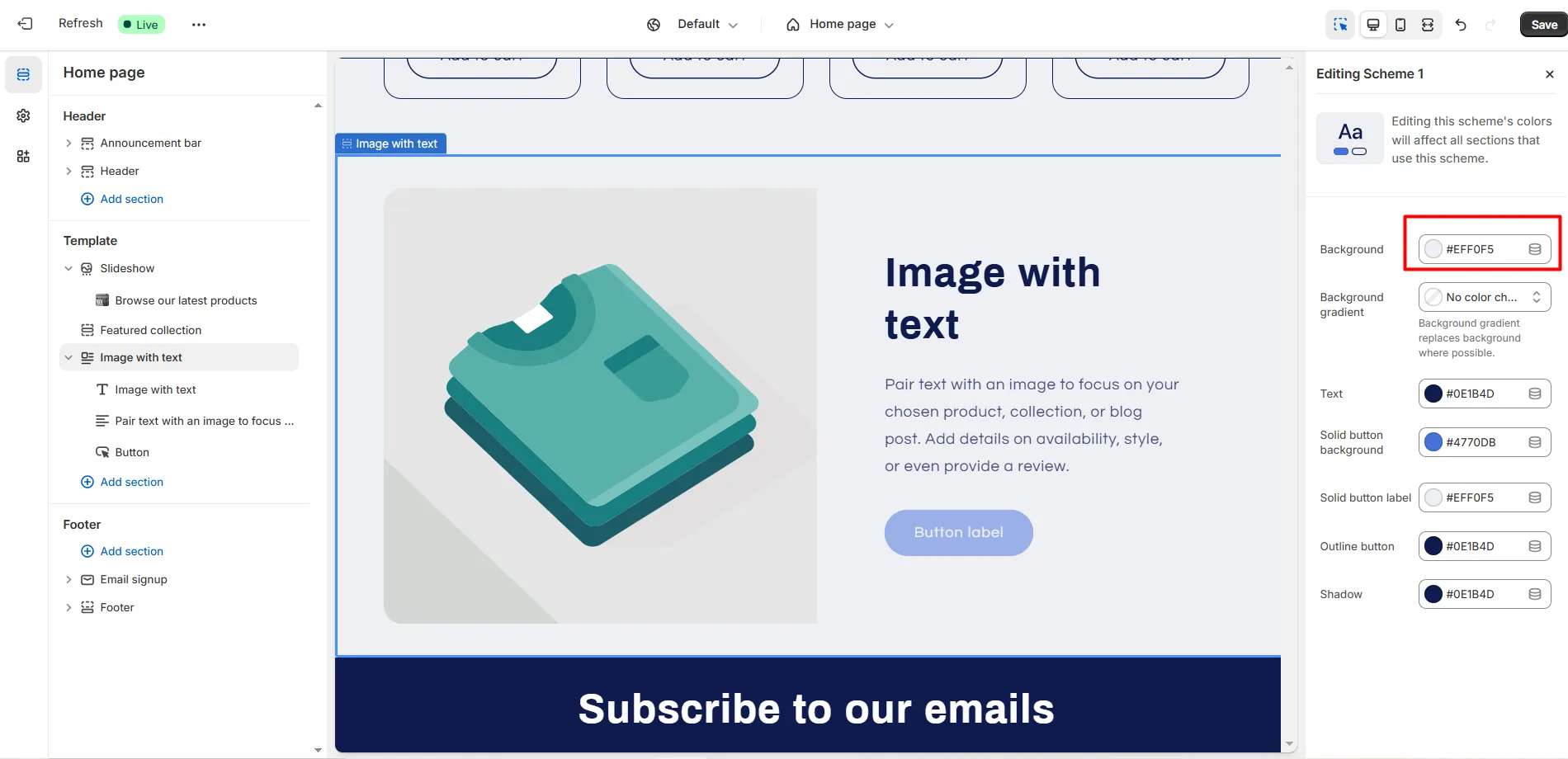
Click Save, and your section's color will be successfully updated.
How to Make a White Background on a Custom HTML Page in Shopify
Here’s a step by step guide to achieve this:
Step 1: Access the Page Settings
- Navigate to your Shopify dashboard.
- Click on Online Store > Pages to view your custom pages.
- Select the page you want to customize and click Edit Page.
Step 2: Add Custom HTML to the Page
- In the rich text editor, click the </> (HTML) icon to access the HTML editor.
- To define the background, wrap the page content in a <div> tag. Use inline CSS to set the background color to white:
<div style="background-color: #ffffff; padding: 20px;">
    <!-- Your custom content here -->
</div>
The #ffffff hex code represents white, and the padding ensures the content is spaced nicely.
Step 3: Customize the Page in the Theme Code (Optional)
If your theme applies a default background to pages, you may need to override it in the theme's code:
- Go to Online Store > Themes > Actions > Edit Code.
- Find the template for your custom page (e.g., templates/page.custom.liquid).
- Use CSS to set the page background to white. Add this CSS either inline or in your theme’s CSS file:
<div class="custom-page" style="background-color: #ffffff;">
    {{ page.content }}
</div>
Or, in your CSS file (e.g., assets/theme.css)
.custom-page {
    background-color: #ffffff;
}
- Save and Preview
Key Benefits of Changing the Background Color in Shopify Sections
Here’s a user-centric explanation of why changing the background color can be a game-changer for your Shopify store, with real-life examples to illustrate each point:
Reinforces Brand Identity
Background colors are a key part of your branding. By ordering your section colors with your brand’s palette, you can create a proper look that makes your store more memorable.
Example: A luxury skincare brand might use nude tones like pastel pinks or creams to show elegance and sophistication. On the other hand, an outdoor adventure brand could use earthy greens or deep blues to reflect nature and adventure. This alignment ensures that customers instantly recognize your brand's personality as they navigate your store.
Improves Visual Hierarchy and Focus
Using different background colors strategically can help guide your visitors' attention to specific elements, such as product highlights, special offers, or call-to-action buttons.
Example: Imagine you are running a flash sale. Giving the sale section a vibrant background color, like yellow or red, immediately stands out, directing the customer’s focus to your offers. Conversely, neutral color in less critical areas ensures the content is not overwhelming.
Enhances Readability
Proper background color contrast improves text readability, making it easier for customers to absorb information without straining their eyes.
Example: If your store’s primary text is black, using a light-colored background like white, beige, or soft grey can ensure the text stands out clearly. A darker background with light-colored text might be more suitable for nighttime or tech-related stores, reducing eye fatigue for users browsing at night.
Sets the Tone and Mood
Colors evoke emotions and set the tone for your store. Choosing the right background color for each section can impact customer's feelings while browsing.
Example: A bakery’s Shopify store could use warm and inviting colors like soft yellows or pastel pinks to evoke warmth and comfort. In contrast, a tech store might use sleek blacks and greys to create a modern and professional vibe.
Drives Conversions
Background colors can influence purchasing decisions by creating an engaging shopping experience. When customers feel comfortable and guided visually, they are more likely to complete a purchase.
Example: A fitness store promoting a “New Year’s Sale” might use bold, energizing colors like red or orange in the promotional section to create a sense of urgency. These colors motivate customers to act quickly, leading to higher conversions.
Showcases Seasonal Themes and Promotions
Customizing your Shopify store’s background colors for seasonal events or promotions can create a festive atmosphere that resonates with your audience.
Example: For a Christmas sale, adding subtle snowflakes on a light blue or festive green background can instantly evoke the holiday spirit, making customers feel more connected to your store and its offerings.
Differentiates Your Store from Competitors
A customized background helps your store stand out in a competitive market. Most Shopify stores stick to default designs, so adding a personal touch can make a lasting impression on your audience.
Example: A sustainable clothing store could use earthy tones and textured backgrounds to emphasize its eco-friendly mission. This stands out compared to competitors using standard white backgrounds.
Personalizes the Customer Experience
Tailoring background colors to suit your target audience’s preferences can make your store more relatable and customer-focused.
Example: A toy store catering to kids and parents could use vibrant, playful colors like yellows, reds, and blues to create a joyful experience. These colors resonate with the target audience and make the store feel tailored for families.
Real-Life Example: How Apple Uses Minimalism to Elevate Design
Apple’s online store is a prime example of how background colors can amplify branding. Their clean, white background emphasizes their sleek, minimalist products. This choice aligns with their brand ethos of simplicity and innovation while making product images and text stand out.
If Apple were to use vibrant or flashy backgrounds, it would clash with its brand identity and dilute the message of sophistication it aims to communicate.
Wrapping Up
Setting up the background colour of your Shopify store is a simple way to enhance your brand’s online presence. If you choose a clean, professional look or a bold, creative design, this small change can make a big impact.
Take the time to experiment and refine your design. The right background color does not just look good. It tells your brand’s story and creates a memorable customer shopping experience.
FAQs
1. Do I need a developer to change the background color?
Not necessarily. Most Shopify themes provide easy-to-use tools for basic customizations. For advanced changes or coding, you may need help from a developer if you're unfamiliar with CSS or Liquid code.
2. Can I reset the background color if I make a mistake?
Yes, you can always revert to the default settings in your theme editor. If you’ve added custom code, remove it to restore the original design. Always back up your theme before making significant changes.
3. What’s the best background color for e-commerce websites?
Neutral colors like white or light gray are commonly used to maintain focus on products. However, choose a color that complements your brand identity and enhances readability.





About the author
Bhavesha Ghatode
Explore Content with Bhavesha, a passionate and dedicated technical content writer with a keen understanding of e-commerce trends. She is committed to sharing valuable insights, practical assets, and the latest trends that can help businesses thrive in a competitive environment.