






You have built a beautiful Shopify store. Your products are great. Your pricing is competitive. But your collection pages are ranking on page 3 of Google, losing traffic instead of gaining customers. Sound familiar?
Do you know Shopify collections SEO is one of the most overlooked growth levers in eCommerce. While everyone obsesses over product page optimization, your collection pages are quietly doing the heavy lifting, they are the pages Google most often ranks for high-intent, category-level searches. In this guide, you will get 10 proven and tested SEO tips specifically designed for Shopify collection page SEO.
Why Shopify Collections SEO is Important
Before we dive into the tips, let's get one thing straight: your Shopify collections page isn't just a navigation tool. It's a landing page.
Think about how shoppers search. They rarely type in a specific product URL. They type things like:
- "best yoga mats under ₹2000"
- mens formal shoes India
- "eco-friendly kitchen products"
These are category-level search queries, and Google loves serving collection pages for them. If your Shopify collection page SEO isn't dialed in, you're leaving massive amounts of organic traffic to your competitors. Collections in Shopify are the bridge between what people search for and what you sell. So, optimizing them is not optional. It's survival!
How to Optimize Shopify Collection Pages for SEO
Tip #1: Research Keywords Like a Category Manager, Not a Blogger
Most merchants guess keywords. Winning merchants research them.
For your Shopify collection page SEO, you want to target keywords that match what a buyer types when they already know what category they want. These are called commercial intent keywords, and they convert far better than informational ones.
How to find them:
- Google Autosuggest: Type your category name into Google and see what it fills in. Those autocomplete suggestions are real searches.
- Google's 'People Also Search For': Scroll to the bottom of a results page. The related searches box is a goldmine for collection page keywords.
- Competitor Collection Pages: Visit your top competitor's site, find their collection URLs, and run them through a free tool like Ubersuggest to see what keywords they rank for.
- Ahrefs or Semrush: If you have access, filter keywords by 'commercial' or 'transactional' intent and a monthly search volume of 500+.
| 💡 Pro Tip Look for long-tail variations of your category. Instead of just targeting 'handbags,' target 'handmade leather handbags for women.' Longer keywords face less competition and attract buyers who are closer to purchasing. |
Tip #2: Write Collection Titles That Google and Shoppers Actually Click On
Your collection title is your H1. It tells Google exactly what the page is about. Most Shopify merchants name collections casually "Summer Stuff" or "New Arrivals." That's a missed SEO opportunity every single time.
The formula for a strong collection title:
| ❌ Weak title | ✅ Strong title (SEO-optimized) |
| Summer Stuff | Women's Summer Dresses - Light, Breezy & Affordable |
| New Arrivals | New Arrivals in Men's Activewear - Shop the Latest Styles |
| Kitchen | Eco-Friendly Kitchen Products - Sustainable & Stylish |
| Shoes | Men's Formal Leather Shoes - Office-Ready & Comfortable |
Tip #3: Craft a Collection Description That Ranks and Converts
Your Shopify collections page description is prime SEO real estate. It's where you can naturally include your target keywords, answer buyer questions, and build trust - all in one block of text.
What a great collection description includes:
- Opening hook: Start with the shopper's pain point or desire, not with your product.
- Natural keyword integration: Mention your primary keyword within the first 50 words and secondary keywords naturally through the description.
- Benefits over features: Tell shoppers what they gain, not just what you sell.
- Social proof signals: Phrases like 'trusted by 10,000+ customers' or 'bestselling since 2020' add E-E-A-T signals.
- A soft CTA: Encourage action without being pushy.
Tip #4: Optimize Your Collection URL Structure
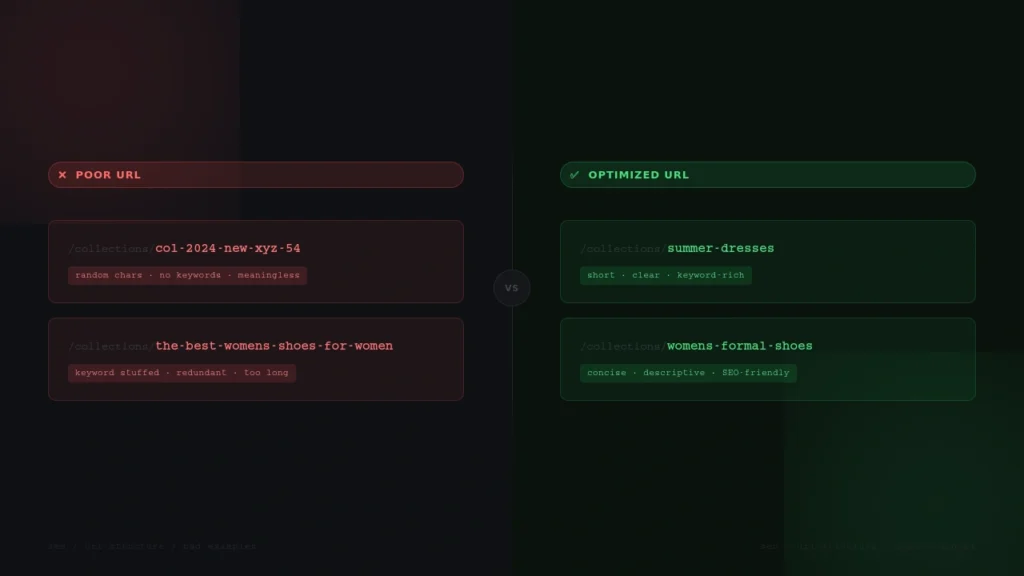
By default, Shopify creates collection URLs like this: yourstore.com/collections/collection-title. That structure is actually fine. The problem is when merchants create messy, auto-generated slugs that don't reflect the keyword they're targeting.
URL best practices for Shopify Collections SEO:
- Keep URLs short, clean, and keyword-rich.
- Use hyphens between words (not underscores).
- Include your primary keyword in the URL.
- Avoid filler words like 'and', 'the', 'for' unless essential.
- Never change a URL after it's indexed without setting a 301 redirect.
Tip #5: Write Meta Titles and Descriptions That Win the Click
Even if you rank on page one, a weak meta title and description means nobody clicks. And in SEO, clicks are everything as they signal to Google that your page is worth the ranking.
Shopify lets you customize the meta title and meta description for every collection.
Meta title formula for Shopify collection pages:
Keep meta titles under 60 characters to avoid truncation in search results.
Meta description example:
Tired of shoes that lose their cushion by noon? Explore our Women's Running Shoes collection- engineered for all-day comfort. Shop 50+ styles. Free shipping over ₹999
Tip #6: Use Internal Linking to Build SEO Authority Within Your Store
Here's something most guides don't tell you: your collection pages can power up each other through internal linking.
Internal links pass what SEO professionals call 'link equity' - essentially telling Google which pages on your site are important. The more relevant internal links a collection page gets, the more authority it builds. Under Advanced SEO documentation, Google discusses the importance of internal links for your website’s sitelinks in search results.
Internal linking strategy for collections in Shopify:
- Link from your homepage: Feature your most important collections prominently on the homepage with descriptive anchor text.
- Link between related collections: At the bottom of your 'Women's Dresses' collection, link to 'Women's Accessories' or 'Summer Looks.'
- Link from blog posts: If you run a Shopify blog, link relevant collection pages from within articles. E.g., a blog about 'How to Style a Silk Blouse' should link to your Silk Tops collection.
- Link from product pages: In the product description or 'You Might Also Like' section, link back to the parent collection.
Tip #7: Add Schema Markup to Help Google Understand Your Collections
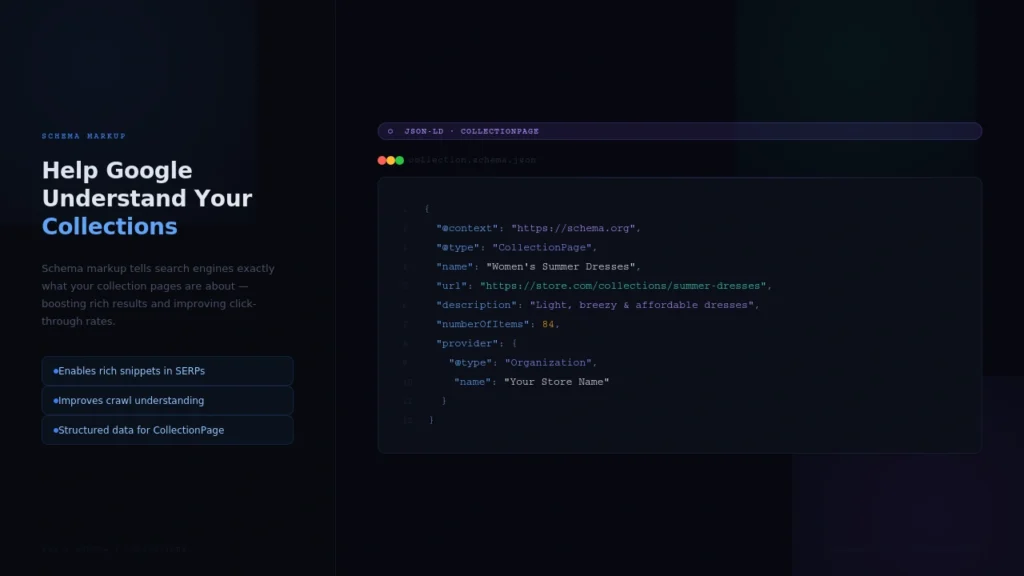
Schema markup is structured data, a special code language that helps Google understand your page content beyond just reading the text. For Shopify collection page SEO, adding schema can unlock rich results like breadcrumbs, product carousels, and ratings in search snippets.
Google has confirmed that structured data helps its AI systems better understand page context which is especially important if you want to rank in AI Overviews.
Key schema types for Shopify collections pages:
- BreadcrumbList: Shows your site hierarchy in search results (e.g., Home > Women > Dresses). This is a quick win for collection pages.
- ItemList: Marks up the list of products within your collection, making it easier for Google to surface individual items in rich results.
- CollectionPage: A schema type specifically for collection or category pages directly relevant to collections in Shopify.
Tip #8: Improve Page Speed
A collection page that loads in 6 seconds on mobile will not rank. Core Web Vitals are a set of speed and usability metrics that are ranking factors.
And your shoppers? They'll bounce in 3 seconds if your page doesn't load. You'll lose the ranking and the sale.
Collection page speed checklist:
- Compress your collection images: Use tools like TinyPNG or Shopify's built-in image optimization. Aim for WebP format and under 200KB per image.
- Limit apps on collection pages: Every app you install adds JavaScript that slows your page. Audit your apps quarterly.
- Use a fast, lightweight theme: Themes like Dawn (Shopify's default), Sense, or Debut are optimized for speed. Heavy, feature-loaded themes often hurt collection page performance.
- Check your Core Web Vitals: Run your collections page through Google PageSpeed Insights (pagespeed.web.dev). Focus on LCP (Largest Contentful Paint) and CLS (Cumulative Layout Shift).
Tip #9: Prevent Duplicate Content With Canonical Tags and Pagination
When customers filter your collection by color, size, or price, Shopify often creates new URLs with query parameters. Google may treat each of these as a separate page and when it finds hundreds of near-identical pages, it gets confused and may devalue all of them.
How to handle this in Shopify:
- Canonical tags: Shopify automatically adds canonical tags to filtered URLs, pointing back to the main collection page. Verify this is working correctly by checking your page's source code or using a Chrome extension like 'SEO Meta in 1 Click.'
- Pagination handling: For long collections that span multiple pages, ensure each paginated URL has a proper canonical or uses rel='next' and rel='prev' signals.
- Noindex filtered pages: If you have a large number of filter combinations generating unique URLs, consider noindexing faceted navigation pages to preserve your crawl budget.
Tip #10: Build Topical Authority Around Your Collections With Content Clusters
Google's algorithm increasingly rewards topical authority the idea that a website is the go-to expert on a particular subject. The more comprehensively you cover a topic, the more Google trusts your content.
For Shopify Collections SEO, topical authority means creating a cluster of related content around each major collection.
How to build a content cluster for a collection:
- Pillar page: Your collection page itself is the pillar. It targets the main category keyword.
- Supporting blog posts: Create 3-5 blog articles that answer questions related to that collection. Each post links back to the collection page.
- FAQ content: Add an FAQ section to your collection page description answering common buyer questions. This is a direct signal for AI Overviews and featured snippets.
- Buying guides: A well-written buying guide ('How to Choose the Right Running Shoe') linked to your collection is both SEO gold and a conversion booster.
Final Thoughts
SEO is a long game but Shopify collections SEO is one of the fastest ways to start seeing organic traffic gains when done right. The tips in this guide are proven, practical, and designed specifically for how Shopify works.
You don't have to do all of this overnight. Start with the collection pages that have the most products and highest commercial intent.
Frequently Asked Questions
1. What is Shopify Collections SEO?
Shopify Collections SEO refers to the practice of optimizing your Shopify collections page the category pages that group related products together so they rank higher in Google search results and attract organic traffic from buyers actively searching for product categories.
2. Do collections in Shopify matter for SEO?
Absolutely. Collections in Shopify are among the most SEO-valuable pages on your store. They target category-level search queries with high commercial intent, the kind of searches made by people who are ready to buy. Neglecting them means missing a massive channel for organic revenue.
3. Can Shopify collection pages rank on Google?
Yes, and they often outperform product pages for high-volume category keywords. When properly optimized with the right keywords, strong descriptions, schema markup, and internal links, Shopify collection pages can rank for highly competitive, high-traffic search terms.
4. How to optimise Shopify collection pages for SEO?
Optimize Shopify collection pages by using keyword-rich titles, meta descriptions, and ~300+ words of unique content. Also, improve H1 tags, image alt text, URL structure, and add quality content below the product grid to boost SEO.

![How to Add Apple Pay to Shopify? [New & Easy Tutorial]](https://www.identixweb.com/wp-content/uploads/2026/03/20-03-Fri-Blog-How-to-Enable-Apple-Pay-in-Your-Shopify-Store_-.webp "How to Add Apple Pay to Shopify? [New & Easy Tutorial]")

About the author
Sajini Annie John
Meet Sajini, a seasoned technical content writer with a passion for e-commerce and expertise in Shopify. She is committed to helping online businesses to thrive through the power of well-crafted content.