





![How to do BOGO Sale on Shopify [With & Without App]](https://www.identixweb.com/wp-content/uploads/2026/02/04-02-Wed-Blog-How-to-Run-Successful-BOGO-Deals-on-Shopify_.webp "How to do BOGO Sale on Shopify [With & Without App]")
Someone lands on your product page for a $28 face serum. They like it, but they’re not 100% sure.
Then they see a simple line: “Buy one, get one free. Add $10 to the cart.” Now it’s not just a purchase, it’s a deal.
They add the second one, and suddenly your AOV increases.
That’s the real power of BOGO. But on Shopify, BOGO can get tricky if you don’t set it up the right way.
In this blog, I’ll show you how to do BOGO sale on Shopify using two methods: With and without an app.
What does BOGO (Buy One Get One) mean on Shopify?
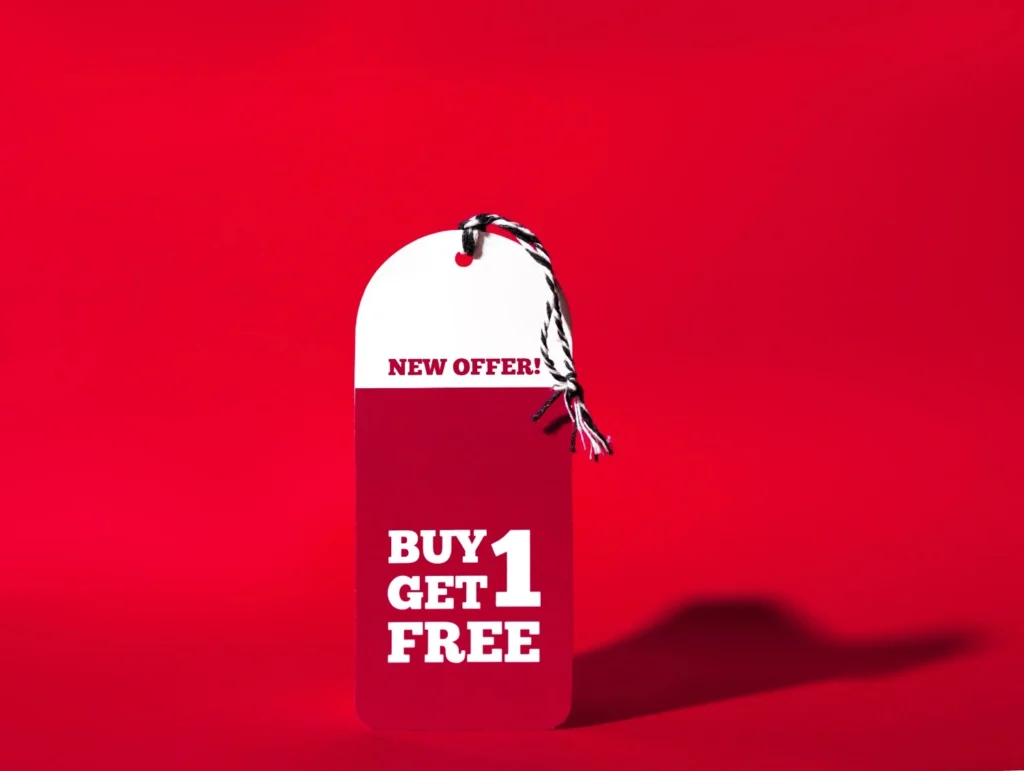
On Shopify, BOGO doesn't mean a free item. Shopify treats BOGO as a Buy X, Get Y discount. That means you set two things:
- What the customer must buy (X)
- What the customer gets discounted (Y)
Simple idea. But the details matter.
Here’s what BOGO looks like in real stores
Buy 1, get 1 free (same SKU)
This is the classic one. They add two of the same product, and one becomes free. Great for everyday items like tees, socks, skincare, or candles.
Buy 2, get 1 free (same collection)
This is a volume-style BOGO. The customer can mix and match within a collection. It’s perfect when you want higher units per order without forcing the same item twice.
Buy 1, get 50% off the second item
This is still “BOGO” to customers, but it protects your margins better than giving away free items. It works well for higher-priced products where giving one away hurts.
You can create BOGO deals on Shopify using two methods.
- Without an app (Shopify's built-in feature)
- With an app (With BOGO Apps like iCart)
How to do BOGO sale on Shopify? (without an app)
You can do this with Shopify’s built-in Buy X Get Y discount feature.
Step 1: Decide your BOGO rule (keep it simple)
Pick one:
- Buy 1, get 1 free (same product)
- Buy 2, get 1 free (same collection)
- Buy 1, get X% off the second item (better for margins)
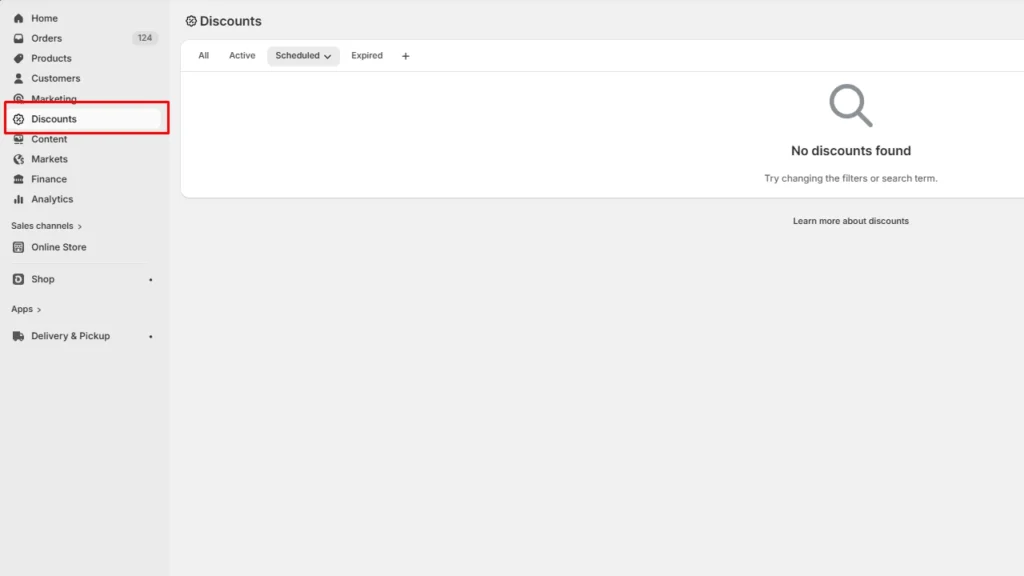
Step 2: Go to Discounts in Shopify admin
In your Shopify admin, go to Discounts
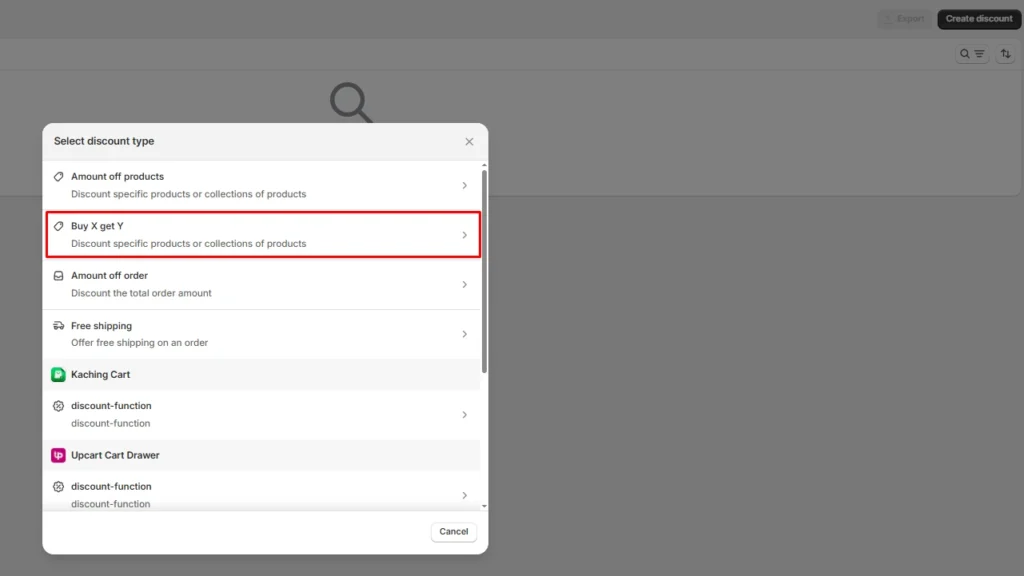
Step 3: Click create discount button
Click the Create discount button on the top right corner and select Buy X get Y from the discount type.
Step 4: Choose how customers get the deal (Automatic is best)
You’ll see two options:
- Automatic discount (best for conversion)
- Discount code (best if you want influencer tracking or email-only offers)
Most store owners choose Automatic because customers will automatically see the code at checkout.
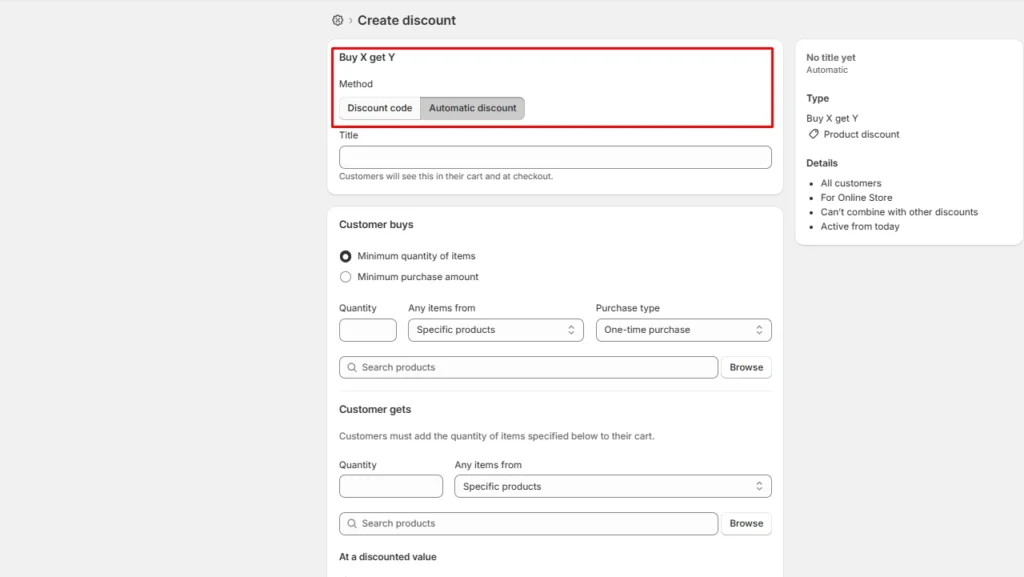
Step 5: Create your discount
There are many criterias you need to fill here. Here are the 4 critical ones.
Title - Enter your discount name (BOGO50)
Customer buys - This is what the customer adds to the cart
- Choose Products or Collections
- Set the quantity (example: 1 free item)
- Choose the discount value: Free or % off (like 50% off)
Customer gets- This is what the customer gets as a free item.
Discounted value - You can select between Percentage, Amount off each, or Free
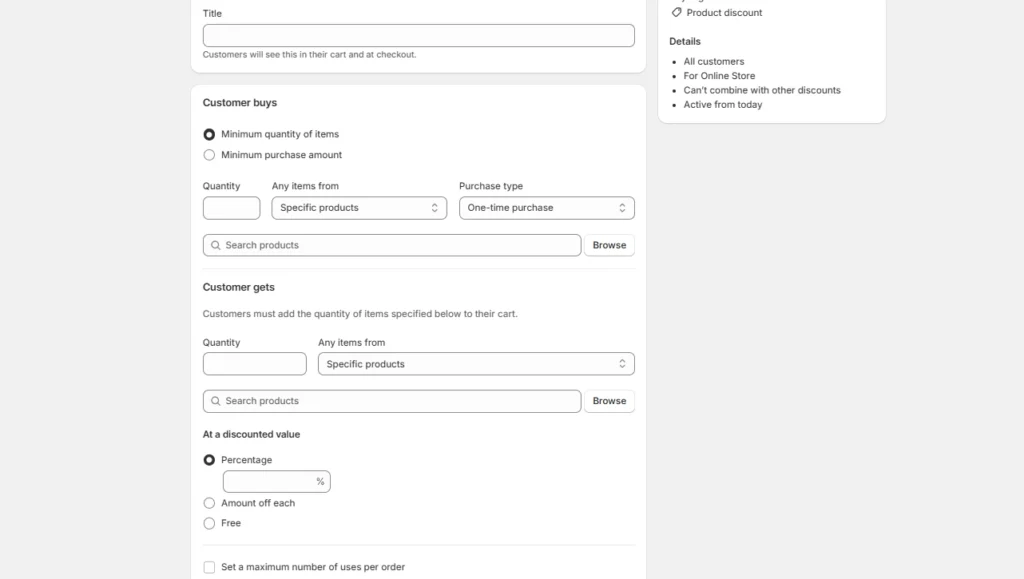
Other criterias include setting the eligibility, maximum discount uses, combinations, and active dates.
Step 6: Save your BOGO deal
Go through everything again and click on Save to create your BOGO sale on Shopify
How to do BOGO sale on Shopify (with an app)
If you want BOGO to feel effortless, an app helps. With BOGO Shopify apps like iCart, you can bring the Buy One Get One deal into the cart drawer.
Store owners can guide the shopper with a progress bar that nudges them to add one more item or spend a little more to unlock the deal.
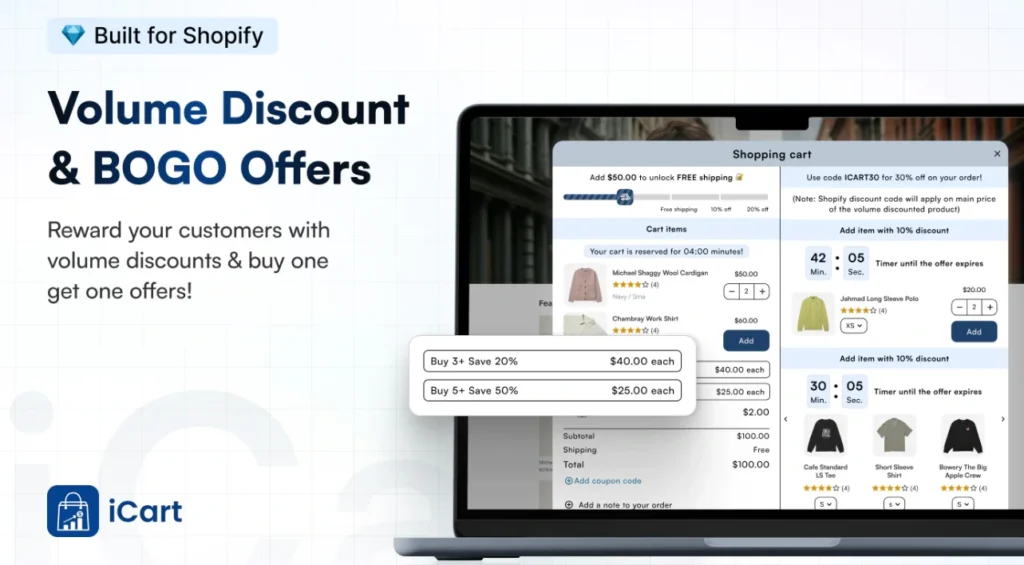
Why Shopify BOGO Apps like iCart are better for BOGO Offers?
BOGO fails when shoppers get confused. They add one item, expect the deal, and bounce.
iCart fixes that by making the offer visual and obvious inside the cart drawer, where the purchase decision happens.
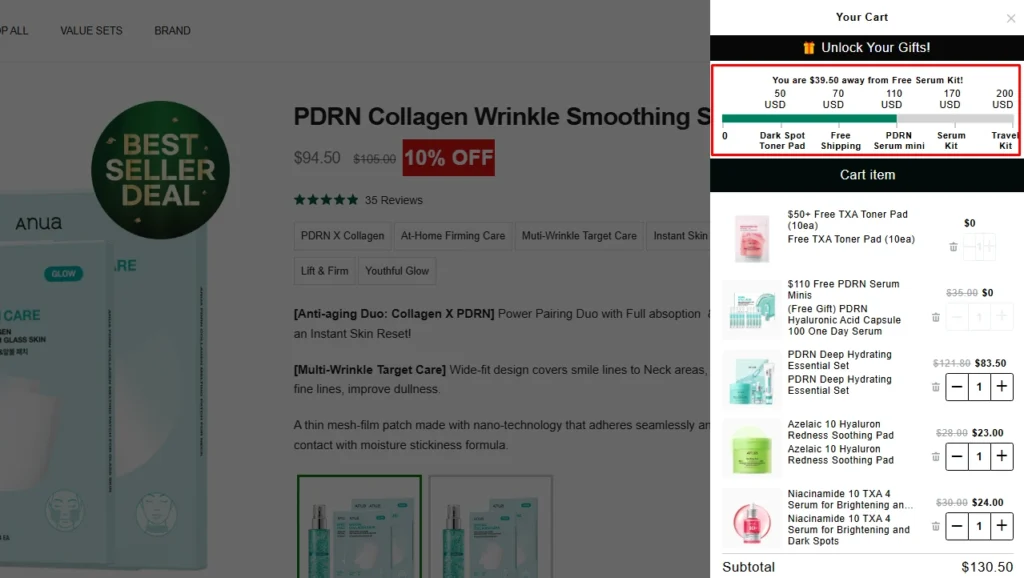
Shopify stores like Anua use iCart to add BOGO offers in their cart drawer.
Think of the progress bar as “cart gamification.” It shows a clear goal and a clear reward.
You set discount tiers (milestones) like:
- “Add 1 more item to unlock a free gift”
- “Spend $50 to unlock a free product”
- “Spend $75 to unlock a bigger reward”
Best tips to run BOGO deals on Shopify
- Keep the rule simple. Use clear copy like “Add 2 to get 1 free” or “Buy 1, get 2nd 50% off”
- Repeat the rule where it matters: product page, cart drawer, and checkout messaging.
- Protect your margins before you launch. If “free” is too costly, run the 2nd item 50% off.
- Use the cart to nudge the last step. A buy one get one free app on Shopify like iCart can show a progress bar and discount tiers so customers know they’re one item or $X away from the reward.
- Run it with a real time window. A clear start and end date keeps urgency real and stops customers from waiting.
Conclusion
BOGO can be one of the fastest ways to push customers from “maybe later” to “let’s checkout.”
If shoppers have to guess what to add they’ll bounce.
What you want is a basic setup. Shopify’s built-in Buy X Get Y discount gets the job done. If you want a smoother experience that shows the BOGO offer inside the cart drawer, iCart gives you more control.
Now pick one BOGO offer, set clear rules, and test it like a real shopper in your store. Once it works cleanly, promote it everywhere.
FAQs for How to do BOGO Sale on Shopify
1. Can you stack BOGO on Shopify?
Yes. Shopify lets you choose whether your BOGO/BXGY discounts can combine with other discount types but Buy X Get Y has extra limitations and may not stack with certain product discounts the way you expect.
2. How to create BOGO on Shopify?
Go to Shopify Admin > Discounts > Create discount, then set “Customer buys” (X) and “Customer gets” (Y) as free (100% off). Just remember, customers usually need to add both items to the cart for the deal to apply.
3. How does BOGO sales work?
BOGO works by setting a rule that says: “Buy this, get that discounted.” Shopify applies the discount when the cart meets the requirement. The deal won’t trigger if the customer doesn’t add the required items.
4. Which is the best BOGO Shopify app?
iCart Cart Drawer Cart Upsell is a strong option used for cart-based offers and AOV boosts. Other options include BOGOS, Koala Free Gift Bogo Upsell, and Quickify Upsell.
5. What does BXGY mean in Shopify?
BXGY is Shopify shorthand for Buy X Get Y. It’s the discount type Shopify uses to run BOGO-style promotions, where customers buy a specified quantity (X) and receive another item (Y) free or discounted.


About the author
Vineet Nair
Vineet is an experienced content strategist with expertise in the ecommerce domain and a keen interest in Shopify. He aims to help Shopify merchants thrive in this competitive environment with technical solutions and thoughtfully structured content.