





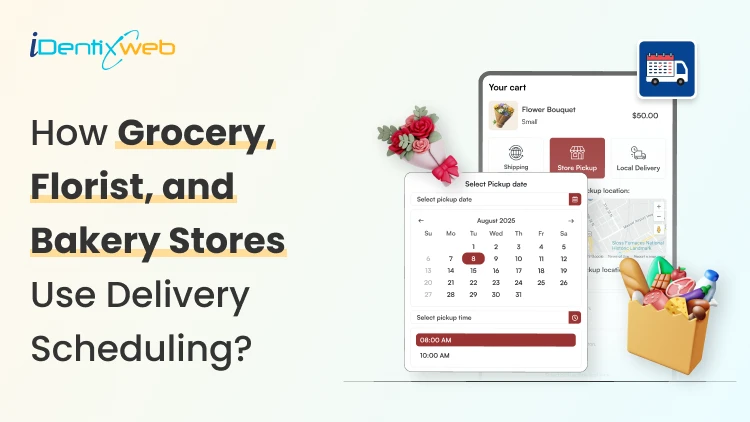
Shopify delivery scheduling means your customer chooses two things:
1. How the order gets to them
2. When the order arrives.
That sounds simple until you sell products that are time-sensitive.
A grocery order can turn into a refund if it shows up late. A bouquet can get ruined if it sits outside. A baked item can miss the order if the pickup window is unclear.
That’s why grocery, floral, and bakery Shopify stores manage scheduling differently.
Each one has a different prep time, freshness window, and delivery route reality.
This guide shows you the exact setup most new Shopify stores use to manage their order scheduling.
First, pick your delivery model
Before you install apps or configure settings, decide how “scheduled”. New stores usually overbuild this part. Then they spend every day fighting their own setup.
The clean move is picking one model that matches your order volume today, not your dream version six months from now.
Model A: Shopify native
This is the best starting point if you’re getting a few local orders a day and you just need the basics to work. Shopify lets you schedule delivery so that customers get their orders as per their convenience.
You set delivery areas using a radius or ZIP codes, then add delivery fees that make sense for your margin. You also turn on pickup so customers can order now and collect later without calling you.
Here’s a complete official setup process to set up local delivery for online orders.
Use this model if you want to launch quickly and keep operations simple. You can always add scheduling later when customers start asking for it.
Model B: Native plus time slots (best for food and perishables)
Grocery and bakery stores use this model all the time because timing is part of the product.
You still use Shopify for the delivery method and pickup option. But you add a Shopify delivery time slot layer so customers can pick a date and time window that your team can actually fulfill.
This is where apps like Stellar Delivery Date & Pickup help by letting customers pick a delivery or pickup date and time with a calendar, across local delivery, store pickup, and shipping.
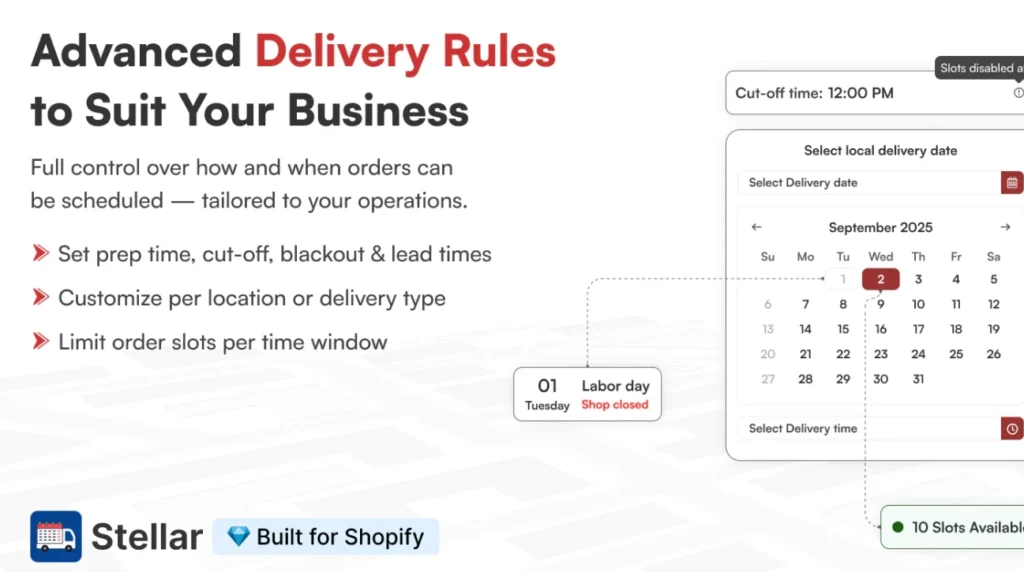
It also supports cutoff times and blocked dates, so you can stop taking same-day orders after a certain hour and block holidays or fully booked days.
Model C: Advanced routing and POS workflow (when volume grows)
This is for stores that deliver a lot and need tighter control over the delivery day.
Here, store owners manage local delivery orders tied to Shopify POS. That makes it easier to process orders, mark them out for delivery, and keep the team on the same page.
Most stores don’t need this on day one, but it becomes worth it when your delivery volume starts stressing your staff.
Scheduling checklist for Shopify groceries

Grocery delivery is all about one thing: keeping food fresh without overloading your team.
The rules that grocery stores on Shopify rely on
✅ Same-day delivery cutoffs keep you from promising what you can’t fulfill. For example, orders after 11:00 AM move to the next available day. Your cutoff should account for picking, packing, and route time.
✅ Limit time slots per day so your staff can deliver orders on time. Early on, 2 to 4 slots are plenty. You can offer “morning window” or “afternoon window” before you try to offer every hour.
✅ Set capacity limits per slot to stop pileups. Cap how many deliveries you accept in each window. When a slot fills, it should disappear.
Scheduling checklist for Shopify floral stores

Florist delivery is tied to a moment. That’s why your scheduling has to feel date-driven, predictable, and strict enough to protect quality.
Florist-specific scheduling rules
✅ Go date-first. Most customers shop for flowers with a specific day in mind. Birthday, anniversary, apology, congratulations. Your flow should make the delivery date obvious and easy to choose.
✅ Use same-day cutoffs. Same-day delivery sounds great, but it is difficult if you accept orders too late. Set an AM cutoff for same-day, then push later orders to next-day or a later window. On peak holidays, move that cutoff even earlier.
✅ Block dates when you’re full. When a delivery route sells out, don’t let customers keep selecting it. Use blackout dates for closed days and block time for fully booked routes. This solution prevents late deliveries.
Delivery zones need tighter control
✅ ZIP codes work better than radius. Radius looks easy, but it can include addresses that don’t fit your real route. ZIP-based zones give you cleaner control over where you promise delivery.
✅ Price by distance. Zones that are far away should cost more. Not to upsell, but to protect your margins. Set delivery fees by ZIP groups so nearby deliveries stay affordable and long-distance deliveries don’t lose money.
Scheduling checklist for Shopify bakery

Bakery orders fail for one main reason: customers assume everything is “ready today.” But a custom-baked item takes time to deliver.
The two important rules for bakeries
✅ Pre-order flow: This is for anything that needs planning. Custom cakes, catering trays, or bulk cupcakes. The customer picks a date up front, and you bake to that date.
✅ Pickup window flow: This is for daily items where timing still matters. Instead of promising an exact minute, give a window like “Ready between 3–5 PM.” That keeps customers from showing up while you’re still finishing the order.
Bakeries often need rules that Shopify doesn’t enforce by default. The biggest one is product-specific lead time.
A cake might need 48 hours. A cookie order might need 2 hours. Without lead times, customers will pick dates you can’t fulfill.
Scheduling apps like Stellar help with holiday closures and capacity limits. You can block days you’re closed, reduce time slots on busy weekends, and cap how many orders you accept per window.
The common scheduling settings checklist
Settings you’ll want no matter your category
✅ Cutoff times
- Set a same-day cutoff time (example: after 11:00 AM = next-day delivery/pickup).
- Make the cutoff message visible near the date/time selector.
✅ Prep time (lead time)
- Set minimum prep time for pickup and delivery orders.
- Set prep time by product type (cake vs cookies, bouquet vs vase add-on).
✅ Blackout dates
- Block store-closed days (holidays or maintenance).
- Block fully booked days when you are at capacity.
✅ Order limits per slot
- Add a daily cap or per-slot cap.
- Make full slots disappear automatically so customers pick another time.
Conclusion
Grocery stores need delivery scheduling to stay on time and protect freshness. Florists need it because the delivery date matters more than the product page. Bakeries need it because prep time is real, and store pickup can be difficult.
Keep your setup clean. Add time slots, cutoffs, and capacity limits when your order volume increases.
As a Shopify expert, my advice is to tighten two things today: your cutoff time and your blackout dates. Those two settings stop most scheduling problems before they hit your store.
FAQs
1. Is Shopify good for florists?
Yes. Shopify works well for florists because you can build a clean product catalog (bouquets, add-ons, gift notes) and run local delivery or pickup for nearby customers.
2. Can I sell homemade baked items on Shopify?
Yes, you can sell baked goods on Shopify, but you still have to follow your local food laws and licensing rules in your state or city.
3. Can I sell groceries on Shopify?
Yes. Shopify supports grocery stores with features like inventory, local delivery, and curbside pickup, so customers can order online and choose how they receive it.
4. Does Shopify do same-day delivery?
Shopify doesn’t deliver orders for you, but it lets you add same-day local delivery as a feature if you deliver yourself (or use a delivery partner).
5. Is Shopify good for home bakers?
Yes. Home bakers can use Shopify to take orders, collect payments, and offer pickup or local delivery, which is usually what customers want for fresh items.




About the author
Vineet Nair
Vineet is an experienced content strategist with expertise in the ecommerce domain and a keen interest in Shopify. He aims to help Shopify merchants thrive in this competitive environment with technical solutions and thoughtfully structured content.