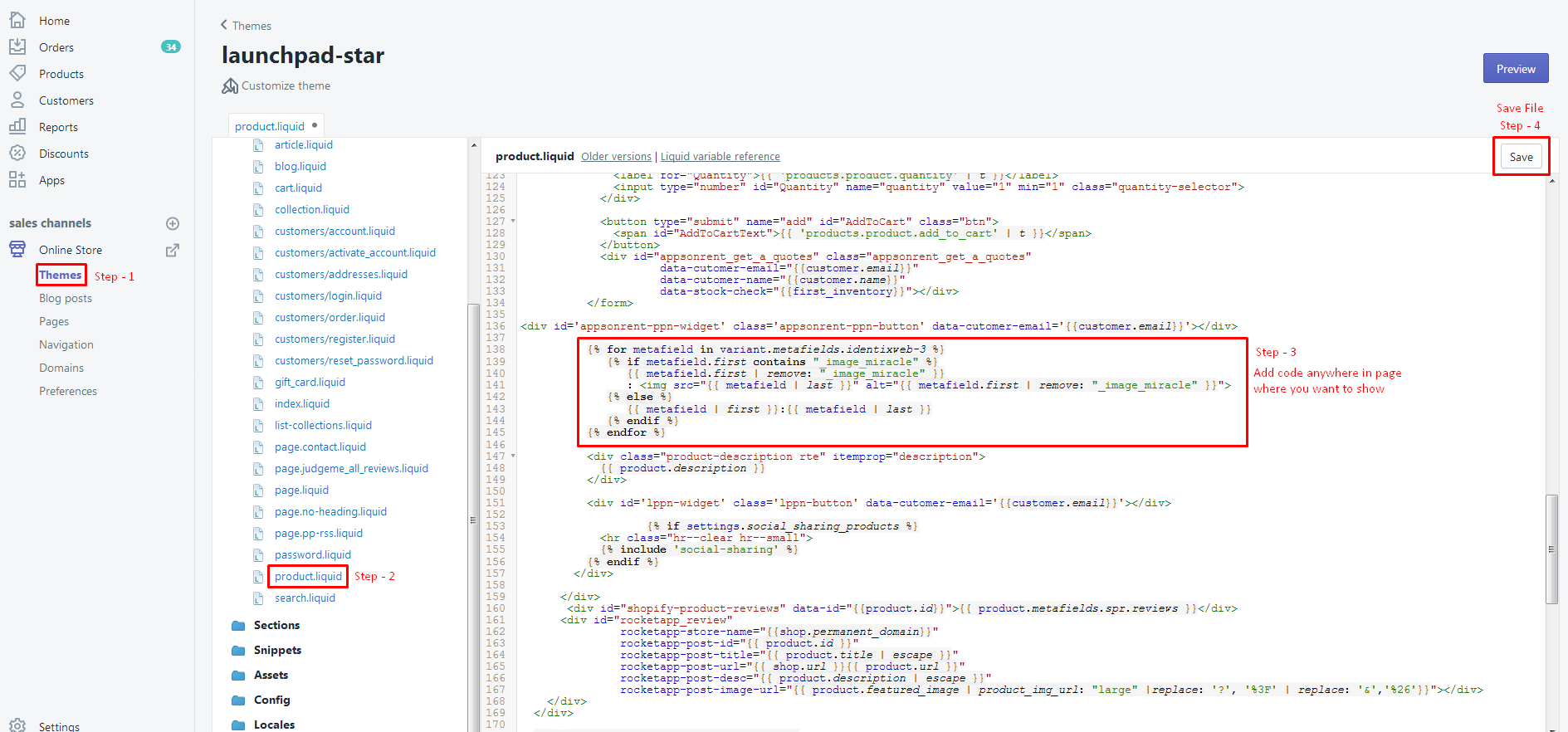
To set up Product Variant metafields on your product page, you need to modify the product. liquid file in your theme. This allows you to display metafields associated with product variants, enhancing the information available to customers. Start by logging into your Admin panel, navigating to Online Store, and selecting Themes. Locate the product-template.
liquid file under the Sections section; if it's not there, check the product. liquid file. Insert the code {% include 'all-in-one-metafields', metafields: 'variants' %} at the desired position in the file and save your changes. Ensure you follow these steps carefully to successfully display the metafields.
Following are the steps to setup Product Variant metafields
- Show Product variant metafield in your product page needs to insert below code in the product.liquid file.
- Product file path: Login into Admin panel-> left side menu select Online store -> select Themes.
- Now left sidebar load with file list. Check at Sections bottom of the list “product-template.liquid” file, click on it.
- If you did not find “product-template.liquid” then add in this file, Inside Template bottom of the list “product.liquid” file, click on it.
- Insert below code where you want to show metafield at this position in the file and save it.
{% include 'all-in-one-metafields', metafields: 'variants' %}
For a quick view of all the above step check the below image