





What if you could test every change to your Shopify store like new themes, seasonal layouts, navigation overhauls without risking a single real sale? That is exactly what Shopify SimGym makes possible. Here is everything you need to know to get started.
What Is Shopify SimGym?
Shopify SimGym is a simulated commerce environment built by Shopify that allows merchants and AI researchers to train reinforcement learning (RL) agents in a realistic e-commerce setting.
It is part of Shopify's broader push into AI-native commerce, released as a research preview to eligible Shopify merchants and developers. The platform is designed to accelerate how AI learns to optimize the most complex parts of running an online store.
Who Is Shopify SimGym For?
It is built for:
- Shopify merchants who want to experiment with AI-driven store optimization
- Developers and researchers building reinforcement learning agents for commerce
- Growth-focused store owners who want to understand how AI can improve conversion, pricing, and inventory decisions
- Tech-savvy entrepreneurs who want early access to tools that their competitors are not using yet
Key Features of Shopify SimGym
Simulated store environment
A realistic, data-driven model of a Shopify store where AI agents can be trained and evaluated.
Reinforcement learning framework
AI agents learn by trial and error inside the simulation, optimizing for goals like revenue, conversion rate, or customer lifetime value.
Safe experimentation
No real customers are affected; all experiments run in a sandboxed environment.
Realistic commerce dynamics
The simulation models real shopping behavior, demand patterns, and inventory constraints.
Research-grade tooling
Built for rigorous AI experimentation, which means the results are meaningful and transferable to real store performance.
Early access advantage
As a research preview, eligible merchants gain hands-on experience with AI tools months before mainstream release.
Shopify SimGym Eligibility: Who Qualifies and How to Get Access
SimGym works with stores that meet all three of these conditions:
- Liquid storefront - Hydrogen and headless storefronts are not compatible
- Shopify Network Intelligence (SNI) - must be active on your store
- No password protection - your store must be publicly accessible
If any of these aren't met, SimGym will show you a screen explaining the issue and what steps to take.
How to Install Shopify SimGym and Start Using It
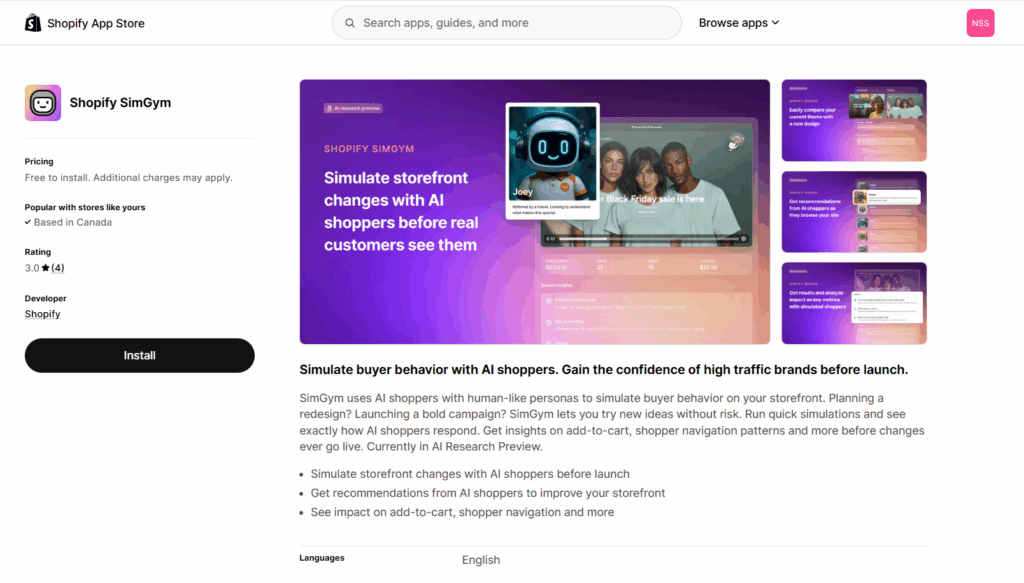
1. Install the SimGym app from the Shopify App Store
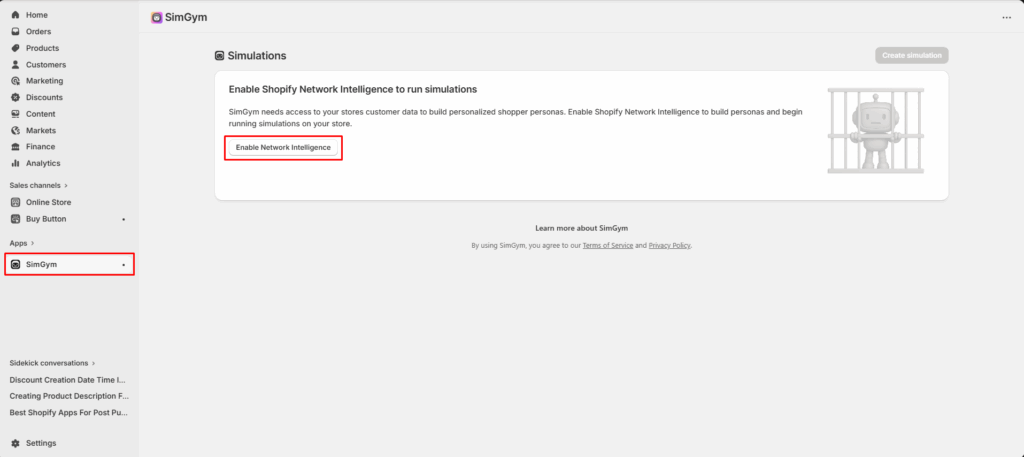
2. From your Shopify admin, go to Apps > SimGym and click on Enable Network Intelligence.
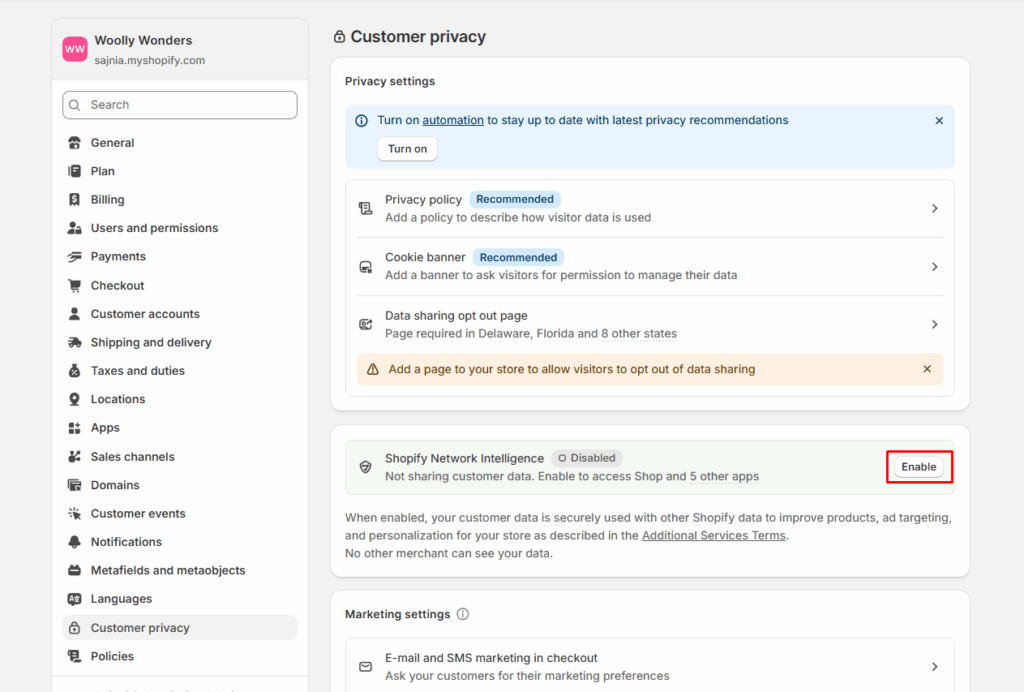
3. Click on Enable
4. After enabling, you will get a message to turn off password, if your store is password protected.
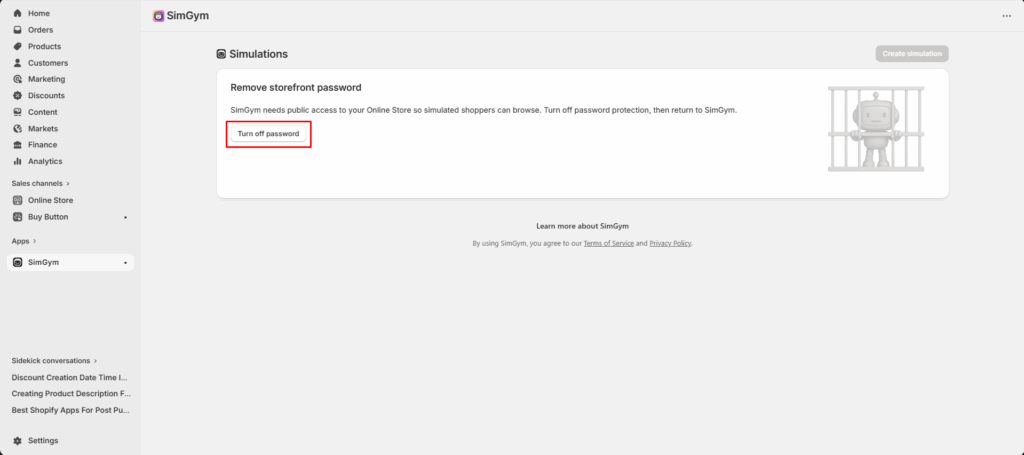
5. After that you can start creating simulations right away
6. Click Create simulation
7. Enter a title for your simulation in the Title field
8. Select a second theme from your Theme Library to compare against your currently active theme
9. Click Start simulation
No complex configuration. No technical setup. Once the app is installed, you are ready to run your first simulation.
What Makes Shopify SimGym Different from Other AI Tools?
| Feature | Standard AI Tools | Shopify SimGym |
| Learns from past data | ✅ | ✅ |
| Explores new strategies | ❌ | ✅ |
| Risk to live store | Medium | None |
| Optimizes for dynamic decisions | Limited | Full |
| Uses reinforcement learning | Rarely | Core approach |
Why Should You Try Shopify SimGym Right Now?
1. You Get Access Before Your Competitors Do
SimGym is in research preview, which means access is limited. Merchants who engage now will understand how to use AI simulation for commerce decisions far ahead of the majority of Shopify store owners. That early knowledge compounds over time.
2. AI Is Changing E-Commerce Faster Than Most Merchants Realize
Decisions that merchants currently make manually what to price a product, when to run a promotion, how to sequence a checkout flow are the exact decisions that reinforcement learning is designed to optimize.
Merchants who understand how AI agents are trained to make these decisions will be better positioned to deploy, interpret, and benefit from AI tools as they become standard across the platform.
3. Zero Risk to Your Live Store
One of the biggest barriers to AI experimentation is fear of disrupting what's already working. SimGym removes that barrier entirely. Every test, every AI decision, every simulation run happens in a contained environment.
Frequently Asked Questions
1. What is Shopify SimGym?
Shopify SimGym is an AI-powered simulation tool available as a research preview for eligible Shopify merchants. It lets you run virtual AI shoppers through your store to test theme changes, layouts, and navigation without affecting your live store or real customers.
2. Who is eligible for Shopify SimGym?
To use Shopify SimGym, your store must meet three requirements: it must run on a Liquid storefront (Hydrogen and headless storefronts are not supported), have Shopify Network Intelligence (SNI) activated, and must not be password protected. If your store does not meet these requirements, SimGym will notify you and explain what action to take.
3. Does Shopify SimGym affect my live store or real customers?
No. It runs entirely in a simulated environment. Your live store, real customers, and actual revenue are never touched during any simulation.
Post Tags




About the author
Sajini Annie John
Meet Sajini, a seasoned technical content writer with a passion for e-commerce and expertise in Shopify. She is committed to helping online businesses to thrive through the power of well-crafted content.