






Checkout abandonment is when a shopper adds items to the cart, goes for checkout, but leaves before completing the payment. It happens because the final cost looks higher than expected, the checkout is too long, they are forced to create an account, or lack of payment options. Unlike cart abandonment, this happens at the last step, so the best fix is to keep checkout simple, show total costs early, and make the payment step feel safe.
Have you checked your Shopify analytics reports and realize how many shoppers reached the final step, then disappeared?
As a Shopify expert, we have seen countless analytics reports on checkout abandonment. Most of the time, it is not because your products are bad; it is because something in the checkout made the buyer pause and abandon your store.
In this blog, we will tell you the most common reasons shoppers drop off at checkout and the simple fixes that bring them back.
First lets have a quick overview of checkout abandonment.
What is Checkout Abandonment?
Checkout abandonment happens when a shopper starts checkout, enters details like shipping information, and then leaves before finishing payment.
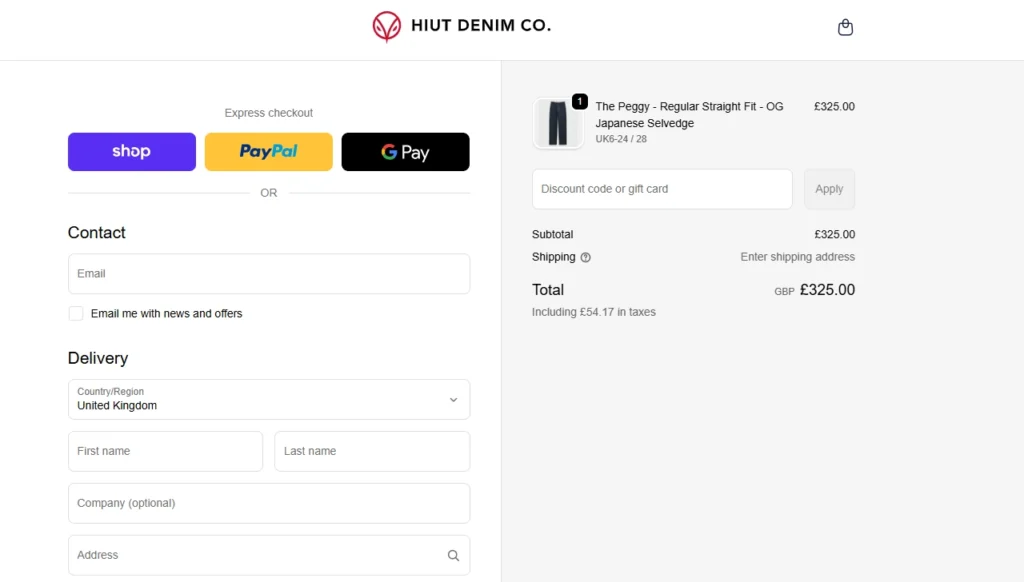
‘Enter your details’ page of Huit Denim CO. before checkout.
It means they had buying intent, but something in the checkout flow made them hesitate or stop.
In most Shopify stores, checkout abandonment spikes because of the following reasons:
- Unclear delivery time.
- When the final cost looks higher than expected.
- The checkout feels long or confusing.
- Payment options do not match what the shopper prefers.
- The store does not feel trustworthy.
That being said, it is different to cart abandonment. Let’s see the difference between the two below.
Cart Abandonment vs Checkout Abandonment
| Aspect | Cart abandonment | Checkout abandonment |
| Definition | Cart abandonment happens when items are added to the cart, but the purchase is not completed. | Checkout abandonment is when a shopper starts the checkout process but leaves before completing the purchase. |
| Where the drop-off happens | The shopper adds products to the cart, then leaves before checkout. | The shopper starts checkout, then leaves before payment is completed. |
| Intent level | Lower intent. | Higher intent. |
| Common causes | Price comparison, just browsing, waiting for a coupon, or getting distracted. | Unexpected costs, no scheduling options for delivery, too many fields, payment issues, or low trust at the payment step. |
| The solutions to reduce it | Add clear shipping/returns, transparent costs, non-disturbing upsells, and show trust signals. | Make checkout fast and predictable: fewer steps, fewer fields, and a delivery date and time picker. |
Do you know that according to Baymard’s research, the combined abandoned rate of cart and checkout is 70%.
How to Reduce Checkout Abandonment (+ Common Reasons)
Unclear delivery date and time
A lot of shoppers abandon checkout when they cannot choose a delivery or pickup date and time. This is because they cannot confirm the order will arrive when they actually need it.
It can be gift deadlines, being home to receive it, fresh or perishable items, or event-based purchases.
Baymard’s research also shows that Shopify merchants should add ‘delivery date’ to their checkout flow.
Shopify itself highlights that showing delivery dates at checkout can encourage customers to complete purchases faster.
How to fix it? If you are on Shopify, add a delivery date and time picker app so customers can select a date or see a clear estimated delivery window.
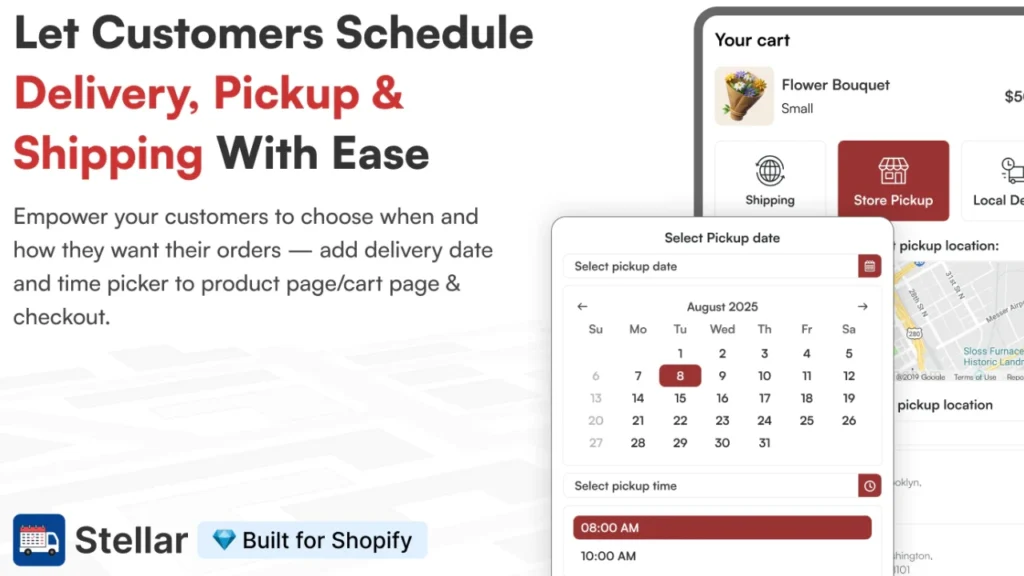
Apps like Stellar Delivery Date & Pickup let customers schedule delivery, pickup, or shipping with a calendar. You can set rules like cut-off times and blocked dates.
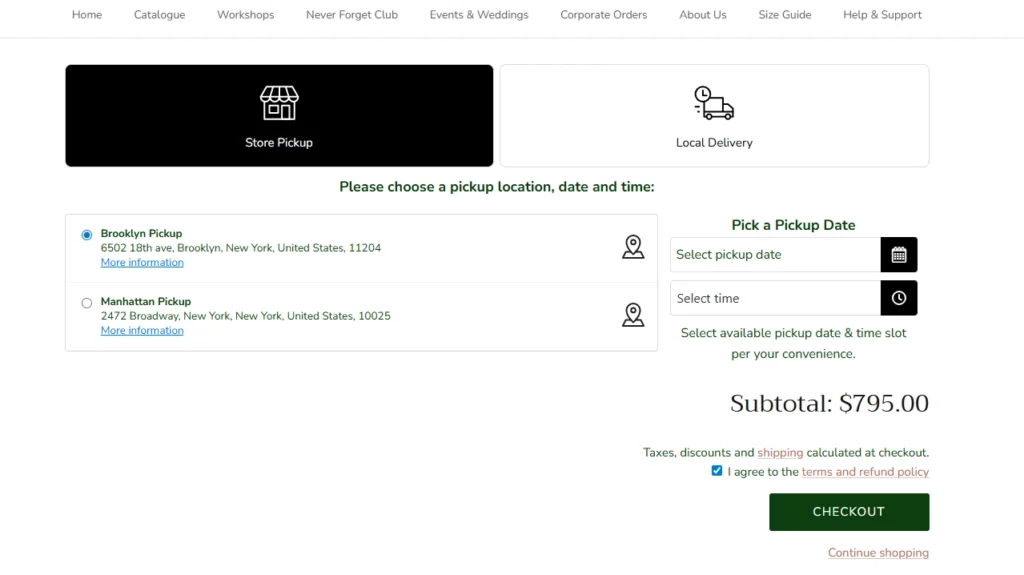
A&M Floral Place is using Stellar to add a pickup date and time selector at checkout
Unexpected extra costs
Shoppers feel tricked when the total jumps at the last step because of shipping or taxes, so they leave and compare other stores. I, as a customer, have abandoned the checkout when I only see shipping costs at checkout, especially with calculated rates.
How to fix this? Reduce surprises by making shipping pricing predictable with clear shipping rates, flat rate options, or free shipping thresholds where it makes sense.
Forced to create an account
Many first-time buyers just want to pay and move on. An account requirement feels like extra work. Shopify highlights guest checkout as a way to simplify buying for shoppers who do not want to create an account.
The solution for this? Keep guest checkout available. Invite them to create an account after purchase for tracking and faster reorders.

Nike has a guest checkout option to reduce checkout abandonment.
Fewer payment options
If a shopper cannot use their preferred payment method, they bounce, even if they like the product. Shopify supports accelerated checkout options like Shop Pay, Apple Pay, Google Pay, PayPal, and more, which can make checkout feel faster and easier.
An easy way for this. Turn on the payment methods your customers expect, especially express options that let them pay with saved details.
Complicated checkout process
A long checkout with too many fields breaks momentum and makes people quit halfway through. Shopify recommends reducing form fields and collecting only what you need so customers do not feel like checkout is “work.”
A quick fix for this is to review your checkout flow and remove anything that is not required to process and fulfill the order.
Lack of trust signals
When shoppers do not feel safe, they hesitate to enter payment details and often leave at the final step. Trust badges and “safe checkout” signals help reduce purchase risk and increase confidence at checkout.
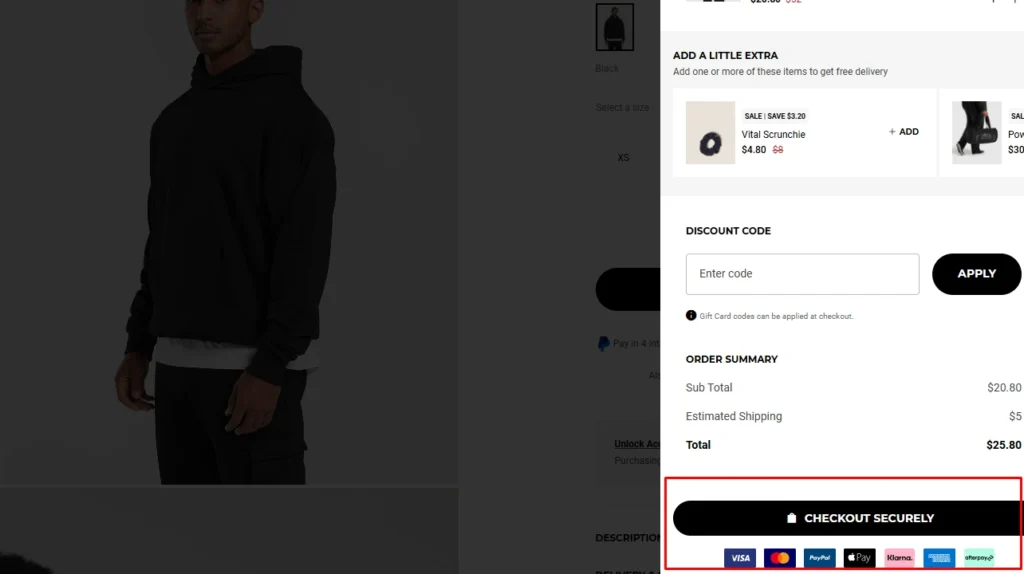
Gymshark: A Shopify store using trust signals at checkout.
How to gain trust at checkout? Add clear trust elements near checkout, like secure checkout messaging, payment icons, and visible shipping and return policies.
In Conclusion: Stop Losing Sales at the Last Step
Checkout abandonment is annoying because you did the hard part already.
You got the click, the product interest, and someone who was close to paying, then they dropped off at the last step.
The good news is you usually do not need a big redesign to fix it. Start with the basics: Show the full cost early, keep checkout simple, do not force account creation, offer multiple payment methods, and make the page feel trustworthy.
FAQs for Checkout Abandonment
1. What is checkout abandonment?
Checkout abandonment is when a shopper starts checkout but does not finish paying, so the order never gets placed.
2. What are the common reasons for customers to abandon the checkout page?
Most shoppers leave when they see higher-than-expected shipping costs, a long checkout, or a lack of trust. Other common problems include forced account creation and limited payment options.
3. How to reduce checkout abandonment?
Keep checkout simple. Show total costs early, remove unnecessary fields, and let customers check out as a guest. Also offer multiple payment options like Shop Pay, Google Pay, Apple Pay, so customers can select their preferred checkout option.
4. What is the average abandonment rate for checkout?
Baymard tracked the global average checkout abandonment rate, and it is around 70%.
5. What is the difference between cart abandonment and checkout abandonment?
Cart abandonment happens when someone adds items to the cart but leaves before starting checkout. Checkout abandonment happens later, when they have decided to checkout and leave before payment.
6. Does it hurt your business when customers leave at the checkout page?
Yes. Your shoppers were very close to buying, so you lost high-intent sales right at the finish line. Recovering even a small share of these checkouts can directly lift revenue.
7. Why do people add items to their cart and not checkout?
Many shoppers use the cart like a wishlist while they compare prices, wait for a discount, or get distracted and leave. Others stop because of unexpected shipping costs, a forced account, or not feeling confident about the purchase.


About the author
Vineet Nair
Vineet is an experienced content strategist with expertise in the ecommerce domain and a keen interest in Shopify. He aims to help Shopify merchants thrive in this competitive environment with technical solutions and thoughtfully structured content.