





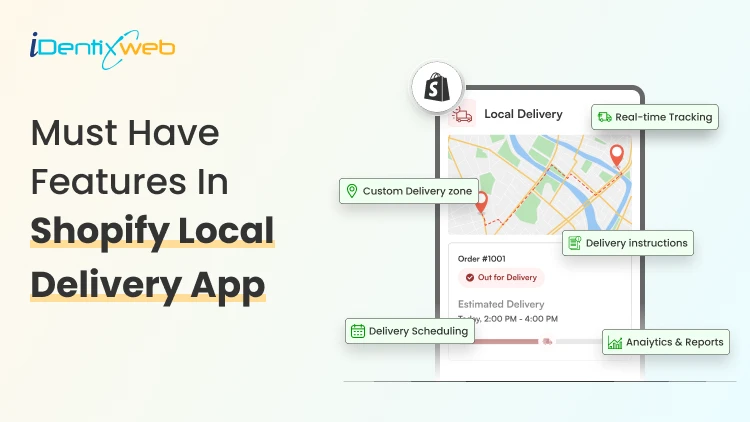
A Shopify delivery route planner can be the difference between a calm delivery day and a stressful one. If you run a local Shopify store, you already know the feeling: orders pile up, drivers leave late, customers call asking where their package is, and fuel costs keep climbing. The good news? A smart route planner solves most of these problems in one go.
In this guide, you will learn what a Shopify delivery route planner does, why it matters for your store, how to set it up, the best practices to follow, and the top apps you can pick from. By the end, you will know exactly how to manage your local deliveries faster and with less stress.
What Is a Shopify Delivery Route Planner?
A Shopify delivery route planner is a tool or app that connects with your Shopify store, pulls in your local orders, and arranges them into the fastest, most fuel-friendly driving route for your drivers. Instead of typing addresses into Google Maps one by one, the planner does it in seconds and sends the route straight to your driver's phone.
Think of it as a smart assistant that sits between your Shopify admin and your delivery van. It looks at every order, considers traffic, delivery windows, and driver schedules, then builds a route that saves time and money.
Why Local Shopify Merchants Need a Route Planner
Local delivery sounds simple until you try doing 20 stops a day with one driver. Suddenly, missed addresses, wrong-order doorsteps, and angry customer DMs become your morning routine. Here is why a Shopify delivery route planner is worth the spend.
1. Last mile delivery is the most expensive part of shipping
Studies show last mile delivery can eat up more than half of your total shipping cost. A route planner cuts the time drivers spend on the road, which directly lowers your fuel and labor bill.
Let Customers Choose Their Delivery Date Before You Plan Routes
Route planning becomes much easier when customers select their preferred delivery date and time slot before they checkout. Instead of manually organizing delivery requests, merchants can collect delivery preferences upfront and build routes around confirmed schedules.
Apps like Delivery Date & Pickup Stellar allow customers to choose delivery dates, time slots, local delivery, or store pickup options directly on the storefront, helping merchants create more predictable delivery routes.
Losing orders because buyers want flexible delivery?
A simple calendar at checkout fixes that.
Start Your Free Plan2. Customers expect faster, clearer delivery
Your customer does not care that you are a small team. They care that the package arrives on time, with a clean update on the way. A route planner gives them real-time tracking and accurate ETAs, which keeps them happy and quiet.
3. Manual route planning eats your day
If your team still copies addresses into Google Maps every morning, you are losing 1-2 hours a day. A Shopify delivery route planner does the same job in under a minute.
How to Set Up a Shopify Delivery Route Planner
Setting up your route planner is simpler than most merchants think. If you don’t want to waste your effort and time in setting up manually, then you can try apps like Delivery Date & Pickup Stellar. The Delivery Route feature in this app is a game-changer for businesses looking to streamline their order fulfillment process.
All you have to do is install the app, go to app’s settings and click on “Delivery Route”.
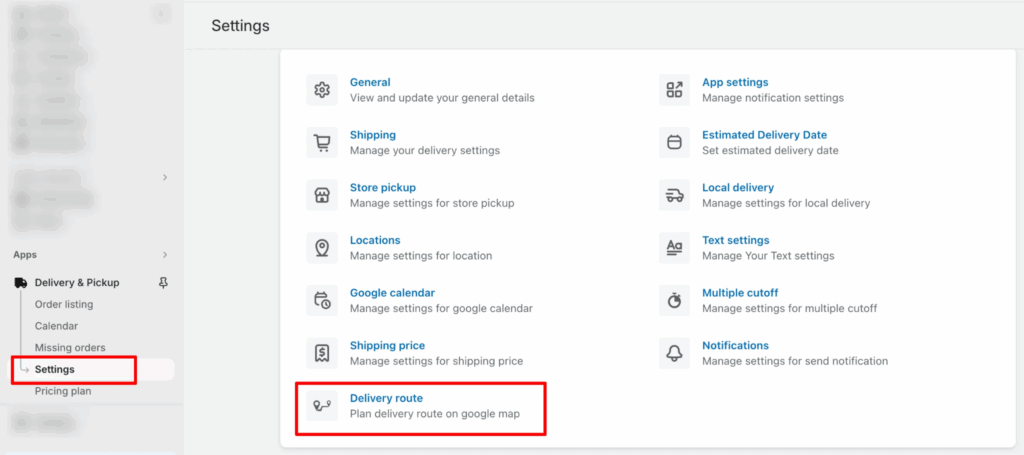
Upon landing on the Delivery Route page, you’ll encounter a range of features designed for seamless configuration:
01. Filter row
02. Order details row
03. Google Map Integration
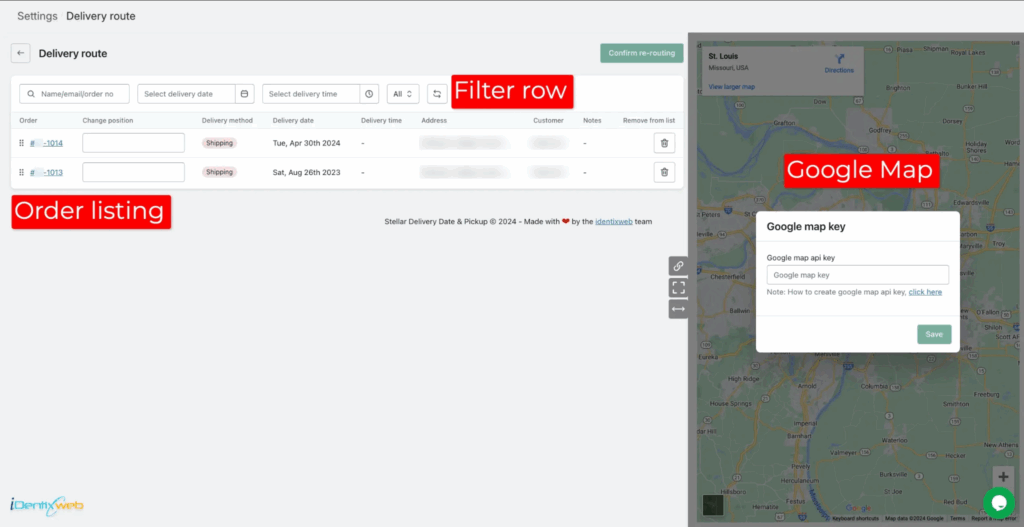
You can use any of the options above as per your convenience and you can see the delivery route of local deliveries placed through the app.
Best Practices to Manage Local Deliveries Faster
A route planner is powerful, but how you use it makes the real difference. Here are the habits that top-performing local Shopify merchants follow.
1. Group deliveries by zone, not by order date
If you deliver to three zip codes, run a route for each zone instead of mixing them up. Drivers stay in one area, fuel use drops, and you can offer tighter delivery windows.
2. Offer date and time slots at checkout
Letting customers pick a delivery slot at checkout removes guesswork. You know exactly when each package needs to arrive, which makes route building far easier.
3. Set realistic delivery windows
Two-hour windows are gold for customers and doable for drivers. Avoid promising one-hour windows unless your routes are very tight and short.
4. Use proof of delivery for every order
Photos and signatures protect your store from "never arrived" disputes. Most route planner apps include this for free.
5. Review your route reports weekly
Look at average stops per hour, fuel cost per delivery, and on-time rate. Tweak your zones, driver count, and delivery hours based on the data.
6. Train drivers on the app, not just driving
The best route in the world fails if the driver does not log proof of delivery or skips a stop. Spend 30 minutes training each driver on the route planner app.
Final Thoughts: Make Every Delivery Count
A Shopify delivery route planner is no longer a nice-to-have. With last mile costs eating over half of your shipping budget and customer patience getting shorter every year, smart routing is one of the highest-ROI changes you can make to your Shopify store.
Frequently Asked Questions
1. What is a Shopify delivery route planner?
A Shopify delivery route planner is an app that connects with your store, imports your local orders, and builds the fastest multi-stop route for your driver. It saves time, lowers fuel costs, and improves customer experience with live tracking and proof of delivery.
2. How do I optimize delivery routes on Shopify?
Install a route planner app from the Shopify App Store, sync your local orders, and click "Optimize Route." The app uses traffic data, time windows, and distance to build the shortest path. Then dispatch the route to your driver's mobile app.
3. Can I track Shopify local deliveries in real time?
Yes. Most dedicated route planner apps offer a live tracking page for customers and a driver tracking dashboard for store owners. You can see exactly where each driver is and share ETAs by SMS or email.
4. How do I reduce failed deliveries on Shopify?
Verify the delivery address at checkout, collect phone numbers, send SMS updates with ETA, offer delivery time slots, and use proof of delivery. These steps can cut your failed-delivery rate by 50% or more.




About the author
Sajini Annie John
Meet Sajini, a seasoned technical content writer with a passion for e-commerce and expertise in Shopify. She is committed to helping online businesses to thrive through the power of well-crafted content.