




Managing Shopify shipping costs may feel overwhelming at first. Setting up Shopify shipping rates is all about balance. If you charge too much, customers may leave at checkout. And if you charge too little, your profit starts shrinking with every order. That is why setting the right Shopify shipping rates matters.
In this guide, we’ll explain the main types of Shopify shipping rates, when to use them, and how to build a setup that works for both your business and your customers.
What are Shopify shipping rates?
Shopify shipping rates are the delivery charges you set in your Shopify store that customers pay at checkout to receive their order. These rates can be based on things like order price, product weight, delivery location, or a flat fee you choose.

Key Shopify shipping rate types
Flat rates
A fixed fee charged on every order (for example, $10 for all orders). This is a simple option and makes shipping costs easy to manage.
Carrier-calculated rates
Real-time rates from carriers like UPS, FedEx, or USPS based on item weight, dimensions, and destination.
Free shipping rates
Shipping is set at $0 for the customer. Stores often offer this on all orders or only when the cart reaches a certain value, like free shipping over $75.
Price-based rates
Shipping charges change based on the total order value (for example, $5 for orders under $50 and free shipping for orders above $50).
Weight-based rates
These Shopify Shipping costs are based on the total weight of the products in the cart. This is useful when product sizes or weights vary.
Local delivery and pickup
Shipping options for nearby customers, where they can either get the order delivered locally or collect it from your store.
Here’s a quick overview of the options available to you:
| Shipping Rate Type | How It Works | Best For |
| Flat Rates | A fixed shipping fee is charged on every order or under a set condition (for example, $5 shipping on all orders) | Simplicity, predictability |
| Price-Based Rates | Shipping cost changes based on the total cart value (for example, free shipping on orders above $100) | Encouraging customers to spend more |
| Weight-Based Rates | Shipping cost depends on the total weight of the order (for example, 0–2 kg = $4, 2–5 kg = $7) | Stores with products of different sizes or weights |
| Free Shipping Rates | Shipping is set to $0, either for all orders or only when certain conditions are met | Improving conversions |
| Carrier-Calculated Rates | Live shipping charges are shown at checkout based on carrier pricing, package details, and destination | Accurate and flexible shipping costs |
| Local Delivery and Pickup | Customers nearby can choose local delivery or pick up their order from your store | Local businesses & nearby customers |
How to calculate Shopify shipping costs
Many different factors can impact shipping costs in your online store. Once you know what they are, you can build a shipping strategy that works better for your business. Below are the factors that you need to consider.
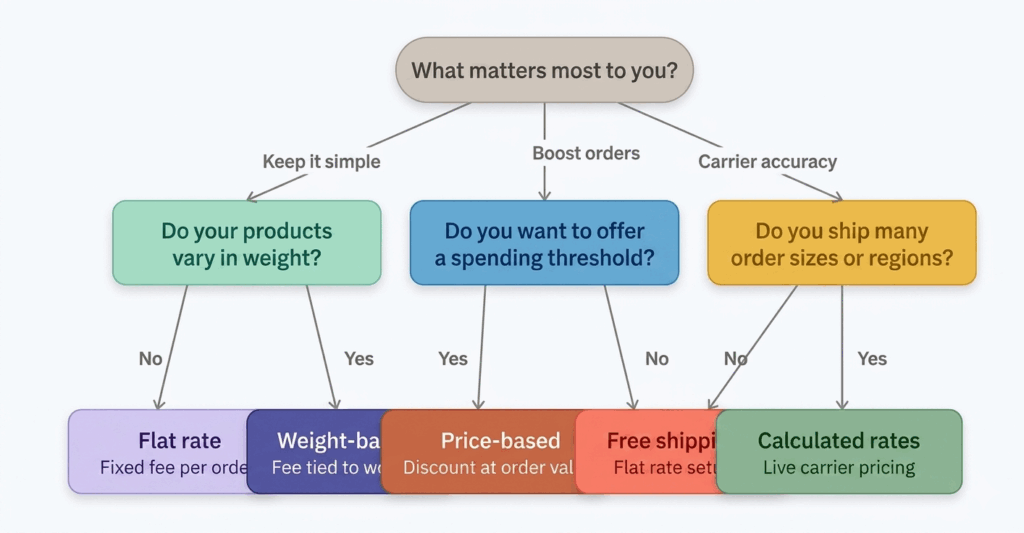
Product Weight and Dimensions
The size and weight of your products directly affect how much you will pay for shipping. If you sell large, bulky, or heavy items, your shipping costs will usually be higher. In that case, weight-based or carrier-calculated rates may work better than a simple flat rate.
Shipping Destination
Where your customers are located also plays a big role in shipping costs. Local deliveries are usually cheaper, while long-distance or international orders can cost much more. That is why many stores create different shipping zones and rates based on the customer’s location.
Shipping Carrier
Different shipping carriers offer different pricing, delivery times, and service options. Some may be more affordable for local orders, while others may be better for express or international shipping. Comparing carriers can help you choose shipping rates that are accurate and practical for your store.
Packaging Costs
Shipping is not only about the courier fee. You also need to consider the cost of boxes, mailers, labels, tape, and protective packaging materials. These extra costs may seem small, but they can add up quickly, especially when order volume grows.
Profit Margins
Your shipping rates should support your business, not reduce your profit. If your margins are already tight, offering low-cost or free shipping on every order may not be sustainable. It is important to set shipping rates that feel reasonable to customers while still protecting your earnings.
How to set up shipping rates in Shopify
To add Shopify shipping costs start with Shopify’s native shipping setup first. In Shopify Admin > Settings > Shipping and delivery, create or edit the right shipping profile, add your shipping zones, and then add the rate type you want, such as flat, free, or carrier-calculated.
Once your base shipping rates are ready, install Stellar Delivery Date & Pickup and enable the app in your store.
The app comes with Shipping price feature that lets you control shipping charges based on the delivery day your customer chooses. For example, you can set higher charges for same-day, weekend, or holiday deliveries, and keep lower charges for regular delivery days. Everything can be managed directly from the app settings.
Follow these steps to add Shopify shipping costs to your store:
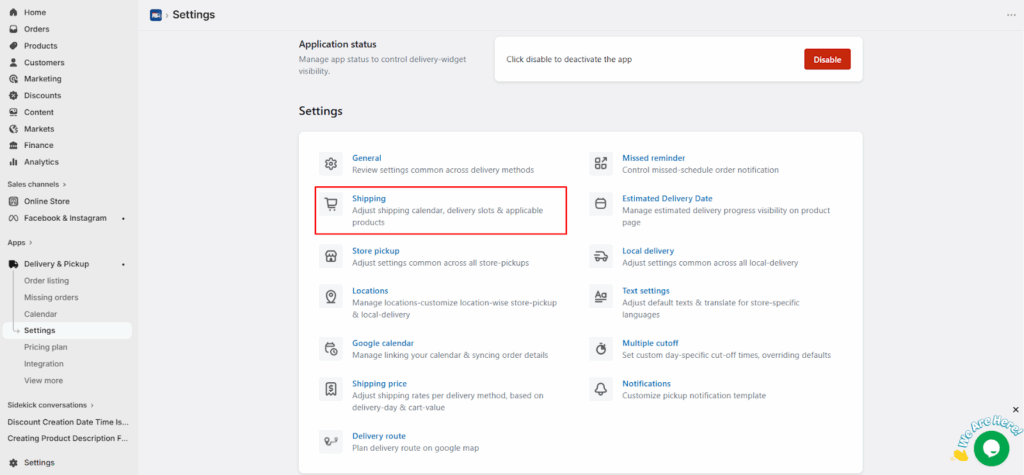
- Open the app and go to Settings > Shipping to set up shipping.
- Next, you need to enable the shipping status and set up the conditions on which you want to offer shipping price. You may get many options. Few of the options are mentioned below:
- Block holidays or non-working days so that customers can’t select those days from the calendar.
- Allow customers to reschedule from thank you page, customer order listing page & order detail page.
- Order limit: Limit how many orders can be accepted per day or per time slot for shipping.
- Product selection: Decide on which products you want to show calendar for shipping.
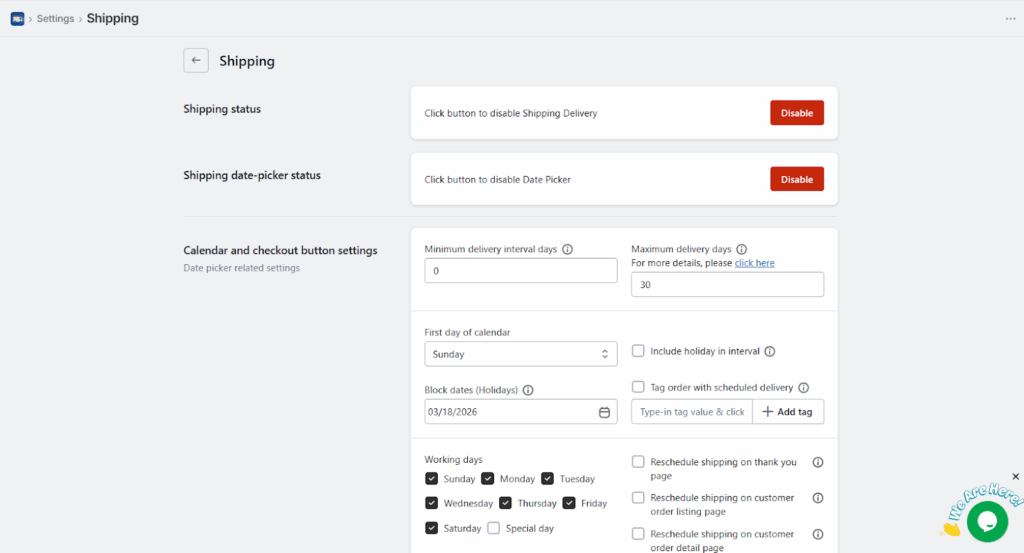
- And that’s it, after making the changes, you can hit save.
Create Flexible Shipping Rates Based on Day and Order Conditions
With Stellar you can set different Shopify shipping costs for different days. Follow the steps below to enable it in your store:
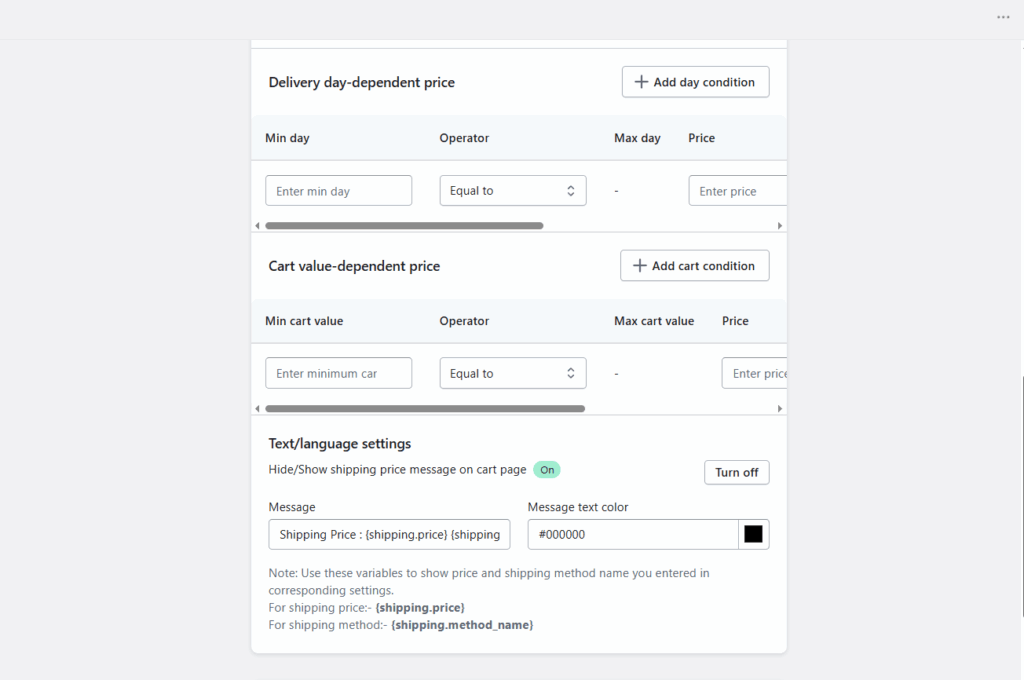
- From the app settings, go to shipping price option and enable the status of the shipping price. After that you can add the rates as per your choice on each day in the given slot as shown below:
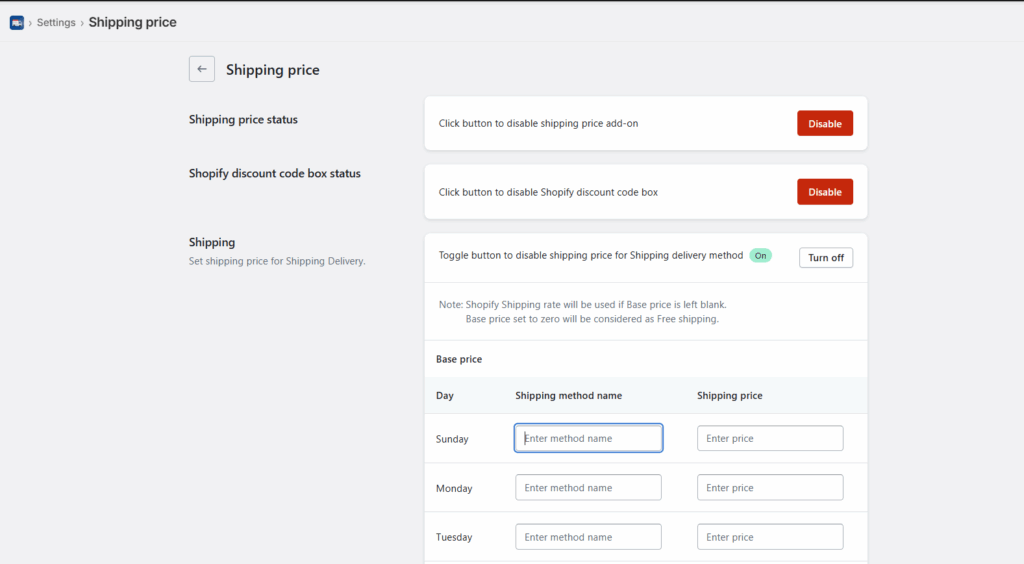
- You can add price based on conditions like:
- Base Price: In the Base Price tab, you can configure delivery charges for each day of the week.
- Conditional Price: The Conditional Price tab allows you to set delivery charges based on how soon the delivery date is from the order date. This means you can configure charges for same-day, next-day, or future-day deliveries depending on your logistics preferences.
- Cart Value Price: The Cart Value Price tab lets you define delivery charges based on the total value of the customer’s cart. You can apply different shipping prices for different cart value ranges, including the option to provide free shipping for higher-value orders.
Not only this, the app also supports local delivery, and store pickup, and lets customers choose a delivery date and time slot from the cart or product page. For Shopify Plus stores, the calendar can also appear on the checkout page.
Final Thoughts
Getting Shopify shipping rates right is not just about adding a fee at checkout. It is about finding a balance between customer expectations, delivery costs, and your store’s profit margins. When you understand the different rate types and the factors that affect them, it becomes much easier to build a shipping setup that feels clear, fair, and practical.
Frequently Asked Questions
1. What are Shopify shipping rates?
Shopify shipping rates are the delivery charges customers see at checkout when they place an order. You can set them as flat rates, free shipping, price-based rates, weight-based rates, or live carrier-calculated rates.
2. How do I calculate shipping costs on Shopify?
Calculate your shipping rates. From your Shopify admin, go to Settings > Shipping and delivery . In the Shipping section, click Shipping labels, and then click Calculate rates.
3. Can I offer free shipping on Shopify?
Yes, Shopify lets you create free shipping rates by setting the rate to $0 or by applying conditions like a minimum order value.
4. Can Stellar Delivery Date & Pickup help me set different shipping charges for different days?
Yes, Stellar includes a Shipping Price feature that lets you set delivery charges based on the selected day. This can be useful when you want to charge more for same-day, weekend, or holiday delivery slots.




About the author
Sajini Annie John
Meet Sajini, a seasoned technical content writer with a passion for e-commerce and expertise in Shopify. She is committed to helping online businesses to thrive through the power of well-crafted content.