





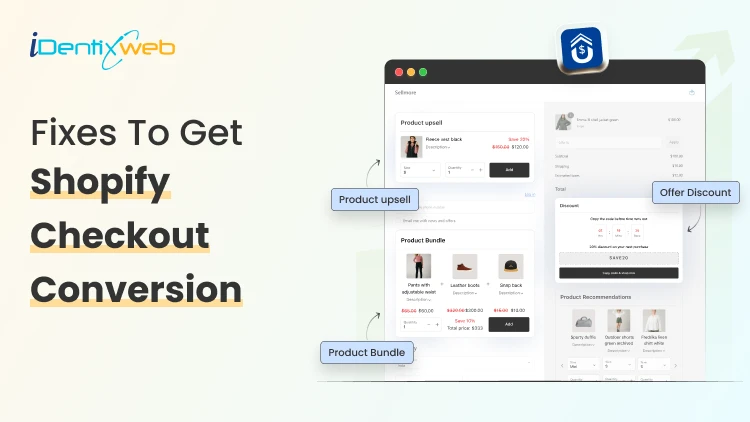
If your Shopify store gets traffic but sales still feel inconsistent, your checkout experience is probably the bottleneck.
Even small friction during checkout can cause shoppers to abandon their carts seconds before purchasing. Slow pages, surprise shipping costs, complicated forms, missing trust signals, or limited payment methods can quietly destroy revenue.
That’s why improving your Shopify checkout conversion rate should be one of the highest priorities for every ecommerce brand in 2026. In this guide, we will see the top fixes for boosting Shopify checkout conversions.
What Is Shopify Checkout Conversion?
Shopify checkout conversion refers to the percentage of shoppers who successfully complete a purchase after entering the checkout process.
Formula:
Checkout Conversion Rate = Completed Purchases ÷ Checkout Sessions × 100
For example:
- 1,000 shoppers reach checkout
- 350 complete their purchase
Your checkout conversion rate is: 35%
A higher checkout conversion rate means:
- Less cart abandonment
- Better user experience
- More revenue from existing traffic
- Higher return on ad spend (ROAS)
Why Checkout Conversion Matters So Much
Most ecommerce stores focus heavily on running ads, improving product pages, creating content or increasing traffic.
But if checkout performance is weak, all that traffic becomes expensive wasted opportunity. Improving checkout conversion is often the fastest way to increase revenue because:
- You already paid to acquire the visitor
- The shopper already showed buying intent
- Small improvements can produce major revenue gains
Why Shoppers Abandon Shopify Checkout
Before fixing checkout conversion, it’s important to understand why customers leave.
Common reasons include:
- Unexpected shipping costs
- Forced account creation
- Slow checkout pages
- Limited payment methods
- Complicated forms
- Lack of trust signals
- Mobile usability issues
- Coupon code distractions
- Delivery uncertainty
Many of these problems are surprisingly fixable.
12 Shopify Checkout Conversion Fixes That Actually Work
1. Enable Shop Pay for Faster Checkout
Fast checkout matters even more in 2026 because mobile shoppers dominate ecommerce traffic. One of the easiest ways to improve Shopify checkout conversion is enabling Shop Pay. The fewer steps shoppers complete, the higher the conversion rate. Shop Pay speeds up checkout by:
- Saving customer information
- Supporting one-tap checkout
- Reducing form filling
- Improving mobile checkout speed
2. Eliminate Surprise Costs
Unexpected fees are one of the biggest checkout killers.
Customers get frustrated when:
- Shipping costs suddenly appear
- Taxes feel unclear
- Extra fees show up late
To reduce abandonment:
- Show shipping costs early
- Offer free shipping thresholds
- Display estimated totals on cart pages
This increases transparency and can even encourage larger cart sizes.
3. Optimize Mobile Checkout Experience
In 2026, mobile commerce continues to dominate ecommerce traffic. If your mobile checkout experience feels frustrating, conversion rates suffer immediately. Test your checkout personally on multiple devices.
Check:
- Button sizes
- Text readability
- Keyboard usability
- Payment loading speed
- Sticky checkout buttons
Common mobile mistakes:
- Tiny form fields
- Slow-loading payment gateways
- Difficult coupon entry
- Cluttered layouts
4. Use Post-Purchase Upsells Instead of Aggressive Pre-Purchase Upsells
Many stores overload customers with upsells before checkout completion. Instead of interrupting checkout, apps like SellMore Post Purchase Upsell show one-click upsell offers after payment is completed.
Benefits include:
- No checkout interruption
- Higher average order value
- Better customer experience
- Increased revenue without hurting conversion
Because the original purchase is already secured, post-purchase offers typically feel smoother and less intrusive.
For many Shopify merchants, this is one of the safest ways to increase revenue while protecting checkout conversion rates.
5. Add More Payment Options
Limited payment choices reduce trust and create friction. Customers prefer different payment methods depending on region and device. For Shopify stores targeting India, popular options include:
- UPI
- Paytm
- Razorpay
- Credit/debit cards
- Wallets
International stores should also support:
- PayPal
- Apple Pay
- Google Pay
- Buy Now Pay Later options
6. Display Trust Signals Throughout Checkout
Trust signals help reduce hesitation and checkout is the moment where shoppers ask:
“Can I trust this store with my money?”
Examples include:
- SSL secure checkout badges
- Money-back guarantees
- Verified reviews
- Return policies
- Delivery guarantees
Add reassurance near:
- Payment sections
- Checkout buttons
- Shipping details
7. Offer Guest Checkout
Forcing account creation hurts conversion rates badly.
Many shoppers simply want:
- Fast purchase
- Minimal commitment
- Quick checkout
Always offer:
- Guest checkout
- Optional account creation after purchase
You can still encourage account signup later through:
- Loyalty rewards
- Order tracking
- Faster future purchases
8. Improve Checkout Speed
Every extra second matters. Checkout speed directly affects Shopify checkout conversion.
Slow checkout pages create:
- Frustration
- Distrust
- Drop-offs
To improve speed:
- Remove unnecessary scripts
- Limit excessive apps
- Optimize images
- Avoid bloated themes
9. Reduce Coupon Code Distractions
Coupon fields can unintentionally encourage shoppers to leave checkout searching for discount codes.
This creates:
- Checkout interruptions
- Tab switching
- Abandonment
Instead:
- Auto-apply discounts when possible
- Use automatic promotions
- Keep discount experiences simple
A smoother checkout often converts better than a heavily discount-focused checkout.
10. Use Exit Intent Recovery
Timing matters. Not every abandoned checkout is lost permanently.
Recovery strategies include:
- Abandoned cart emails
- SMS reminders
- Retargeting ads
- Push notifications
Best-performing abandoned cart emails usually:
- Remind shoppers quickly
- Include product images
- Reinforce urgency
- Highlight free shipping or guarantees
11. Continuously Test Your Checkout Experience
Checkout optimization is never truly finished. Small experiments can produce major gains.
Test:
- Button text
- Shipping messaging
- Payment options
- Trust badges
- Mobile layouts
- Checkout flow order
Even small conversion improvements compound over time.
Final Thoughts
Improving your Shopify checkout conversion rate is one of the highest-impact optimizations you can make for your ecommerce business in 2026. You don’t always need more traffic.
Sometimes the fastest path to more revenue is simply helping more existing shoppers complete their purchases.
Focus on:
- Simplicity
- Speed
- Trust
- Mobile usability
- Transparent pricing
And once checkout conversion is optimized, you can increase total revenue even further using post-purchase upsell strategies.


About the author
Sajini Annie John
Meet Sajini, a seasoned technical content writer with a passion for e-commerce and expertise in Shopify. She is committed to helping online businesses to thrive through the power of well-crafted content.