



Running a one product Shopify store sounds simple. You sell one main product, build one focused landing page, and drive traffic to one clear offer. But simplicity does not automatically mean higher sales.
In fact, a one-product store has less room for mistakes. If the product page is confusing, the offer is weak, the CTA is hidden, or the checkout experience feels risky, customers may leave without buying.
A one product Shopify store works best when the full shopping journey is built around one goal: helping the customer understand why this product is worth buying now.
This checklist will help you optimize your shopify single product store for better conversions, stronger customer trust, and higher average order value.
What is a one product Shopify store?
A one product Shopify store is a Shopify store that focuses on selling one main product instead of a large catalog. The product can have variants, bundles, accessories, refills, or add-ons, but the core business is built around one hero product.
For example, your store may sell:
- One skincare device with different color options
- One fitness product with bundle packs
- One kitchen gadget with accessories
- One pet product with refill packs
- One digital product or subscription offer
The biggest advantage of a one-product store is focus. You do not need to guide visitors through multiple categories or hundreds of product choices. Instead, you can create one strong sales journey around one product, one problem, and one solution.
A well-built shopify single product store can convert well because it reduces decision fatigue and keeps the customer’s attention on one clear buying decision.
Why conversion optimization matters more for one product stores
In a multi-product store, a visitor may browse multiple categories, compare products, and still buy something else. But in a one product Shopify store, the customer either buys your main product or leaves.
That makes conversion optimization more important.
Every small detail matters, such as:
- How fast your page loads
- How clear your product promise is
- How strong your images are
- How visible your CTA button is
- How trustworthy your reviews look
- How easy checkout feels
- How well your offer handles objections
1. Make Your Above-the-Fold Section Clear
The first screen of your store decides whether visitors stay or leave. When someone lands on your one product Shopify store, they should understand three things within a few seconds:
- What the product is
- What problem it solves
- Why they should care
Your above-the-fold section should include:
- A clear headline
- A short benefit-driven subheading
- High-quality product image or video
- Product rating or trust badge
- Strong CTA button
- Price or offer highlight
- One key differentiator
Avoid vague headlines like:
“Upgrade Your Lifestyle Today”
Instead, use a specific headline like:
“Remove Pet Hair From Your Sofa in Seconds”
This tells the customer exactly what the product does and why it matters.
For a Shopify single product store, clarity is more powerful than cleverness. Your customer should not have to scroll or guess what you sell.
2. Use Product Images That Sell the Outcome
Your product images should do more than show the product. They should show the value of the product.
Strong product visuals include:
- Clean product shots
- Lifestyle images
- Before-and-after visuals
- Close-up detail shots
- Size comparison images
- Product-in-use photos
- Packaging images
- Short demo videos or GIFs
If your product solves a visible problem, before-and-after images can be powerful. If your product has premium materials, show close-up textures. If your product is compact, show it in a real hand, bag, kitchen, desk, or bathroom setup.
For a one product Shopify store, your visuals need to replace the in-store experience. Customers cannot touch the product, so your images must answer their doubts visually.
3. Promote the Right Upsell After Purchase With SellMore
Once a customer buys your product, the sales journey does not have to end there. This is where post-purchase upselling can help.
For a one product Shopify store, upselling needs to be simple and relevant. Since you sell one main product, your best upsell offers may include:
- Refill packs
- Product accessories
- Extended warranty
- Gift packaging
- Priority shipping
- Care kit
- Bundle upgrade
- Second item at a discount
- Subscription refill offer
You can use SellMore Post Purchase Upsell to show one-click upsell, cross-sell, bundle, checkout, post-purchase, thank you page, and order status page offers. The app also includes upsell funnels, AI-driven recommendations, and detailed analytics to track offer performance.
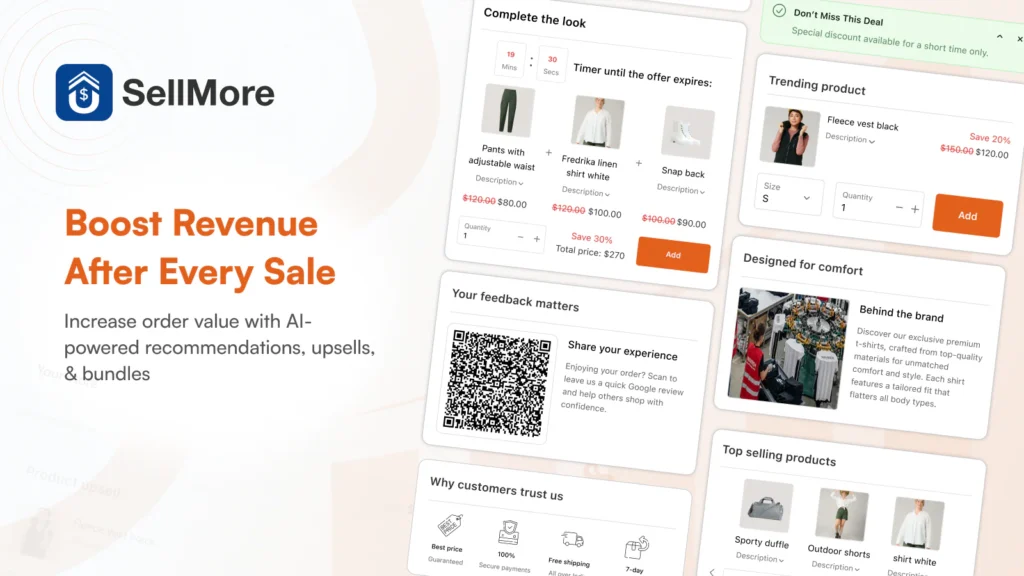
This is useful because the customer has already completed the main purchase. Instead of disturbing the buying decision before checkout, you can show a relevant add-on after the order is placed.
4. Write Benefit-First Product Copy
A common mistake in one-product stores is writing only feature-based copy.
Features explain what the product has. Benefits explain why the customer should care.
Example:
Feature: Made with stainless steel
Benefit: Built to last longer and resist rust during daily use
Feature: 10-hour battery life
Benefit: Use it all day without charging again and again
Your product page should include both, but the benefits should lead.
For a Shopify single product store, your copy should feel like a guided sales conversation. It should answer the questions customers are already thinking but may not ask directly.
5. Add a Strong Product Story
A one-product brand needs a story because the whole store is built around one offer.
Your product story can answer:
- Why was this product created?
- What problem inspired it?
- Who is it made for?
- What makes it different?
- Why is it better than common alternatives?
This does not need to be long. Even a short brand story can make your store feel more real.
Example:
“We created this product after seeing how many pet owners struggled with hair on clothes, sofas, and car seats. Most rollers worked once and then became useless. So we designed a reusable cleaner that works every day without waste.”
This type of story gives customers a reason to connect emotionally with your product. It also makes your one product Shopify store feel less like a dropshipping page and more like a real brand.
6. Use One Main CTA Across the Page
Your store should not confuse customers with too many actions.
For a one-product store, the main action is usually:
- Buy Now
- Add to Cart
- Try It Today
- Get Yours Now
- Shop Now
Use one main CTA style across your page. Keep it visible above the fold and repeat it after important sections.
Best CTA placement:
- Hero section
- After benefits section
- After reviews
- After pricing or bundle section
- Near FAQs
- Sticky mobile bottom bar
Avoid using too many competing buttons like “Learn More,” “Explore,” “Contact Us,” and “Read Blog” in the main sales flow. A one product Shopify store should guide visitors toward purchase, not distract them.
7. Build Trust Before Asking for the Sale
Trust is one of the biggest conversion factors for a one product Shopify store.
Because the store sells only one product, customers may ask:
- Is this product real?
- Will it work for me?
- Is the store trustworthy?
- What if I do not like it?
- How long will shipping take?
- Can I return it?
- Are the reviews genuine?
Add trust signals throughout the page, not only at the bottom.
Important trust elements include:
- Customer reviews
- Star ratings
- Video testimonials
- User-generated content
- Secure payment badges
- Money-back guarantee
- Clear return policy
- Shipping timeline
- Brand story
- Contact details
- FAQ section
- Real product images
Do not hide important trust information. If shipping takes 5-8 days, say it clearly. If returns are available within 30 days, mention it near the CTA. If your product has a warranty, show it before checkout.
8. Add Reviews That Answer Real Objections
Generic reviews like “Great product!” are not enough.
Your reviews should answer objections.
For example:
- “I thought it would be too small, but the size is perfect.”
- “Shipping took 5 days and the packaging was good.”
- “I have tried other products, but this one actually worked.”
- “The setup took less than two minutes.”
- “I bought one for myself and ordered another for my sister.”
These reviews help new customers feel more confident because they answer practical doubts.
Use different review formats:
- Text reviews
- Photo reviews
- Video reviews
- Before-and-after reviews
- Reviews by use case
- Reviews by customer type
For a Shopify single product store, reviews should not just prove that people bought the product. They should prove that people got the result they expected.
9. Optimize Your Store for Mobile Buyers
Most shoppers will likely view your store on mobile, especially if you run ads from Instagram, TikTok, Facebook, or YouTube Shorts.
Your mobile experience should be fast, clean, and thumb-friendly.
Mobile conversion checklist:
- CTA button is visible without zooming
- Product images load fast
- Text is easy to read
- Reviews are easy to scroll
- Sticky add-to-cart button is enabled
- Checkout buttons are easy to tap
- No popups blocking the screen
- Product price is visible
- Variant selection is simple
- FAQ accordion is easy to open
Do not design only for desktop. Many one-product stores look beautiful on desktop but feel crowded on mobile.
Check your page on a real phone before publishing. Scroll like a customer. Tap every button. Try adding the product to cart. Test checkout. If anything feels slow or confusing, fix it.
10. Improve Page Speed and Loading Experience
Page speed directly affects conversions. A slow product page can increase bounce rate and reduce sales.
For a one product Shopify store, speed matters even more because many visitors come from paid ads. Every slow-loading second can waste ad spend.
Speed optimisation checklist:
- Compress images before uploading
- Use WebP images where possible
- Avoid too many third-party apps
- Remove unused scripts
- Use lightweight sections
- Limit autoplay videos
- Test your theme speed
- Avoid heavy sliders
- Use lazy loading for lower-page images
Do not overload the store with animations just to make it look premium. A clean, fast-loading page usually converts better than a slow, fancy page.
11. Add Scarcity and Urgency Carefully
Urgency can improve conversions, but fake urgency can damage trust.
Good urgency examples:
- “Sale ends tonight”
- “Only 12 left in stock”
- “Order today for dispatch tomorrow”
- “Limited launch offer”
- “Free gift available for first 100 orders”
Bad urgency examples:
- Countdown timer that resets every time
- Fake low-stock alerts
- “Only 3 left” for weeks
- Too many flashing banners
Use urgency only when it is true.
For a Shopify single product store, trust is more valuable than short-term pressure. Customers are more likely to buy when urgency feels real and the offer feels fair.
12. Keep Navigation Simple
Your navigation should support conversion, not distract from it.
For a one-product store, your menu can include:
- Product
- Reviews
- How It Works
- FAQs
- Track Order
- Contact
Avoid adding too many links to blogs, collections, unrelated pages, or external profiles in the main navigation.
Your homepage and product page may even be the same page. That is completely fine for a one product Shopify store if the page includes everything customers need to make a buying decision.
The goal is simple: keep visitors moving toward checkout.
FAQs About One Product Shopify Store Conversion
1. Is a One Product Shopify Store good for beginners?
Yes, a one product Shopify store can be good for beginners because it is easier to manage than a large catalog store. However, the product page, offer, and marketing need to be strong because the entire store depends on one main product.
2. How do I increase sales on a shopify single product store?
To increase sales on a Shopify single product store, improve your product images, headline, CTA, reviews, page speed, mobile layout, and checkout experience. You can also use post-purchase upsells to increase average order value after the first purchase.
3. What should a one-product store homepage include?
It should include a clear hero section, product benefits, product images, reviews, pricing, FAQs, guarantee, shipping details, and a strong CTA. The page should guide customers from problem awareness to purchase without distractions.
4. Can I add upsells to a One Product Shopify Store?
Yes, you can add upsells such as accessories, refills, warranties, bundles, gift packaging, or second-unit discounts. Post-purchase upsells work especially well because they appear after the customer completes the main order.
5. What is the biggest mistake in a shopify single product store?
The biggest mistake is assuming one product means one simple page with very little information. Customers still need clear benefits, proof, trust signals, shipping details, return policy, and strong reasons to buy.




About the author
Sajini Annie John
Meet Sajini, a seasoned technical content writer with a passion for e-commerce and expertise in Shopify. She is committed to helping online businesses to thrive through the power of well-crafted content.