






If you are a florist or a bakery store owner using Shopify, you need a local delivery feature to fulfill orders.
But as a Shopify expert, I have seen that local delivery also breaks easily.
One wrong ZIP code, or inventory tied to the wrong location, and Shopify won’t show the option at checkout.
There are many mistakes merchants make when setting up local deliveries in their store.
Common Mistakes Shopify Merchants Make in Local Delivery
#1: Local delivery doesn't work when accelerated checkout is on
What it looks like: A customer swears local delivery is not available, but you can see it sometimes. It usually happens when they tap Apple Pay, PayPal, or another accelerated button.
Why it happens: Those accelerated checkouts can skip parts of the normal checkout flow where local delivery options show.
Fix it fast:
- Add a short note near the checkout buttons: “Local delivery shows in standard checkout.”
- Run test orders using different payment paths (Shop Pay or PayPal).
- Disable the accelerated checkout button or keep it lower on the page.
#2: Your zones overlap & Shopify picks the cheapest delivery price
What it looks like: A customer inside your local delivery area gets the cheaper rate. Your rate is right, but the checkout picks a different price.
Why it happens: When a customer matches multiple zones, Shopify can apply the lowest eligible delivery charge.
Fix it fast:
- Make zones mutually exclusive. No overlap.
- If you offer “free local delivery,” ensure it triggers only in the exact zone you want.
- Re-check your ZIP list or radius boundaries after you change.
#3: You do not set pricing rules that protect margin
What it looks like: Your local delivery orders are moving fast, but profits are still low. Products are costing more to deliver than you earn.
Why it happens: Delivery has real costs: driver time, fuel, packing, and failed attempts. If you do not price it, you eat it.
Fix it fast:
Shopify local delivery apps like Stellar help merchants with advanced delivery rules that suit their business.
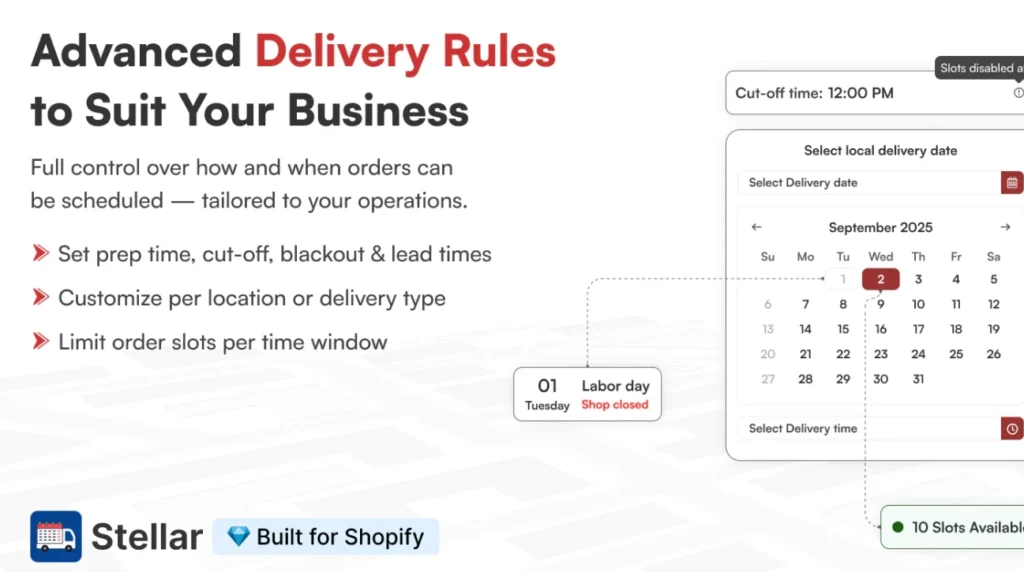
Here’s a great case study of A&M Floral Place. They needed an app that handles both store pickup and local delivery for their flowers. By implementing Stellar, they set up delivery zones for surrounding communities and boosted their AOV by 115%.
#4: Not stocking inventory at each delivery location
What it looks like: Local delivery shows for some products, but not others. Or it disappears when customers add one extra item.
Why it happens: Local delivery requires deliverable items to be fulfilled from one location that has inventory available. If you do not stock inventory at each location, products won’t be available for local delivery.
Fix it fast:
- Stock deliverable items at the location that offers local delivery.
- Avoid splitting inventory across multiple locations for your “local delivery” catalog.
- Use a clear label like “Local delivery available” only on products that truly qualify.
#5: Google cannot verify the customer’s address
What it looks like: Customers type an address, but local delivery never appears in the dropdown automatically. You see it only when the address is entered in a cleaner format.
Why it happens: Local delivery eligibility can depend on a verified address. If the address entry is messy or incomplete, Shopify may not match it to your delivery area.
Fix it fast:
- Add a short checkout note: “Select your address from the suggested dropdown.”
- Ask for apartment and unit numbers in the right fields, not in the name field.
#6: Merchants assume customers can choose “some shipped + some delivered”
What it looks like: A customer wants one item delivered locally and another shipped. They cannot select that option, so they abandon the cart.
Why it happens: Shopify generally treats the checkout delivery choice as one selection per order. It does not let shoppers split fulfillment methods across items in the same checkout in the way most people expect.
Fix it fast:
- Add a simple line in your delivery policy: “Local delivery applies to the full order.”
#7: Merchant forget the “same state/province” boundary rule
What it looks like: Your delivery radius looks perfect on a map, but customers just across the border cannot get local delivery.
Why it happens: Radius delivery can be restricted by state/province boundaries unless you allow neighboring regions. It also does not extend across countries.
Fix it fast:
- If you serve border areas, use ZIP-based zones instead of radius.
- Put a small “delivery area” map or ZIP list on your site so customers can self-check.
Conclusion: Local Delivery Works But…
Local delivery can become a real growth lever for your Shopify store, but only when it shows up without any errors.
Fix the basics first: Fix zones, set rules on minimum order value, add the right inventory location, and a delivery promise your customers can actually understand.
Then lock it in with a simple routine. Run a test order after every change, and make delivery instructions easy to follow. When you remove the confusion, you get fewer support tickets, fewer abandoned carts, and more repeat orders.
FAQs
1. Why isn’t my local delivery option showing at checkout?
This usually happens because the customer is not eligible based on your setup, like their address is outside your delivery zone, your minimum order rule is not met, or the items are not available from the same location. Also, check if they used an accelerated checkout option, because that can remove local delivery.
2. Why does local delivery disappear when customers use Apple Pay or PayPal?
Shopify local delivery does not work with accelerated checkouts like Apple Pay and PayPal, so it will not appear as a delivery option when customers choose them.
3. Why do customers only see shipping when they click an accelerated checkout button?
Because those buttons take customers into an accelerated checkout flow, and Shopify removes local delivery there (except Shop Pay).
4. Why does local delivery show for some customers but not others?
It depends on eligibility per customer, mainly their address and whether the order can be fulfilled from one location with inventory. One customer might be in your zone and meet the minimum, while another can be outside the zone.
5. Which is the best Shopify app to add local delivery to my store?
If you want customers to pick a delivery date and time and reduce support tickets, an app like Stellar Delivery Date & Pickup is built for that scheduling experience.

![The Only Easter Marketing Ideas for Shopify Stores [Proven Strategies]](https://www.identixweb.com/wp-content/uploads/2026/02/24-02-Tue-Blog-Tips-Tools-for-Shopify-Stores-to-Boost-Easter-Sales.webp "The Only Easter Marketing Ideas for Shopify Stores [Proven Strategies]")

About the author
Vineet Nair
Vineet is an experienced content strategist with expertise in the ecommerce domain and a keen interest in Shopify. He aims to help Shopify merchants thrive in this competitive environment with technical solutions and thoughtfully structured content.