






To sell on Shopify, start by creating an account and choosing a theme to design your online store. Next, add your products whether physical or digital set up payment methods, and configure your shipping options. The core steps include selecting a niche, uploading product images, writing clear product descriptions, and using Shopify apps for marketing, automation, or dropshipping to grow your business.
Thinking about selling online but not sure where to start? You’re not alone and that’s exactly why Shopify has become one of the most popular platforms for building an online store. Whether you want to sell physical products, digital downloads, or even start a dropshipping business, Shopify makes the process simple, even if you have no technical background.
In this guide, you will learn how to sell on Shopify step by step, from setting up your store and adding products to accepting payments and launching your business. We will keep things simple, practical, and beginner-friendly so you can follow along without feeling overwhelmed. You will also learn practical tips to optimize your store, attract customers, and turn visitors into paying buyers. By the end of this guide, you will have a clear roadmap to start selling on Shopify with confidence and scale your online business in 2026 and beyond.
What Is Shopify and How Does It Work?
Shopify is an all-in-one eCommerce platform that helps you create and run an online store without needing technical skills. It takes care of hosting, security, payments, and store management, so you can focus on selling your products.
With Shopify, you can:
- Create a professional-looking online store
- Add and manage products (physical or digital)
- Accept payments from customers
- Manage orders, customers, and inventory
- Use apps to add more features like marketing, reviews, or upsells
Why Choose Shopify to Sell Online in 2026?
Shopify continues to be one of the most reliable and easy-to-use eCommerce platforms. In 2026, it’s more powerful, faster, and more beginner-friendly than ever.
Here’s why people choose Shopify:
- Easy setup with no coding required
- Fast and secure hosting included
- Mobile-friendly and modern themes
- Built-in payment and checkout system
- Huge app store to extend your store’s features
- Scales well from small stores to big brands
Before You Start: What You Need to Sell on Shopify
Before creating your store, it’s smart to prepare a few things. This will make the setup faster and smoother.
You should have:
- A clear idea of what you want to sell (your niche or product type)
- Product details ready:
- A brand name and basic branding (logo, colors if possible)
- A plan for payments & shipping
- Basic policy pages like Shipping policy, Return/refund policy
How to Sell on Shopify
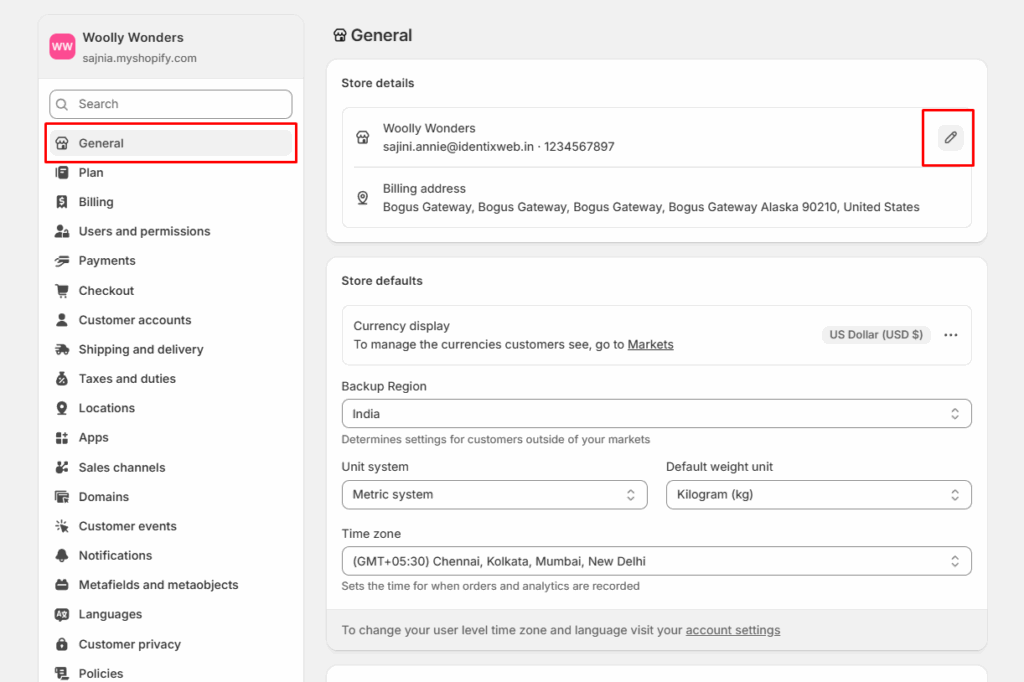
Step 1: Create Your Shopify Account
Getting started with Shopify is simple.
You just need to:
- Go to Shopify’s website
- Sign up using your email address
- Enter basic details about your business
- Choose a store name
Step 2: Choose and Customize Shopify Theme
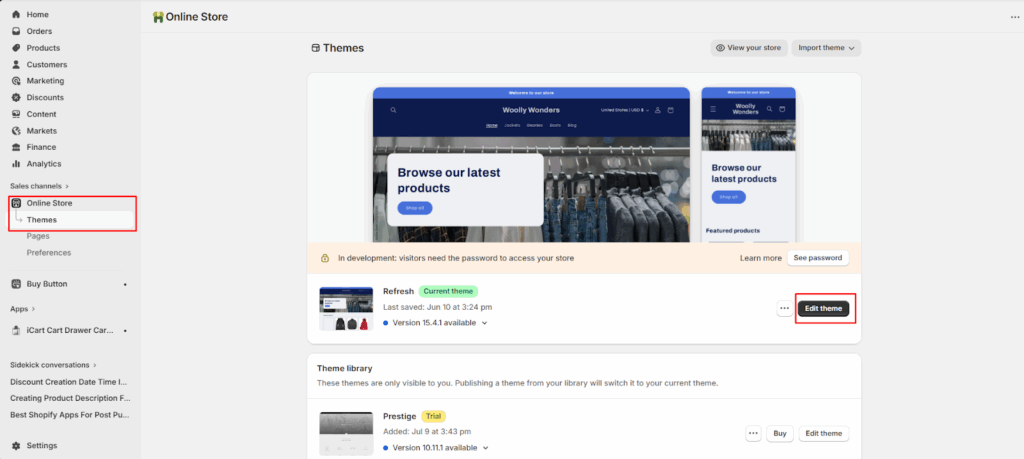
Your theme controls how your store looks. Shopify offers both free and paid themes.
- Go to online store > themes and you can customize colors, fonts, logo, branding, layout, menus, pages and more as per your needs and goals.
Step 3: Add Your Products (Physical or Digital)
Now it’s time to add what you want to sell.
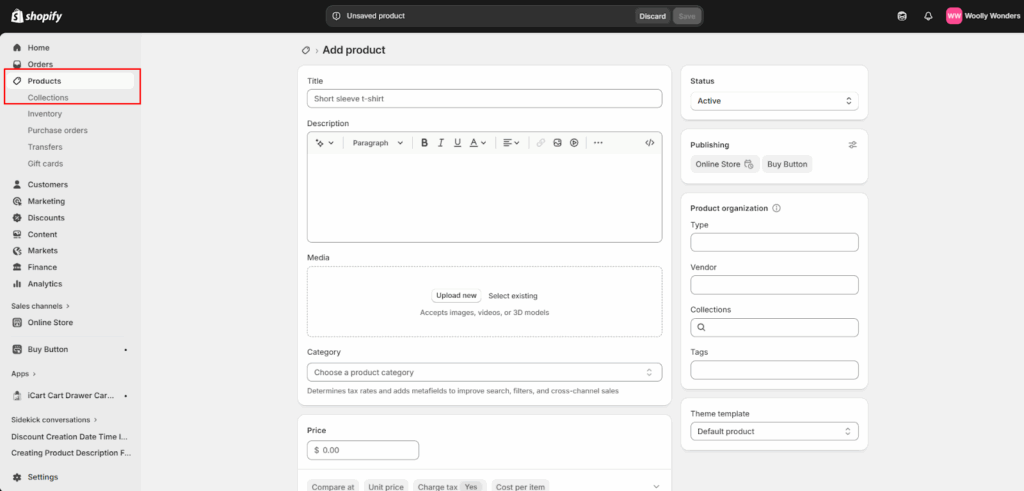
For each product, you should add:
- Product title
- Clear description (features, benefits, use cases)
- Price and compare-at price (if any)
- High-quality images
- Variants (size, color, etc., if applicable)
- Inventory and SKU details
Step 4: Set Up Payments on Shopify
To get paid, you need to set up payment methods.
Shopify supports:
- Shopify Payments (credit/debit cards, local methods)
- PayPal
- Other third-party payment gateways
You’ll need to:
- Add your business or personal details
- Connect your bank account
- Choose which payment methods you want to offer
If you want to know in detail how to setup shopify payments, you can refer to this step-by-step guide on setting up payments on Shopify.
Step 5: Configure Shipping and Taxes
Next, you need to decide how you’ll deliver products to customers.
For shipping, you can:
- Set flat rates (e.g., $5 per order)
- Offer free shipping
- Charge based on weight or location
- Use carrier-calculated rates
For taxes:
- Set up tax rules based on your country or region
- Shopify can automatically calculate taxes in many places
Step 6: Set Up Your Store Policies and Pages
Policies build trust and protect your business.
Important pages to add:
- About Us - Tell your story and build trust
- Contact Us - Let customers reach you easily
- Shipping Policy - Explain delivery times and costs
- Return & Refund Policy - Explain returns and refunds
- Privacy Policy & Terms - For legal and trust reasons
Step 7: Install Essential Shopify Apps
Apps help you add more features to your store without coding.
Useful app categories include:
- Marketing (email, SMS, ads, popups)
- SEO and optimization
- Reviews and trust badges
- Upsells and cross-sells
- Dropshipping or print-on-demand
- Customer support (chat, helpdesk)
Step 8: Test Your Store Before Launch
Before going live, test everything like a customer would.
Check:
- Can you add products to cart?
- Does checkout work properly?
- Are payment methods working?
- Are emails (order confirmation, etc.) being sent?
- Does the site look good on mobile?
Step 9: Launch Your Shopify Store
Once everything looks good, it’s time to launch.
To launch, you should:
- Remove the password protection from your store
- Connect your domain (if you have one)
- Do one final check of pages, products, and checkout
How to Get Your First Sales on Shopify
Getting your first sales takes effort, but it’s very achievable.
Some simple ways to start:
- Share your store on social media
- Tell friends, family, and contacts
- Run small ads on Facebook, Instagram, or Google
- Offer a launch discount or free shipping
- Create simple content (reels, posts, short videos) about your products
Common Mistakes to Avoid When Selling on Shopify
Many beginners make the same mistakes. Try to avoid these:
- Using poor-quality product images
- Writing weak or unclear product descriptions
- Making checkout too complicated
- Installing too many apps and slowing down the store
- Not testing the store before launch
- Ignoring mobile users
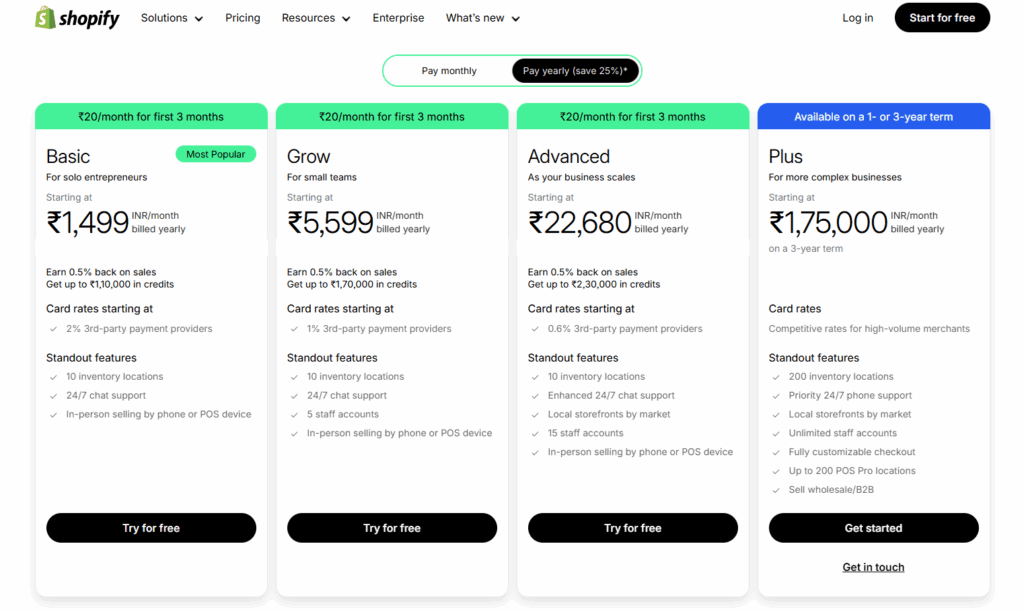
How much does it cost to sell on Shopify?
Shopify offers four selling plans to choose from:
- Basic
- Grow
- Advanced
- Plus
Conclusion
Selling on Shopify in 2026 is easier than ever, even if you’re just getting started. With the right setup, a clear plan, and a step-by-step approach, you can turn your idea into a fully functional online store that’s ready to attract customers and generate sales.
Remember, you don’t need to make everything perfect from day one. Start simple, focus on offering value to your customers, and keep improving your store as you learn what works best.
Frequently Asked Questions
Is Shopify good for beginners?
Yes, Shopify is very beginner-friendly and doesn’t require coding or technical skills.
How much does it cost to start?
You’ll pay a monthly plan fee, plus optional costs for themes, apps, and a domain. You can start with a small budget.
Can I sell digital or physical products?
Yes, Shopify supports both digital and physical products.
Do I need a business license?
This depends on your country and local laws. It’s best to check your local requirements.


About the author
Sajini Annie John
Meet Sajini, a seasoned technical content writer with a passion for e-commerce and expertise in Shopify. She is committed to helping online businesses to thrive through the power of well-crafted content.