





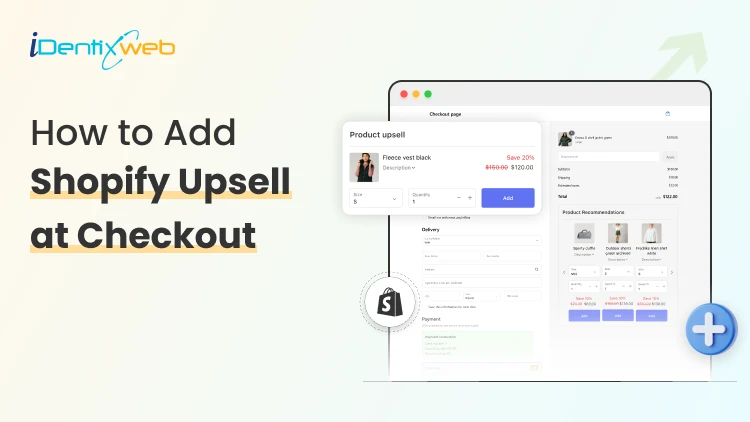
What if you could increase your sales instantly without increasing your ad budget or traffic? That’s exactly where upselling comes in. Upselling is a simple but powerful strategy that encourages customers to add extra products, upgrades, or complementary items to their order before completing their purchase.
When done correctly, upselling not only increases your average order value but also improves customer satisfaction. And the numbers prove it works. McKinsey reports that upselling and cross-selling can boost sales by up to 20% and profits by as much as 30%.
For Shopify merchants, one of the most effective places to apply this strategy is at checkout, the exact moment when customers are ready to complete their purchase. In this article, you will learn how upselling at checkout can help you increase profits.
What Is Shopify Upsell at Checkout
Shopify Upsell at Checkout is the process of offering customers an additional product or upgrade during or immediately after checkout to increase average order value (AOV).
Types of Shopify Upsell at Checkout You Can Implement
Choosing the right upsell type is critical if you want to increase average order value without hurting conversions. Below are the most effective types you can implement, along with clear explanations and examples.
1. Checkout Upsell
What it is:
An offer shown directly on the checkout page before the customer completes payment. It encourages buyers to add a related product, upgrade, or add-on while they are reviewing their order.
Why it works:
Customers are already in buying mode. A well-placed, relevant offer feels convenient rather than pushy, especially if it enhances the original purchase.
When to use it:
Best for small add-ons, warranties, gift wrapping, or bundle upgrades that complement the main product.
Examples:
- Customer buys a laptop - Offer extended warranty for $49
- Customer adds a dress - Offer matching belt at 20% off
- Customer buys skincare - Offer serum upgrade bundle
2. Post-Purchase Upsell (One-Click Offer)
What it is:
An offer shown immediately after payment is completed but before the thank-you page. Customers can accept the offer with just one click, no need to re-enter payment details.
Why it works:
There is zero risk of cart abandonment because the original purchase is already complete. This makes it one of the highest-converting Shopify upsell strategies.
When to use it:
Ideal for complementary products, limited-time discounts, or bundle deals that naturally extend the initial purchase.
Examples:
- Customer buys running shoes - Offer premium socks at 30% off
- Customer buys protein powder - Offer shaker bottle for $9.99
- Customer buys phone - Offer screen protector + case bundle
3. Thank You Page Upsell
What it is:
An offer displayed on the order confirmation page after checkout is fully completed. It invites customers to make an additional purchase.
Why it works:
Customers feel satisfied after purchasing, which creates a positive emotional moment. A smart suggestion can turn that satisfaction into another sale.
When to use it:
Best for subscription offers, referral incentives, or future purchase discounts.
Examples:
- “Upgrade to subscription and save 15% on future orders”
- “Add this product now and get free shipping”
- “Refer a friend and both get $10 off”
4. Bundle Upgrade Upsell
What it is:
An offer that upgrades a single product into a bundle with added value, often at a discounted combined price.
Why it works:
Bundles increase perceived value. Customers feel they are getting more for a better deal.
When to use it:
Best for stores with complementary product lines or multi-item use cases.
Examples:
- Buy a camera - Upgrade to photography starter kit
- Buy coffee machine - Add coffee beans + cleaning kit bundle
- Buy yoga mat - Add block + strap at bundle discount
5. Subscription Upsell
What it is:
Encourages customers to convert a one-time purchase into a recurring subscription.
Why it works:
Subscriptions increase lifetime value (LTV) and predictable revenue. Customers also benefit from convenience and discounts.
When to use it:
Perfect for consumables, beauty products, supplements, pet supplies, or any replenishable item.
Examples:
- “Subscribe & save 10% every month”
- “Get free shipping with subscription”
Step-by-Step: How to Add Shopify Upsell at Checkout
Step 1: Choose the right Shopify checkout upsell app
To implement Shopify upsell at checkout effectively, you need automation. When selecting a shopify checkout upsell app, look for:
- Post-purchase compatibility
- One-click functionality
- Advanced targeting
- Analytics dashboard
- Mobile optimization
SellMore checks all these boxes and simplifies Shopify checkout upsell implementation.
Step 2: Install the app
- Go to Shopify App Store
- Search for Sellmore
- Click Install
- Grant permissions
Step 3: Create a new template & choose checkout page
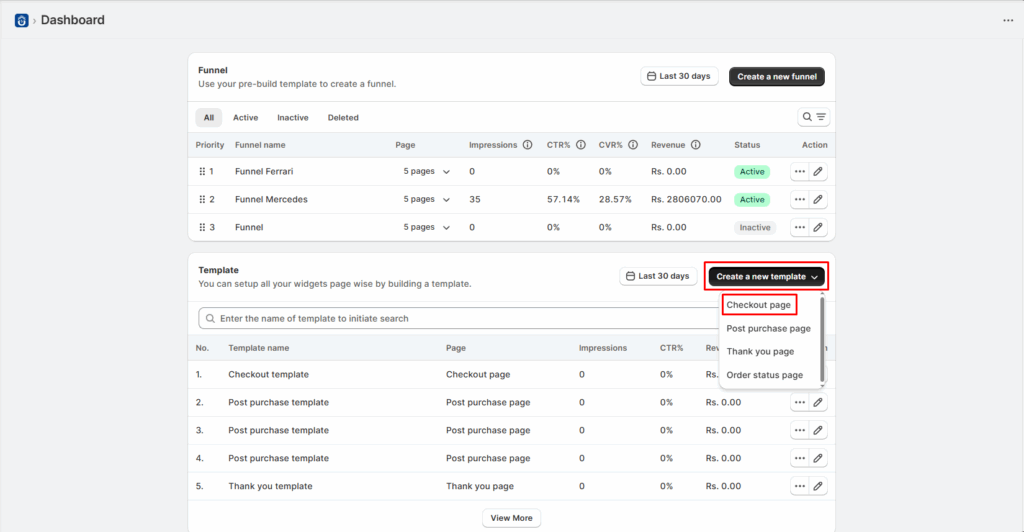
Check this video to see how a template can be created:
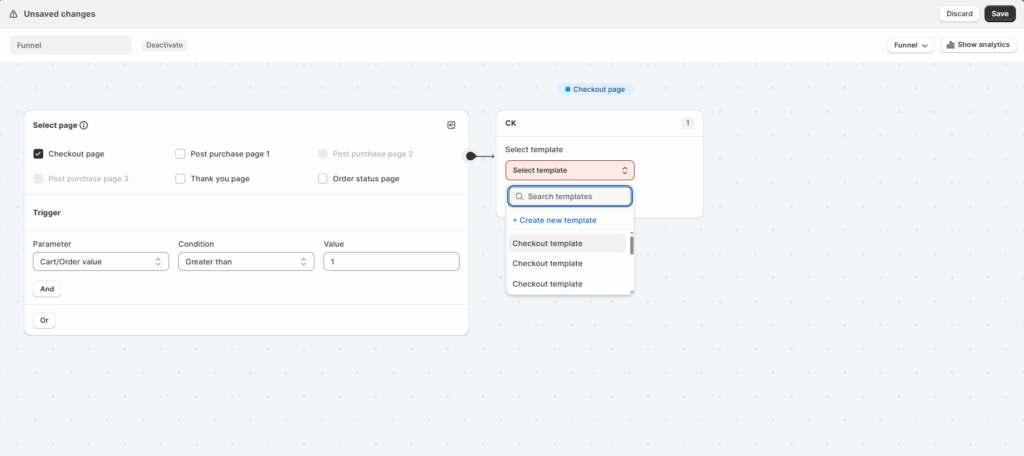
Step 4: After creating template, click on create a new funnel.
Choose the checkout page, set the conditions under which you want to display the upsell and select the template and save changes.
Why SellMore Is Ideal for Shopify Upsell at Checkout
SellMore was built specifically to optimize checkout upsell.
Here’s why merchants prefer it:
- One-click post purchase offers
- High-converting templates
- Easy setup
- Smart targeting
- No coding required
Compared to generic Shopify checkout upsell solutions, SellMore focuses exclusively on post-purchase revenue optimization.
Best Practices for High-Converting Shopify Upsell at Checkout
1. Keep It Relevant
Irrelevant upsell offers kill conversions.
Match:
- Product category
- Customer intent
- Price range
Your shopify checkout upsell app should support segmentation.
2. Offer a Clear Value Incentive
Examples:
- “Add this for 25% off”
- “Complete your bundle and save $15”
Strong incentives increase Shopify Upsell at Checkout acceptance rates.
3. Use One-Click Functionality
Requiring customers to re-enter payment details destroys Shopify checkout upsell conversions. Always use a shopify checkout upsell app that supports one-click functionality like SellMore.
4. Optimize for Mobile
Most Shopify Upsell at Checkout traffic is mobile.
Ensure:
- Fast loading
- Clear CTA
- Simple layout
Good shopify checkout upsell app design is mobile-first.
Conclusion
Instead of constantly chasing new traffic, you maximize the value of customers who are already ready to buy. Whether you use in-checkout offers, post-purchase one-click upsells, or thank-you page promotions, the goal is simple: increase average order value while improving the shopping experience.
Frequently Asked Questions
1. Does Shopify allow checkout upsells?
Yes, Shopify allows certain types of Shopify checkout upsell options, especially through approved apps and post-purchase extensions.
2. What is the difference between in-checkout and post-purchase upsell?
In-checkout upsells appear before payment is completed. Post-purchase upsells appear after payment but before the thank-you page, allowing customers to add products with one click.
3. How much can Shopify Upsell at Checkout increase revenue?
Many stores see a 10–30% increase in average order value after implementing Shopify Upsell at Checkout properly. Results depend on product type, pricing, and how well the shopify checkout upsell app is configured.

![How to Create Upsell in Shopify Without an App [2026 Tested]](https://www.identixweb.com/wp-content/uploads/2026/02/27-02-Fri-Blog-How-to-Create-Upsells-in-Shopify-Without-an-App_.webp "How to Create Upsell in Shopify Without an App [2026 Tested]")

About the author
Sajini Annie John
Meet Sajini, a seasoned technical content writer with a passion for e-commerce and expertise in Shopify. She is committed to helping online businesses to thrive through the power of well-crafted content.