





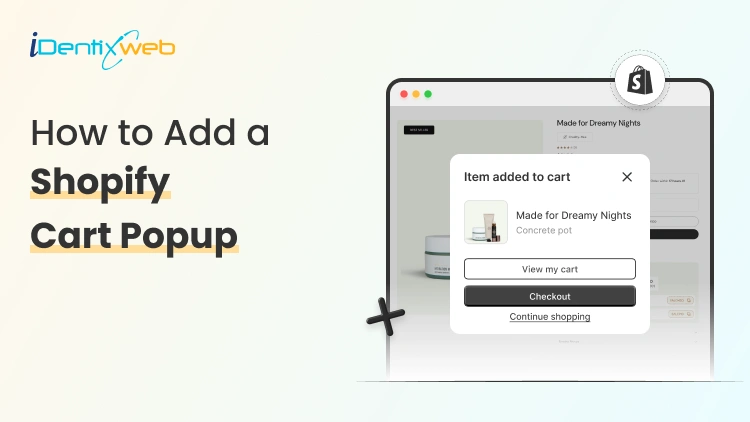
Have you ever experienced this thing in your store? When someone clicks Add to cart, you are at a critical moment in the buying journey. Send them to a new page, and you risk slowing them down. This is where a cart popup (also known as a cart drawer or mini cart) makes a real difference. Instead of interrupting the shopping experience, it shows customers what they’ve added right away and lets them continue browsing or head to checkout in just one click.
For store owners using Shopify, setting up a cart popup is a practical way to make the shopping flow smoother and more user-friendly. You don’t need advanced technical skills to do it, either. In this guide, you will learn exactly what a cart popup is, why it helps, and how to add one to your store step by step using either your theme’s built-in features or a simple app.
What is a cart popup
A cart popup is a small overlay or side drawer that appears when a customer clicks Add to cart. Instead of sending shoppers to the full cart page, it:
- Confirms the item was added
- Shows cart contents instantly
- Keeps customers browsing (lower friction)
- Creates space for upsells or free-shipping messages
Why do you need a cart popup
A cart popup might seem like a small feature, but it can make a big difference in how smoothly your store runs and how confidently customers move toward checkout.
For stores built on Shopify, a cart popup helps solve a few common problems at once:
1. It reduces friction in the buying process
Every extra page load is a chance for a customer to lose interest. A cart popup removes that extra step by letting shoppers review their cart without leaving the product page.
2. It reassures customers instantly
When someone clicks “Add to cart,” they want confirmation that it worked. A popup gives immediate feedback, showing the product, price, and quantity, building confidence and reducing confusion.
3. It keeps shoppers browsing longer
Instead of interrupting the experience, a cart popup encourages customers to continue shopping. They can quickly close it and explore more products, which often leads to bigger carts.
4. It creates space for smart nudges
Many cart popups can display free shipping messages, recommended products, or special offers. These small prompts can increase average order value without being pushy.
5. It improves the overall user experience
A smoother, faster cart experience feels more modern and professional. When shopping feels easy, customers are more likely to complete their purchase.
Steps to add a Shopify cart popup
Method 1: Enable the Cart Popup in Your Shopify Theme (No App)
- Go to your admin dashboard > Online Store > Themes.
- Click customize on your active theme.
- Look for theme settings, cart, or header (names vary by theme).
- Find an option like cart type, cart behavior, or enable cart drawer/popup.
- Select drawer or popup instead of page.
- Save and test by adding a product to your cart on the storefront.
If you don’t see the option
- Your theme may not support a popup natively.
- Check your theme’s documentation or support.
- If it’s not available, use method 2 below.
Method 2: Adding cart pop-up using an app
- Open your Shopify admin and go to the Shopify App Store.
- Search for “iCart Cart Drawer Cart Upsell” and install the app.
- Once installed, go to app’s general settings and enable the app in your store.
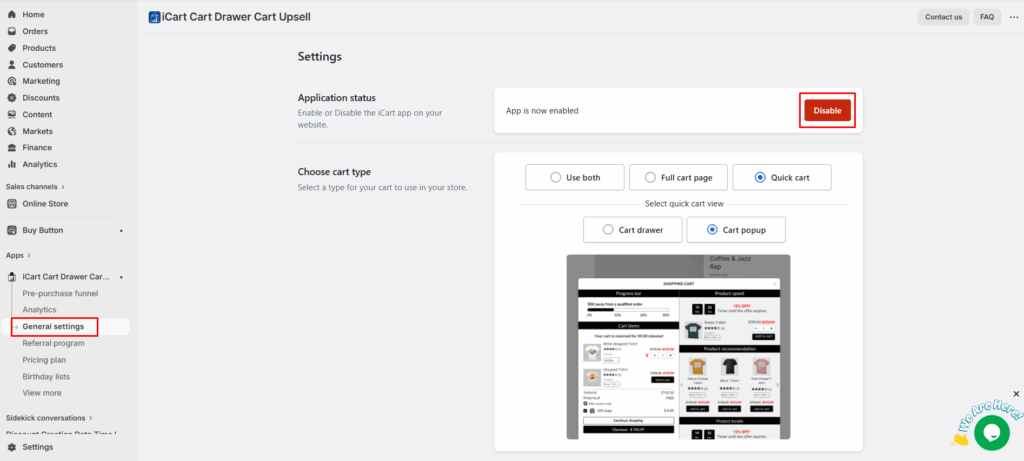
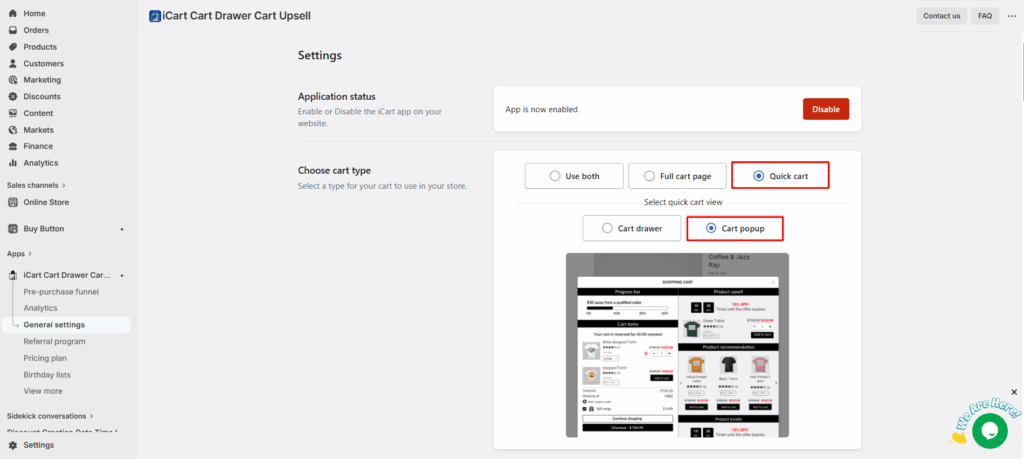
- iCart not only offer cart popup, but it also provides a cart drawer, popup & full cart. So, as per your requirement, choose the cart type that you want to display in your storefront.
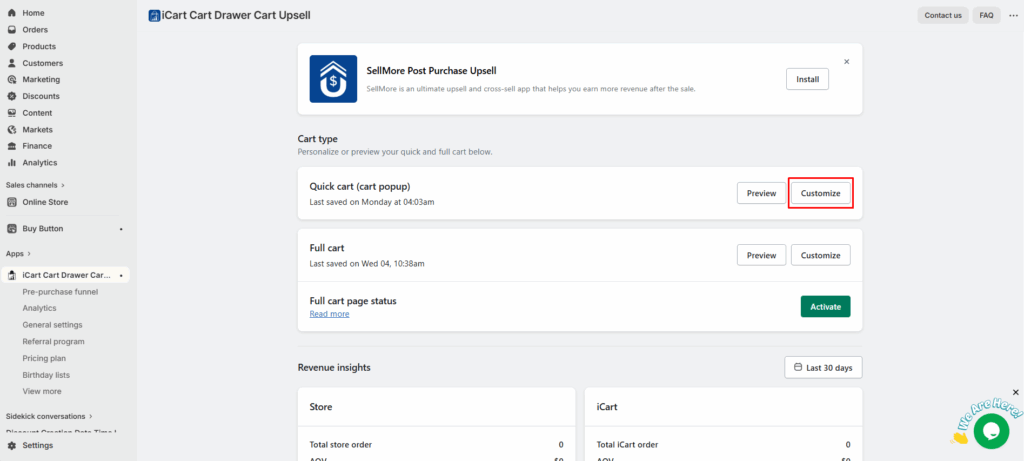
- Once the cart style is selected, you can customize your cart as per your needs by adding product upsells, recommendations, bundles, progress bar, discounts and more offers.
Benefits of Using iCart’s Cart Popup
1. Instant Cart Preview
When a customer adds a product, the popup appears immediately showing cart contents without navigating away from the current page. This reduces interruptions and keeps the customer engaged.
2. Smart Upsells & Cross-Sells
iCart lets you showcase recommended products, bestsellers, or related items right inside the cart popup. This encourages customers to add more before checking out.
3. Free Shipping & Progress Bars
Display progress indicators such as “₹X more for Free Shipping.” These visual cues motivate customers to increase their cart value, which boosts your revenue without aggressive selling.
4. Customizable Design
Match the cart popup to your store’s branding by adjusting layout, colors, fonts, and button text. A well-designed popup feels like a natural part of your store rather than an add-on.
5. Mobile-Optimized Experience
The cart drawer works smoothly on both desktops and mobile devices since a large portion of Shopify traffic comes from mobile shoppers.
6. No Coding Required
Even if you don’t know HTML, CSS, or JavaScript, iCart gives you a point-and-click interface to set up and manage your cart popup.
7. Works with Any Theme
iCart is designed to integrate with most Shopify themes, so you don’t have to worry about compatibility issues or custom development.
8. Analytics
Track what conversions or sales you made through iCart’s popup and which widgets performed well.
Conclusion
Adding a Shopify cart popup is a simple but powerful way to improve the shopping experience in your store. Instead of interrupting customers with extra page loads, a cart popup keeps them focused, informed, and moving smoothly toward checkout. Whether you use your theme’s built-in option or a feature-rich app like iCart, the goal is the same: reduce friction, build confidence, and make buying feel effortless.
On Shopify, even small improvements to the cart experience can have a noticeable impact on conversions and average order value. By setting up a well-designed cart popup, you’re not just adding a visual feature, you’re optimizing a critical step in the customer journey. Take the time to test, refine, and customize your setup, and your Shopify cart popup can become a reliable tool for turning more visitors into paying customers.
Post Tags



About the author
Sajini Annie John
Meet Sajini, a seasoned technical content writer with a passion for e-commerce and expertise in Shopify. She is committed to helping online businesses to thrive through the power of well-crafted content.