






Key Highlights: Shopify push notifications help you bring back interested shoppers with short, timely messages that drive action. For most new stores, web push notifications are the best place to start because they are simple to set up and work well for abandoned carts, back-in-stock alerts, flash sales, and product launches. Use push notifications app for Shopify like Brevo PushOwl to add web notifications to your store.
Getting traffic to your Shopify store is hard. Getting those visitors to come back and buy is even harder.
That’s where big brands like Kylie Cosmetics & Gymshark use Shopify push notifications to make a real difference.
They use them to recover abandoned carts, bring shoppers back to trending products, announce flash sales, and turn missed visits into sales.
For a new store, this is one of the easiest ways to stay in front of interested shoppers without depending only on email.
In this blog, you’ll see how leading brands use push notifications for Shopify to drive more revenue, what makes their strategy work, and how you can apply the same ideas to your store without overcomplicating things.
What are Shopify push notifications & how do they work?
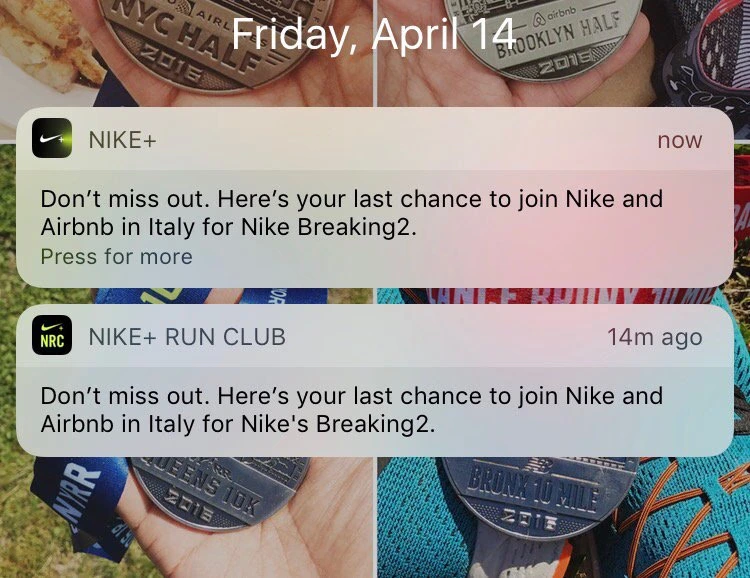
Here's how Nike uses web push notifications
Push notifications are short messages you send to shoppers after they allow notifications from your store.
These alerts help you bring people back to your site, remind them about products they viewed, and recover sales that may have slipped away.
They usually appear on a shopper’s device or browser screen, even when they are not actively browsing your store. For a new store, this can be a smart way to stay visible.
The process starts with an opt-in. When someone lands on your store, they see a browser prompt asking whether they want to allow notifications.
If they accept, your store can push notifications using an app. That means every message goes to people who have already shown some level of interest.
How are push notifications different from email?
They are different from email and SMS in a few clear ways. Email usually needs longer copy, a subject line, and space in a crowded inbox.
SMS feels more personal and intrusive and comes with an extra cost.
Push notifications sit in the middle. They are fast, short, and built for quick action. That makes them useful for urgent offers, reminders, and high-intent moments.
What are the types of push notifications?
Push notifications are mainly of two types:
Web push notifications
These are sent through a website and appear on a user’s browser or desktop device after they allow notifications.
A shopper just needs to visit your store and click Allow on the browser prompt for notifications.
For Shopify stores, this is the most common type because many merchants do not have a mobile app.
Mobile push notifications
These are sent through a mobile app and appear on a shopper’s smartphone.
These only work if your store has its own mobile app and the customer has installed it on their device.
This type is more common for larger brands that already have an app and want to stay connected with repeat customers.
Benefits of sending Shopify push notifications
Push notifications increase your sales by sending reminders. Here are some great advantages of using them for online stores.
Abandoned cart reminders
A shopper adds something to the cart but leaves without checking out. Instead of losing that sale, you can send a quick reminder that brings them back.
Example ideas:
- You left something behind in your cart
- Your cart is waiting for you
- Complete your order before it sells out
Back-in-stock alerts
A shopper checks a product, likes it, but finds it out of stock.
Here, a back-in-stock notification helps you bring them back the moment the product becomes available again.
This type of message is useful because the interest is already there. The shopper wanted the product.
Example ideas:
- Good news. This item is back in stock
- Your favorite product is available again
- Restocked and ready to order
Price drop updates
Some shoppers want the product, but they are waiting for a better price. A price drop notification gives them a reason to come back.
This works especially well for stores that run offers often, promote limited discounts, or want to re-engage visitors who did not convert the first time.
Example ideas:
- The price just dropped on a product you viewed
- Your saved item is now available at a better price
- Shop now before the price goes back up
Flash sale announcements
Flash sale notifications are great when you want quick action. These messages create urgency and work best when the value is clear.
For new stores, this can be a simple way to push traffic during weekends, festive sales, clearance periods, or short campaigns.
Example ideas:
- 24-hour deal ends tonight
- Limited-time offer. Shop before it’s gone
New product launch
When you launch a new product, collection, or variation, Shopify push notifications help you get instant visibility.
This is useful if you release products regularly or want to build excitement around fresh arrivals.
Example ideas:
- New arrivals just dropped
- Be the first to shop our latest collection
How can you allow Shopify web push notifications?
Shopify has a dedicated Web push app category in its App Store, which is where merchants usually choose a tool to collect browser subscribers and send notifications.
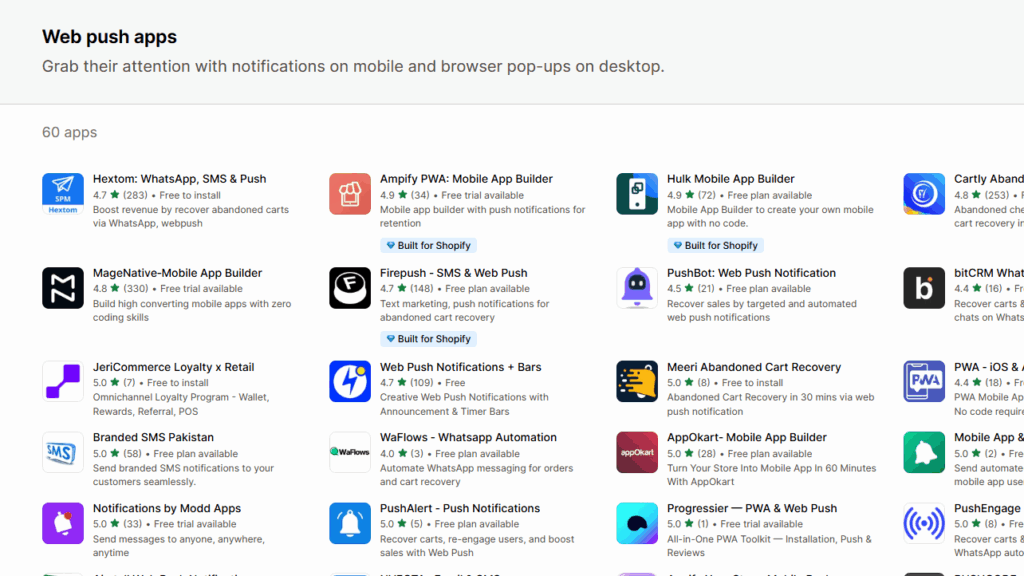
Brevo PushOwl, Hextom and Cartly are fantastic web push notifications apps for Shopify. Many merchants get it wrong when choosing Shopify apps. Make sure you check for the required features before you select an app for your store.
Best practices for web push notifications
Here are the best practices to follow if you are a new store.
Send notifications with a clear purpose
Every notification should have a reason behind it. This can be a cart reminder, a back-in-stock alert, a flash sale, or a price drop.
Keep the message short
Web push notifications are small by nature. Long copy does not work here. Shoppers should understand the message in seconds.
Focus on timing
Timing matters more than volume. A cart reminder works when sent soon after a shopper leaves. A flash sale works when the offer is live.
Test what works
Not every store gets the same results from the same type of message. Test different timings, offers, and notification copy. Then look at what gets more clicks and conversions.
So, does adding Shopify push notifications help?
Yes. Getting people to visit your store is one thing. Getting them to come back is where Shopify push notifications can help.
For a new store, the best part is that you do not need to overcomplicate it. Install the right app, get visitors to opt in, and start with useful notifications that match shopper intent.
FAQs for Shopify push notifications
1. How can I turn on push notifications for my Shopify store?
You need to install a web push notification app from the Shopify App Store, since Shopify does not provide browser push as a standard built-in feature.
2. Which is the best push notification app for Shopify?
For most Shopify stores, Brevo PushOwl is one of the best choices because it is built specifically around web push, supports abandoned cart, back-in-stock, and flash-sale notifications.
3. Which type of push notifications should I use for my store?
Most new stores use web push notifications because they do not have a mobile app yet. They use abandoned cart notifications, back-in-stock alerts, and flash-sale or promotion messages because they match strong buying intent and bring shoppers back at the right moment.


About the author
Vineet Nair
Vineet is an experienced content strategist with expertise in the ecommerce domain and a keen interest in Shopify. He aims to help Shopify merchants thrive in this competitive environment with technical solutions and thoughtfully structured content.