





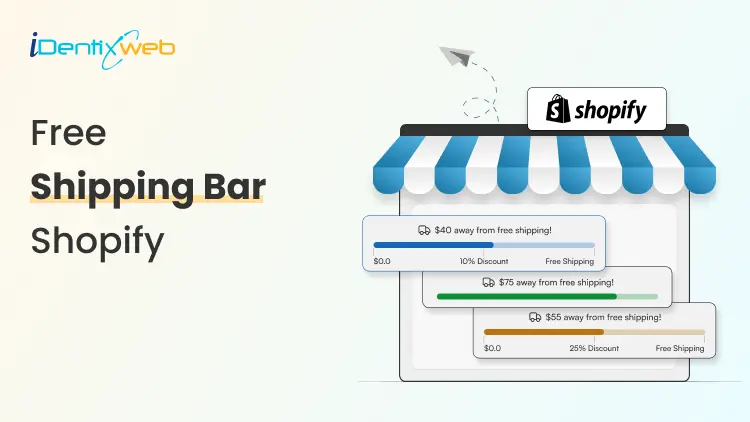
Using a free shipping bar Shopify strategy can significantly increase Average Order Value (AOV) by motivating customers to add extra items to qualify for free shipping. For Shopify store owners looking to increase conversions without heavy discounts, implementing a free shipping bar strategy is one of the easiest optimizations. In this blog, let's see how to add a free shipping bar in Shopify store.
What a Free Shipping Bar Shopify Tool Does
It displays a dynamic message on your store that encourages customers to increase their cart value in order to qualify for free shipping.
Core functions include:
- Showing a free shipping threshold
- Displaying a progress message
- Updating automatically when items are added to the cart
- Encouraging customers to purchase more items
Key Benefits of Free Shipping Bar
1. Increases Average Order Value (AOV)
A free shipping bar Shopify encourages customers to add more items to their cart to reach the free shipping threshold. When shoppers see they are close to qualifying for free shipping, they are more likely to purchase an additional product. This simple incentive helps increase the overall order value without requiring discounts.
2. Reduces Cart Abandonment
Unexpected shipping fees are one of the biggest reasons customers abandon their carts. A free shipping bar clearly communicates the shipping benefit before checkout, reducing surprises. By showing how customers can avoid shipping costs, it keeps them engaged and more likely to complete the purchase.
3. Improves Conversion Rates
Clear incentives make it easier for customers to decide whether to complete their purchase. A free shipping bar highlights a valuable benefit that encourages shoppers to move forward with checkout. This visible offer builds confidence and helps convert browsing visitors into paying customers.
4. Creates Urgency
Seeing progress toward the free shipping goal motivates shoppers to act quickly. This dynamic feedback creates urgency and encourages immediate purchasing decisions.
Types of Free Shipping Bar Shopify Implementations
1. Shopify Apps
The easiest way to add a free shipping bar is through apps.
Popular options typically include:
- Customizable progress bars
- Geo-targeted messages
- Cart-based messaging
- Mobile optimization
Apps require no coding and can be installed within minutes.
2. Theme-Based Free Shipping Bar
Some Shopify themes include a built-in free shipping bar Shopify feature.
Advantages:
- Faster loading
- No extra app cost
- Fully integrated with the theme
However, customization options may be limited.
3. Custom Coded Free Shipping Bar
Developers can create a free shipping bar Shopify script using JavaScript and Liquid.
This allows:
- Full design control
- Custom progress animations
- Advanced personalization
Best suited for stores with technical resources.
How to Add a Free Shipping Bar in Shopify
- Install a suitable app like iCart Cart Drawer Cart Upsell
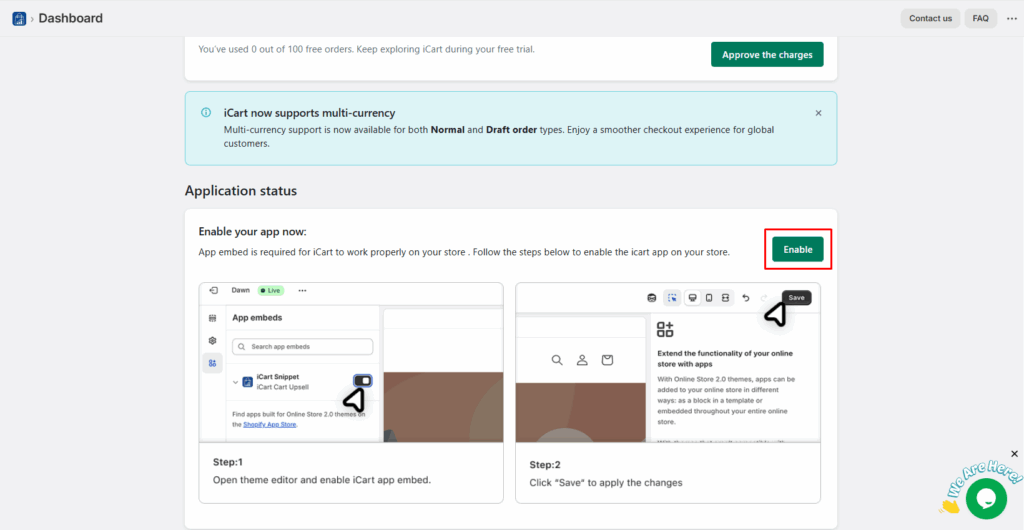
- Enable the app status
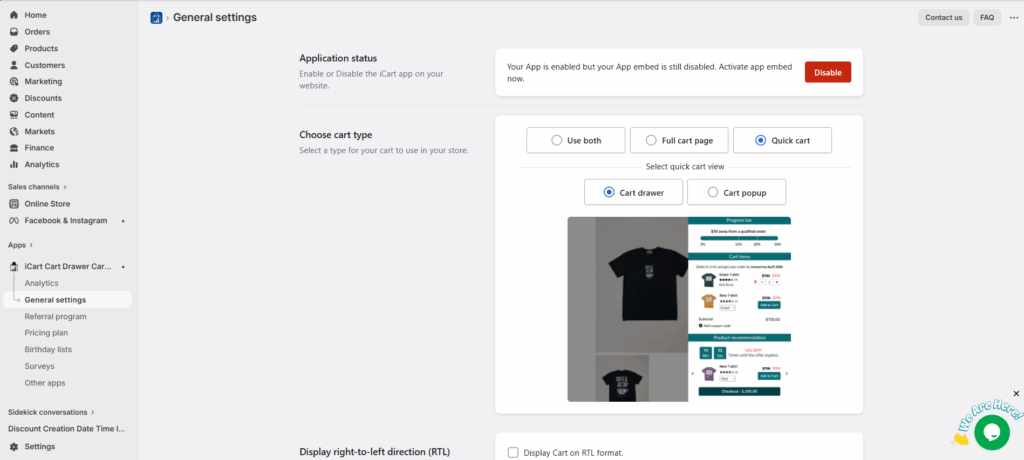
3. Choose the cart type that you want to show in your store.
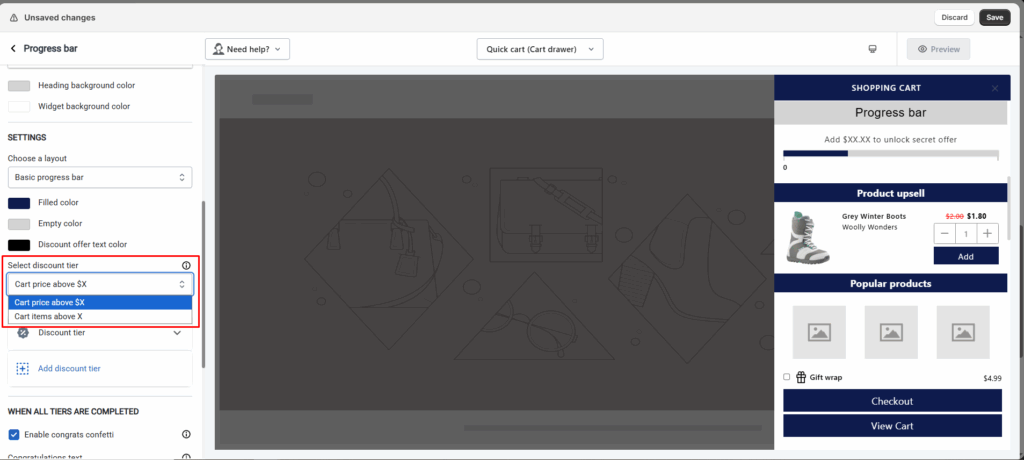
4. Go to app’s dashboard and click on “Customize” button and add the progress bar widget.
5. You will find many options. Here’s we will see the main conditions. You can select discount tier based on 2 conditions:
cart price above Rs. X - When selecting the cart price above Rs. X, action will apply according to the price that has been set in the discount tier.
cart items above X - When selecting cart items above X, actions will be applied according to the quantity of items set in the discount tier.
6. Next you can select the type of discount that you would like to offer and set the conditions on which the discounts will be displayed.
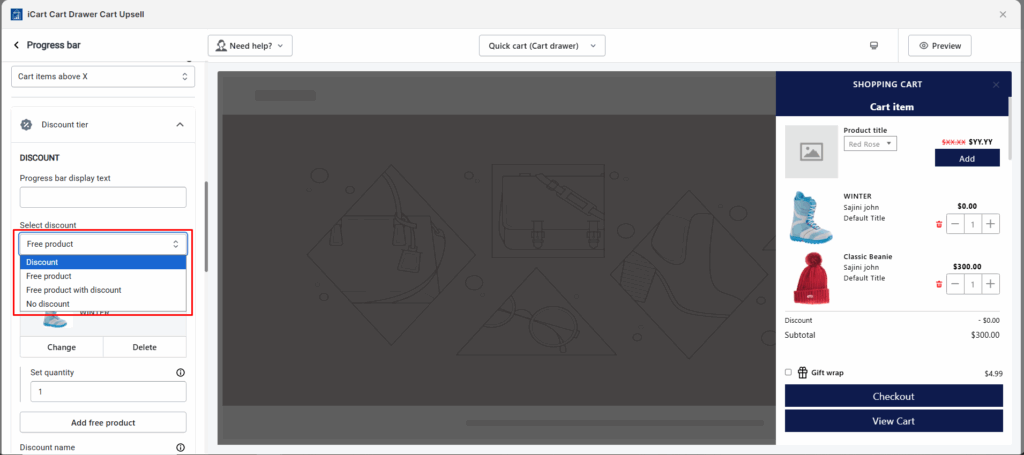
7. After adding all the required tiers and discounts, click on the Save button to save changes.
Conclusion
A free shipping bar Shopify strategy is one of the easiest and most effective ways to increase Average Order Value (AOV) without increasing advertising costs. By clearly showing customers how much more they need to spend to qualify for free shipping, a free shipping bar Shopify encourages shoppers to add extra products to their cart.
The biggest advantage of using this bar is that it creates a simple and visible incentive during the shopping journey. Instead of surprising customers with shipping fees at checkout, the bar communicates the benefit upfront and keeps updating the progress as the cart value grows.
Frequently Asked Questions
1. What is a free shipping bar Shopify?
It is a notification bar displayed on a Shopify store that tells customers how much more they need to spend to qualify for free shipping. The message updates automatically based on the current cart value and encourages customers to increase their order amount.
2. How does a free shipping bar increase AOV?
A free shipping bar increases Average Order Value by motivating customers to add additional products to their cart to unlock free shipping. When shoppers see that they are close to reaching the free shipping threshold, they often add one more item to qualify.
3. Can I add a free shipping bar Shopify without coding?
Yes. You can add using apps from the Shopify App Store. These apps allow you to install and configure the bar without any coding. Many also provide customization options for colors, messages, and placement.
4. What is the best free shipping threshold for Shopify stores?
The best threshold for a free shipping bar Shopify is usually 20-30% higher than your current Average Order Value (AOV). For example, if your average order value is ₹1500, you might set the free shipping threshold at ₹1800-₹2000.
Post Tags


![Best ChatGPT Prompts for Shopify You Can Copy-paste [+Tips to Write Prompts]](https://www.identixweb.com/wp-content/uploads/2026/03/13-03-Fri-Blog-AI-Prompts-for-Shopify-That-Grow-Your-Store-1.webp "Best ChatGPT Prompts for Shopify You Can Copy-paste [+Tips to Write Prompts]")

About the author
Sajini Annie John
Meet Sajini, a seasoned technical content writer with a passion for e-commerce and expertise in Shopify. She is committed to helping online businesses to thrive through the power of well-crafted content.