






Shopify Click and Collect is a game changer for local businesses because it combines the convenience of online shopping with the immediacy of in-store pickup. Customers can place orders online and collect them the same day, without paying for shipping or waiting for delivery.
This guide will help you to know how it works and how to enable click and collect option in your Shopify store.
What Is Shopify Click and Collect?
Shopify Click and Collect is a fulfillment method that lets customers browse and buy products on your online store, then pick up their order at your physical location instead of waiting for home delivery. No shipping fees. No delivery delays. Just a seamless bridge between your online storefront and your brick-and-mortar shop.
It's also called Shopify in-store pickup and Shopify has this built right into its platform, or extendable via third-party apps, depending on how much control you want over the experience.
How Shopify In-Store Pickup Actually Works
Here's the customer journey when you have Shopify in-store pickup enabled from their perspective:
1. Customer adds to cart and reaches checkout
At the shipping step, they see a "Pick up at store" option alongside standard shipping. They select it.
2. They choose their pickup location
If you have multiple locations, they can select the most convenient one. Shopify shows the address and available pickup windows.
3. Order is placed, you get notified
You receive the pickup order in your Shopify admin dashboard. You can set it to require manual approval or auto-confirm instantly.
4. You mark the order as ready
Once you've pulled the item and it's ready at the counter, you mark it "Ready for pickup" and Shopify automatically sends the customer a notification email or SMS.
5. Customer comes in and collects
They present the order confirmation (or you look it up by name/order number). You mark it as "Picked up." Done.
Common Mistakes to Avoid
Enabling Shopify click and collect is straightforward. But the merchants who get the most out of it avoid these common pitfalls:
- Setting unrealistic pickup windows: Promising "ready in 1 hour" when you're a solo operator during a busy Saturday is a recipe for frustrated customers. Be conservative, then impress them by being early.
- Forgetting mobile inventory updates: If you're not keeping your Shopify inventory sync'd with what's actually on your shelf, you'll accept pickup orders for items that aren't there. This is the fastest way to destroy trust with local customers.
- Not promoting it: Most merchants enable click and collect and do nothing else. Put it in your Instagram bio, mention it in your email newsletter, add a banner on your homepage. "Buy online, pick up same day!" is a genuine selling point use it.
- Ignoring the post-pickup experience: What happens when a customer walks in? Is your team ready? Is there a designated pickup area? The physical experience has to match the smooth digital one or the brand trust you built online evaporates.
- No follow-up after pickup: Send a post-pickup email asking how it went. Ask for a review. This is a warm customer who just had a great experience they're primed to become a loyal repeat buyer.
How to enable Shopify Click and Collect with Stellar App
Stellar's Store Pickup feature gives your customers a date-and-time-scheduled click and collect experience, far beyond what Shopify's native feature offers. Here's every step, clearly explained.
1. Install the Stellar App from Shopify App Store
2. Enable the app
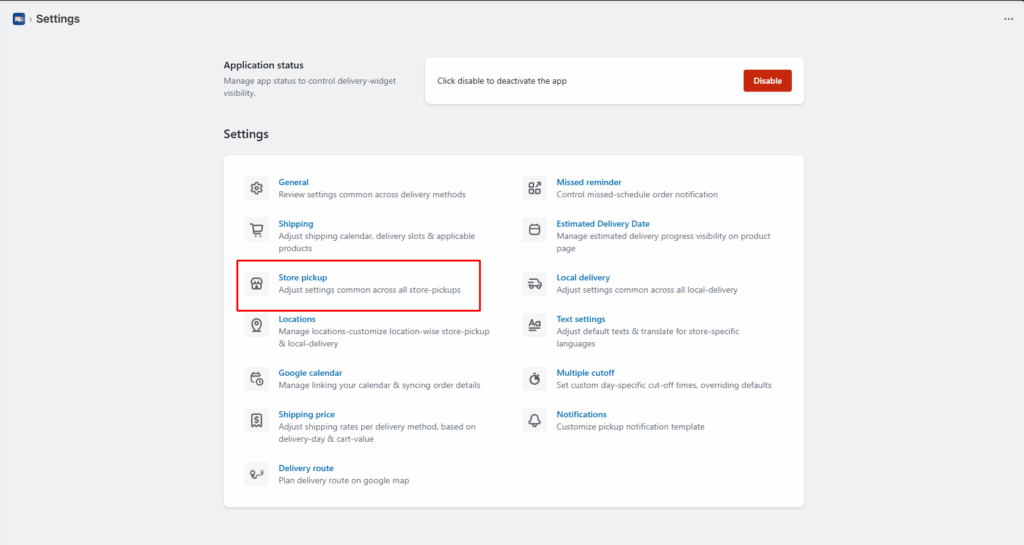
3. From the general settings of app click on “Store Pickup”.
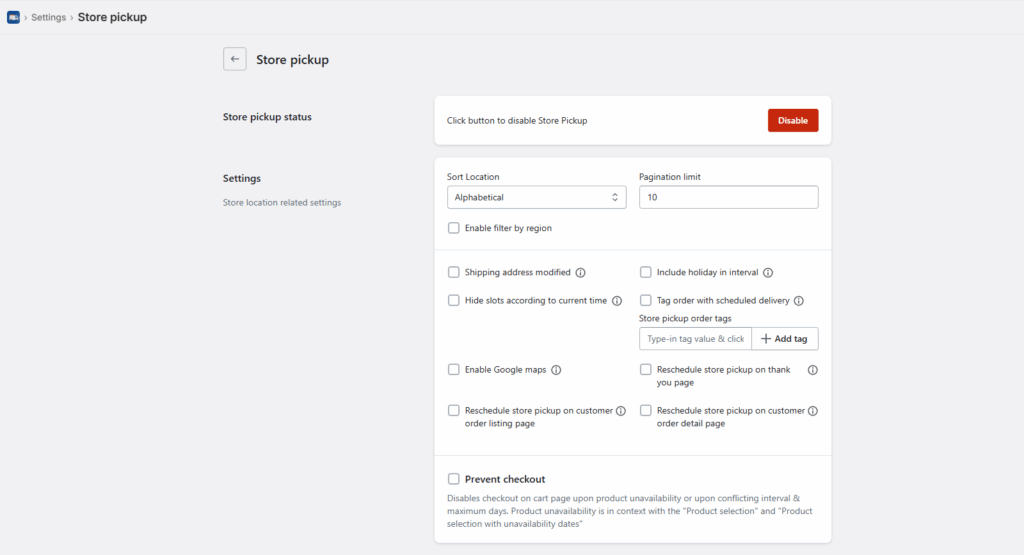
4. When you enable the store pickup option, you will get multiple options. Add your required settings and save the changes.
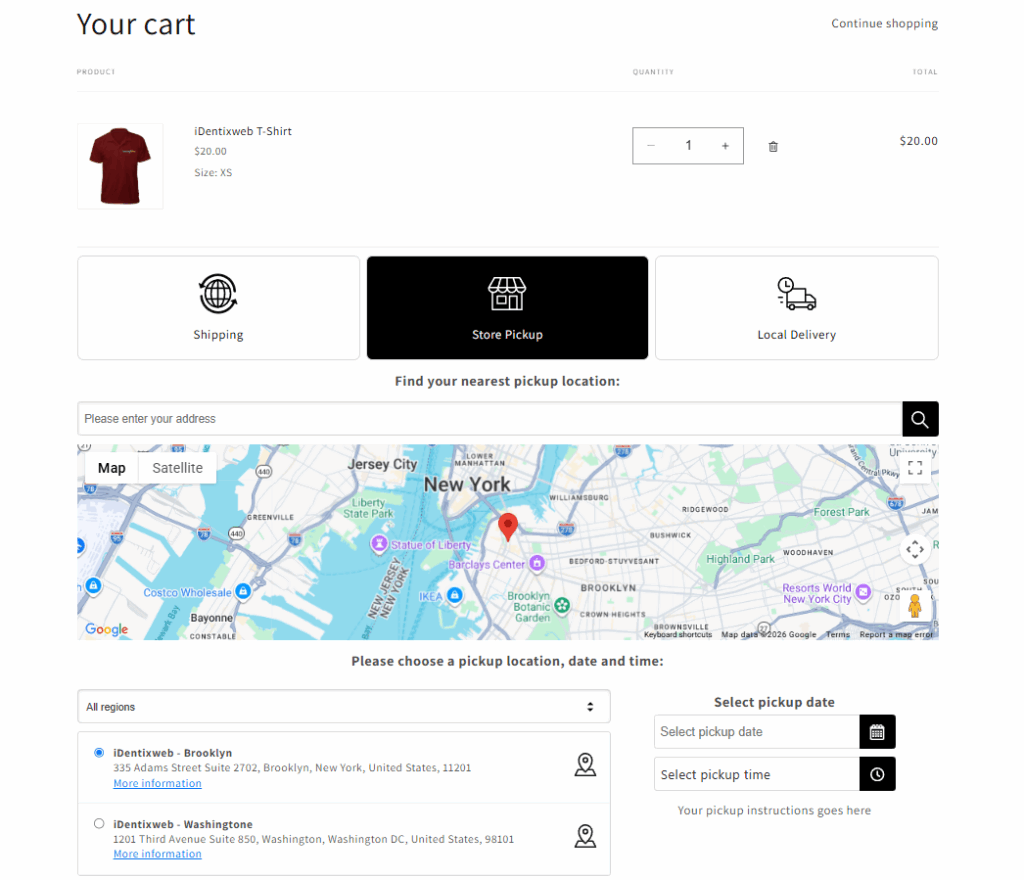
5. After enabling all the settings, this is how store pickup will look in your storefront:
Conclusion
Shopify click and collect is more than just a convenient fulfillment option, it’s a strategic advantage for local businesses looking to blend digital ease with physical accessibility. By allowing customers to shop online and pick up in-store, it eliminates shipping friction, drives foot traffic, and creates opportunities for stronger in-person engagement.
When implemented correctly, it can significantly enhance customer satisfaction and loyalty. Apps like Stellar further elevate this experience by adding flexibility, control, and scalability to your pickup operations.
Frequently Asked Questions
1. Can I offer click and collect at multiple locations with Stellar?
Yes. Stellar supports unlimited pickup locations on the appropriate plan.
2. Does Stellar work with Shopify POS for click and collect orders?
Yes. Stellar is POS-compatible. Pickup orders show up in your Shopify admin and can be managed through POS, making counter staff workflows smoother for in-store collection.
3. Will the date picker appear at checkout or in the cart?
By default, Stellar shows the picker on the cart page. For Shopify Plus merchants, you can also enable a checkout-page date picker.
4. Can I limit which products are available for Shopify click and collect?
Yes. Under product selection in the app settings, you can include or exclude specific products from being eligible for store pickup. This is useful if some products aren't held at your physical location.


About the author
Sajini Annie John
Meet Sajini, a seasoned technical content writer with a passion for e-commerce and expertise in Shopify. She is committed to helping online businesses to thrive through the power of well-crafted content.