





![Magento to Shopify Migration: Complete Guide [Updated 2025]](https://www.identixweb.com/wp-content/uploads/2019/11/26-11-Wed-Blog-Magento-to-Shopify-Migration_-Complete-Guide-Updated-2025.webp "Magento to Shopify Migration: Complete Guide [Updated 2025]")
There is a lot of confusion in choosing between Magento and Shopify as your e-commerce platform. Both are equally popular and efficient. But as per the report of Google Trends, it comes as no surprise that Magento to Shopify migration has increased in 2026.
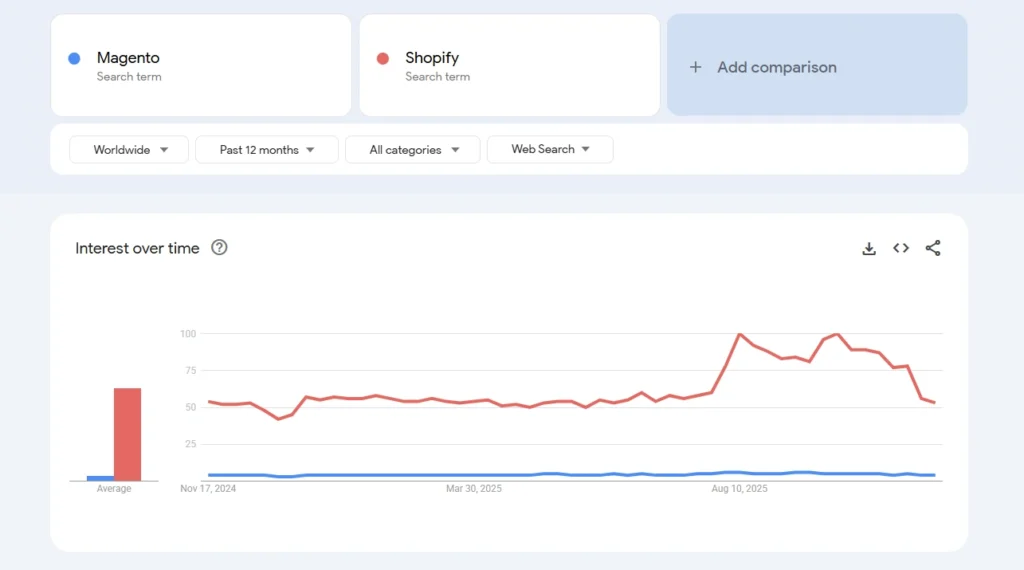
The ease of use, support, and features of Shopify are the reasons why it's ahead. According to Storeleads, it has helped them gain more than 2.7 million users as of 2026.
Why Businesses Are Migrating from Magento to Shopify in 2026?
If you've been running on Magento, you already know how it goes: every update is a project, every customization needs a developer, and hosting bills don't come cheap. In 2026, that frustration has hit a tipping point.
Adobe's shift toward Adobe Commerce (the enterprise, paid version) has left Magento Open Source users in a tough spot. Security patches are becoming scarce, community support is shrinking, and running a competitive store on an ageing codebase is getting harder to justify.
Shopify, by contrast, handles everything: Hosting, security, updates, and compliance, so your team can focus on selling instead of maintaining infrastructure. Here's why merchants making the switch aren't looking back:
- No hosting or server costs. Shopify's monthly subscription covers everything. No AWS bills, no server maintenance, no surprise costs when traffic spikes.
- 24/7 support that actually helps. Shopify's support team is available around the clock via chat, email, and phone. When something breaks at 2 am before a sale, you're not searching forums alone.
- Proven growth at every stage. Brands like Gymshark and Allbirds built their businesses on Shopify. Whether you're doing $500K or $50M in revenue, the platform scales with you.
- Dramatically lower dev dependency. On Magento, you need a developer to change a banner. On Shopify, your marketing team can handle it. That's hours and dollars saved every week.
- Better conversion tools out of the box. Shopify's app ecosystem gives you access to best-in-class upsell, loyalty, reviews, and email tools without writing a line of code.
- PCI compliance and security are handled automatically. Shopify takes care of PCI compliance, SSL certificates, and security updates so you're never exposed.
Magento vs. Shopify: Quick Comparison
| # | Magento (Open Source) | Shopify |
| Hosting | Self-hosted (you pay) | Fully hosted (included) |
| Maintenance | Manual updates, patches | Automatic |
| Technical expertise needed | High | Low to Medium |
| Monthly cost | $200–$1,000+ (hosting + dev) | $39–$399/month |
| Customization | Unlimited (requires dev) | High (themes + apps) |
| Time to launch | Months | Days to weeks |
| Security & compliance | You manage | Shopify manages |
| Support | Community forums | 24/7 dedicated support |
| App ecosystem | 3,000+ extensions | 8,000+ apps |
The bottom line: Magento gives you unlimited flexibility if you have the dev team and budget to use it. Shopify gives you 80% of that flexibility at 20% of the operational cost and for most growing stores, that's the smarter trade.
Here's a great video on how to migrate from Magento to Shopify using the tool Litextension.
Will the Migration from Magento to Shopify Affect my Store?
Yes. If not done correctly, there will be effects on traffic, SEO search results. This can be easily taken care of.
Pay more attention to the new site structure and set up 301 redirects so that whenever a customer comes to your site, they will be redirected to the new website by clicking on old links. This will help your customers find you.
As a Shopify expert, I have seen these primary issues that stores face during migration:
- Moving from Magento to Shopify migration requires solid technical expertise, especially when your store includes custom modules or integrations.
- Magento product export often leads to mismatched attributes, variant limits, or image mapping issues when moved to Shopify.
- Shopify import issues also arise because Shopify’s data structure is simpler than the Magento database migration format. This requires cleanup or transformation.
- An incomplete 301 redirect migration or incorrect Shopify redirect setup can negatively impact SEO rankings and user experience.
- During Magento URL rewrite mapping, every old path must be matched with its Shopify equivalent to avoid broken links.
Before You Start: How Long Does a Magento to Shopify Migration Take?
One of the first questions store owners ask is: how long will this actually take?
Here's a realistic timeline based on store size:
| Store Size | Timeline | Complexity |
| Small (under 1,000 products) | 1–3 weeks | Low |
| Mid-size (1,000–10,000 products) | 3–6 weeks | Medium |
| Large (10,000+ products) | 6–12 weeks | High |
| Enterprise / Custom integrations | 3–6 months | Very high |
What affects the timeline?
- Number of products, variants, and categories
- Amount of custom Magento functionality to replicate
- Size of customer and order history databases
- Number of third-party integrations (ERP, PIM, marketing tools)
- Whether you're building a custom theme or using an existing one
The worst thing you can do is rush a migration. A poorly executed Magento to Shopify migration can tank your SEO rankings, break customer accounts, and create fulfillment chaos. Plan properly, and you'll go live correctly.
Magento to Shopify Migration Checklist
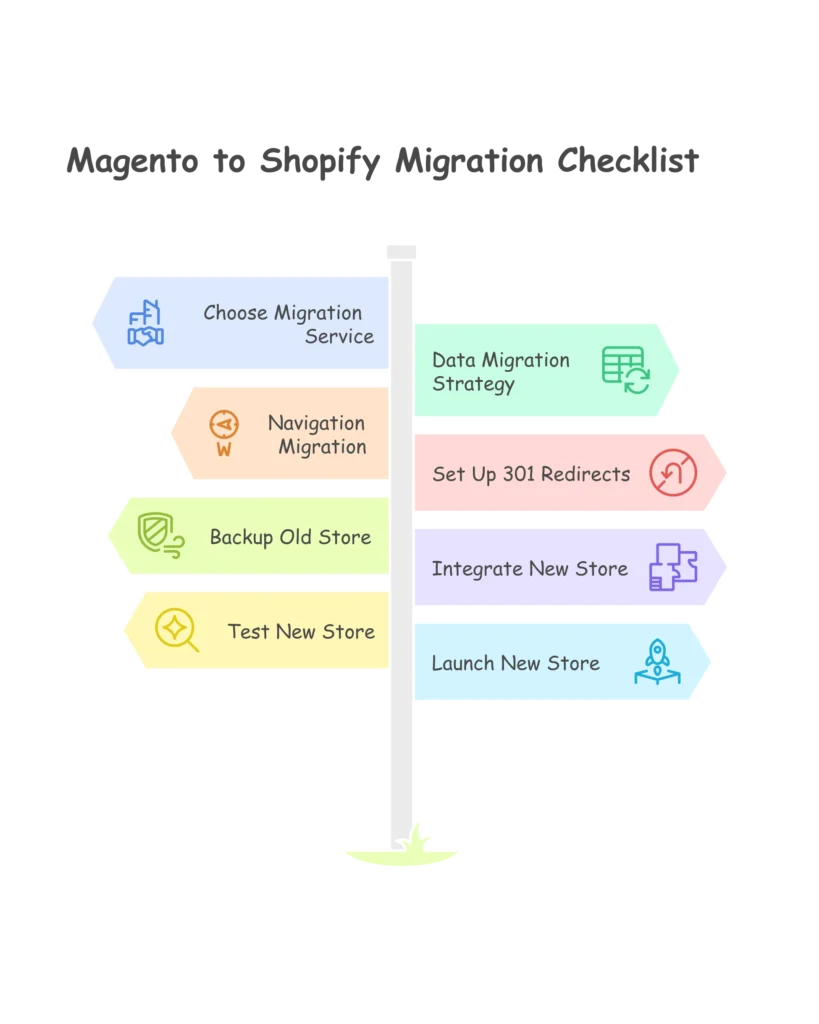
Step 1: Audit Your Magento Store Before You Touch Anything
Before you migrate a single product, do a proper audit. Skipping this step is the #1 reason migrations go sideways.
Product catalog audit:
- How many products do you have? How many variants?
- Are there discontinued products that don't need to migrate?
- Do any products have more than 3 option types or 100 variants? (Shopify's limit — these need restructuring before migration)
- Are product images optimized and under 2MB?
Customer and order data:
- How large is your customer database? How much order history do you need to preserve?
- Are there duplicate or test accounts that should be cleaned before migration?
Integrations and custom functionality:
- List every third-party extension and integration your Magento store uses
- For each one, identify if Shopify has a native equivalent or an app substitute
- Flag anything that required custom code — that's the stuff that needs special planning
Content:
- Catalog all blog posts, static pages, and CMS blocks
- Note which pages have significant organic traffic (these are your SEO-critical pages)
This audit becomes your migration blueprint. It tells you exactly what needs to move, what can be left behind, and where you'll need custom solutions in Shopify. A reputable Magento to Shopify migration service will always start here; if they don't, that's a red flag.
Step 2: Choosing the perfect Magento to Shopify Migration service
Development is the main part of a complex task like migrating a store from Magento to Shopify. Above that, hiring the right development team is the most crucial part.
You will find several developers, but choosing the best Shopify migration services is the most challenging job. To select the best amongst them, see their reviews, compare with others, check their overall experience and go to their portfolio. After doing these things, discuss your project and come to the final decision.
Step 3: Choose the Right Shopify Plan for Your Store
Most Magento merchants don't need the cheapest Shopify plan, but they also don't always need Shopify Plus. Here's how to choose:
Shopify Basic ($39/month): Fine for very small stores just starting out. Limited reporting and only 2 staff accounts. Probably not right for a store migrating from Magento.
Shopify ($105/month): A solid choice for stores doing under $1M/year. Better reporting, 5 staff accounts, lower transaction fees.
Shopify Advanced ($399/month): Best for stores doing $1M–$5M annually. You get custom report builder, real-time carrier shipping, and the lowest transaction fees on standard plans.
Shopify Plus (from $2,300/month): Built for enterprise. Includes custom checkout, automation tools (Shopify Flow), B2B features, dedicated support, and multi-store capabilities. If you're on Magento Enterprise / Adobe Commerce, this is your equivalent.
If you're unsure, start with Advanced and upgrade to Plus as you scale. You can always move up, but you can't easily move down without disrupting your store's configuration.
Step 4 (A): Migrate Your Data: Products, Customers, and Orders
This is the technical core of any Magento to Shopify migration. Done well, your store arrives on Shopify intact. Done poorly, you spend weeks cleaning up mismatched data. Let's break it down by data type.
Migrating products from Magento to Shopify isn't just a copy-paste job. Shopify and Magento have fundamentally different product data structures.
What needs special attention:
- Shopify's variant limit: Shopify allows a maximum of 3 option types (e.g., Size, Color, Material) and 100 variants per product. If your Magento store has products that exceed this, you'll need to split them into multiple listings or use Shopify's metafields to store additional attributes.
- Attribute mapping: Magento's attribute system is far more complex than Shopify's. Custom attributes (like "fabric weight" or "lens type") need to be mapped to Shopify product tags or metafields before migration.
- Product images: Export all images at full resolution. Shopify recommends images under 2MB for performance. Rename image files to be descriptive (use the product name, not "IMG_4823.jpg"). This helps with image SEO.
- Categories to collections: Magento uses categories; Shopify uses collections. Smart collections in Shopify automatically group products by tag, vendor, or price. Use these to recreate your category structure more efficiently.
Step 4 (B): How to migrate products from Magento to Shopify?
- Export your full product catalog from Magento (System > Data Transfer > Export)
- Format the CSV to match Shopify's import template
- Map Magento attributes to Shopify fields (title, body HTML, vendor, tags, variants)
- Import via Shopify's built-in CSV importer or a migration tool
- Spot-check 10–15% of products after import for accuracy
For stores with 1,000+ products, a dedicated migration tool like LitExtension, Cart2Cart, or Matrixify handles this far more reliably than manual CSV work.
Migrating Customer Data
Customer data migration is straightforward, with one important caveat: customer passwords cannot be migrated. This isn't a Shopify limitation — it's a security requirement. Passwords are stored as encrypted hashes that can't be decrypted and re-encrypted for a different system.
What this means for you: plan a post-migration email campaign notifying customers that they need to reset their passwords on the new store. Most customers handle this without issue. Keep the email friendly and explain why it's happening.
What migrates: Names, email addresses, phone numbers, billing/shipping addresses, customer groups/tags, and purchase history.
What needs extra planning: Loyalty points (need a compatible Shopify loyalty app), custom customer attributes, and B2B customer groups.
Migrating Order History
Historical order data doesn't transfer natively into Shopify's order management system; it's stored separately, so it doesn't interfere with inventory or reporting. Tools like Matrixify can import order history into Shopify as reference records, which means your customer service team can still look up past orders without leaving Shopify.
At a minimum, export your complete order history from Magento and archive it. You'll need it for accounting, customer service inquiries, and any return/refund requests that come up post-migration.
Navigation migration
Before migrating your store, make sure that it is easy to navigate because it shouldn’t affect your customers.
Even after doing the navigation, your customers should be able to find you. Try to arrange all your products in a well-organized way in the collection.
This would help customers to reach you and find your products. Don’t get confused with the collection. It is similar to categories on the Magento platform.
“We decided to move to Shopify as we believe it provides us with the most future-proof way to think about commerce.”
Usama Dar — CTO, Westwing
Step 6: Choose your migration method: tools vs. agency
There's no single right way to migrate from Magento to Shopify. The best method depends on your store's complexity and how much you want to be involved.
Option 1: Automated migration tools
| Tool | Best For | Cost |
| LitExtension | Mid-size stores, good UI | $99–$599+ |
| Cart2Cart | Speed, pay per entity | $29–$249+ |
| Matrixify | Technical teams, complex data | $10–$40/month |
| Shopify's built-in importer | Simple stores under 500 products | Free |
Automated tools handle bulk data transfer well and can complete migrations in 24–72 hours for standard stores. The trade-off: they don't handle custom functionality, theme setup, or complex redirect mapping. You still need to do that manually.
Option 2: DIY with CSV
Exporting from Magento and importing via Shopify's CSV importer is free and gives you full control, but it's time-intensive and error-prone for large catalogs. Only recommended if you have fewer than 500 products and a solid understanding of both platforms.
Option 3: Professional migration service
For complex stores, custom functionality, large catalogs, ERP integrations, and B2B pricing, a professional Magento to Shopify migration service is worth the investment. You get clean data, proper redirect mapping, SEO preservation, and a team that's done this before.
👉 At Identixweb, we offer a Shopify Store Migration service built specifically for merchants moving off Magento.
Our team handles the full migration data transfer, theme setup, app configuration, 301 redirects, and post-launch support so you're not piecing it together yourself.
Step 7: Set Up 301 Redirects and Protect Your SEO
This step makes or breaks your Magento to Shopify migration from an organic traffic perspective. Get it right, and your rankings survive. Skip it, and you could lose 30–50% of your organic traffic overnight.
Why this matters: Magento and Shopify have different URL structures. A product at yourstore.com/catalog/product/view/id/123 in Magento will have a completely different URL in Shopify. Without a 301 redirect, anyone clicking that old URL from Google, a bookmark, or an email campaign hits a 404 error.
Google sees 404s and starts deindexing your pages.
How to build your redirect map:
- Export all URLs from your Magento store. Use a crawl tool like Screaming Frog or export URL rewrites from Magento's admin. You need every product URL, category URL, blog URL, and CMS page URL.
- Map each old URL to its new Shopify URL. Create a spreadsheet: Column A = old Magento URL, Column B = new Shopify URL. Prioritize pages with organic traffic (check Google Search Console) and pages with backlinks (check Ahrefs or SEMrush).
- Upload redirects to Shopify. Shopify accepts bulk redirect uploads via CSV (Online Store > Navigation > URL Redirects > Import). On Shopify Plus, there's no redirect limit. On standard plans, use a redirect app for large volumes.
- Preserve your meta titles and descriptions. Every product, collection, page, and blog post needs its original meta title and meta description carried over. Most migration tools handle this, but always verify manually for your top 20–30 pages.
- Submit your new sitemap. Immediately after launch, submit yourstore.com/sitemap.xml to Google Search Console and Bing Webmaster Tools. This tells search engines where your pages now live.
- Monitor Google Search Console daily for the first 2 weeks. Watch for spikes in 404 errors. That's your signal that you missed redirects. Fix them the same day.
Pre-migration SEO benchmark: Before you go live, run a ranking report for your top 50 keywords. Screenshot or export it. This gives you a baseline to compare against in the weeks after launch so you can tell quickly if something went wrong.
Step 8: Generating a backup of the old store
Data should be secure even though you move your store. For that, you should create a backup of your old store’s data. Make sure that all information is stored properly. Check that all custom details, along with standard information, are stored or not.
Developers will help you take a backup of your old store. You can also display on your website showing the maintenance mode, or you can show the message “temporarily service unavailable” or under construction instead of showing a 404 error message.
Step 9: Create a useful integration for your new store
Obviously, your new store will not look identical to your old one. If you are willing to use a ready-made theme or design from scratch, then there will be a few adjustments in both front-end and back-end. This will depend on your business requirements. To handle this task, there are many apps and plugins that the developers can build.
Step 10: Testing
Before launching your new store, it is important to test to find the errors and correct them. You can check it by placing some orders, cancelling orders, and making the payment.
Make sure that all the customer data has been well-organized. Try to install analytics in your new store before launching it.
Step 11: Use a Staging Environment. Never Migrate Live
One of the most common (and costly) mistakes in Magento to Shopify migration is testing on the live store. Don't do it.
Set up your Shopify store in password-protected mode while you build and test. This gives you a staging environment where you can make mistakes without customers seeing them.
Pre-launch testing checklist:
- Browse all product pages. Check images, variants, pricing, and inventory
- Test the full checkout flow with a real payment (then refund yourself)
- Test every discount code and gift card
- Test on mobile (iOS and Android) and across browsers (Chrome, Firefox, Safari)
- Verify all 301 redirects are working (spot-check 20+ URLs)
- Test all forms: Contact, newsletter signup, and account creation
- Verify customer account login and order history access
- Confirm that order confirmation emails are being sent correctly
- Test all third-party integrations: email, shipping, CRM, and accounting
- Check page load speed using Google PageSpeed Insights
When everything passes, switch your domain DNS to Shopify. DNS propagation typically takes 15–30 minutes, meaning your store is live on the new platform with minimal downtime.
Step 12: Launch of the new store
I hope you have completed the testing process and made the store completely error-free. So it’s time to launch your new store.
Decide the moment to make a complete switch. But make sure about the performance of the new store on both the front-end and back-end.
Post-Launch: What to Monitor in the First 30 Days
Going live is not the finish line. It's the start of the monitoring phase. Here's what to watch closely after your Magento to Shopify migration:
Week 1: Critical checks:
- Place live test orders with each payment method and verify end-to-end
- Check Google Search Console daily for 404 errors and indexing issues
- Monitor checkout abandonment rate (a spike = friction in your new checkout)
- Verify inventory is syncing correctly
- Check that all email automations (welcome, abandoned cart, order confirmation) are firing
Weeks 2–4: Performance tracking:
- Compare organic rankings against your pre-migration benchmark
- Track organic traffic in Google Analytics — expect a small dip initially; a large, sustained drop means redirect or indexing issues
- Monitor site speed — Shopify stores should load in under 3 seconds
- Review customer support tickets for migration-related issues (login problems, missing order history, etc.)
If rankings drop significantly: Check that your 301 redirects are all in place, that meta titles and descriptions are transferred correctly, and that your sitemap was submitted. Most post-migration SEO drops recover within 4–8 weeks if redirects are properly configured.
Migrating to Shopify is Your Key to Sales
Shifting from Magento to Shopify gives your store a cleaner, more reliable setup without the heavy technical work you’re used to managing. With the right plan in place, you can move your products, customers, and SEO structure smoothly and keep your store’s foundation intact.
Once you’re on Shopify, selling becomes easier. The platform handles hosting, security, and speed, while giving you better tools, themes, and apps to improve conversions and day-to-day operations. Even the common migration issues become manageable when handled with a structured approach.
If you want a storefront that’s easier to run and built to grow, migrating from Magento to Shopify is a practical upgrade in 2026.
Magento to Shopify Migration FAQs
1. Is Shopify better than Magento?
Shopify is usually a better fit for brands that want a hosted, easy-to-manage platform with lower technical overhead and 24/7 support. Magento (Adobe Commerce) often needs deep customisation, an in-house dev team and bigger budgets. Comparatively, Shopify is simpler to run and faster to launch on.
2. How to migrate from Magento to Shopify?
A typical migration flow is: audit your current Magento store, back up everything, set up your Shopify store, then move products, categories, customers, orders, and content using a tool (like LitExtension) or a migration agency. After that, you set up 301 redirects, re-create design and functionality with a theme + apps, and run a full QA/SEO check before pointing the domain to Shopify.
3. Will there be a loss of data if I migrate from Magento to Shopify?
There is always some risk of data loss during Magento to Shopify migration if the process isn’t planned and tested properly, especially with large catalogs and historical orders.
4. How much will it cost to migrate to Shopify?
Migration costs vary a lot depending on catalog size, custom features, and who handles the work. Discuss every cost in the migration cycle before taking up the migration services.
5. What benefits will I get if I migrate to Shopify?
You move to a fully hosted platform where hosting, security, and updates are handled for you, which cuts a lot of maintenance headaches compared to Magento. You also get faster setup, an app ecosystem for adding features without heavy custom code, built-in payment and sales tools.
6. Will I lose my rankings if I migrate to Shopify?
Most stores see some temporary fluctuation in traffic and rankings after a migration, but serious long-term drops usually happen only when redirects, URL mapping, and metadata are handled poorly. If you plan your SEO migration properly, mapping URLs, setting 301s, updating internal links, and auditing everything post-launch are necessary to protect your rankings.
7. How do I migrate products from Magento to Shopify?
Export your product catalog from Magento using System > Data Transfer > Export. Format the CSV to match Shopify's product import template, making sure to map attributes like variants, pricing, images, and SEO metadata. Then import via Shopify's built-in CSV importer or a migration tool like LitExtension or Cart2Cart. Keep in mind Shopify's 100-variant limit per product any products that exceed this in Magento need to be restructured before the import.
8. What is a Magento to Shopify migration checklist?
A Magento to Shopify migration checklist is a step-by-step list of everything that needs to happen before, during, and after you move your store from Magento to Shopify. At a minimum, it should cover: store audit, Shopify plan selection, data backup, product migration, customer and order migration, 301 redirect mapping, theme setup, app configuration, pre-launch testing, domain switch, sitemap submission, and post-launch monitoring.
9. How much does a Magento to Shopify migration cost?
It depends heavily on store complexity and who does the work. Here's a rough breakdown:
- DIY with tools (LitExtension, Cart2Cart): $99–$600 for the tool, plus your time. Works for simple stores under 5,000 products.
- Mid-tier agency: $3,000–$7,000 for full migration, including redirect mapping, theme setup, and basic integrations.
- Full-service (custom theme + complex integrations): $7,000–$15,000+.
- Enterprise (large catalog + ERP + custom functionality): $15,000–$50,000+.




About the author
Sajini Annie John
Meet Sajini, a seasoned technical content writer with a passion for e-commerce and expertise in Shopify. She is committed to helping online businesses to thrive through the power of well-crafted content.