





Establishing a clear order cutoff time is essential for any Shopify merchant aiming to streamline fulfillment operations and set accurate delivery expectations. A well-configured delivery cutoff time ensures that customers understand the latest moment they can place an order to qualify for same-day or next-day delivery. It also enables your fulfillment team to operate more efficiently by aligning picking, packing, and courier schedules.
In this guide, we will explore why cutoff times matter and the step-by-step methods you can use to set an order cutoff time that fits your delivery strategy.
Why Order Cutoff Times Matter
Setting a clear Order Cutoff Time is critical for any Shopify merchant who offers scheduled delivery, same-day shipping, or next-day fulfillment. Without a defined cutoff, customers may place orders at times when your team cannot realistically process, pack, and hand them over to carriers. This often leads to missed delivery promises, operational bottlenecks, and unnecessary customer service issues.
A well-structured Order Cutoff Time helps you create a predictable workflow by aligning customer expectations with your actual fulfillment capacity. It ensures your operations team has a clear processing window each day, reduces last-minute rush orders, and improves overall accuracy in preparing shipments.
Methods to Set Order Cutoff Times in Shopify
Method 1: Using Shopify’s Local Delivery and Local Pickup Settings
Shopify’s built-in Local Delivery and Local Pickup features allow you to control delivery availability, preparation time, and service areas. While Shopify does not offer a direct “set cutoff time” field, these settings allow you to approximate an order cutoff time by adjusting delivery windows and preparation rules.
- Log in to your Shopify Admin.
- In the left-hand menu, select Settings.
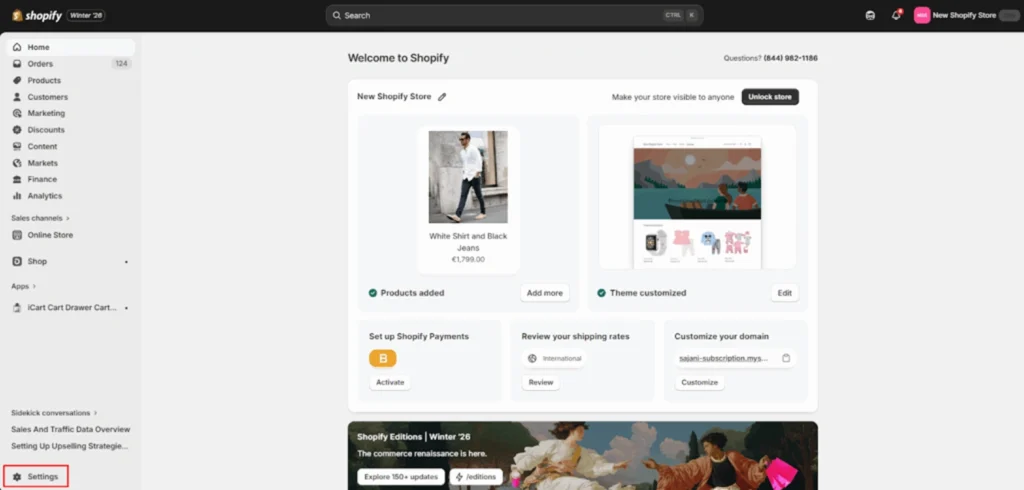
- Click Shipping and delivery.
- Under Local Delivery, find your location and select Manage.
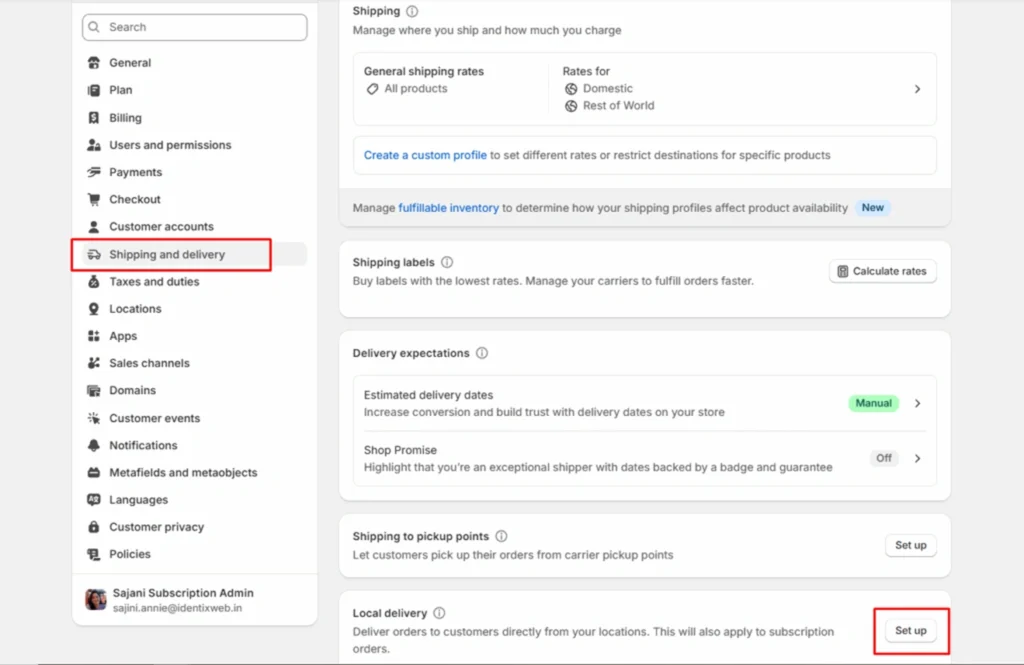
- Check the option This location offers local delivery.
- Enter your Delivery radius or configure Postal codes to define your delivery zone.
Method 2: Using Shopify Apps
For most merchants, Shopify apps provide the most flexible and user-friendly method of implementing true order cutoff times in Shopify. These apps are designed specifically to manage delivery dates, timeslots, preparation times, blackout periods, and cutoff logic.
There are many Shopify apps providing this functionality but in this blog we will see how to enable this feature using the Stellar Delivery Date & Pickup Shopify app.
- Go to your Shopify Admin.
- Click on Locations from settings.
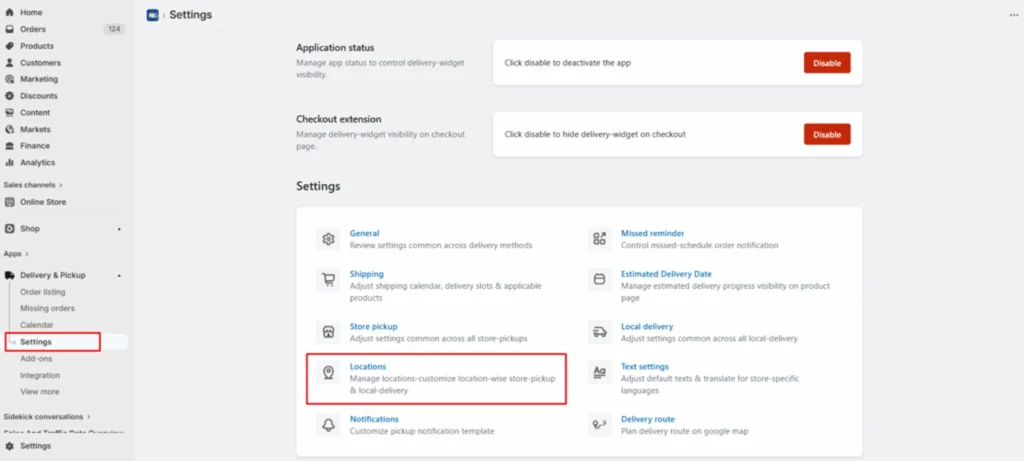
- Edit the location, then edit Local Delivery.
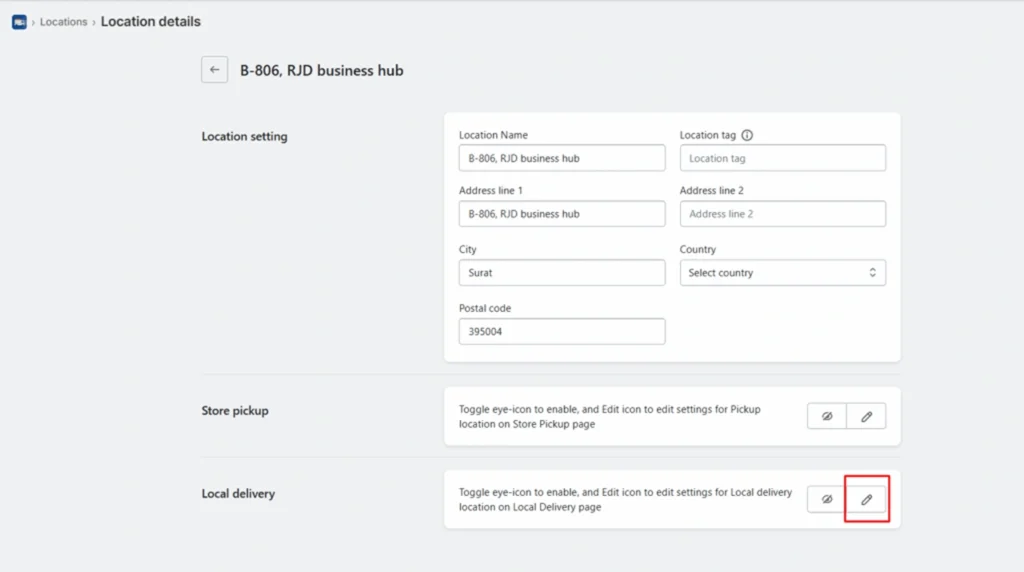
- Next, go to Calendar and Checkout Button Settings.
- Enable the Cutoff Time feature, set the desired cutoff time.
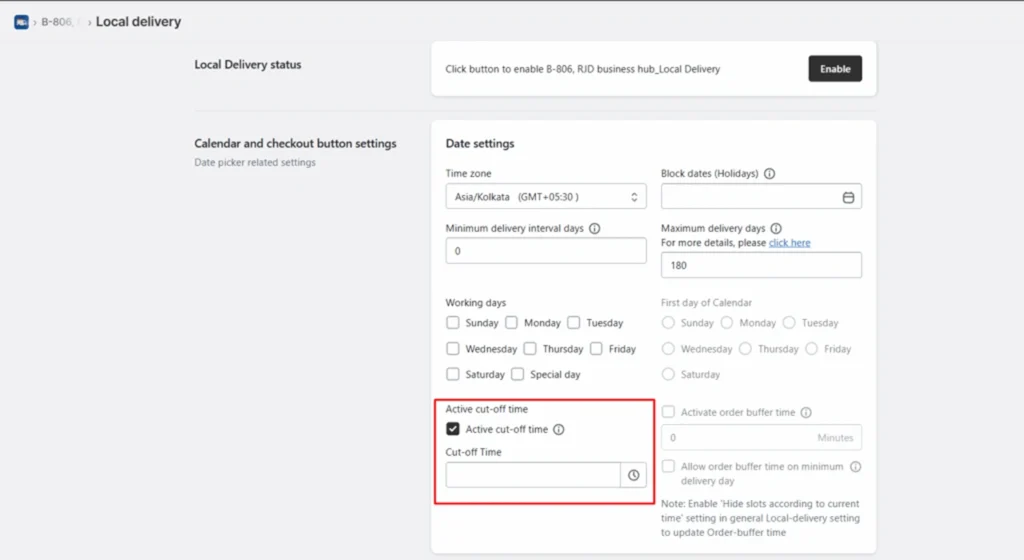
- Save the settings.
Conclusion
Setting a clear order cutoff time for delivery in Shopify is one of the most effective ways to streamline your operations, reduce fulfillment pressure, and set the right expectations with customers. Whether you rely on Shopify’s native delivery settings or use a third-party app to create more advanced rules, the goal is the same: ensure customers understand when an order will arrive and give your team the time they need to fulfill it accurately.
Frequently Asked Questions
1. What is an order cutoff time in Shopify?
An order cutoff time is the latest time customers can place an order and still qualify for a specific delivery window, such as same-day or next-day delivery. Orders placed after the cutoff automatically shift to the next available delivery date.
2. Can I set different cutoff times for different products or collections?
Not natively. Shopify’s built-in settings apply broadly to delivery methods. If you need different rules for items like fresh food, flowers, or made-to-order products, you will need an app like Stellar Delivery Date & Pickup that allows product-level cutoff customization.
3. Does Shopify have a built-in feature to set delivery cutoff times?
Shopify offers basic delivery windows for local delivery and pickup, but it does not include fully customizable cutoff logic by default. For advanced rules such as same-day exclusions, per-product cutoffs, or weekday restrictions you typically need a third-party delivery or scheduling app.





About the author
Sajini Annie John
Meet Sajini, a seasoned technical content writer with a passion for e-commerce and expertise in Shopify. She is committed to helping online businesses to thrive through the power of well-crafted content.